


AI Review Message Feature Description
Updated: 2026-08-17 11:27:00
Version: v1.0
1. Feature Overview
| Feature Info | Description |
|---|---|
| Feature Name | AI Review Message |
| Feature Description | AI-based automatic review of chat content |
| Purpose | Improve content security management efficiency through AI automatic review |
| Use Cases | 1. Large-scale chat content requiring automatic review 2. Need to improve review efficiency 3. Need unified review standards |
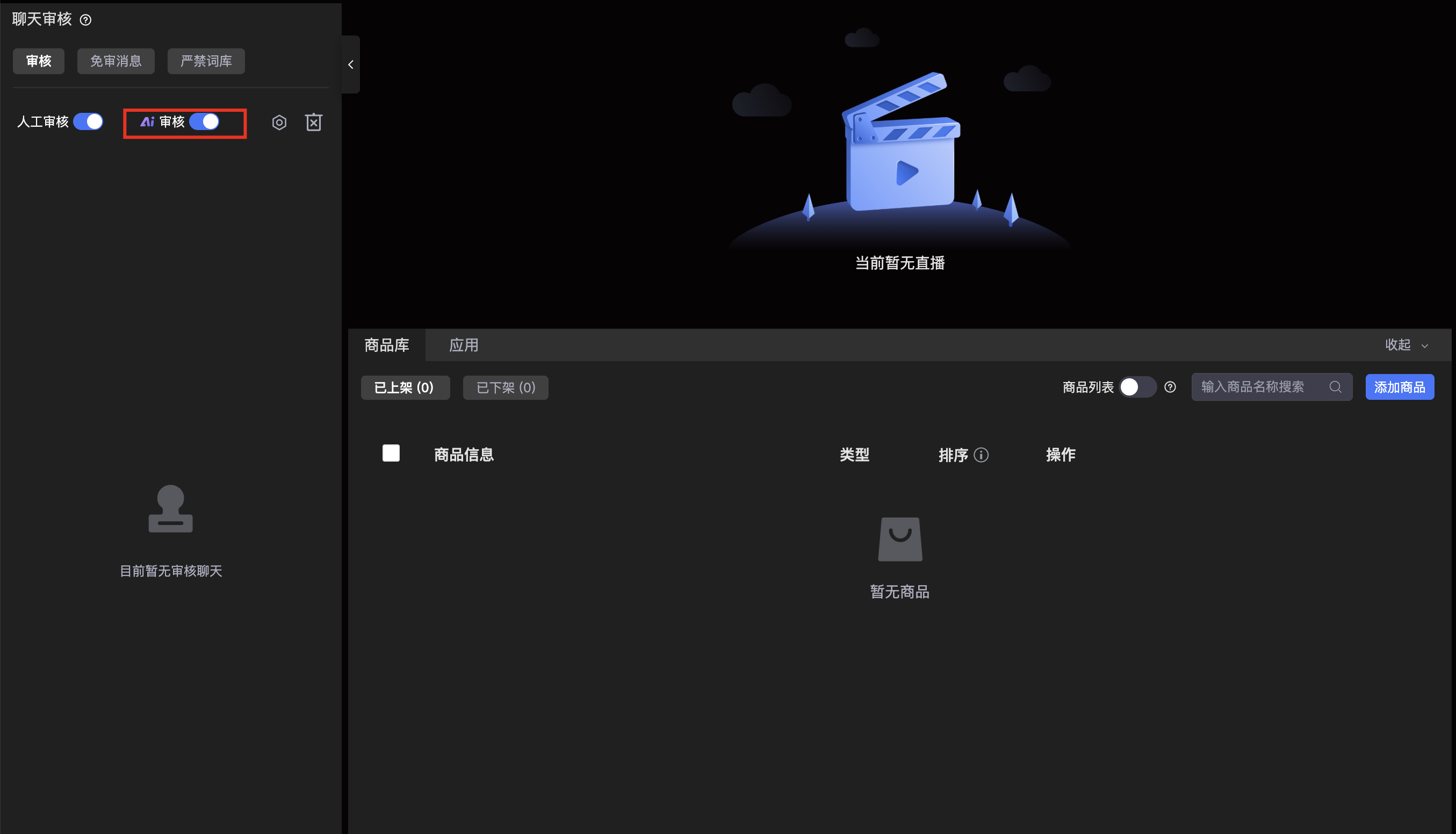
| Operation Path | Admin Console: Default Template / Compliance & Risk -> Prohibited Words Management -> AI Review Message Assistant Console: Chat Room Review Quick Toggle |
2. Feature Details
2.1 AI Review Mechanism
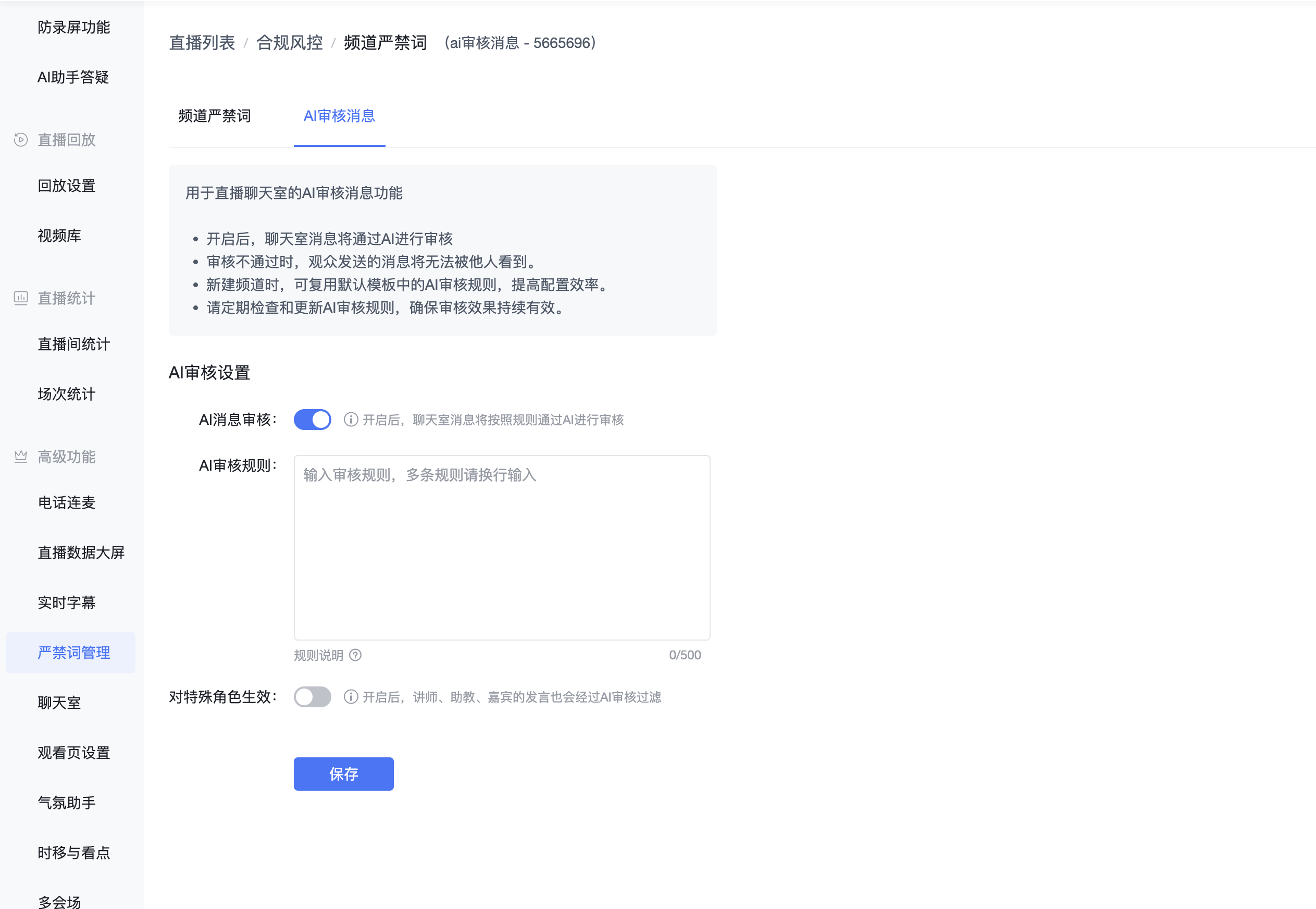
2.1.1 Review Rule System
Platform Basic Rules (Automatically Effective)
- Politically Sensitive Words: Sensitive expressions related to political figures, historical events, and policies/regulations
- Violent and Bloody Words: Words inciting violence or describing bloody scenes
- Obscene and Vulgar Words: Explicit or implicit words related to pornographic content
- Discriminatory Words: Discriminatory expressions targeting race, ethnicity, gender, religion, etc.
- Insults and Abusive Words: Words involving personal attacks or insults
- Illegal Activity Words: Words related to illegal activities such as gambling, drugs, and fraud
Custom Rules
- Supports supplementary configuration of review rules
- Takes effect simultaneously with platform basic rules
2.1.2 Configuration Hierarchy
Admin Console Configuration
- Platform Template Configuration (Only serves as default for new channels)
- Channel-Specific Configuration (Actually effective configuration)
Assistant Quick Toggle
- Location: Assistant chat room interface
- Supports quick switching of AI review status
- Takes effect in sync with admin console configuration
2.2 Usage Instructions
2.2.1 Review Mode
- AI Review Mode
- Automatically filters content based on rules
- Suitable for large-scale chat scenarios
- Improves review efficiency
- Unifies review standards
Note: The system supports switching to manual review mode; both modes can coexist.
2.2.2 Activation Mechanism
- Takes effect immediately upon enabling AI review
- Chat content is automatically filtered through rules
- Violating content is automatically blocked and invisible to other users
- Supports real-time switching of review status
2.3 Feature Effects
- Automatically identifies and filters violating content
- Provides unified review standards
- Supports supplementary custom review rules
- Takes effect in real-time for efficient management
3. Important Notes
Rule Priority
- Platform basic rules cannot be disabled or modified
- Custom rules serve as supplements and take effect simultaneously with basic rules
- It is recommended to avoid duplication with platform basic rules
Configuration Notes
- Platform templates only serve as defaults for new channels
- Actual configuration is based on channel settings
- Assistants can control via quick toggle
Usage Limitations
- Mutually exclusive with manual review mode; one message can only be reviewed by one party
- Rule modifications take effect immediately
4. Best Practices
Usage Recommendations
- Prioritize use in large-scale live streaming scenarios
- Establish reasonable custom rules
- Regularly evaluate rule effectiveness
Rule Configuration Recommendations
- Set rules based on business scenarios
- Avoid conflicts between rules
- Maintain rule precision
Daily Maintenance Recommendations
- Regularly check rule effectiveness
- Update supplementary rules promptly
- Optimize and adjust review strategies
