


Product Overview
Introduction
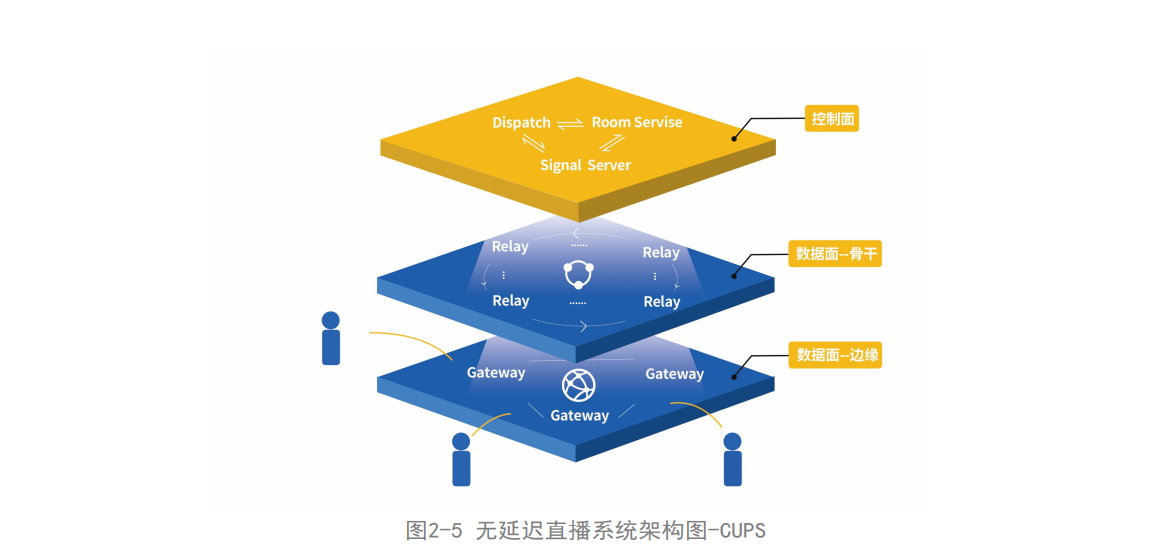
The low-latency product is a live streaming full-scenario solution provided by POLYV. Through its self-developed PRTC (POLYV-Real Time Communication) technology, it can control live streaming latency within 400ms. PRTC is a comprehensive upgrade based on the original live streaming technology solution, enabling stable real-time transmission for global live streaming and compatibility with multiple devices such as mobile phones and computers. It provides a stable viewing experience for up to 10,000 concurrent online users and a low-latency live interactive experience. In terms of integration, low-latency live streaming supports access via PaaS, aPaaS, and SaaS, flexibly addressing various business needs.
Zero-latency live streaming covers various teaching scenarios such as 1-on-1 interactive teaching, online interactive small classes, and large interactive classes with thousands of participants, as well as enterprise scenarios like internal and external training and corporate marketing. It supports multiple classroom roles including instructors, teaching assistants, and students, and provides a rich set of interactive tools such as real-time audio-video interaction, real-time messaging, dynamic course materials, interactive whiteboards, screen sharing, check-ins, answer sheets, and lucky draws. It also supports cloud recording and on-demand playback with anti-piracy measures. Additionally, zero-latency live streaming allows for UI customization, flexible business expansion, and seamless integration with business systems (such as user management systems and course scheduling systems).
Differences in No-Latency Solutions
PolyLive's low-latency live streaming supports three solutions: PaaS, aPaaS, and SaaS. The differences are as follows:
| PaaS Solution | aPaaS Solution | SaaS Solution | |
|---|---|---|---|
| Solution Description | Integrate the PRTC SDK | Use the POLYV low-latency multi-scenario SDK to quickly implement business scenarios | No development required, ready to use immediately after account registration |
| Target Customers | Suitable for customers with ample development resources and high customization needs | Suitable for customers with limited development resources, tight schedules, need for rapid deployment, and customization requirements | Suitable for customers with no development resources who need to start business immediately |
| Development Cost | High | Low | None |
| Time to Launch | 1 to 3 months | Minimum 14 minutes | Out-of-the-box |
| Features Implemented | Customers implement real-time audio/video, real-time messaging, interactive whiteboard, etc. on their own | Provides real-time interactive experiences within live rooms, supporting core features such as real-time audio/video, real-time messaging, interactive whiteboard, real-time recording, and screen sharing. Offers cloud services for classroom and user management. Supports flexible extension of business functions, enabling seamless integration with customer user systems, scheduling, and other backend systems. | Features include audio/video co-hosting, interactive whiteboard, static and dynamic PPT, lottery, quiz cards, live commerce, screen sharing, and cloud recording |
| Scalability | Strong | Relatively strong | Average |
| Frontend UI | Customers implement all UI on their own | POLYV provides a default UI with support for customized modifications | Fixed |
| Supported Platforms | Supports over 20 platforms and frameworks | Android, iOS, macOS, Windows, Web, H5 | Android, iOS, macOS, Windows, Web, H5 |
| Supported Scenarios | Customers define and implement business scenarios on their own | 1-on-1 interaction, small classes, large classes, enterprise training, meeting systems, live commerce, enterprise marketing | 1-on-1 interaction, small classes, large classes, enterprise training, meeting systems, live commerce, enterprise marketing |
Implementation Scenario
| Scenario | Description |
|---|---|
| 1-on-1 Interactive Teaching | One teacher provides exclusive online tutoring to one student. |
| Interactive Live Large Class | One or more teachers conduct online teaching, with multiple students watching and listening in real-time. No limit on the number of students. Students can interact with the teacher in real-time during the class. |
| Enterprise Training | One instructor conducts online training, with multiple trainees watching and listening in real-time. No limit on the number of trainees. Trainees can interact with the instructor in real-time during the training. |
| Enterprise Marketing | One streamer hosts a live broadcast, with multiple viewers watching and listening in real-time. Business conversion is achieved through online sales of products. |
| Dual-Teacher Classroom | Multiple teachers collaborate for offline and online integrated teaching. |
| Online Interactive Small Class | One or more teachers conduct online teaching, with multiple students watching and listening in real-time. The number of students typically ranges from a few to dozens. |
| Seminar | Multiple participants engage in a real-time online meeting, allowing multiple viewers to watch and listen in real-time. |
Product Features
| Feature | Description |
|---|---|
| Real-time Audio/Video Interaction | * In 1-on-1 interactive teaching scenarios, both students and teachers can send and receive audio/video streams by default. * In small online interactive classes, students do not send audio/video by default. During class, the teacher can invite students to "come on stage" to speak and engage in real-time audio/video interaction. * In large interactive live broadcast classes, students do not send audio/video by default. During class, students can "raise their hand" to request to speak, and after the teacher agrees, they can send streams to interact with the teacher. * In dual-teacher classrooms, students do not send audio/video by default. Multiple teachers collaborate online and offline. * In enterprise training, one instructor conducts online training while multiple trainees watch and listen in real-time. There is no upper limit on the number of trainees. During training, trainees can interact with the instructor in real-time. * In enterprise marketing, one host conducts a live broadcast while multiple viewers watch and listen in real-time. The goal is business conversion through online sales of products. * In seminars, guests send audio/video by default. Multiple participants engage in a real-time online meeting, allowing multiple viewers to watch and listen in real-time. |
| Real-time Messaging | Instructors and audience can send text messages to interact during class. |
| Interactive Whiteboard | Instructors can draw and doodle on the whiteboard, supporting features such as pens, text boxes, shapes, mosaics, erasers, pagination, laser pointers, and dot-matrix pens. * In 1-on-1 interactive teaching, both students and teachers can operate the whiteboard by default. * In small online interactive classes, students do not have permission to operate the whiteboard by default; the teacher can authorize students to do so. * In large interactive live broadcast classes, students cannot operate the whiteboard and can only watch. |
| Interactive Teaching Tools | No-delay live streaming supports the following interactive teaching tools: * Courseware Library: Enterprises and instructors can upload teaching files in various formats such as PDF, PPT, and DOC to the classroom, helping students grasp the course content. * Interactive Tools: Instructors can interact with the audience during class using tools such as check-ins, answer cards, red packet rain, and lucky draws. * Participant List: Displays the on-stage/off-stage status, camera status, microphone status, number of rewards, and other information for all users in the live room. Administrators can use the participant list to invite students on/off stage, authorize whiteboard use, toggle audio/video, grant rewards, and remove users. |
| Screen Sharing | Instructors can share their screen, window, or browser tab with the audience during class. |
| Recording and Playback | Instructors can start recording during class. No-delay live streaming uses cloud recording to mix specified pages and audio into a single MP4 audio/video file, synchronously recording audio/video content, whiteboard content, and courseware content. After recording, a playback link is provided for students to review after class. |
| Customizable Classroom UI | The no-delay aPaaS integration method supports custom UI. |
| Cloud Services | POLYV provides no-delay live streaming cloud services, supporting the management of live content and users, including the following features: classroom status management, recording status management, review management, live data management, user roles and permission management. |
| Teaching Quality Transparency | * Supports pre-class audio/video device testing (microphone, camera, speaker) and in-class network condition monitoring to ensure a high-quality interactive teaching experience. * Provides full-cycle call quality monitoring and analysis tools. |
Live Room Roles and Endpoint Support
| Live Room Role | Windows | macOS | Web | iOS | Android |
|---|---|---|---|---|---|
| Host | ✔️ | ✔️ | ✔️ | ✔️ | ✔️ |
| Guest | ✔️ | ✔️ | ✔️ | ✔️ | ✔️ |
| Audience | ✔️ | ✔️ | ✔️ | ✔️ | ✔️ |
Description
1.Android 5.0 and above
iOS 9.0 and above
For the web version, please use the latest stable version of Google Chrome on desktop.
macOS 10.10 or later
Windows 7
Comparison of Advantages with Traditional Live Streaming
| No-Delay Live Streaming | Traditional Live Streaming | |
|---|---|---|
| Streaming Method | PRTC | CDN |
| Protocol | UDP-based, compatible with WebRTC communication protocol | TCP-based content distribution |
| Concurrency | 100,000 | Unlimited |
| Latency | <400ms | 3~20s |
| Network Adaptability | High network requirements Under poor network conditions, unreceived parts are dropped and new content is received directly |
Low network requirements Under poor network conditions, playback pauses and video buffers, causing latency to accumulate |
| Core Features | Multi-party calls, interactive live streaming, recording, relay push streaming, etc. | Push streaming, viewing, recording |
| Billing Method | Flexible | Traffic/Bandwidth |
