


点播对接方案
Updated: 2025-12-19 11:06:42
VOD Integration Plan
Advantage: Rapid implementation based on customer customization requirements.
Introduction:
- The customer management backend connects to POLYV's business system via API, JAVA SDK, or Single Sign-On.
- Supports multiple methods for video upload and multi-platform video viewing.
- The quick integration solution utilizes the PC Client Assistant, POLYV backend video upload, and H5 player video viewing capabilities.
- The customized integration solution uses JS SDK, Android SDK, and iOS SDK as needed.
Business Diagram
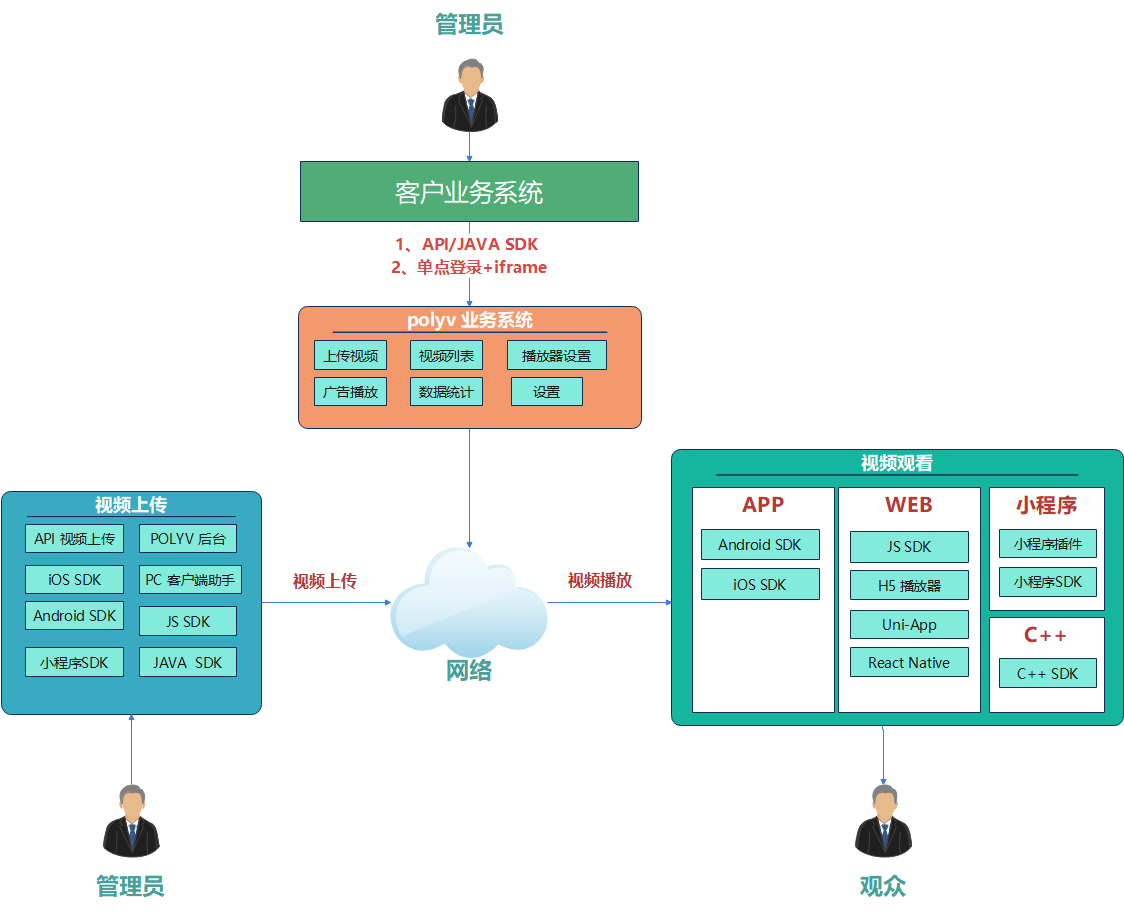
Video Upload
| Platform | Documentation | Applicable Scenario | Usage Instructions |
|---|---|---|---|
| JS SDK | 1. SDK Method 2. Plugin Method |
JS Development | The JS SDK method allows the customer's end-user videos to be directly transferred to the POLYV cloud server without being saved on the customer's server. 1. The SDK method has no UI controls; customers can customize their own UI and trigger upload actions via events. 2. The plugin method includes UI controls that customers can use directly. |
| Java SDK | DOC | Backend Development | The Java SDK method allows uploading videos from the customer's server to the POLYV cloud server. The Java SDK encapsulates all operations involved in file upload, including file upload, resumable upload, file verification, status callbacks, etc., making it very convenient. |
| API Video Upload | 1. Single Upload 2. Batch Upload |
Backend Development | For Java, it is recommended to use the Java SDK method. For non-Java languages, the API method can be used for video file upload. |
| iOS SDK | DOC | iOS SDK | The iOS SDK provides customers with full VOD functionality including video playback, video download, and video upload. |
| Android SDK | DOC | Android SDK | The Android SDK provides customers with full VOD functionality including video playback, video download, and video upload. |
| POLYV Backend | POLYV Official Website | Backend | Manual upload via the POLYV official website backend, suitable for business scenarios with a fixed number of videos that do not require frequent changes. Backend Entry |
| PC Client Assistant | DOC | Windows, Mac | Supports manual video upload by installing a desktop client locally on Windows or Mac. |
| Mini Program SDK | DOC | Supports WeChat Mini Programs | Supports video file upload via WeChat Mini Programs. |
Video Playback
| Platform | Documentation | Applicable Scenario | Usage Instructions |
|---|---|---|---|
| JS SDK | DOC | PC H5, Mobile H5, WeChat Mini Programs | The POLYV Player JS SDK deeply integrates with POLYV's video cloud services, covering multiple application scenarios. It provides a simple and convenient embedding method, allowing developers to quickly integrate it into their own applications for video playback. |
| H5 Player | Obtained from the official website backend | PC H5, Mobile H5, WeChat Mini Programs | Encapsulated using the JS SDK, it provides basic video playback functionality for customers. Customers can directly copy the player source code, which is obtained from the management backend. Refer to the H5 Player description below for details. |
| Android SDK | DOC | Android Instructor and Viewer Apps | The Android SDK provides customers with full VOD functionality including video playback, video download, and video upload. |
| iOS SDK | DOC | iOS Instructor and Viewer Apps | The iOS SDK provides customers with full VOD functionality including video playback, video download, and video upload. |
| Mini Program Playback Plugin |
DOC | WeChat Mini Program Viewing | Simply upload the video to the POLYV cloud VOD platform to obtain a vid, then use the plugin to play the video, enabling rapid integration with your own business. |
| Mini Program SDK | DOC | WeChat Mini Program Viewing | The Mini Program SDK for VOD video playback has relatively simple functionality, only providing basic features like obtaining video playback addresses and sending logs. It is recommended to use the Mini Program Plugin for VOD video playback, which offers simpler integration and richer features. |
| C++ SDK | DOC | PC C++ Client Development | Provides online and offline playback functionality for encrypted and unencrypted VOD videos on Windows and Mac platforms for PC clients. |
| uni-app Cloud VOD Plugin |
DOC | Development based on the uni-app framework | The Uni-app Cloud VOD plugin encapsulates POLYV's native Android and iOS SDKs, supporting VOD video playback, download, and other functions. |
| React Native Cloud VOD Plugin |
DOC | Development based on the React Native framework | The React Native Cloud VOD plugin encapsulates POLYV's native Android and iOS SDKs, supporting VOD video playback, download, and other functions. |
Other
- Video Upload Client: Download Link
- (VLC Player) When a video uploaded to the POLYV cloud cannot be played, use this tool to check if the local video is corrupted: Click to Download
- (PotPlayer) A portable multimedia player that can smoothly play various audio and video formats and portable multimedia: Click to Download
- (Format Factory) Provides audio and video file editing, merging, splitting, video file muxing, cropping, and watermark removal. The software also includes video playback, screen recording, and video website download functions, eliminating the need to install additional software.
