


AI Digital Human Assistant
I. Feature Overview
| Feature Information | Description |
|---|---|
| Feature Name | AI Digital Human Assistant |
| Feature Introduction | The AI Digital Human Assistant is a comprehensive upgrade of the AI Q&A feature, combining traditional text-based Q&A with a vivid digital human image. Enterprises can select a digital human image, configure a dedicated voice and knowledge base, and generate an independent, full-screen accessible link to answer brand or business-related content in an immersive interactive manner. |
| Purpose | 1. Enhance brand's technological appeal and user interaction experience through a visual digital human image. 2. Provide professional, standardized Q&A services while effectively reducing labor costs for repetitive inquiries. |
| Use Cases | 1. Offline Large Screen Interaction: Suitable for scenarios such as product launches, exhibition halls, corporate front desks, and self-service terminals, acting as an intelligent guide or service consultant offering 24/7 consultation services. 2. Online Independent Service Portal: Can serve as an independent consultation portal on official websites, event pages, or online exhibition halls, offering a more engaging interactive experience than traditional chatbots. |
| Feature List | 1. Add and manage enterprise-specific knowledge bases. 2. Create an AI Digital Human Assistant with customizable name and positioning. 3. Configure the assistant's digital human image, voice, and personalized welcome message. 4. Bind a dedicated knowledge base to each digital human assistant to ensure professional Q&A. 5. Preview digital human configuration effects in real-time in the backend. 6. Generate an independent, full-screen accessible link with one click. 7. The access link supports landscape and portrait mode adaptive switching, suitable for different terminal devices. |
II. Operation Instructions
"AI Digital Human Assistant" Usage Process
Step 1: Prepare Knowledge Content (Create Knowledge Base)
Before using the AI Digital Human Assistant, you need to prepare the "knowledge" it will rely on to answer questions.
- Enter the live streaming backend, select "AI Applications" -> "AI Knowledge Base".
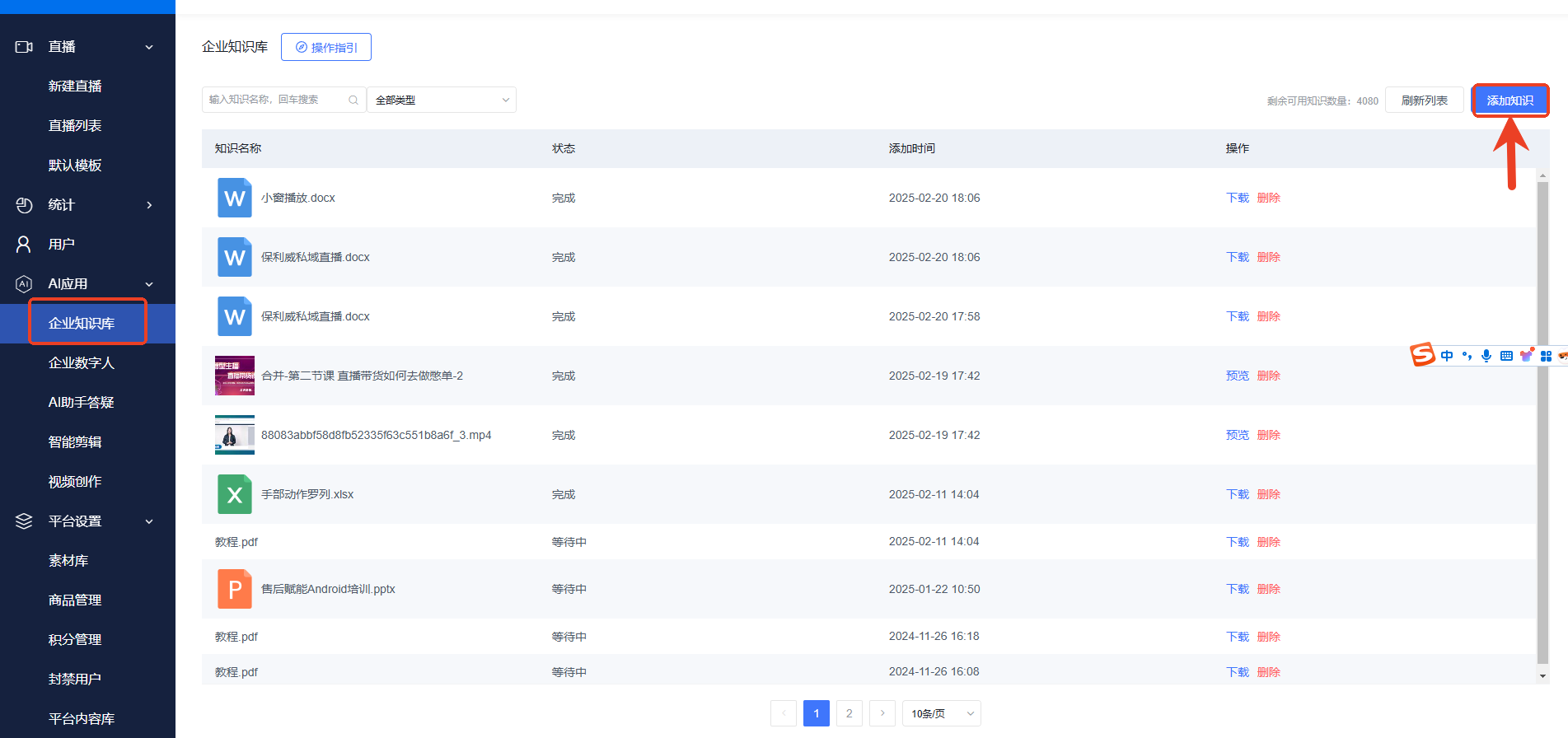
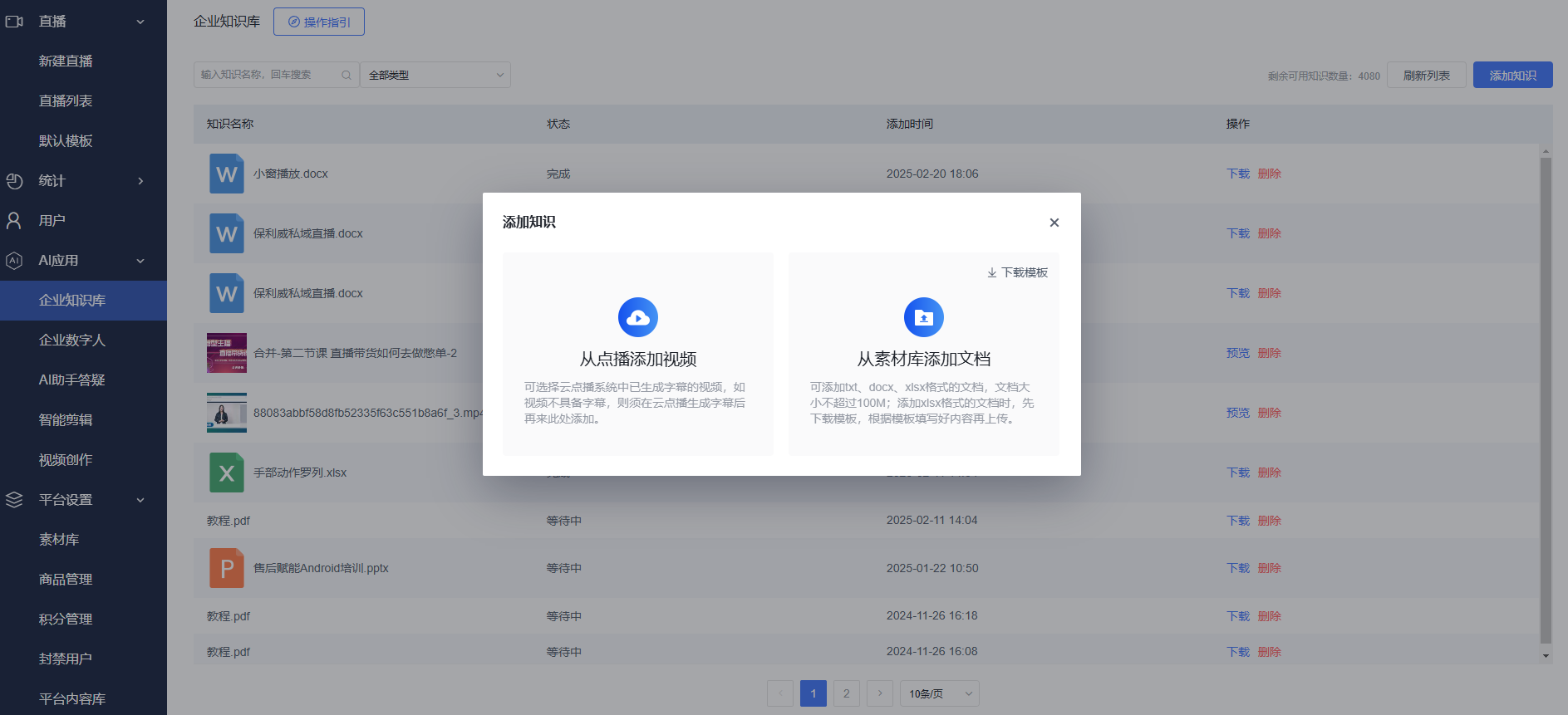
- Click "Add Knowledge". You can choose to upload local documents (such as Word, PDF, TXT) or extract content from on-demand videos as material for AI learning.
Step 2: Create and Configure the AI Digital Human Assistant
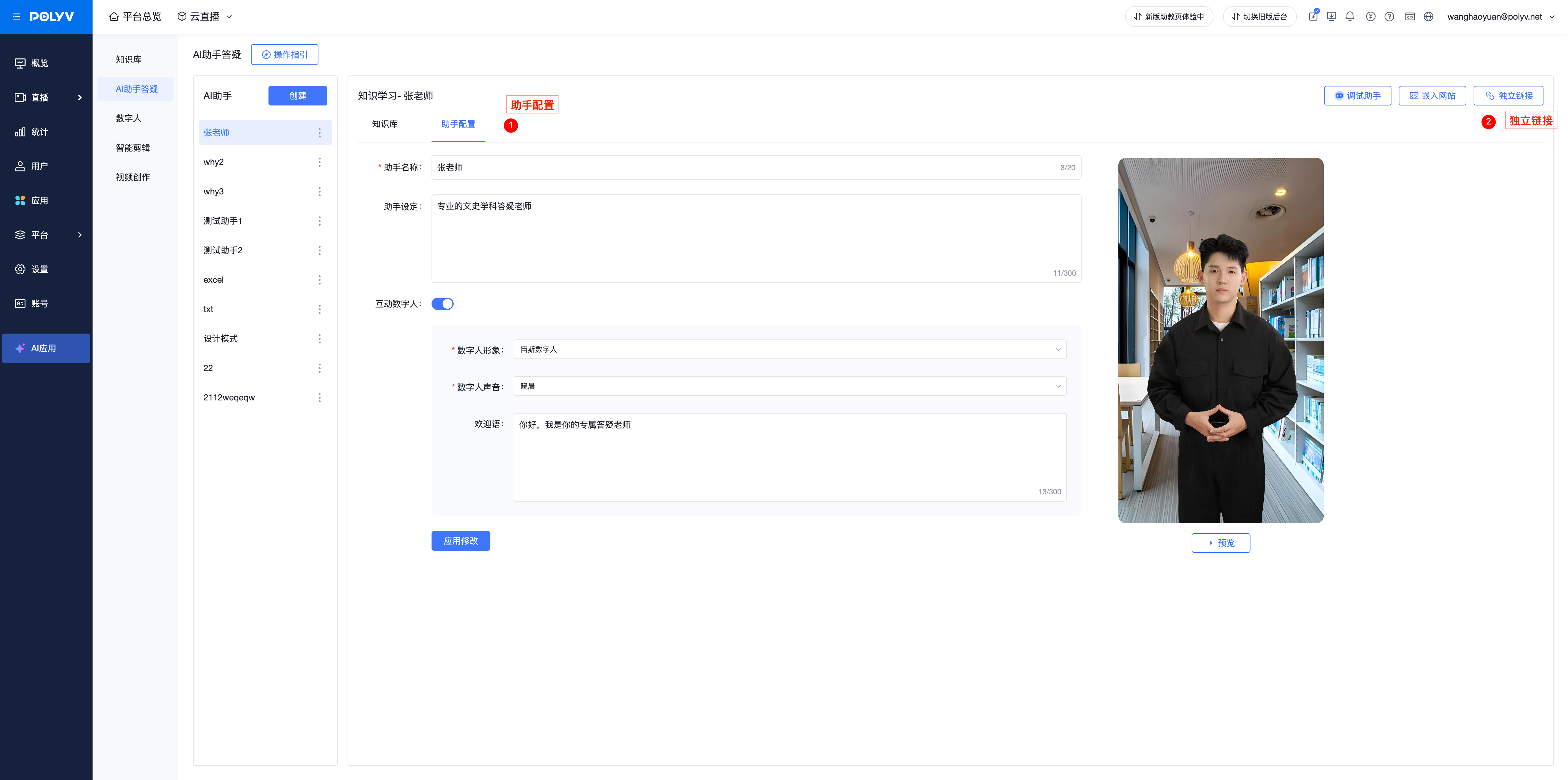
- In the left menu bar, select "AI Applications" -> "AI Assistant Q&A".
- Click the "Create Assistant" button to enter the assistant configuration page.
- Fill in Basic Information and Configure the Digital Human Image:
- Assistant Name: Name your digital human assistant, e.g., "Brand Specialist Consultant".
- Assistant Positioning: Briefly describe the assistant's function, e.g., "Professionally answers pre-sales and after-sales questions".
- Interactive Digital Human: Ensure this switch is turned on to enable the digital human feature.
- Digital Human Image: Select a digital human model from the system-provided image library.
- Digital Human Voice: Choose a voice for your digital human.
- Welcome Message: Customize a welcome message. When a user opens the access link, the digital human will automatically speak this message.
- On the right side of the page, you can preview the selected digital human's image and effects in real-time.
Step 3: Link a Knowledge Base to the Assistant
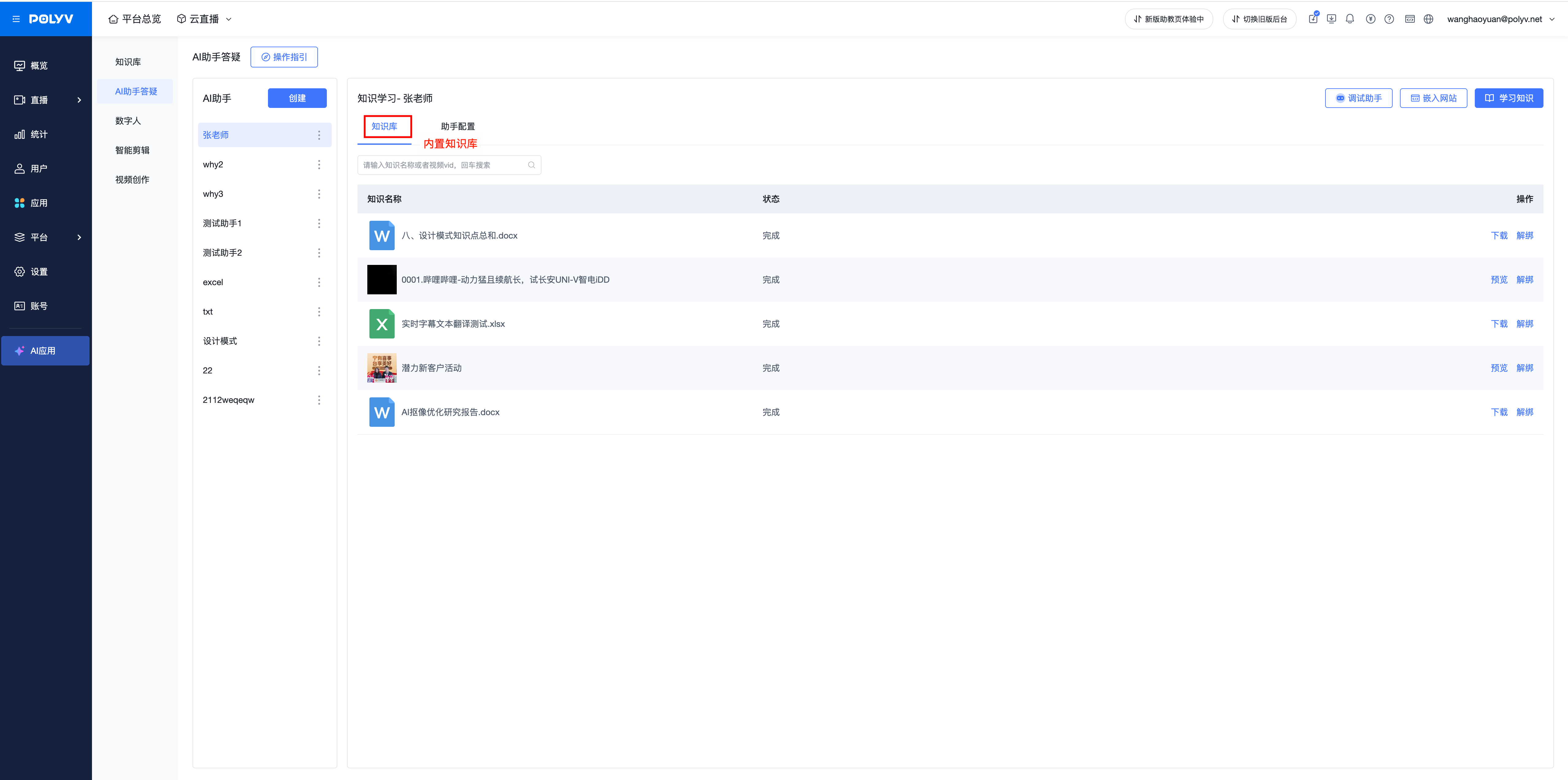
- On the assistant configuration page, switch to the "Knowledge" tab at the top.
- Click "Add Knowledge". From your created enterprise knowledge bases, select the content you want this digital human assistant to learn and master. Each assistant can be linked to multiple knowledge points.
Step 4: Generate and Use the Independent Access Link
- After completing all configurations, return to the "Assistant Configuration" tab and click the "Submit to Link" button at the bottom of the page.
- In the pop-up confirmation window, click "Independent Link Access" to complete the creation and obtain the link.
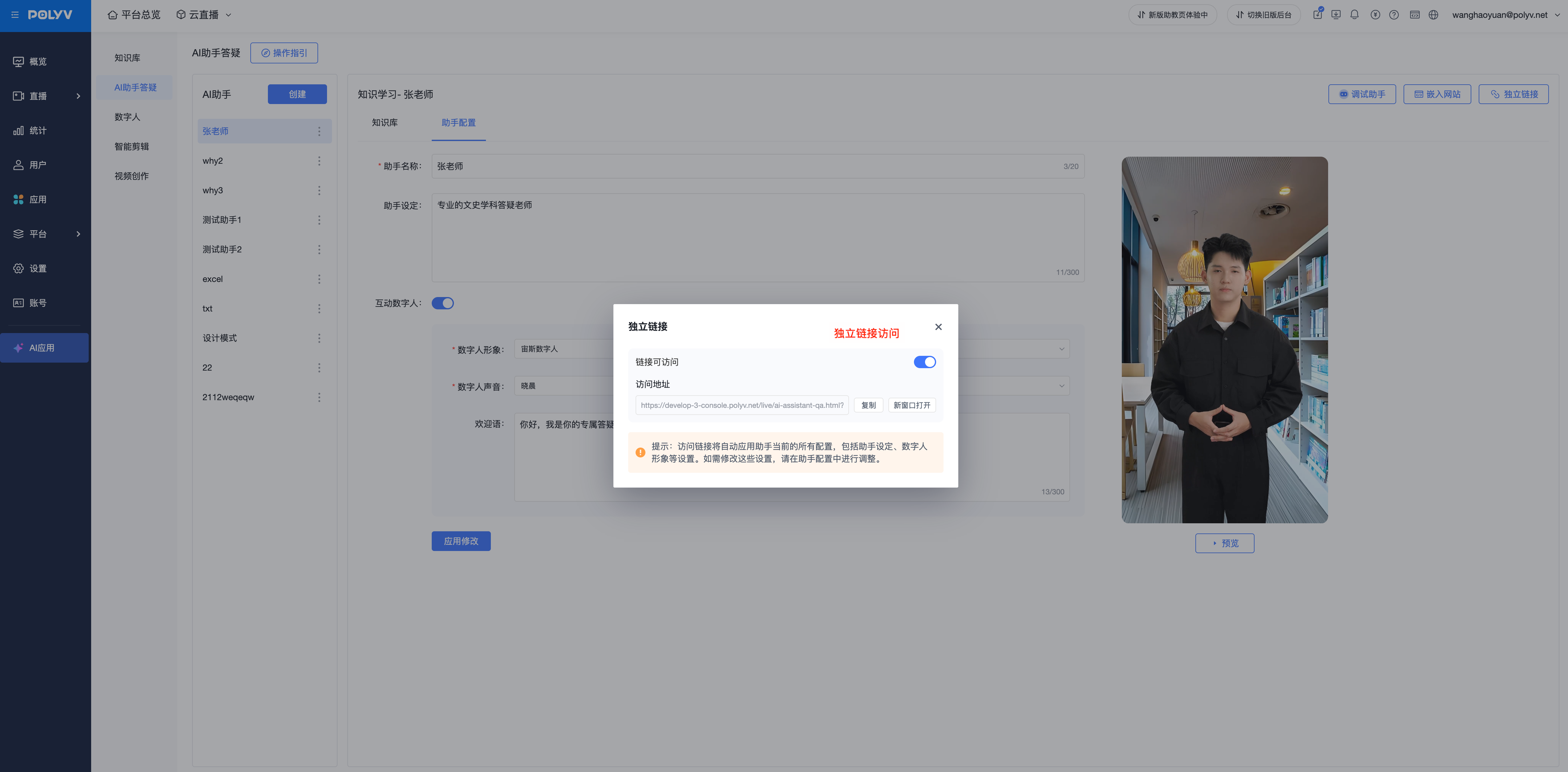
- You can find the newly created assistant in the assistant list and copy its independent access link.
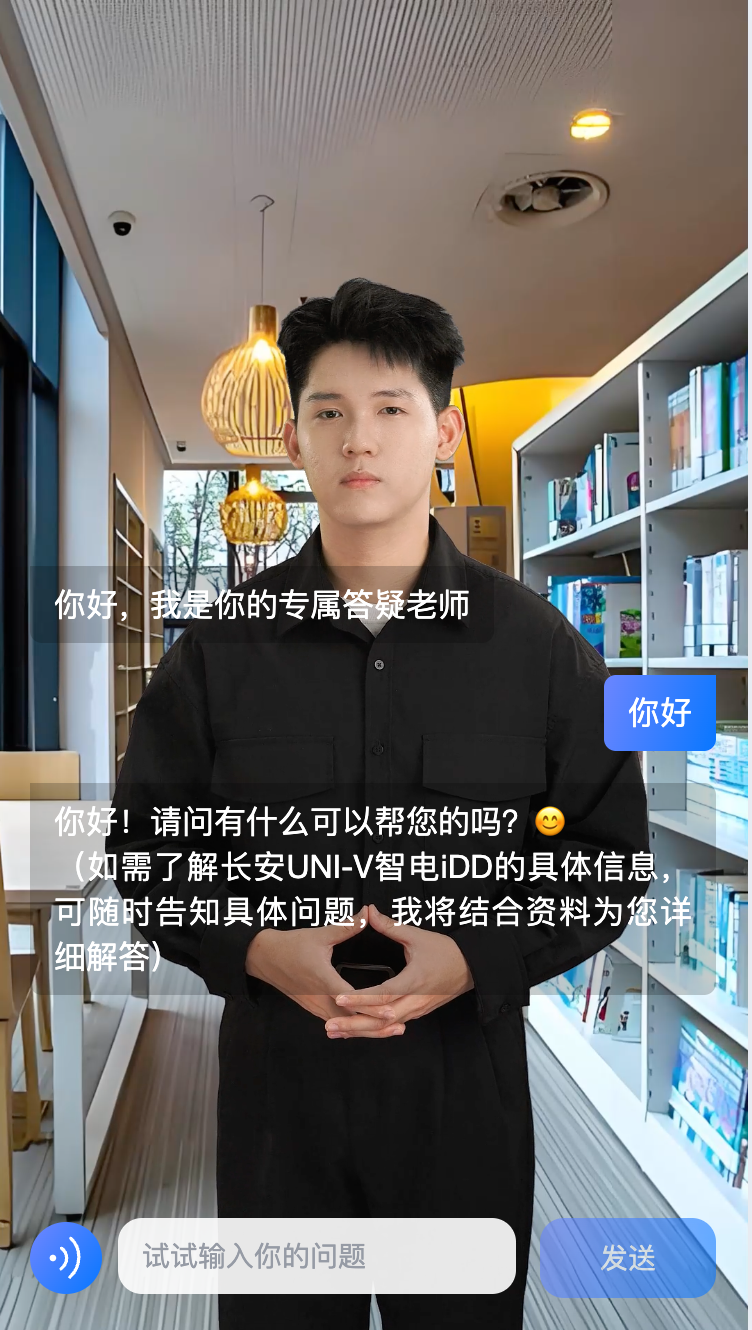
- Deploy this link on launch event screens, exhibition hall tablets, official websites, or promotional materials. Users accessing this link can engage in immersive interactive Q&A with your AI Digital Human. The link page supports landscape and portrait mode adaptive switching.
III. Frequently Asked Questions (FAQ)
What is the difference between the AI Digital Human Assistant and the previous AI Assistant Q&A? The AI Digital Human Assistant is a visual and experiential upgrade of the original AI Assistant Q&A feature. It not only possesses knowledge base-based Q&A capabilities but also adds a visual digital human image, voice, and an independent access link. This makes it no longer limited to a live streaming plugin but serves as an independent brand image and service terminal, suitable for more online and offline scenarios.
Where is the independent access link mainly used? It is mainly suitable for offline scenarios requiring large screen display and self-service, such as product launches, exhibitions, corporate front desks, smart stores, etc. It can also serve as an independent consultation portal within official websites, apps, or mini-programs to enhance user interaction experience.
Are there any requirements for the uploaded knowledge content? To ensure the AI assistant's responses are legal and compliant, we perform prohibited word recognition on the knowledge content added by the enterprise. Please ensure the content is properly adjusted before uploading.
Why might I encounter inaccurate answers? Inaccurate answers are usually due to the linked knowledge materials being too extensive or complex. Recommendation: Keep a single knowledge document to around 20,000-30,000 characters, and link 2-3 knowledge points to one AI assistant for optimal results.
If I delete a knowledge base, will the AI assistant still remember its content? No. When you delete a knowledge base from the enterprise knowledge base, all AI assistants linked to that knowledge will simultaneously lose the memory of that content.
