


Video Encryption
Security mechanisms such as domain whitelist/blacklist and authorized playback are mainly used to control the legitimacy of video playback request sources, effectively ensuring legitimate user access. However, these mechanisms do not encrypt the video data itself. For business scenarios involving paid video viewing, users can download the video locally and redistribute it after a single payment to obtain the video resource URL. Therefore, these mechanisms are insufficient for video copyright protection.
Polyv Video Encryption uses a proprietary encryption algorithm, providing an integrated video security solution including encrypted transcoding, secure transmission, and decryption playback. By applying high-strength encryption to the video data itself, even if the video file is downloaded locally, it cannot be directly played or distributed, effectively preventing video leakage and piracy.
Core Advantages
The core advantages of Polyv Video Encryption are:
- Polyv Video Encryption uses patented technology with independent intellectual property rights. The entire process of video encryption transcoding, transmission, and decryption playback is protected by proprietary algorithms, making it extremely difficult to crack.
- Each video file has an independent private key, effectively preventing a single key leak from causing widespread security issues. The player and server use encrypted protocols for ciphertext transmission, effectively preventing key theft.
- Provides multiple encryption schemes with different security levels, allowing selection based on your specific business scenario.
- Offers secure player SDKs covering multiple platforms such as H5, Flash, iOS, Android, Mini Programs, and Desktop Clients. Encrypted videos can only be played using the Polyv secure player.
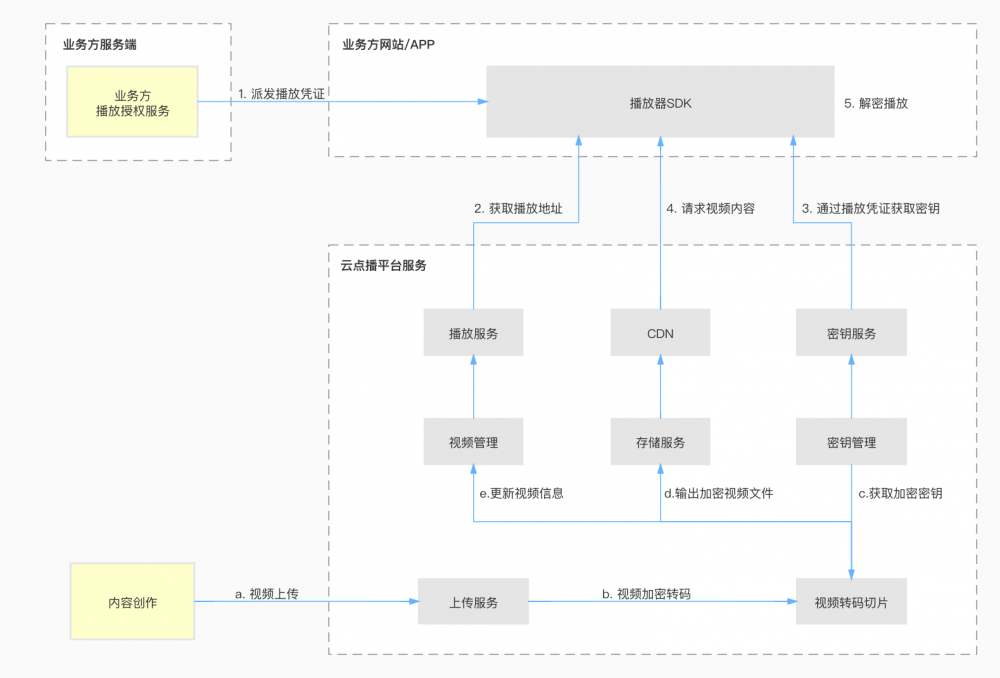
- The cloud video-on-demand platform provides a complete authorization system for encrypted video playback. Developers only need to obtain playback credentials and pass them to the Polyv player to enable encrypted playback, eliminating the development work of managing, verifying, and distributing credentials and keys.
- The authorized playback and anti-screen-recording watermark features provided by the Polyv player further enhance copyright protection capabilities.
- Polyv serves thousands of online education clients, and its video copyright protection technology is continuously updated and iterated, always maintaining an industry-leading level.
Process Architecture
The overall architecture process for on-demand video encryption and decryption playback is as follows:
Usage Instructions
1. Backend Configuration
In the cloud video-on-demand management backend, you can configure encryption settings for the entire account or a specific video category. The operation process is as follows:
- Log in to the cloud video-on-demand management backend, click 【Settings】 → 【Encryption Settings】 to enter the encryption settings page.
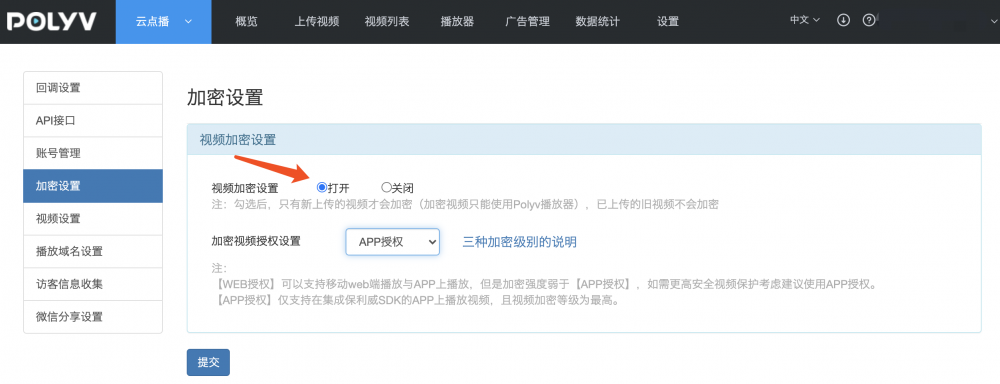
Video Encryption Setting: When enabled, newly uploaded videos will undergo encrypted transcoding.
Encrypted Video Authorization Setting: There are four authorization methods for playing encrypted videos: Non-encrypted Authorization, Web Authorization, App Authorization, and Mini Program Authorization. These four methods have different security levels and support different playback terminals. You can choose the appropriate authorization method based on your business scenario. See the table below:
Authorization Method / Supported Terminal PC Web Mobile H5 Mobile APP PC Client WeChat Mini Program Non-encrypted Authorization ✔️ ✔️ ✔️ ✔️ ✔️ WEB Authorization ✔️ ✔️ ✔️ ✔️ ✔️ APP Authorization ✔️ ❌ ✔️ ✔️ ❌ Mini Program Authorization ✔️ ❌ ✔️ ✔️ ✔️ - The security level from high to low is: APP Authorization > Mini Program Authorization > WEB Authorization > Non-encrypted Authorization.
- If your business scenario only involves mobile APP playback, it is recommended to choose "APP Authorization". If there is a need for mobile H5 video playback, "WEB Authorization" is recommended, but its security level is lower than APP Authorization.
- Encrypted videos can only be played using the secure player SDK provided by Polyv.
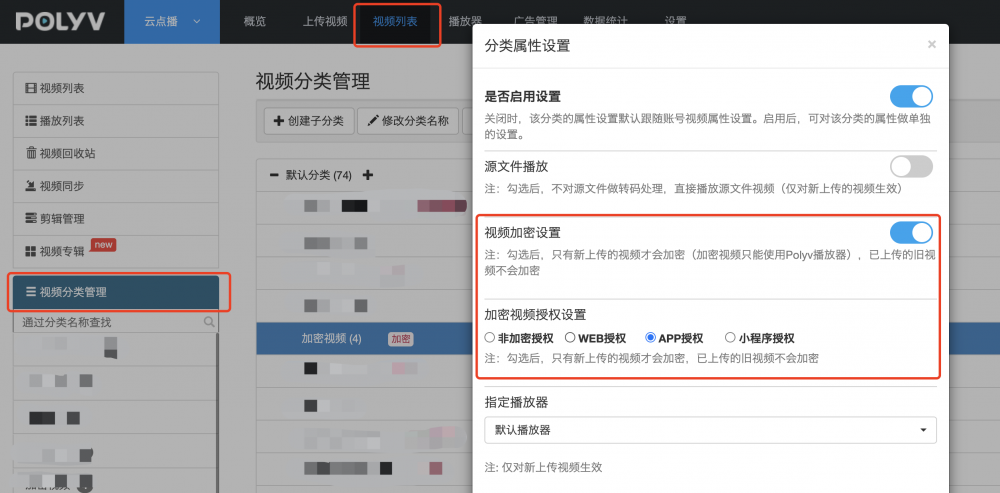
- After enabling encryption settings, all newly uploaded videos will undergo encrypted transcoding. The management backend also supports setting encryption for a specific video category only. The operation method is: Click 【Video List】 → 【Video Category Management】, select a category, click 【Category Property Settings】 to configure encryption for that category.
2. Playing Encrypted Videos
Encrypted videos can only be played using the player provided by Polyv. The cloud video-on-demand platform offers player SDKs for multiple platforms, including Web, iOS, Android, Mini Programs, and Desktop Clients, allowing you to quickly integrate them into your own applications or websites.
- Web Player (PC/Mobile H5, Flash): By introducing the Polyv Web Player code, you can embed the player into your own web page and enable playback. See: Playing Encrypted Videos on Web.
- Mobile Player (iOS, Android SDK): Users can quickly integrate video playback capabilities into their own applications via the SDK. See: iOS SDK, Android SDK.
