


Video Categories
Adding categories to videos helps manage them more effectively.
Category Management Page
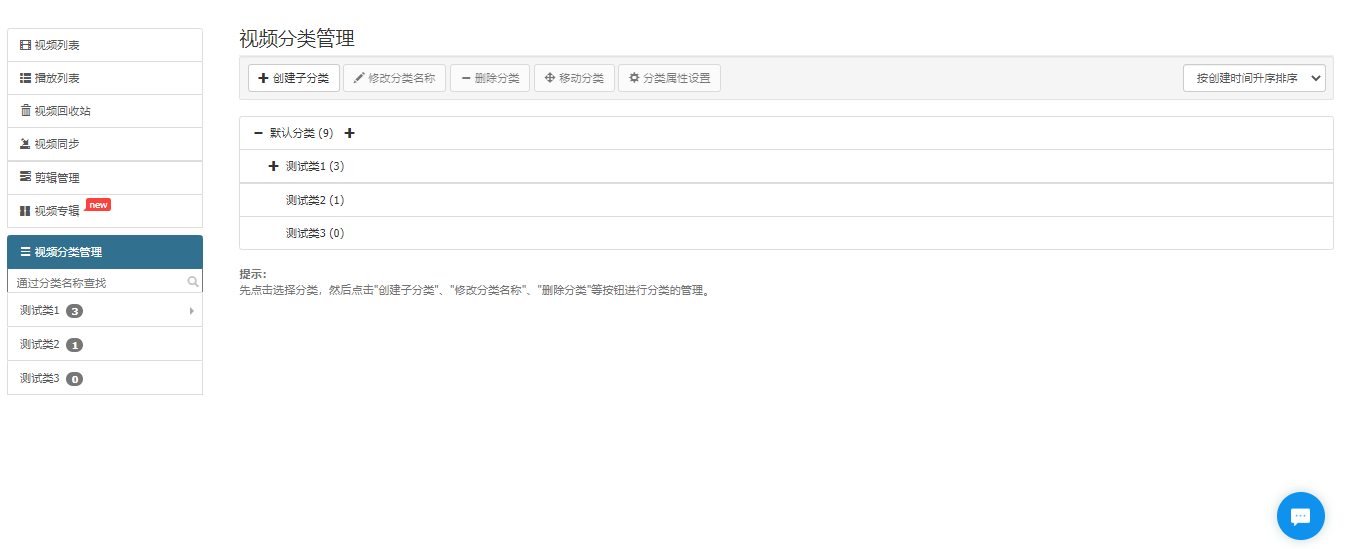
(1) Create a Category
Navigate to the Category Management page, select a category (the default category is selected by default), and click Create Subcategory. In the "Create Video Category" pop-up window, enter the desired category name, then click Submit. Alternatively, in the list, you can click the Create button next to a category to create a corresponding subcategory.
(2) Modify a Category
Navigate to the Category Management page, select a category (the default category cannot be modified), and click Modify Category Name. In the "Modify Video Category" pop-up window, enter the new category name, then click Submit. Alternatively, in the list, you can click the Modify button next to a category to modify the corresponding subcategory.
(3) Delete a Category
Navigate to the Category Management page, select a category (the default category cannot be deleted), and click Delete Category. In the "Prompt" pop-up window, click Confirm. Alternatively, in the list, you can click the Delete button next to a category to delete the corresponding category.
(4) Move a Category
Navigate to the Category Management page, select a category (the default category cannot be moved), and click Move Category. In the "Move Category" pop-up window, select the target video category to move it. Alternatively, in the list, you can click the Move button next to a category to move the corresponding category.
(5) Category Attribute Settings
Navigate to the Category Management page, select a category (only top-level directories can be configured), and click Category Attribute Settings. In the "Category Attribute Settings" pop-up window, choose whether to enable the settings, then click Submit. Alternatively, in the list, you can click the Attribute Settings button next to a category to configure the corresponding subcategory attributes.
(6) Category Sorting
On the Category Management page, you can sort categories by creation time (ascending), creation time (descending), or category name.
