


Authorized Playback and Anti-Screen Recording Watermark
Screen recording is one of the most difficult video piracy methods to prevent. The anti-screen recording watermark feature provided by the Polyv player helps protect video copyright by displaying irregularly scrolling text (usually the viewer's identity ID information) on the video, thereby deterring potential pirates.
Additionally, on the user's website, besides verifying whether a viewer has permission to access the video playback page through login information (cookies), the Polyv player can also verify whether the viewer has permission to play a specific video, thus achieving dual verification of viewer permissions.
Implementation Flow
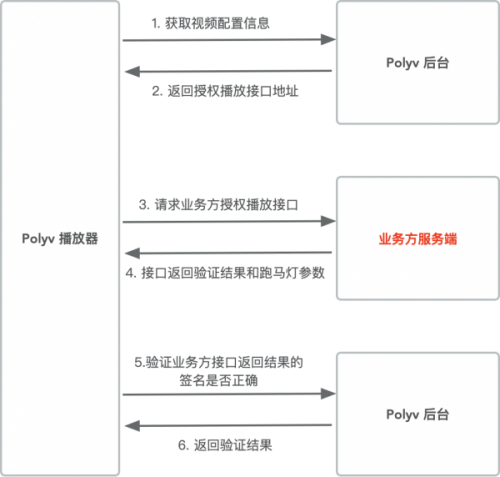
Implementation Steps
I. Admin Console Settings
Log in to the Cloud Video Management Console, click 【Settings】 → 【Video Settings】 to enter the video settings page.
In the "Authorized Playback and Anti-Screen Recording Watermark Interface Settings" section, fill in the URL of your business interface service.
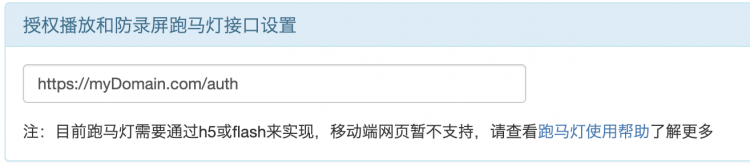
When the player requests the authorization interface, it will automatically adapt to the following situations:
- When a complete URL is filled in, the player will request it directly, e.g.: http://mywebsite.com/interface/validate。
- When an interface address without a protocol header is filled in, the player will automatically complete it based on the request protocol of the current page. For example, if
//mywebsite.com/interface/validateis filled in and the current page uses the https protocol, the actual request will be: https://mywebsite.com/interface/validate。- When an interface address without a protocol header and HOST is filled in, the player will automatically complete it based on the request protocol and HOST of the current page. For example, if
/interface/validateorinterface/validateis filled in, the current page's domain ismywebsite2.com, and the page uses the http protocol, the actual request will be: http://mywebsite2.com/interface/validate。
II. Business Server-Side Implementation
1. Player Request
After setting the authorization playback and watermark interface in the admin console, the Polyv player will first request the interface URL set in the admin console when playing a video. The request method is GET, and it will include four parameters: vid, code, t, and callback. For example: https://www.mywebsite.com/validate?vid=e2e84a73837363106d8d257f60e55c4c_e&code=&t=1457938821973&callback=polyvObject16209048491895664483_1457938783908&_=1457938784101。
Here, code is a parameter from the player embed code, and its value can be customized; t is a random number generated by the player. Example player embed code:
<script src='https://player.polyv.net/script/player.js'></script>
<div id='player'></div>
<script>
var player = polyvPlayer({
    wrap: '#player',
    width: 800,
    height: 533,
    vid: '88083abbf5bcf1356e05d39666be527a_8',
    code: 'myCodeValue'  // 用户可自定义参数值,也可以不设置此参数,那么在请求接口时该参数值为空。参数值为中文时需要做base64URLSafe。
});
</script>
Since the H5 player requests the user's interface via Ajax, which requires cross-origin requests, the
callbackparameter is needed. The Flash player achieves cross-origin requests through a cross-domain file, so thecallbackparameter is not needed; it only submits thevid,code, andtparameters when requesting the interface. For Flash player cross-origin implementation, please refer to Cross-origin Access Settings.
2. Server-Side Interface Implementation
If the business server-side interface only needs to implement authorization verification, it only needs to return the status, username, and sign parameters for the player to verify.
PHP example for server-side implementation:
// validate.php
<?php
$username = "elvis"; // 用户昵称, 若值为中文需要urlencode('张三'),可从session获取
$secretkey = "secretkey"; // 登录保利威管理后台,点击 【设置】 → 【API接口】获取
$vid=$_GET["vid"];
$t = $_GET["t"];
$code = $_GET["code"];

if($username=="elvis"){
  $status = 1; // 业务方可自定义授权验证逻辑
}else {
  $status = 2;
}
if(!empty($_GET["callback"])){
  $callback = $_GET["callback"];
}else{
  $callback = '';
}

$sign=md5("vid=$vid&secretkey=$secretkey&username=$username&code=$code&status=$status&t=$t");
$array=Array("status"=>$status,"username"=>$username,"sign"=>$sign);
$Json = json_encode($array);

if($callback!=''){ //PC H5播放器会提交callback参数
  echo $callback."(".$Json.")";
} else{ //Flash播放器不提交callback参数
  echo "(".$Json.")";
}
?>
Where the calculation rule for sign is: concatenate the vid, secretkey, username, code, status, and t parameters and perform MD5 calculation:
Plain ="vid=" + vid + "&secretkey=" + secretKey + "&username=" + username + "&code=" + code + "&status=" +status + "&t=" + t
sign = MD5.hash(Plain);
Below is an example of the interface response:
  polyvObject16208229674372271079_1478765178186({
  "status":1,
  "username":"elvis",
  "sign":"1cca74bd55c6076091ed84807065e5b7"
  })
// 不提交callback参数时
{
  "status":1,
  "username":"elvis",
  "sign":"2c2bfb00314da7d768d50a7d1e93bd9f"
}
If, in addition to authorization verification, the watermark function is also needed, the interface needs to return parameters related to the watermark.
PHP example for server-side implementation:
// validate.php
<?php
$username = "elvis"; // 用户昵称, 若值为中文需要urlencode('张三'),可从session获取
$secretkey = "secretkey"; // 登录保利威管理后台,点击 【设置】 → 【API接口】获取
$vid=$_GET["vid"];
$t = $_GET["t"];
$code = $_GET["code"];
$fontSize="40";
$fontColor="0xFFE900";
$speed="200";
$filter="on";
$setting="3";
$alpha="1";
$filterAlpha="1";
$filterColor="0x3914AF";
$blurX="2";
$blurY="2";
$tweenTime="1";
$interval="5";
$lifeTime="3";
$strength="4";
$show="on";
$msg="Errormessage!";

if($username=="elvis"){ // 业务方可自定义授权验证逻辑
 $status = 1;
}else {
 $status = 2;
}

if(!empty($_GET["callback"])){
 $callback = $_GET["callback"];
}else{
 $callback = '';
}

$sign=md5("vid=$vid&secretkey=$secretkey&username=$username&code=$code&status=$status&t=$t&msg=$msg&fontSize=$fontSize&fontColor=$fontColor&speed=$speed&filter=$filter&setting=$setting&alpha=$alpha&filterAlpha=$filterAlpha&filterColor=$filterColor&blurX=$blurX&blurY=$blurY&interval=$interval&lifeTime=$lifeTime&tweenTime=$tweenTime&strength=$strength&show=$show");
$array = Array("status"=>$status,"username"=>$username,"sign"=>$sign,"msg"=>$msg,"fontSize"=>$fontSize,"fontColor"=>$fontColor,"speed"=>$speed,"filter"=>$filter,"setting"=>$setting,"alpha"=>$alpha,"filterAlpha"=>$filterAlpha,"filterColor"=>$filterColor,"blurX"=>$blurX,"blurY"=>$blurY,"tweenTime"=>$tweenTime,"interval"=>$interval,"lifeTime"=>$lifeTime,"strength"=>$strength,"show"=>$show,);
$Json = json_encode($array);

if($callback!=''){
 echo $callback."(".$Json.")";
} else{
 echo $Json;
}
?>
Where the calculation rule for sign is (parameters must be concatenated in the order shown in the example):
Plain = "vid=" + vid + "&secretkey=" + secretKey + "&username=" + username + "&code=" + code + "&status=" + status + "&t=" + t +
"&msg=" + msg + "&fontSize=" + fontSize + "&fontColor=" + fontColor + "&speed=" + speed +"&filter=" +filter + "&setting=" + setting +
"&alpha=" + alpha + "&filterAlpha=" + filterAlpha  + "&filterColor=" + filterColor + "&blurX=" + blurX + "&blurY=" + blurY +
"&interval=" + interval + "&lifeTime=" + lifeTime + "&tweenTime=" + tweenTime + "&strength=" + strength + "&show=" +show;
sign = MD5.hash(Plain);
For example: when vid="8f8482aaab11dd5f45f183a9192a04c5_8", secretkey="AiDQw1mAmi", username="suki", code="abc", status="1", t="143020010115550947", msg="Errormessage!", fontSize="40", fontColor="0xFFE900", speed="200", filter="on", setting="3", alpha="1", filterAlpha="1", filterColor="0x3914AF", blurX="2", blurY="2", interval="5", lifeTime="3", tweenTime="1", strength="4", show="on",
the string concatenated for MD5 calculation is:
vid=8f8482aaab11dd5f45f183a9192a04c5_8&secretkey=AiDQw1mAmi&username=suki&code=abc&status=1&t=143020010115550947&msg=Errormessage!&fontSize=40&fontColor=0xFFE900&speed=200&filter=on&setting=3&alpha=1&filterAlpha=1&filterColor=0x3914AF&blurX=2&blurY=2&interval=5&lifeTime=3&tweenTime=1&strength=4&show=on
Then sign is the 32-character lowercase MD5 hash: 3b07f56f29b7fd728bf20020442338e7
Below is an example of the interface response:
{
  "status":1,
  "username":"elvis",
  "sign":"6ab63590797e513d1b6c46b407413478",
  "msg":"Errormessage!",
  "fontSize":"40",
  "fontColor":"0xFFE900",
  "speed":"200",
  "filter":"on",
  "setting":"3",
  "alpha":"1",
  "filterAlpha":"1",
  "filterColor":"0x3914AF",
  "blurX":"2",
  "blurY":"2",
  "tweenTime":"1",
  "interval":"5",
  "lifeTime":"3",
  "strength":"4",
  "show":"on"
}
III. Interface Return Parameter Description
| Parameter | Type | Required | Default | Description |
|---|---|---|---|---|
| status | Integer | Yes | / | Whether playback is allowed: 1 Allow 2 Deny |
| username | String | Yes | / | Viewer name, also used as the text content displayed in the watermark. If it is Chinese, URL encoding is required. |
| sign | String | Yes | / | Interface signature, used to verify whether the returned content has been tampered with. |
| show | String | Yes | off | When the parameter value is "on", it indicates displaying the watermark. Default is not displayed. |
| setting | Integer | Yes | 1 | Watermark scrolling style: 1 Scroll from right to left 2 Random position flicker 3 Flicker scroll from right to left |
| speed | Integer | Yes | 200 | Time required for the watermark text to move from the right side to the left side, unit: 1/10 second |
| lifeTime | Integer | Yes | 3 | Display time of the watermark text, unit: seconds |
| interval | Integer | Yes | 5 | Hidden interval time of the watermark text, unit: seconds |
| tweenTime | Integer | Yes | 1 | Fade-in and fade-out time of the watermark text, unit: seconds |
| fontSize | Integer | Yes | 30 | Font size of the watermark text |
| fontColor | String | Yes | 0x000000 | Color of the watermark text, represented by a hexadecimal color value, e.g., 0xFF0000. Default is black. |
| alpha | Float | Yes | 1 | Transparency of the watermark text, value range 0.01~1. The parameter value cannot be less than 0.01. |
| filter | String | Yes | off | Whether to outline the watermark text: on Outline off No outline |
| filterAlpha | Float | Yes | 1 | Transparency of the text outline, value range 0~1 |
| filterColor | String | Yes | 0x000000 | Color of the text outline, represented by a hexadecimal color value, e.g., 0xFF0000. Default is black. |
| strength | Integer | Yes | 4 | Outline strength, value range 0~255 |
| blurX | Integer | Yes | 2 | Horizontal blur amount of the outline, value range 0~255 |
| blurY | Integer | Yes | 2 | Vertical blur amount of the outline, value range 0~255 |
| msg | String | Yes | / | Custom error message |
- When the interface is only used for authorization verification, only the
status,username, andsignparameters need to be returned. Watermark-related parameters can be omitted.- Ensure the interface returns data in utf-8 encoding. Note that the
statusparameter is an integer type, not a string type.- Currently, the watermark function is not supported on mobile H5 players.
- Please try not to modify the player style or the
<video>tag.
