


Copyright Protection Best Practices
1. Feature Overview
Polyv is committed to enhancing video playback security and protecting your video resources. Through its self-developed video copyright protection solution (VRM) and proprietary encryption algorithms, Polyv ensures maximum security for video files. When integrating Polyv's PlaySafe video protection feature, it is recommended to follow the best practices in this document for optimal video security.
Important Security Principles
secretKey is intended solely for server-side request signing. It must not be written into Web, mobile app, desktop client, or any other client package, nor distributed through client-side interfaces. Clients should not directly call the API to create playback credentials; instead, the business server should create the PlaySafe token and return it to the client for use by the player.
2. Overall Solution
Integrating the video encryption feature requires modifications on both your server side and client side. The following flowchart illustrates the overall workflow for playing encrypted videos:
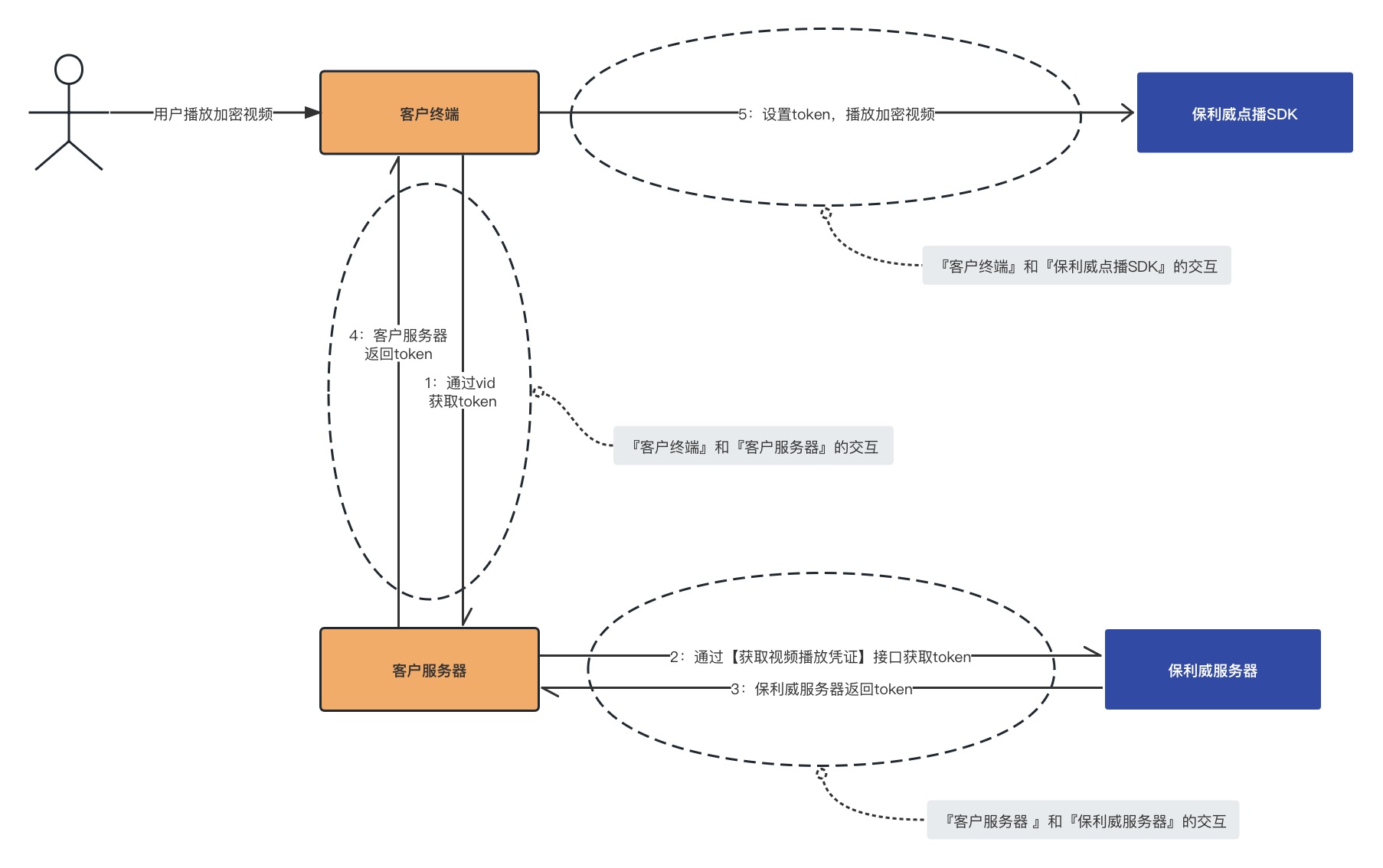
The steps in the flowchart are described in detail below:
- Your terminal requests playback authorization from the business server
Before playback, the terminal (including Web, mobile app, and PC players) submits the video's vid and necessary identity information through a business interface. The business server verifies the login status and viewing permissions.
Upon successful verification, the business server creates the corresponding PlaySafe token and returns it to the terminal for use by the player. The terminal must not carry, store, or use secretKey. The business interface should use the HTTPS protocol.
- Your server creates the PlaySafe token
Your server side should use the secretKey stored only on the server side to call the Get Video Playback Credential API to create the PlaySafe token required for playing encrypted videos. Do not allow the client to carry secretKey to create the token.
- It is recommended to configure an IP whitelist in the VOD management console, adding only the fixed egress IP of your business server. After configuration, only servers within the whitelist can call the token creation API; other IPs cannot create tokens.
- Polyv server returns the Token to your server
After receiving your request for a specific video's playback credential and verifying no anomalies, the Polyv server returns a Token for playing the encrypted video to your server.
- Your server returns the token to your terminal
After receiving the token from Polyv, your server returns it to the terminal. The business interface should use HTTPS and verify the request based on the business's login status and video viewing permissions. The interface response must not contain secretKey or other server-side keys used for signing. If additional security is required, the token can be re-encapsulated or encrypted on the server side.
- Your terminal uses the VOD SDK to play the video
Before playing the encrypted video, the terminal calls the VOD SDK's interface, passing the token obtained from the business server. If the business server has re-encrypted or encapsulated the token, it must be restored according to the corresponding rules before passing the real token to the VOD SDK.
The following sections explain the parts you need to modify and provide example code for reference.
3. Server Side
Your server needs to focus on the "Interaction between Customer Server and Polyv Server" part in the diagram above.
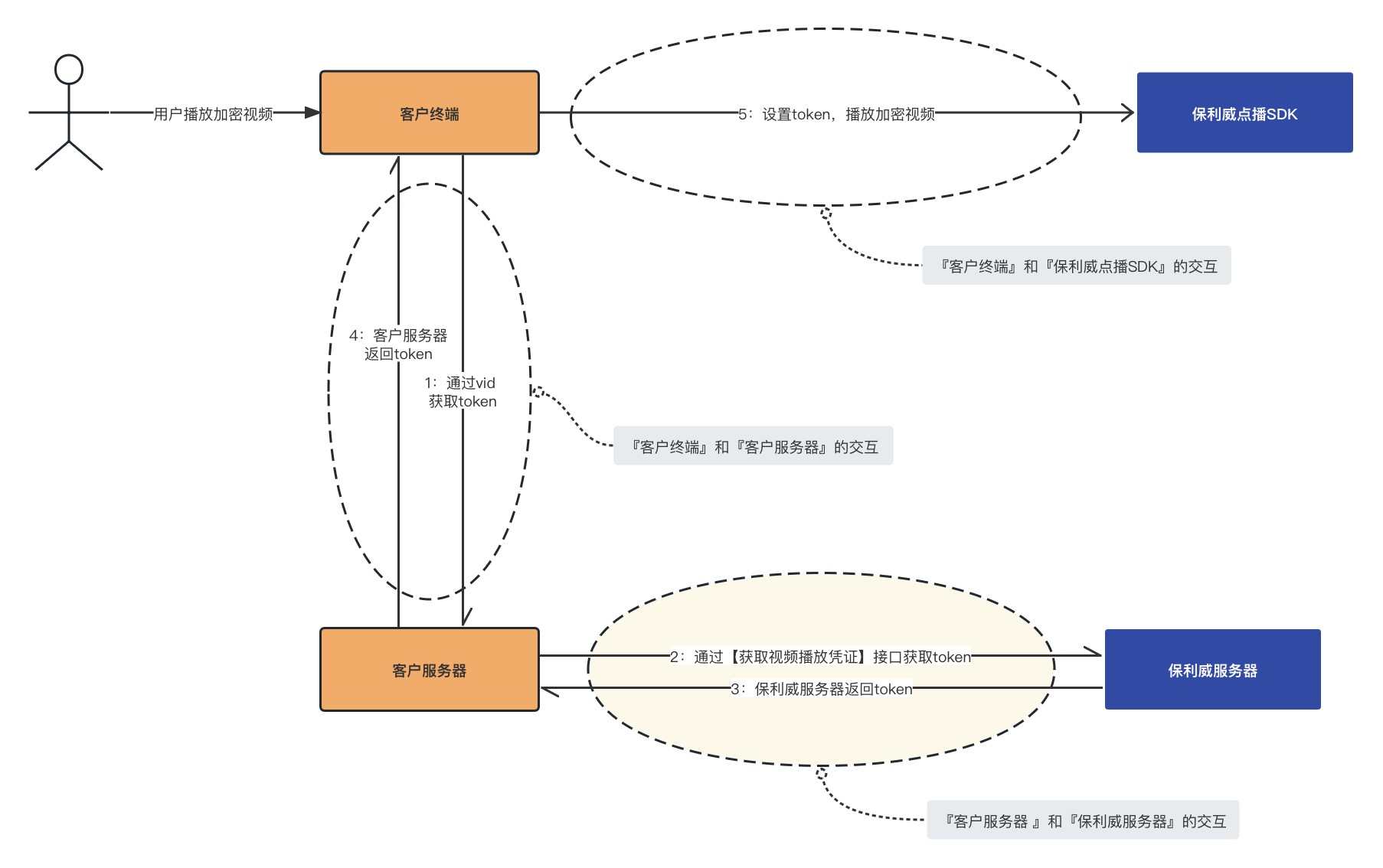
On the server side, you should provide a business interface: after verifying the terminal user's login status and video viewing permissions, use the key stored on the server side to create a PlaySafe token for the specified video (specified vid) from the Polyv server, and return the token to the terminal.
The server side must adhere to the following requirements:
- Store
secretKeyin server-side environment variables, configuration centers, or key management services; do not write it into apps, frontend code, installation packages, or public repositories. - Only the server side should use
secretKeyto calculate the signature and call the token creation API; the terminal only requests the playback token provided by the business server. - Configure an IP whitelist in the VOD management console, allowing only the fixed egress IP of the business server to create tokens.
Specific functional points are as follows:
- Obtain API request parameters: video vid, user viewerId, and other parameters;
- Request the Get Video Playback Credential API from the Polyv server; for mobile requests, viewerId must be base64 encoded;
- Parse the API response to obtain the Token;
- Re-encapsulate or encrypt the token according to business security requirements;
- Return the token to the client via HTTPS, without returning server-side keys like
secretKey.
3.1 Example Code
/**
 * 获取点播加密视频的播放token
 */
@PostMapping("/getVodToken")
@ResponseBody
public ResponseVO getVodToken(@RequestBody GetTokenRequestVO tokenReq, HttpServletRequest request) throws IOException, NoSuchAlgorithmException {
    // USER_ID 和 SECRET_KEY 仅从服务端安全配置读取,禁止下发或写入客户端
    // 请求参数处理
    String videoId = tokenReq.getVideoId();
    String viewerId = tokenReq.getViewerId();
    if (StringUtils.isEmpty(videoId) || StringUtils.isEmpty(viewerId)) {
        return ResponseVO.failure("argument is error");
    }
    Map<String, Object> args = new HashMap<>(16);
    args.put("videoId", videoId);
    args.put("viewerId", viewerId);
    args.put("viewerIp", IPUtil.getIPAddress(request));
    args.put("viewerName", tokenReq.getViewerName());
    args.put("expires", tokenReq.getExpires());
    args.put("disposable", tokenReq.getDisposable());
    args.put("iswxa", tokenReq.getIswxa());
    args.put("userId", USER_ID);
    args.put("ts", System.currentTimeMillis());
    // 去除空值参数
    Map<String, String> params = args.entrySet()
            .stream()
            .filter(entry -> entry.getValue() != null)
            .collect(
                    Collectors.toMap(Map.Entry::getKey, entry -> String.valueOf(entry.getValue()))
            );
    // 请求参数签名
    params.put("sign", LiveSignUtil.getSign(params, SECRET_KEY));

    // 向保利威服务器请求Token
    TokenVO vo = RequestTokenService.requestTokenFromServer(params);
    if (vo == null || vo.getCode() == null || vo.getCode() != HttpStatus.OK.value()) {
        return ResponseVO.failure("请求数据失败");
    } else {
        // 可按业务安全要求对 token 进行二次封装;接口须使用 HTTPS
        return ResponseVO.success(vo.getData());
    }
}
The requestTokenFromServer method implements calling the Polyv server's Get Video Playback Credential API to obtain the Token.
private const val API_URL = "http://hls.videocc.net/service/v1/token"

/**
 * 向保利威服务器请求Token
 * POST方式,Content-type: application/x-www-form-urlencoded
 */
fun requestTokenFromServer(params: Map<String, String>): TokenVO {
    return httpClient.submitForm(
        url = API_URL,
        formParameters = Parameters.build {
            params.forEach { (key, value) ->
                append(key, value)
            }
        }
    ).bodyAsObject<TokenVO>()
}
For more detailed code, please visit the Gitee repository.
3.2 GetTokenRequestVO Parameter Description
| Parameter | Required | Type | Description |
|---|---|---|---|
| videoId | true | String | Video ID, e.g., e6b23c6f519c5906e54a13b8200d7bb0_e |
| viewerId | true | String | Viewer ID, different viewers must use different IDs; for mobile requests, viewerId must be base64 encoded |
| viewerIp | false | String | Viewer IP, if empty, the IP used to call the API will be automatically obtained |
| viewerName | false | String | Viewer name |
| expires | false | Long | Token validity period in seconds. Default is 10 minutes if empty, maximum validity is 24 hours. |
| disposable | false | Boolean | Token validity, default is false true: Token is valid for one-time use only (invalid after first verification) false: Can be verified multiple times within the validity period. |
| iswxa | false | Integer | Whether it is a WeChat Mini Program playback, default is 0 1: Yes 0: No |
| extraParams | false | String | Custom additional parameters |
3.3 TokenVO Parameter Description
| Parameter | Type | Description |
|---|---|---|
| token | String | Token value |
| userId | String | Polyv VOD account ID |
| appId | String | Account appId |
| videoId | String | Video ID, e.g., e6b23c6f519c5906e54a13b8200d7bb0_e |
| viewerId | String | Viewer ID |
| viewerIp | String | Viewer IP |
| viewerName | String | Viewer name |
| ttl | Long | Token validity period in milliseconds |
| disposable | Boolean | Token validity true: Token is valid for one-time use only (invalid after first verification) false: Can be verified multiple times within the validity period. |
| iswxa | Integer | Whether it is a WeChat Mini Program playback 1: Yes 0: No |
| extraParams | String | Custom additional parameters |
| createdTime | Long | Token creation time, 13-digit millisecond timestamp |
| expiredTime | Long | Token expiration time, 13-digit millisecond timestamp |
4. Client Side
The client side needs to focus on the "Interaction between Customer Terminal and Customer Server" and "Interaction between Customer Terminal and Polyv VOD SDK" parts in the diagram above.
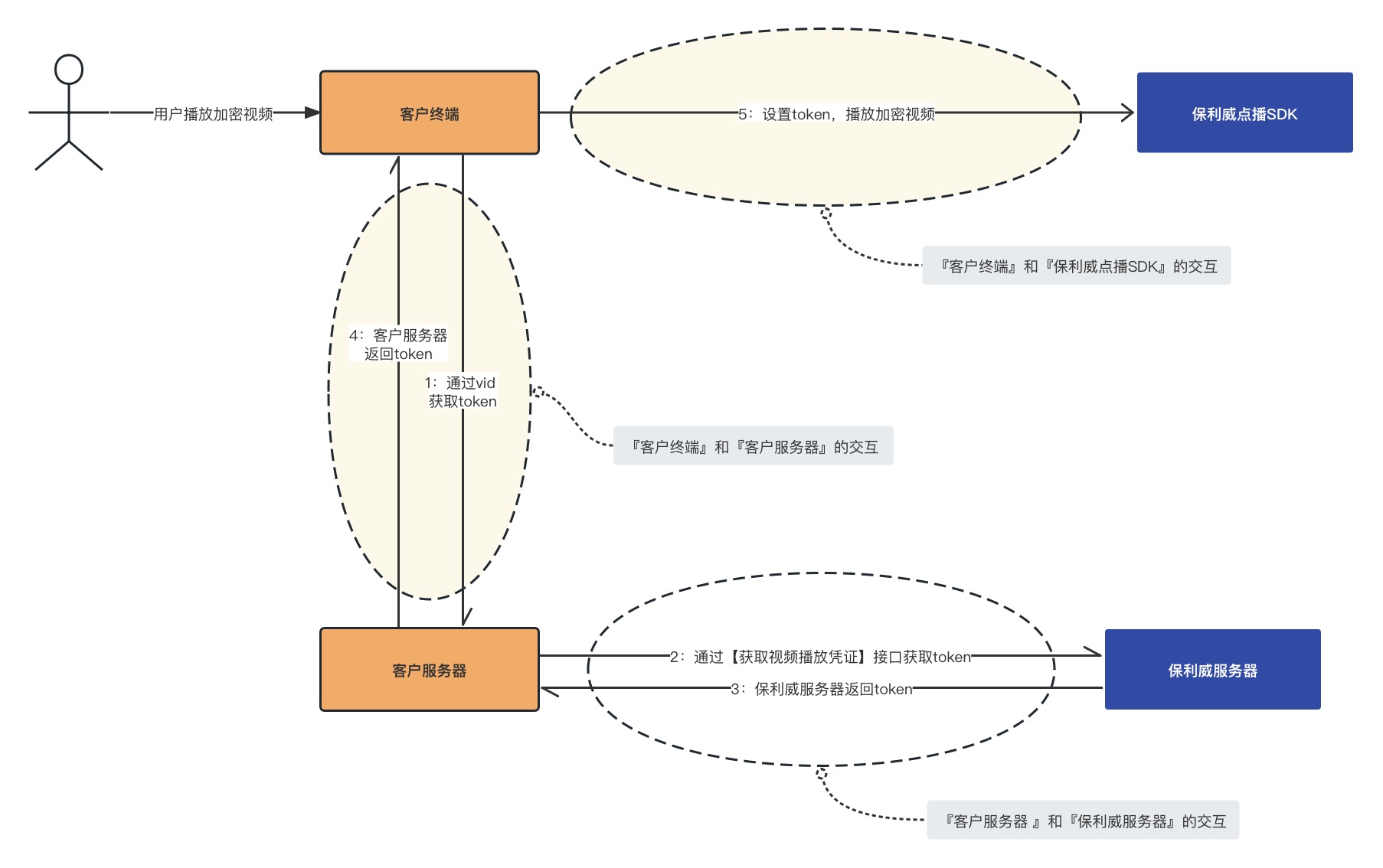
On the client side, you need to do the following:
- Before video playback, call the interface developed by your business server to obtain the PlaySafe token for the corresponding video using the video vid. The terminal must not store or pass
secretKey, nor directly call the token creation API.
Note: When the mobile terminal (iOS and Android) requests the playback token from your server, the viewerId in the request parameters must be Base64 encoded.
If the business server has re-encrypted or encapsulated the token, restore it according to the corresponding rules first.
Pass the token obtained from the business server through the API provided by the Polyv VOD SDK.
Steps 1 and 2 above belong to the "Interaction between Customer Terminal and Customer Server" and need to be developed by you. They are not detailed here. The following example code mainly demonstrates step 3—how to call the VOD SDK's API to pass the Token. This part belongs to the "Interaction between Customer Terminal and Polyv VOD SDK".
4.1 Web
For complete example code, please refer to VOD JS SDK Play Encrypted Video.
var player = polyvPlayer({
   wrap: '#player',
   width: 800,
   height: 533,
   vid: '88083abbf5bcf1356e05d39666be527a_8',
   playsafe:'81814fed-bdd0-4506-bec1-ebc8093148c5-hfevwsfxcsbcocx', // 通过 playsafe 传入 token
   ts:'1568131545000',
   sign:'88313661ba7ded642c7b557b0a364b4b'
});
4.2 iOS
For complete example code, please refer to VOD iOS SDK 4. Video Playback section 4.1.2 External Playback Credential.
// 通过配置播放器的 requestCustomKeyTokenBlock 属性,播放器内部在开始播放加密视频时,将会自动执行该 block ,并使用 block 返回的 token 对加密视频进行解密。
self.player.requestCustomKeyTokenBlock = ^NSString *(NSString *vid) {
        // 通过参数 vid,向客户自己的服务器请求 token
        NSString *encodeToken = @"xxxxxxxx";
        // 将服务器返回的 token 进行解密
        NSString *decodeToken = @"yyyyyyyy";
    return decodeToken;
};
// 通过 vid 获取在线播放视频模型
[PLVVodVideo requestVideoWithVid:vid completion:^(PLVVodVideo *video, NSError *error) {
    // 播放视频
    weakSelf.player.video = video;
}];
4.3 Android
4.3.1 Video Playback
For complete example code, please refer to VOD Android SDK 4. Video Playback section 1.2 External Playback Credential.
videoView.setVideoTokenRequestListener(new IPLVVideoTokenRequestListener() {
    @Override
    public String onRequestToken(PolyvVideoVO videoVO, String viewerId, String viewerName, String viewerParam) {
        // 返回外部获取的 token
        return token;
    }
});
// 通过vid播放视频
videoView.setVid(vid, bitrate, isMustFromLocal);
4.3.2 Video Download
For complete example code, please refer to VOD Android SDK 5. Video Download.
downloader.setDownloaderTokenRequestListener(new IPLVDownloaderTokenRequestListener() {
    @Override
    public String onRequestToken(@NotNull String videoId, int bitRate) {
        // 返回视频下载的token
        return token;
    }
});
4.4 C++ SDK
Example code for how the C++ SDK passes the Token and plays the video:
// 创建播放器对象,window为播放窗口句柄
auto player = PLVPlayerCreate(window);
// 播放前要先设置vid, videoPath为离线播放的视频存放地址,videoRate为视频的清晰度
PLVPlayerSetVideo(player, vid, videoPath, videoRate);
// 开始在线播放,token通过业务侧获取传入,seekMillisecond开始播放时想要seek的位置,sync是否同步(播放时会请求videoJson,同步时会阻塞等待请求结果,异步时通过回调通知结果)
PLVPlayerPlay(palyer, token, seekMillisecond, sync);
4.5 APICloud Platform
Example code for how APICloud calls the VOD SDK's API to pass the Token and play the video:
// 设置 播放外部播放 token
this.polyvVideo.setCustomVideoToken({token:""}, function (ret, err) {
});
// 通过 vid 播放在线视频
this.polyvVideo.setVid({
     vid: ""
 });
4.6 uniapp Platform
Example code for how uniapp calls the VOD SDK's API to pass the Token and play the video:
// 设置 播放外部播放 token
this.$refs.vod.setCustomVideoToken({token: ""},(ret) => {
})
// 通过 vid 播放在线视频
this.$refs.vod.setVid({
        vid: "",
    level: 0
},(ret) => {
})
