


Sub-Account
1. Overview
Sub-account management is a service provided by Cloud Video on Demand for managing user identities and functional access permissions. When your enterprise requires multi-account collaboration, different employees have different job responsibilities and thus require different permissions. Using sub-account management, you can create and manage sub-accounts, and control their operational permissions for Cloud Video on Demand features, thereby reducing enterprise information security risks.
2. Operation Steps
- Log in to the Cloud Video on Demand backend using the main account.
- In the settings menu of the primary navigation bar, select "Account Management".
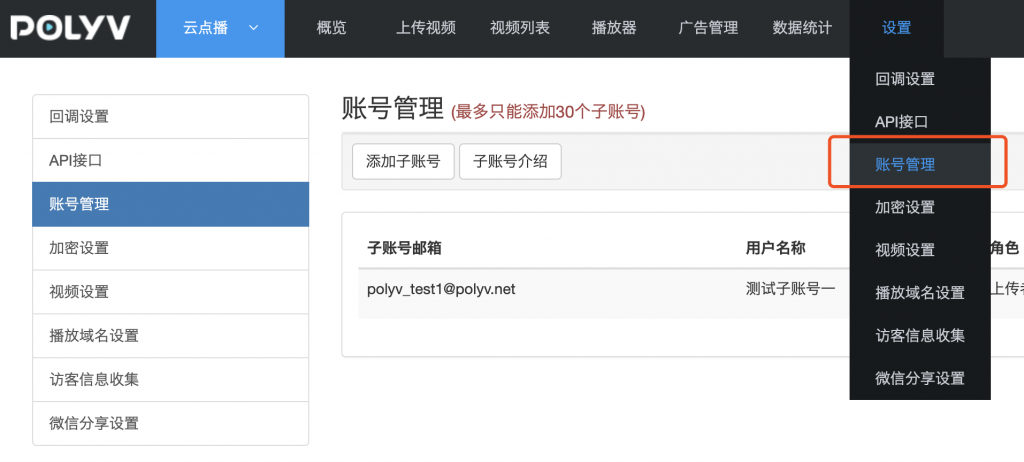
- Click "Add Sub-Account", then enter the login email, password, user name, role, account expiration time, and other information.
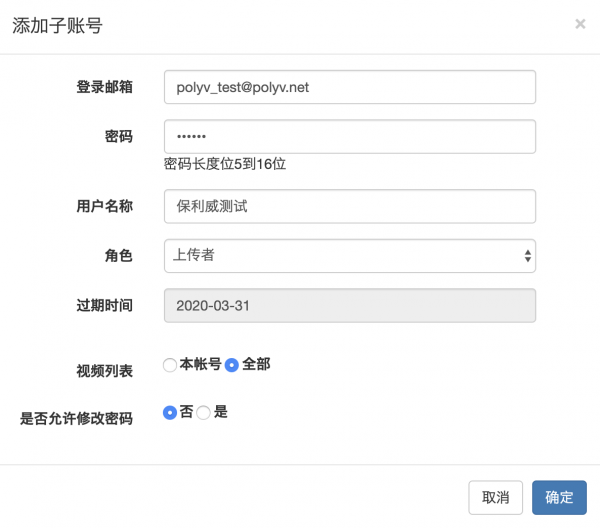
- Click "Confirm" to complete the addition.
3. Detailed Feature Description
When creating a sub-account, the meanings of each information field are as follows:
| Field | Description | Notes |
|---|---|---|
| Login Email | The account used to log in to the management backend or upload client, must be in email format. | |
| Password | The password used to log in to the management backend or upload client, length 5-16 characters. | |
| User Name | The name of the sub-account, can be used to set employee names, etc. | |
| Role | Different roles have different operation permissions. Currently, only system preset roles are supported. | |
| Expiration Time | The sub-account will be unusable after expiration. | |
| Video List | Controls whether the sub-account can see all videos or only videos uploaded by this account after login. | |
| Allow Password Change | Whether the sub-account can change its password in the management backend. Specific supported roles are subject to the feature permission table. | |
| Select Video Category Permissions | When a specific category is set, the sub-account can only see videos under that category and its subcategories. | Only available for Categorizer and Maintainer roles. |
The account used to register for Polyv Cloud Video on Demand is the main account, which has all platform permissions. Sub-accounts with different roles have different permissions. Currently, only system preset roles are supported, including the following types:
- Administrator: The role with the highest permissions besides the main account. Within the account validity period, it has all platform permissions except for deleting videos from the recycle bin.
- Operator: Has operation permissions related to videos (e.g., uploading, editing videos, managing players, ads, viewing data statistics, etc.), but does not have system settings permissions (e.g., encryption settings, API settings, account management, etc.).
- Editor: Only has permissions related to uploading and editing videos.
- Uploader: Only has permission to log in to the upload client and upload videos.
- Categorizer: Only has permission to log in to the upload client and upload videos. When creating a categorizer, you must specify the video categories they have permission to operate on. The categorizer cannot see other categories and videos outside the specified video categories.
- Maintainer: Only has permission to log in to the upload client, upload videos, and delete videos to the recycle bin. When creating a maintainer, you must specify the video categories they have permission to operate on. The maintainer cannot see other categories and videos outside the specified video categories.
- Live Broadcast Administrator: After logging in, can only access the live broadcast management backend, not the video on demand management backend.
- Content Distributor: Sub-accounts with the content distributor role cannot log in to the management backend or upload client. However, this type of sub-account has an independent appId and secretKey, and can be authorized to access specific video ranges and API call permissions based on business needs. See: Sub-Account Access Control Management.
| Feature Permission | Administrator | Operator | Editor | Uploader | Categorizer | Maintainer | Live Broadcast Administrator | Content Distributor |
|---|---|---|---|---|---|---|---|---|
| Overview Page | ✔️ | ✔️ | ❌ | ❌ | ❌ | ❌ | ❌ | ❌ |
| Upload Video | ✔️ | ✔️ | ✔️ | ❌ | ❌ | ❌ | ❌ | ❌ |
| Video List | ✔️ | ✔️ | ✔️ | ❌ | ❌ | ❌ | ❌ | ❌ |
| Playlist | ✔️ | ✔️ | ✔️ | ❌ | ❌ | ❌ | ❌ | ❌ |
| Video Recycle Bin | ❌ | ❌ | ❌ | ❌ | ❌ | ❌ | ❌ | ❌ |
| Video Sync | ✔️ | ✔️ | ✔️ | ❌ | ❌ | ❌ | ❌ | ❌ |
| Video Category Management | ✔️ | ✔️ | ✔️ | ❌ | ❌ | ❌ | ❌ | ❌ |
| Player | ✔️ | ✔️ | ❌ | ❌ | ❌ | ❌ | ❌ | ❌ |
| Ad Management | ✔️ | ✔️ | ❌ | ❌ | ❌ | ❌ | ❌ | ❌ |
| Data Statistics | ✔️ | ✔️ | ❌ | ❌ | ❌ | ❌ | ❌ | ❌ |
| System Settings | ✔️ | ❌ | ❌ | ❌ | ❌ | ❌ | ❌ | ❌ |
| Change Password | ✔️ | ✔️ | ✔️ | ❌ | ❌ | ✔️ | ❌ | ✔️ |
| Video Upload Client | ✔️ | ✔️ | ✔️ | ✔️ | ✔️ | ✔️ | ❌ | ❌ |
| Live Broadcast Management Backend | ❌ | ❌ | ❌ | ❌ | ❌ | ❌ | ✔️ | ❌ |
| Play Encrypted Video | ❌ | ❌ | ❌ | ❌ | ❌ | ❌ | ❌ | ✔️ |
| Video Category Authorized Access | ❌ | ❌ | ❌ | ❌ | ❌ | ❌ | ❌ | ✔️ |
| API Interface Authorized Call | ❌ | ❌ | ❌ | ❌ | ❌ | ❌ | ❌ | ✔️ |
