


Playback Domain Allowlist/Blocklist
Updated: 2021-05-18 14:13:37
Videos on the cloud video platform are played on the web via user websites. POLYV Cloud Video provides a feature to set playback domain allowlists and blocklists. You can configure these lists in the management backend to reduce the risk of malicious hotlinking.
Setting Domain Allowlist/Blocklist in the Management Backend
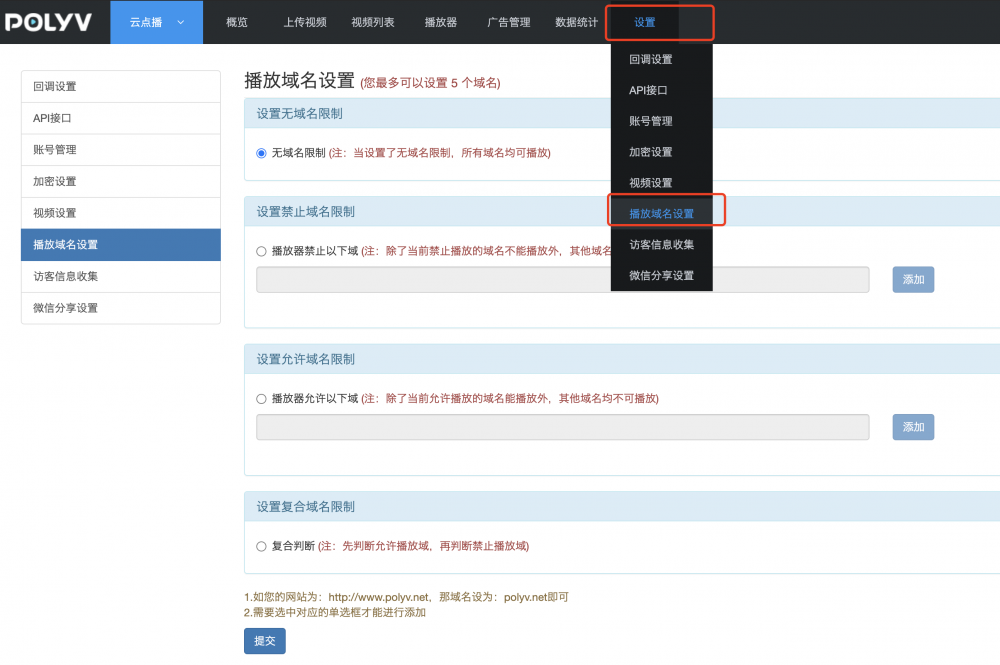
Log in to the Cloud Video management backend, click 【Settings】 → 【Playback Domain Settings】 to enter the domain allowlist/blocklist configuration interface.
Select the domain restriction scope based on your business scenario:
- If "No Domain Restriction" is selected, videos can be played on any website (domain).
- If "Blocked Domains" is set, videos cannot be played within the scope of the blocked domains (blocklist). A maximum of 5 domains can be set.
- If "Allowed Domains" is set, videos can only be played within the scope of the allowed domains (allowlist). A maximum of 5 domains can be set.
- If "Composite Judgment" is selected, the player first checks whether the current playback domain is in the allowlist, then checks the blocklist. This option is suitable for scenarios where videos are allowed on a specific domain but one of its subdomains should be blocked.
Setting Domain Allowlist/Blocklist via API
You can also query and set the playback domain allowlist/blocklist using the server-side API. For details, see:
