Guest Mode and Custom User System Integration Guide
Last updated: May 20, 2026
1. Applicable Scenarios
This document applies to scenarios where the integrator already has a custom user system and wants viewers to first enter the Polyv viewing page as guests, then convert to formal user identities through the integrator's login process when login is required.
Typical requirements include:
- Unauthenticated viewers can enter the viewing page to browse content first.
- Viewers enter the integrator's login process only when triggering operations requiring identity, such as interactions or comments.
- After viewers complete login on the integrator's login page, their custom user identity is synced to the Polyv viewing page.
- The Polyv viewing page subsequently recognizes the viewer as a formal user.
Guest mode can be used with embedded SaaS viewing pages or integrated Web viewing page SDKs. The login trigger methods differ between these two integration approaches.
2. Solution 1: Embedded SaaS Viewing Page
2.1 Implementation Method
This approach is suitable when the integrator directly uses the Polyv SaaS viewing page and embeds it within a web page, app, or mini-program.
Implementation logic:
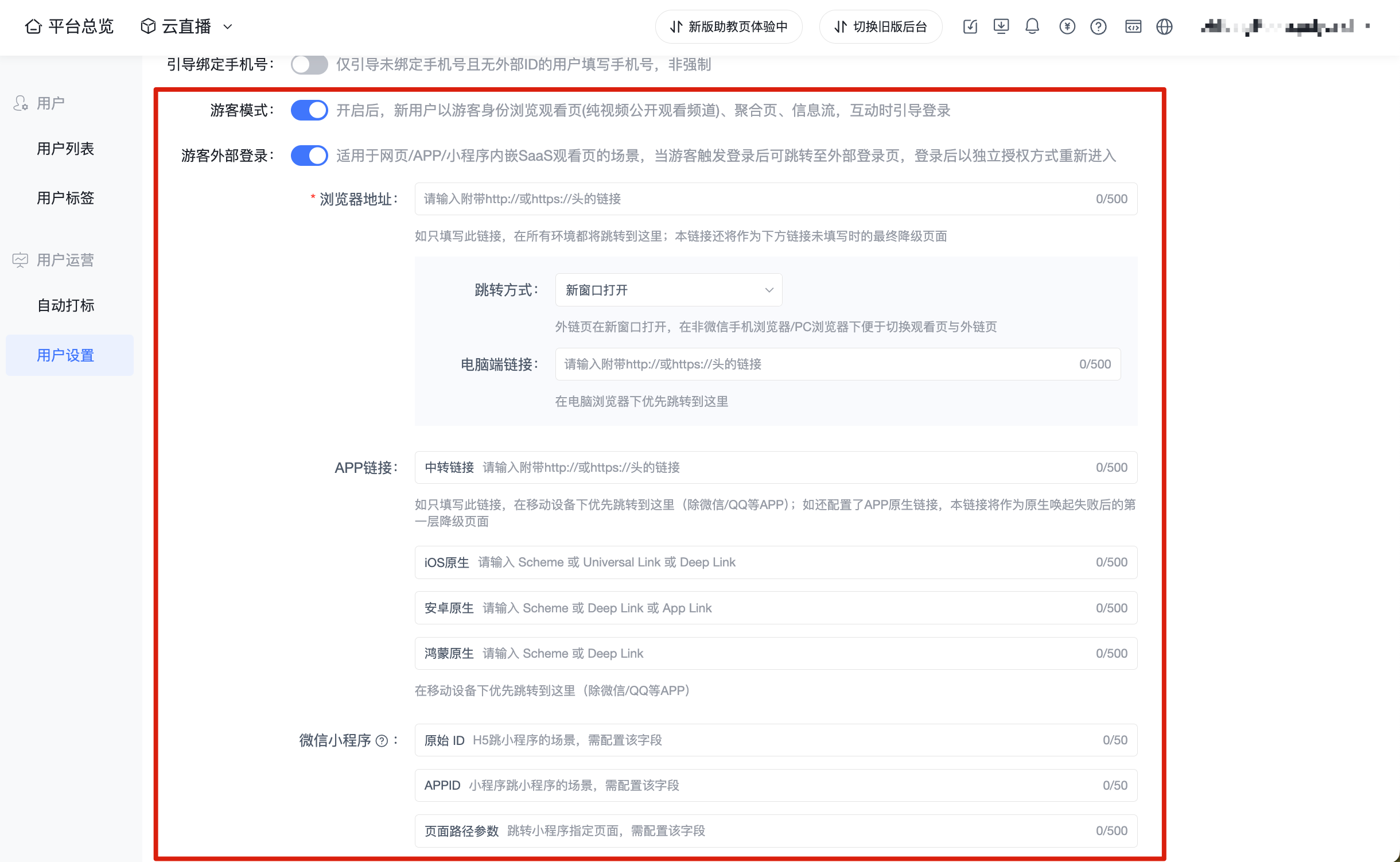
- The integrator enables guest mode in the Polyv backend.
- The integrator enables guest external login.
- The integrator configures the custom login page redirect URL.
- Unauthenticated viewers enter the SaaS viewing page as guests.
- When a guest triggers an operation requiring login, the SaaS viewing page directs the viewer to the integrator's login page.
- After the viewer completes login on the integrator's login page, the integrator calls the independent authorization API.
- The viewer returns to the viewing page and enters as a formal user.
Polyv is responsible for:
- Supporting guest identity entry into the viewing page.
- Directing viewers to the configured login page when login scenarios are triggered.
- Receiving the formal user identity passed by the integrator through independent authorization.
- Recognizing the formal user identity within the viewing page.
The integrator is responsible for:
- Providing a custom login page.
- Enabling guest mode and guest external login in the Polyv backend.
- Configuring the external login redirect URL.
- Calling the independent authorization API after the viewer logs in successfully.
- Returning the viewer to the viewing page with formal user identity parameters.
Advantages:
- Reuses the SaaS viewing page's guest access and login guidance capabilities.
- The integrator retains its own login system.
- The viewer's identity can ultimately enter the Polyv viewing page's formal user state.
Notes:
- The integrator's login page must handle the redirect logic after successful login.
- Parameters and signatures required for independent authorization must be generated by the integrator's server.
- The external login URL needs to be configured based on the actual terminal scenario, such as browser, app, or mini-program.
Backend configuration reference:

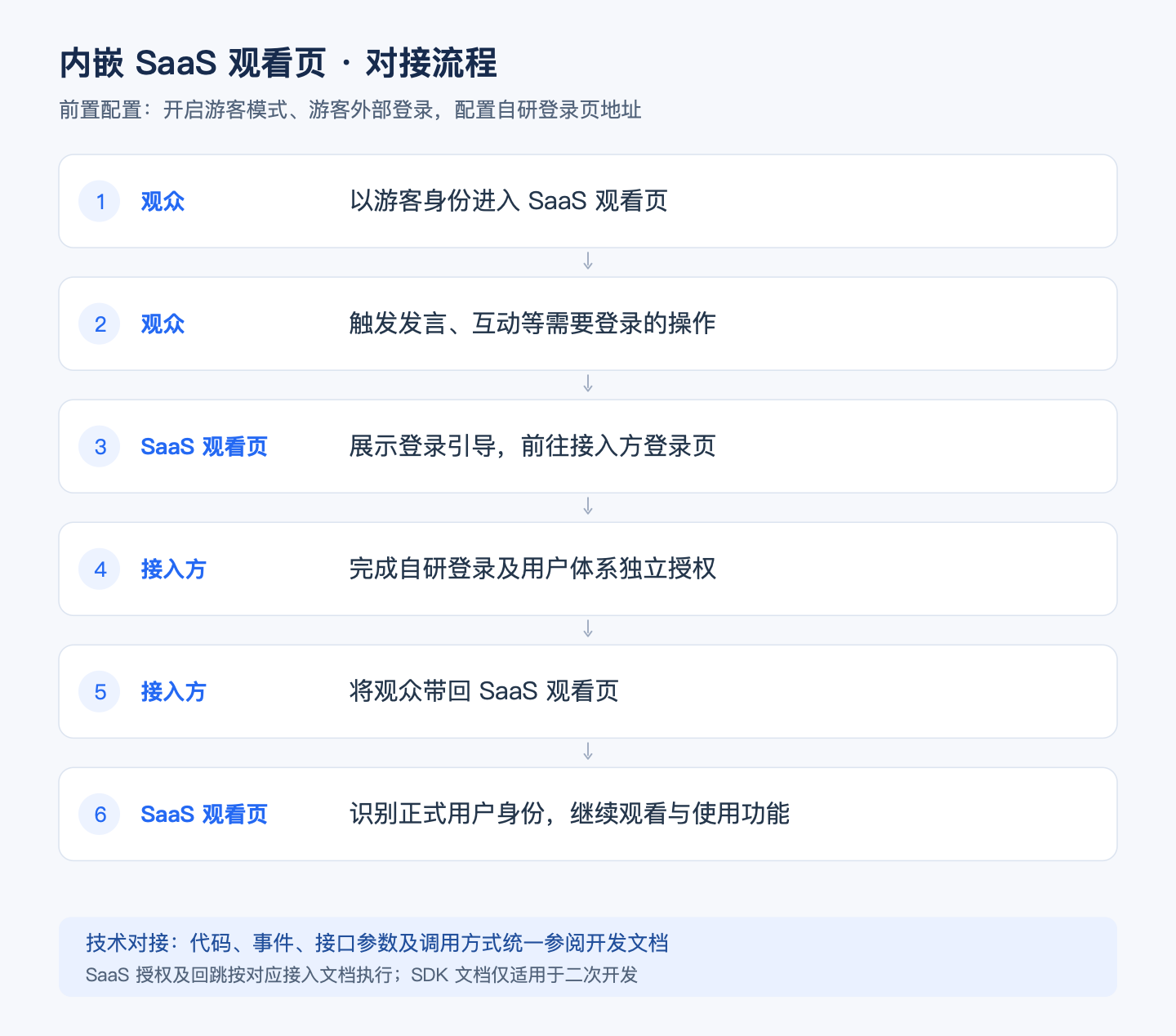
2.2 Integration Flow
graph TD
A["未登录观众进入 SaaS 观看页"] --> B["以游客身份浏览"]
B --> C["触发发言/互动等登录场景"]
C --> D["SaaS 跳转接入方登录页"]
D --> E["观众完成登录"]
E --> F["接入方调用独立授权接口"]
F --> G["观众返回观看页"]
G --> H["观看页以正式用户身份识别观众"]
- The integrator enables guest mode in the Polyv backend.
- The integrator enables guest external login.
- The integrator configures the custom login page redirect URL.
- An unauthenticated viewer opens the SaaS viewing page and enters as a guest.
- The guest clicks on features requiring login, such as commenting or interacting.
- The SaaS viewing page displays a login prompt and redirects to the integrator's login page.
- The viewer completes custom login on the integrator's login page.
- The integrator's server calls the independent authorization API, passing external user ID, nickname, timestamp, signature, and other information.
- The integrator returns the viewer to the SaaS viewing page.
- The viewing page recognizes the viewer as a formal user.
The integrator needs to complete:
- Prepare the custom login page URL.
- Enable guest mode in the Polyv backend.
- Enable guest external login in the Polyv backend.
- Configure the external login redirect URL.
- Prepare user information such as external user ID and nickname.
- Generate
timestampandsignaccording to independent authorization requirements. - Call the independent authorization API after the viewer logs in successfully.
- Complete the redirect back to the viewing page after login.
Examples of entering the viewing page:
Entering as a guest:
https://live.polyv.cn/watch/123456
Entering as a formal user:
https://live.polyv.cn/watch/123456
&external_user_id=UID123
&nickname=张三
×tamp=xxxx
&sign=xxxx
The channel URL, external user ID, nickname, timestamp, and signature parameters in the examples above should be configured based on the actual integration.
3. Solution 2: Integrated Web Viewing Page SDK
3.1 Implementation Method
This approach is suitable when the integrator integrates the Web viewing page SDK themselves and wants to handle guest login within their own page logic.
Implementation logic:
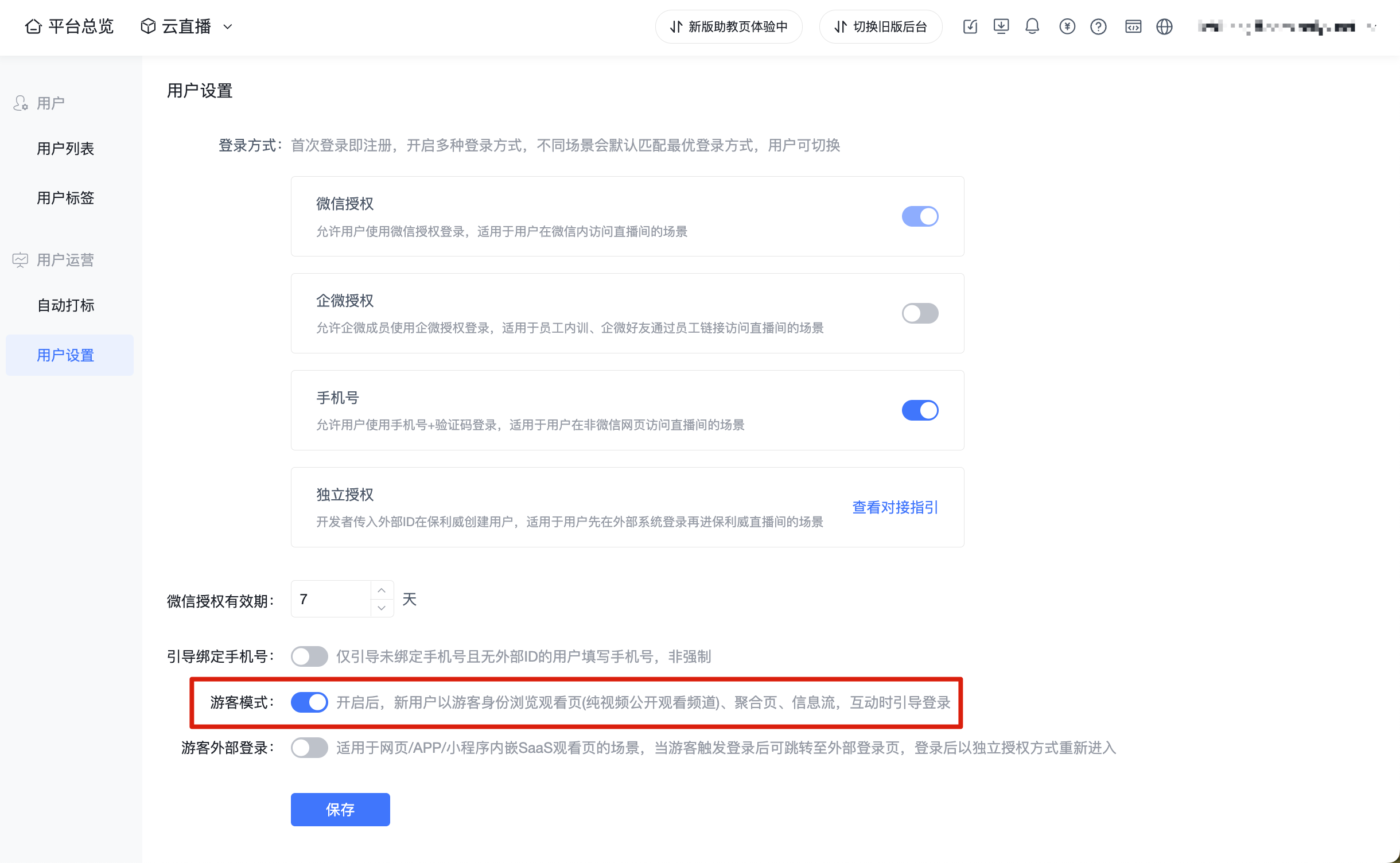
- The integrator enables guest mode in the Polyv backend.
- The integrator initializes the SDK without passing a formal user identity.
- The SDK recognizes the guest identity and emits the
guestLoginevent. - The integrator listens for this event and displays their own login entry or redirects to a login page.
- After the viewer completes login through the integrator's login flow, the integrator calls the independent authorization API.
- After successful authorization, the integrator uses
updateAuthto refresh the SDK user identity or reinitializes the SDK.
Polyv is responsible for:
- The SDK supports initialization with a guest identity.
- The SDK emits the
guestLoginevent when login is required. - Supports refreshing the viewing page identity with the authorized formal user identity.
The integrator is responsible for:
- Integrating the Web viewing page SDK.
- Listening for the
guestLoginevent. - Implementing their own login flow.
- Calling the independent authorization API after the viewer logs in successfully.
- Using
updateAuthor reinitializing the SDK to update the user identity.
Advantages:
- Login interaction and page presentation are controlled by the integrator.
- Suitable for scenarios where the integrator builds their own viewing page or deeply integrates the SDK.
- Can be combined with the integrator's existing frontend routing, modals, and account system.
Notes:
- The integrator needs to handle the display of the login entry and identity refresh after login completion.
- In the SDK integration approach, the guest external login configuration can be used or not, depending on the integrator's page implementation.
- The integrator must ensure the independent authorization call succeeds before refreshing the SDK identity.
Backend configuration reference:

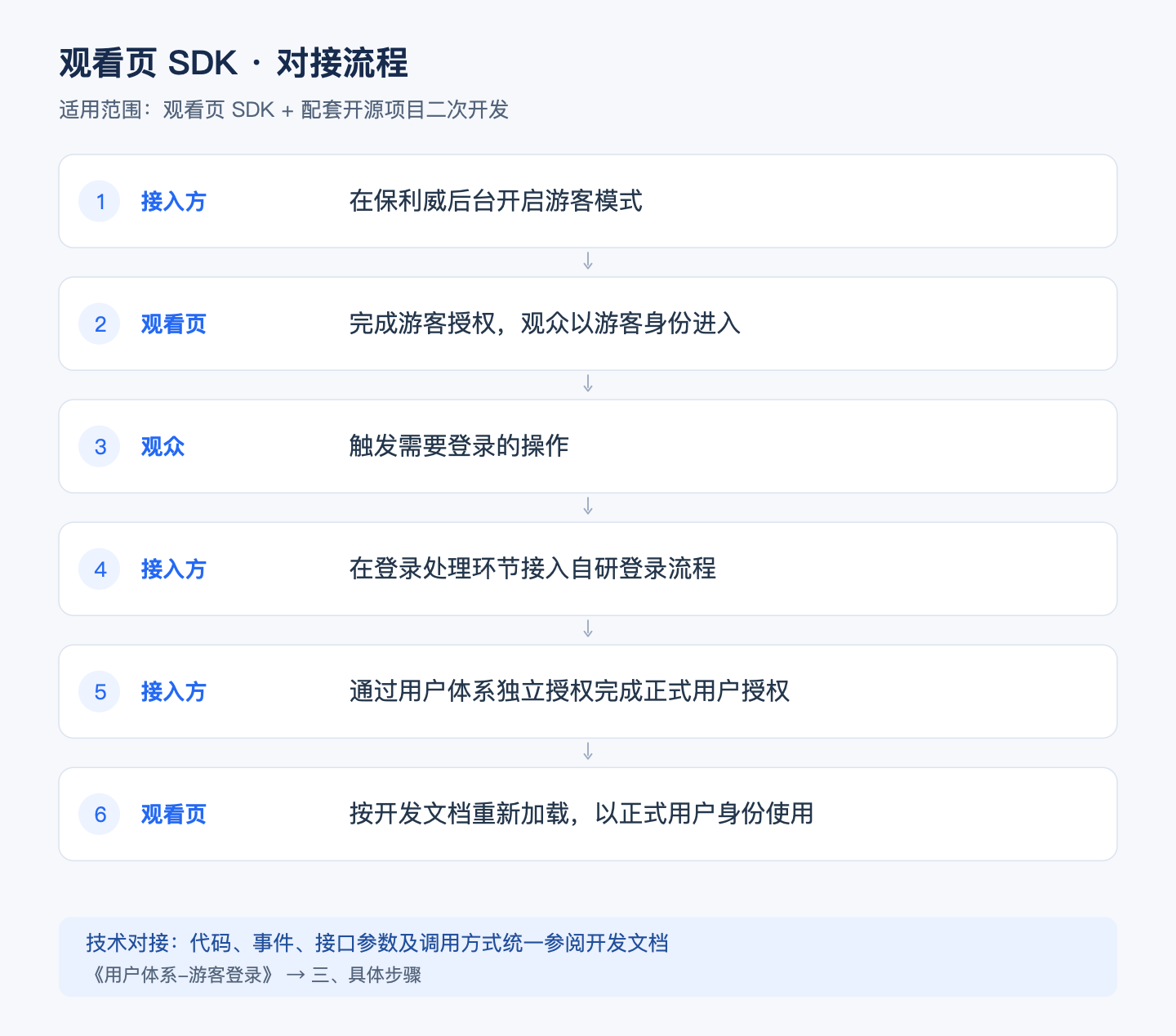
3.2 Integration Flow
graph TD
A["接入方初始化 SDK,不传 externalUserId"] --> B["SDK 以游客身份进入观看页"]
B --> C["SDK 触发 guestLogin 事件"]
C --> D["接入方展示登录入口"]
D --> E["观众完成登录"]
E --> F["接入方调用独立授权接口"]
F --> G["接入方 updateAuth 或重新初始化 SDK"]
G --> H["SDK 以正式用户身份继续观看"]
- The integrator enables guest mode in the Polyv backend.
- The integrator initializes the SDK without passing
externalUserId. - The SDK enters the viewing page as a guest.
- The SDK triggers the
guestLoginevent when login is required. - The integrator listens for the event and displays a login entry or redirects to the integrator's login page.
- The viewer completes custom login through the integrator's login flow.
- The integrator's server calls the independent authorization API.
- After successful authorization, the integrator passes the formal user identity via
updateAuthor reinitializes the SDK. - The SDK continues viewing as a formal user.
The integrator needs to complete:
- Enable guest mode.
- Distinguish between guest identity and formal user identity when initializing the SDK.
- Listen for the
guestLoginevent. - Implement a custom login flow.
- Prepare authorization parameters such as external user ID, nickname, timestamp, and signature.
- Call the independent authorization API.
- Refresh the SDK identity after successful authorization.
SDK initialization example:
const player = new PolyvLivePlayer({
channelId: 'xxx',
authParams: {}
});
Listening for the guest login event:
player.on('guestLogin', () => {
// 此时观看页需要登录,可在这里展示接入方登录入口或跳转接入方登录页
});
After the viewer logs in successfully, the integrator's server needs to call the independent authorization API:
POST https://api.polyv.net/live/v4/user/viewerrecord/direct_auth
Request parameters include external user ID, nickname, timestamp, sign, and other information. Specific parameters and signature rules should follow the independent authorization API documentation.
After successful independent authorization, the SDK identity can be refreshed:
player.updateAuth({
externalUserId: 'UID123',
nickname: '张三',
sign: 'xxxx'
});
Alternatively, the SDK can be reinitialized based on the integrator's page implementation.
4. Solution Comparison
| Comparison Item | Embedded SaaS Viewing Page | Integrated Web Viewing Page SDK |
|---|---|---|
| Viewing page form | Uses Polyv SaaS viewing page | Integrator integrates SDK to build their own viewing page |
| Login trigger | Triggered by SaaS viewing page | SDK emits guestLogin event |
| Login page provider | Integrator | Integrator |
| Login entry display | Guided by SaaS viewing page | Handled by integrator's page |
| Guest external login configuration required | Yes | Depends on integrator's implementation |
| Independent authorization required | Yes | Yes |
| Formal identity entry method | Redirect back to SaaS viewing page with identity parameters | updateAuth or reinitialize SDK |
| Integrator frontend development effort | Lower | Higher |
| Suitable for | Integrators wanting to reuse SaaS viewing page capabilities | Integrators building their own viewing page or needing deep control over login interaction |