


Guide for Integrating Invitation Posters in Mini-Program Embedded SaaS Viewing Pages
1. Applicable Scenarios
This document is applicable when the integrator embeds the Polyv SaaS viewing page into a WeChat Mini-Program via the <web-view> method and wishes to use invitation posters within the viewing page for sharing and attribution.
Typical requirements include:
- Viewers watch the Polyv SaaS live streaming viewing page within the integrator's Mini-Program.
- When a sharing viewer clicks share, an invitation poster with a Mini-Program code can be generated.
- Scanning viewers enter the integrator's Mini-Program page after scanning the Mini-Program code on the poster.
- The integrator wants to identify the sharing source via Mini-Program code parameters, such as channel, invitation poster, and sharer.
Note: The Mini-Program code must be generated by the integrator's Mini-Program server. Polyv cannot use the integrator's Mini-Program appid and secret to generate the Mini-Program code on its behalf.
2. Solution 1: SaaS Outputs Invitation Poster, Integrator Provides Mini-Program Code API
2.1 Implementation Method
In this approach, the invitation poster page is output by the Polyv SaaS viewing page. The integrator only needs to provide an API for obtaining the Mini-Program code.
Implementation logic:
- The integrator configures a "Get Mini-Program Code API" in the Polyv backend.
- The sharing viewer clicks share or generates an invitation poster on the SaaS viewing page.
- Polyv calls the API configured by the integrator.
- The integrator's server generates a parameterized Mini-Program code based on the parameters.
- The integrator's API returns the image URL of the Mini-Program code.
- Polyv renders this Mini-Program code onto the SaaS invitation poster.
Polyv is responsible for:
- Outputting the native SaaS invitation poster page.
- Calling the Mini-Program code API configured by the integrator.
- Displaying the Mini-Program code image returned by the integrator on the invitation poster.
The integrator is responsible for:
- Preparing the WeChat Mini-Program code generation capability.
- Providing the API for obtaining the Mini-Program code.
- Generating the corresponding Mini-Program code based on the parameters passed by Polyv.
- Ensuring that scanning viewers enter the designated page of the integrator's Mini-Program after scanning.
Advantages:
- The integrator does not need to develop the invitation poster UI separately.
- The invitation poster experience remains consistent with the SaaS viewing page.
- The integrator's development scope is focused on the Mini-Program code API.
Notes:
- The logic for generating the Mini-Program code is still handled by the integrator's server.
- The integrator must ensure the API is stable and available.
- The Mini-Program code parameters must be consistent with the parsing logic of the integrator's Mini-Program landing page.
2.2 Integration Process
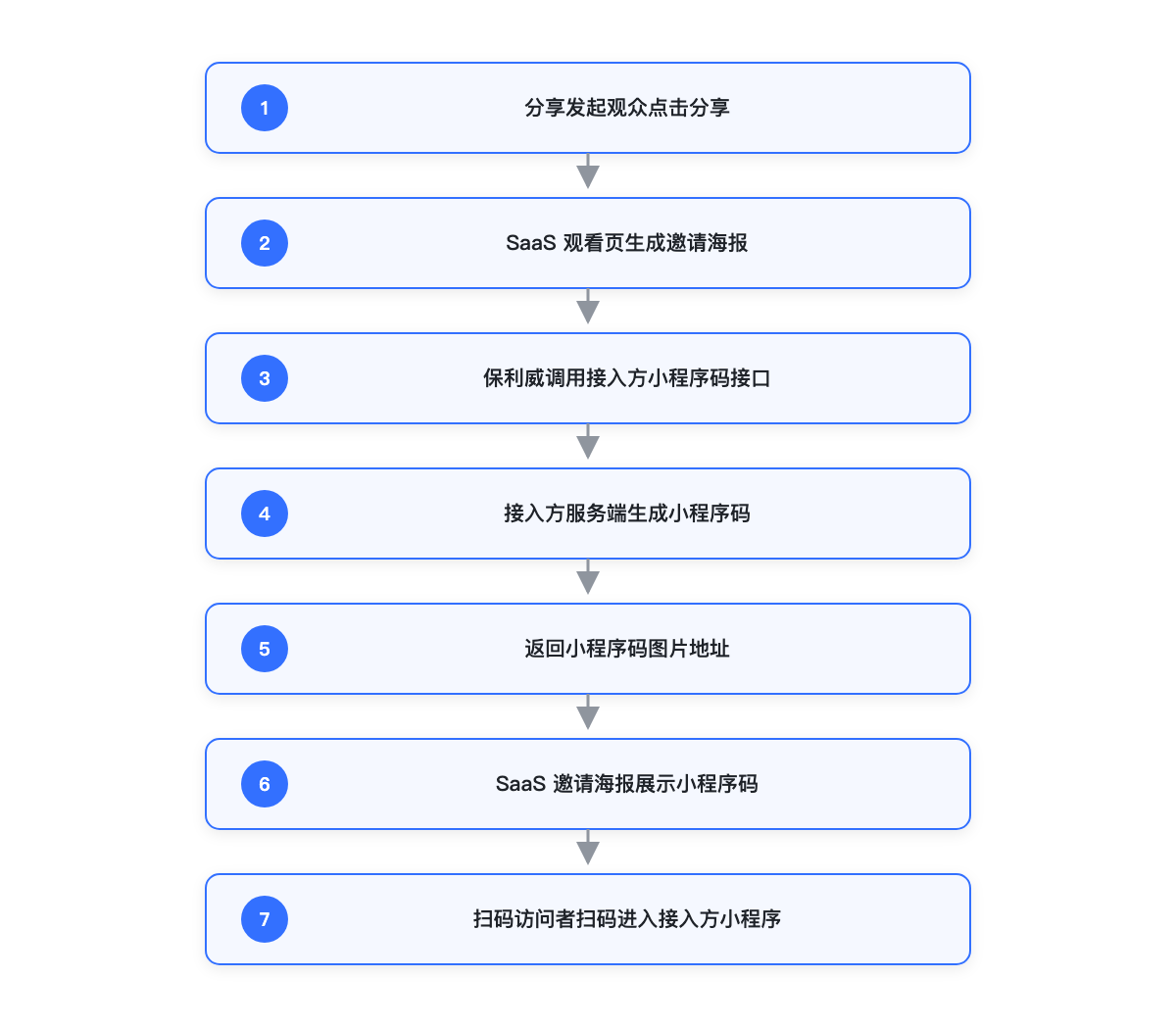
- The integrator confirms the landing page after scanning the Mini-Program code.
- The integrator's server integrates the WeChat Mini-Program code generation capability.
- The integrator develops the "Get Mini-Program Code API," which returns the image URL of the Mini-Program code.
- The integrator configures this API address in the Polyv backend.
- The sharing viewer clicks share on the SaaS viewing page and generates an invitation poster.
- Polyv calls the integrator's API to obtain the Mini-Program code.
- The integrator's API generates the Mini-Program code based on the parameters and returns the image URL.
- Polyv displays the Mini-Program code on the invitation poster.
- The scanning viewer scans the code and enters the integrator's Mini-Program.
The integrator needs to complete:
- Prepare the Mini-Program
appidandsecret. - Prepare the server-side capability to generate Mini-Program codes.
- Provide a Mini-Program code API that can be called by Polyv.
- Define the attribution parameters to be carried in the Mini-Program code.
- Parse the parameters on the Mini-Program landing page and handle subsequent business logic.
3. Solution 2: Integrator Develops Share Page Natively in Mini-Program
3.1 Implementation Method
In this approach, the integrator implements the share button, share popup, invitation poster, and Mini-Program code display natively outside the Mini-Program WebView.
Implementation logic:
- The SaaS viewing page runs as an H5 page within the Mini-Program
<web-view>. - The integrator overlays native Mini-Program components outside the WebView.
- The sharing viewer clicks the share entry developed by the integrator.
- The integrator's Mini-Program calls the integrator's server to generate the Mini-Program code.
- The integrator's Mini-Program displays the custom invitation poster or share popup.
Polyv is responsible for:
- Providing the SaaS viewing page content.
- Not participating in the integrator's native share page UI or Mini-Program code generation process.
The integrator is responsible for:
- Designing and developing the native Mini-Program share entry.
- Designing and developing the invitation poster UI.
- Calling the integrator's server to generate the Mini-Program code.
- Displaying the poster, saving the poster, or triggering the Mini-Program share capability.
- Maintaining the business logic and attribution logic within the sharing chain.
Advantages:
- The share page UI and interaction are fully controlled by the integrator.
- Can be combined with the integrator's own business capabilities, such as membership, coupons, events, and distribution.
- Decoupled from the SaaS invitation poster display logic.
Notes:
- The integrator needs to maintain the complete sharing system independently.
- Development and testing costs are higher.
- Whether the sharing experience is consistent with the SaaS viewing page is controlled by the integrator.
3.2 Integration Process
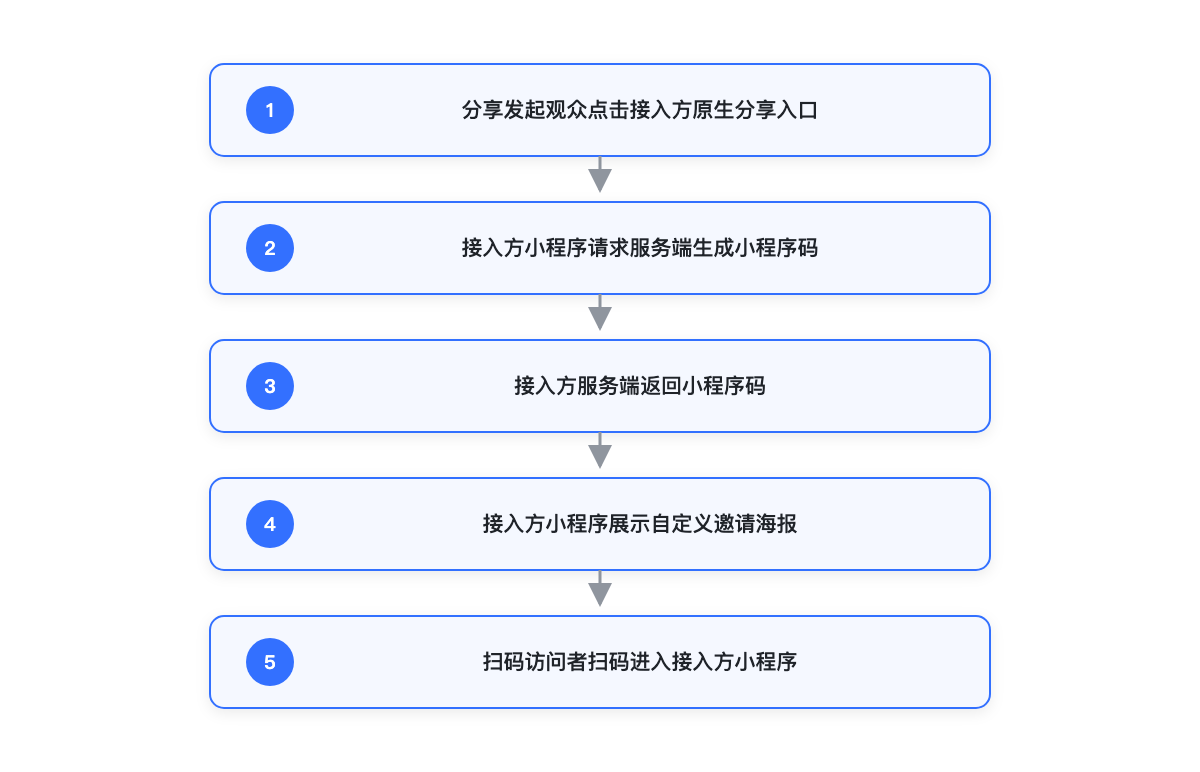
- The integrator opens the SaaS viewing page via
<web-view>within the Mini-Program. - The integrator develops a native share entry outside the WebView.
- The sharing viewer clicks the integrator's native share entry.
- The integrator's Mini-Program calls the integrator's server to generate the Mini-Program code.
- The integrator's Mini-Program displays a custom invitation poster or share popup.
- The scanning viewer scans the code and enters the integrator's Mini-Program.
- The integrator's Mini-Program parses the parameters and completes attribution.
The integrator needs to complete:
- Design the native Mini-Program share entry and share page.
- Develop the capability to generate or display invitation posters.
- Prepare the server-side Mini-Program code generation capability.
- Design the scan landing page and parameter parsing logic.
- Maintain the sharing, saving, scan return, and attribution chain.
4. Solution Comparison
| Comparison Item | SaaS Outputs Invitation Poster, Integrator Provides Mini-Program Code API | Integrator Develops Share Page Natively in Mini-Program |
|---|---|---|
| Share Page UI Output By | Polyv | Integrator |
| Mini-Program Code Generated By | Integrator | Integrator |
| Mini-Program Code Display Location | SaaS Invitation Poster | Integrator's Native Mini-Program Share Page |
| Does Integrator Need to Develop Share UI? | No | Yes |
| Does Integrator Need to Provide API to Polyv? | Yes | No |
| Customization Capability | Limited by SaaS invitation poster capabilities | Fully controlled by integrator |
| Development Cost | Lower | Higher |
| Suitable For | Integrators wanting to reuse the SaaS invitation poster, only needing Mini-Program code and attribution | Integrators wanting deep customization of the share page and to incorporate more proprietary business logic |
