


Interactive SDK UI Components Not Loading
Updated: 2023-03-28 11:45:32
Issue Description
After integrating the Interactive SDK's UI components (e.g., check-in, survey, lottery, announcement, answer sheet, etc.), when the instructor initiates the corresponding function, the viewer side fails to display the relevant interactive UI components.
Solution and Troubleshooting Steps
- Check whether the socket connection in the console is established and whether the corresponding event notifications are received. Use the shortcut key F12 to open Developer Tools → Network → Click WS → Check the socket connection.
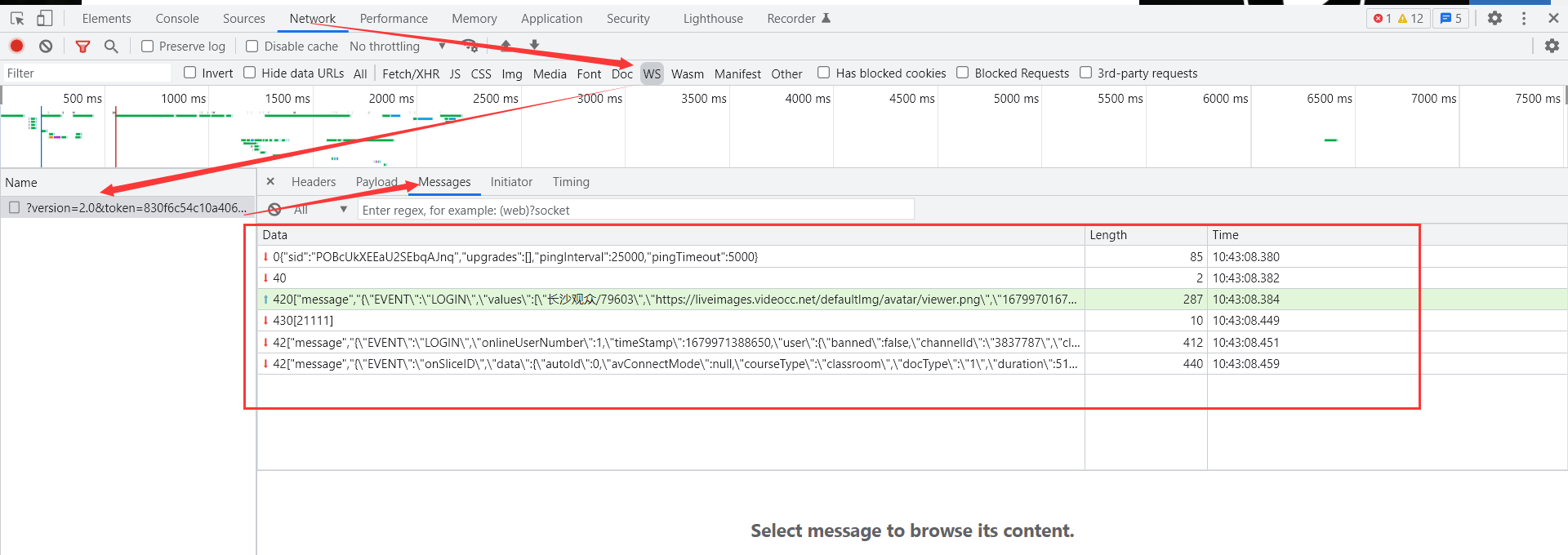
- Ensure that the interactive initialization configuration
updateConfigis completed before loading the interactive UI components.
<template v-if="interactInit">
    <!-- 签到 -->
    <check-in />
</template>
<script>
    import { updateConfig } from '@polyv/interactions-receive-sdk' // 初始化加载互动模块
    import checkIn from '@polyv/interactions-receive-sdk-ui-default/lib/MobileCheckIn'// 签到UI组件
    export default {
        components: {
            checkIn
        },
        data () {
            return {
                ...
                interactInit: false // 用来加载互动SDK组件时机问题,因为互动组件加载前必须初始化互动SDK配置
            }
        },
        methods: {
            createPolyvLiveSdk () {
                // 创建直播
                this.liveSdk = new PolyvLiveSdk({
                    ...
                })
                this.liveSdk.on(PolyvLiveSdk.EVENTS.CHANNEL_DATA_INIT, (event, data) => {
                    ...
                    this.loadInteractionsReceive() // 初始化互动SDK配置
                   this.interactInit = true // 加载互动UI组件
                })
            },
            loadInteractionsReceive () {
                const appSecret = '';// 账号 appSecret
                const appId = '';// 账号 appId
                const userInfo = {
                  nick: '观众昵称',// 昵称
                  pic: '',// 头像
                  userId: '123456',// 观众id
                };
                const channelInfo = {
                  channelId: '',// 频道号
                  roomId: '',// 房间号
                  sessionId: '', // 频道场次id
                };
                updateConfig({
                  userInfo: userInfo, // 观众信息
                  channelInfo: channelInfo, // 频道信息
                  socket: socket,// 此处传入 socketio 实例
                  getViewerApiToken: (callback) => {// viewerApiToken 更新函数
                      ...
                  },
                })
            }
        }
    }
</script>
