


Guide for Embedding Polyv SaaS Viewing Page Product Redirection in Mini Programs
Applicable Scenarios
This document applies when the integrating party embeds the Polyv SaaS viewing page within their WeChat Mini Program via <web-view>, and expects product clicks on the viewing page to redirect to a specified page within the integrating party's Mini Program.
Typical requirements include:
- Viewers watch the Polyv SaaS live streaming page within the integrating party's Mini Program.
- Products configured in the product library are displayed on the viewing page.
- Clicking a product redirects the viewer to a specified page within the integrating party's Mini Program.
- The integrating party wishes to reuse the capabilities of the Polyv SaaS viewing page or handle product fulfillment within their own Mini Program system.
Note: The current product redirection implementation on the Polyv SaaS viewing page requires initializing the WeChat JS-SDK first, then calling the Mini Program redirection interface. Configuration items vary depending on the viewing page domain and the fulfillment method.
Solution 1: Directly Embed the Polyv SaaS Viewing Page for Product Redirection
Implementation Method
This method is suitable when the integrating party directly embeds the default Polyv SaaS viewing page into their Mini Program via <web-view>, without using a custom viewing page domain or configuring a custom WeChat Official Account.
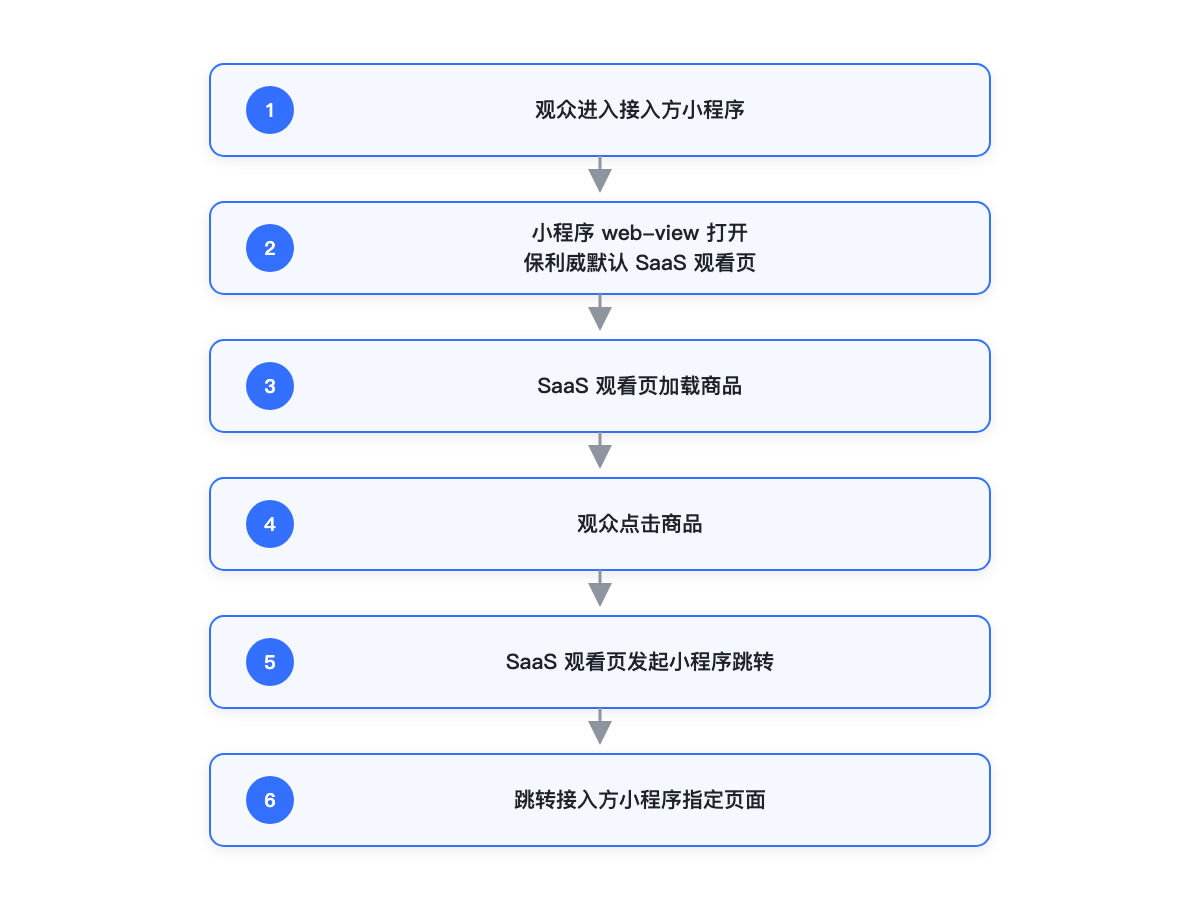
Implementation logic:
- The integrating party's Mini Program opens the default Polyv SaaS viewing page via
<web-view>. - The SaaS viewing page loads products configured in the product library.
- Viewers click a product on the SaaS viewing page.
- The SaaS viewing page initializes using the WeChat JS-SDK configuration corresponding to the default Polyv viewing page domain.
- The SaaS viewing page calls the Mini Program redirection interface.
- Viewers enter the specified page within the integrating party's Mini Program.
Polyv is responsible for:
- Providing the default SaaS viewing page.
- Displaying products on the SaaS viewing page.
- Triggering the Mini Program redirection logic based on product library configuration.
- Maintaining the WeChat JS-SDK configuration for the default viewing page domain.
The integrating party is responsible for:
- Configuring the default Polyv viewing page domain as a business domain in the WeChat Mini Program backend. Path: WeChat Mini Program Backend → Development Management → Development Settings → Business Domains.
- Configuring the Mini Program path and parameters for product clicks in the product library.
- Ensuring the integrating party's Mini Program can recognize the product redirection path and parameters.
Advantages:
- Lower integration cost.
- No need for the integrating party to configure a custom viewing page domain.
- No need for the integrating party to configure a custom Official Account.
- Suitable for scenarios where rapid reuse of the SaaS viewing page's product redirection capability is desired.
Notes:
- The integrating party must still configure the default Polyv viewing page domain as a business domain in the Mini Program backend; otherwise, the Mini Program may not be able to open the viewing page.
- This solution uses the default Polyv viewing page domain and default WeChat JS-SDK configuration, typically requiring no additional custom Official Account configuration from the integrating party.
- The Mini Program path and parameters for product redirection still need to be confirmed and tested by the integrating party.
- If the integrating party must display their own viewing page domain externally, the custom viewing page domain solution should be chosen.
Integration Process
Solution 2: Configure Custom Domain and Official Account, Then Let the SaaS Viewing Page Handle Product Redirection
Implementation Method
This method is suitable when the integrating party wants viewers to access the SaaS viewing page via their own domain and wishes to reuse the built-in product redirection capability of the SaaS viewing page. When viewers click a product, the SaaS viewing page initiates the Mini Program redirection.
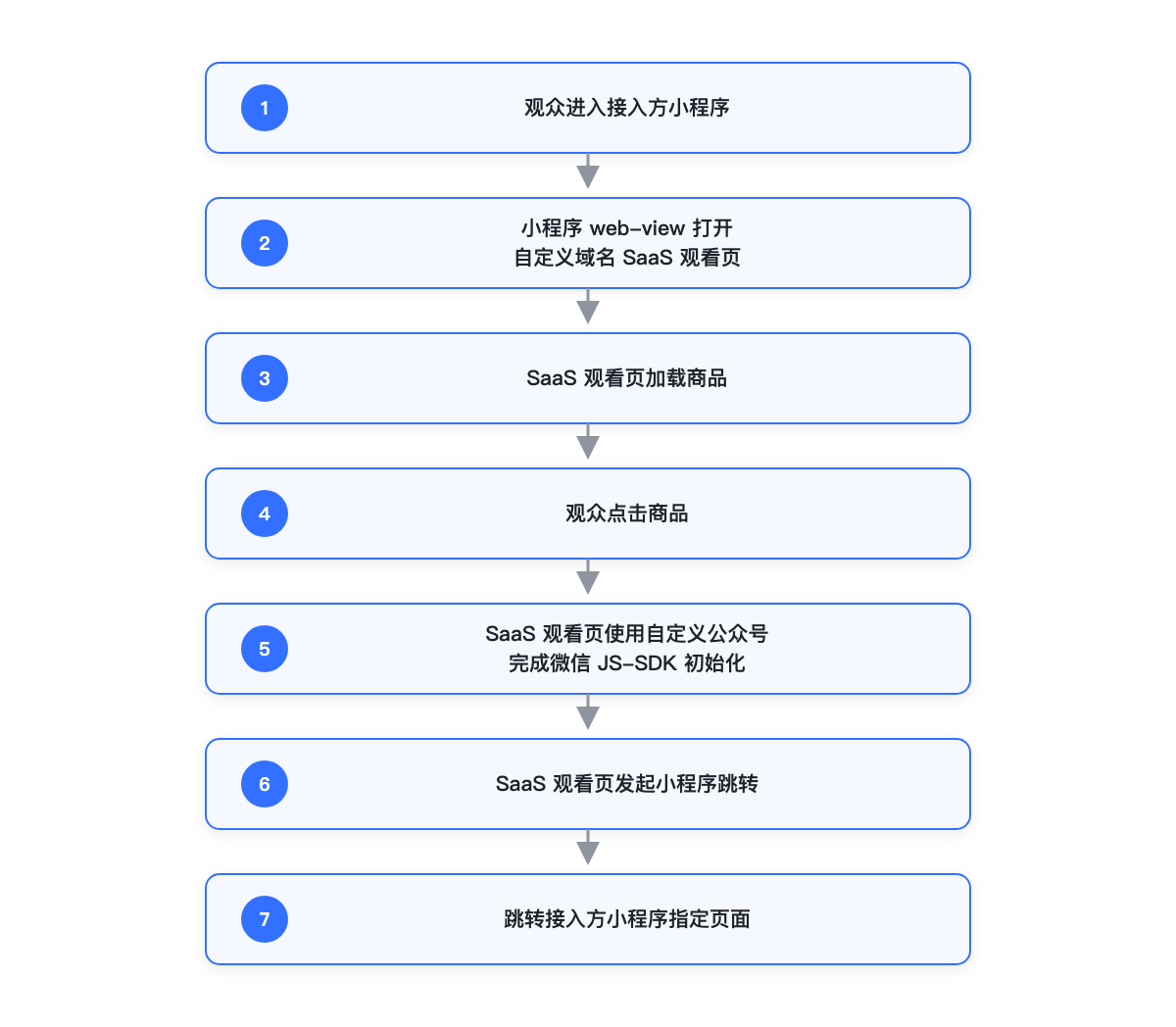
Implementation logic:
- The integrating party's Mini Program opens the SaaS viewing page under the integrating party's custom domain via
<web-view>. - The SaaS viewing page loads products configured in the product library.
- Viewers click a product on the SaaS viewing page.
- The SaaS viewing page initializes the WeChat JS-SDK based on the custom Official Account configured by the integrating party.
- The SaaS viewing page calls the Mini Program redirection interface.
- Viewers enter the specified page within the integrating party's Mini Program.
Polyv is responsible for:
- Supporting the integrating party in accessing the SaaS viewing page via a custom viewing page domain.
- Displaying products on the SaaS viewing page.
- Triggering the Mini Program redirection logic based on product library configuration.
- Supporting the use of the integrating party's configured custom Official Account information to complete WeChat JS-SDK initialization.
The integrating party is responsible for:
- Completing the custom viewing page domain configuration. If using the CNAME method, the integrating party must point the custom domain to the target address provided by Polyv at their DNS provider.
- Configuring the custom viewing page domain as a business domain in the WeChat Mini Program backend. Path: WeChat Mini Program Backend → Development Management → Development Settings → Business Domains.
- Configuring the custom viewing page domain as a JS interface security domain in the WeChat Official Account backend. Path: WeChat Official Account Backend → Settings & Development → Official Account Settings → Feature Settings → JS Interface Security Domains.
- Preparing custom Official Account information. Path: WeChat Official Account Backend → Settings & Development → Basic Configuration, obtain the Official Account
AppIDandAppSecret. - Downloading the domain verification file as required by the WeChat Official Account backend and ensuring the file is accessible via the root path of the custom viewing page domain.
- Configuring the custom Official Account information on the Polyv side. The configuration entry is typically the custom Official Account or WeChat authorization configuration entry in the Polyv backend; if the current account lacks the corresponding entry, contact support for assistance.
- Configuring the Mini Program path and parameters for product clicks in the product library.
Advantages:
- Viewers see the integrating party's own viewing page domain.
- The built-in product display and redirection capabilities of the SaaS viewing page can be reused.
- The integrating party does not need to develop a separate product click fulfillment page.
Notes:
- If the integrating party uses a custom viewing page domain, the default Polyv Official Account typically cannot cover the JS-SDK configuration for that custom domain.
- The integrating party must use their own Official Account or a custom Official Account to complete WeChat JS-SDK initialization.
- The Mini Program
<web-view>business domain and the Official Account JS interface security domain need to be configured separately. The former determines whether the Mini Program can open the viewing page, and the latter determines whether the WeChat JS-SDK can be initialized within the viewing page. - If WeChat JS-SDK initialization fails, product clicks may appear unresponsive.
Integration Process
Solution 3: The Integrating Party's H5 Page Handles Product Clicks and Redirects to the Mini Program
Implementation Method
This method is suitable when the integrating party wishes to control the redirection chain after a product click themselves, or wants to complete WeChat JS-SDK initialization and Mini Program redirection within their own H5 page.
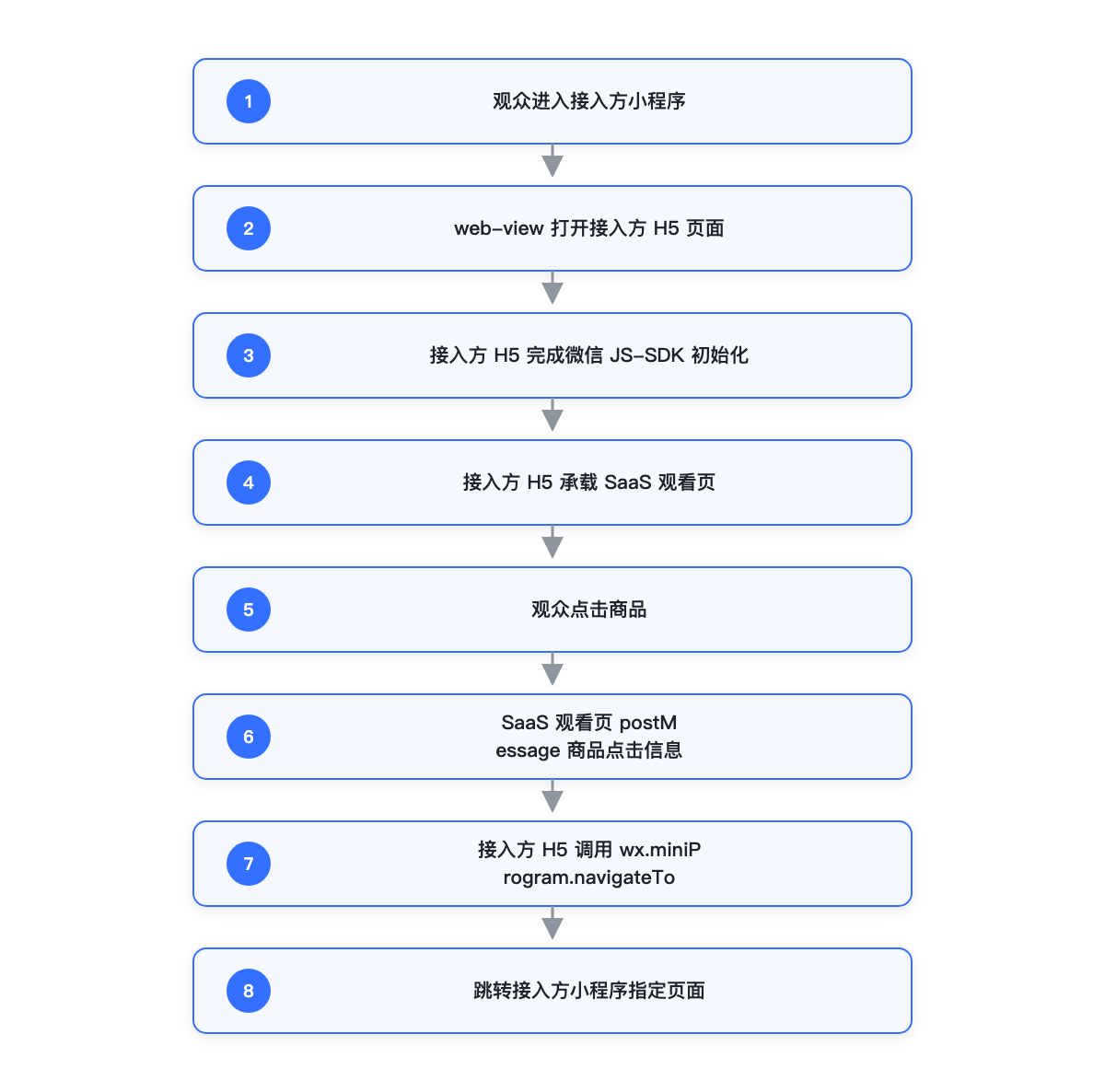
Implementation logic:
- The integrating party's Mini Program opens the integrating party's H5 page via
<web-view>. - The integrating party's H5 page completes WeChat JS-SDK initialization.
- The integrating party's H5 page embeds the SaaS viewing page via iframe or other methods.
- Viewers click a product on the SaaS viewing page.
- The SaaS viewing page passes the product click information to the integrating party's H5 page via
window.parent.postMessage. - The integrating party's H5 page calls
wx.miniProgram.navigateToto redirect to the Mini Program page.
Polyv is responsible for:
- Providing the SaaS viewing page and product click capability.
- Supporting the emission of click events for product items in the product list.
- Passing product click information to the integrating party's H5 page via
window.parent.postMessagein iframe embedding scenarios.
The integrating party is responsible for:
- Developing their own H5 fulfillment page.
- Configuring the domain of the H5 fulfillment page as a business domain in the WeChat Mini Program backend. Path: WeChat Mini Program Backend → Development Management → Development Settings → Business Domains.
- Configuring the domain of the H5 fulfillment page as a JS interface security domain in the WeChat Official Account backend. Path: WeChat Official Account Backend → Settings & Development → Official Account Settings → Feature Settings → JS Interface Security Domains.
- Completing WeChat JS-SDK initialization on the H5 fulfillment page.
- Listening for and validating product click information emitted by the SaaS viewing page via
postMessage. - Calling
wx.miniProgram.navigateToto complete the Mini Program redirection. - Maintaining product paths, parameter parsing, and redirection error handling.
Advantages:
- The redirection logic is fully controlled by the integrating party.
- Can be integrated with the integrating party's own product, membership, order, and other business processes.
- The integrating party can uniformly handle authentication, tracking, and error prompts after product clicks.
Notes:
- The integrating party needs to maintain the H5 fulfillment page and Mini Program redirection logic themselves.
- The integrating party needs to handle
postMessagemessage communication between the H5 page and the SaaS viewing page. - Vue
emitevents inside the SaaS viewing page cannot be directly listened to by the external iframe page; if the integrating party embeds the SaaS viewing page via iframe, the SaaS viewing page must explicitly callwindow.parent.postMessageto pass product click information to the integrating party's H5 page. - The integrating party still needs to ensure correct configuration of business domains, JS interface security domains, Official Account, and Mini Program paths.
- Development and testing costs are higher than directly using the SaaS viewing page's redirection capability.
Integration Process
Solution Comparison
| Comparison Item | Directly Embed Polyv SaaS Viewing Page for Product Redirection | Configure Custom Domain and Official Account, SaaS Viewing Page Handles Redirection | Integrating Party's H5 Handles Product Clicks and Redirects to Mini Program |
|---|---|---|---|
| Product Display | Polyv SaaS viewing page | Polyv SaaS viewing page | Polyv SaaS viewing page |
| Viewing Page Domain | Polyv default domain | Integrating party's custom domain | Integrating party's H5 domain |
| Redirection Initiator | SaaS viewing page | SaaS viewing page | Integrating party's H5 page |
| WeChat JS-SDK Initialization Location | SaaS viewing page | SaaS viewing page | Integrating party's H5 page |
| Custom Official Account Required | Typically not | Yes | Depends on integrating party's H5 implementation |
| Integrating Party Development Cost | Lower | Medium | Higher |
| Integrating Party Control | Lower | Medium | Higher |
| Suitable Scenarios | Integrating party wants to quickly reuse the default SaaS viewing page | Integrating party wants to display their own viewing page domain | Integrating party wants full control over the product redirection chain |
| Main Points to Note | Need to configure Mini Program business domain and product redirection path | Need to configure custom domain, custom Official Account, and related domains | Need to maintain postMessage communication and redirection logic |
Supplementary Notes
Custom Viewing Page Domain
A custom viewing page domain means the integrating party uses their own domain to access the Polyv SaaS viewing page, for example, replacing the default viewing page address with the integrating party's own business domain.
The common integration method is the CNAME method:
- The integrating party prepares their own domain, e.g.,
live.example.com. - Polyv provides a CNAME target address.
- The integrating party points the CNAME of
live.example.comto the target address provided by Polyv at their DNS provider. - After the domain resolution takes effect, when viewers access
live.example.com, they are actually accessing the SaaS viewing page hosted by Polyv.
This can be understood as: CNAME does not copy the page to the integrating party's server; instead, it points the integrating party's domain to Polyv's viewing page service. The integrating party displays their own domain externally, while the viewing page content is still provided by Polyv.
Mini Program Business Domain vs. Official Account JS Interface Security Domain
The Mini Program <web-view> business domain and the Official Account JS interface security domain are two different configurations that control different capabilities.
| Configuration Item | Mini Program <web-view> Business Domain |
Official Account JS Interface Security Domain |
|---|---|---|
| Configuration Location | WeChat Mini Program Backend | WeChat Official Account Backend |
| Configuration Path | Development Management → Development Settings → Business Domains | Settings & Development → Official Account Settings → Feature Settings → JS Interface Security Domains |
| Problem Solved | Whether the Mini Program is allowed to open this H5 page | Whether this H5 page is allowed to call WeChat web capabilities |
| Typical Scenario | Mini Program opens the SaaS viewing page via <web-view> |
SaaS viewing page calls wx.miniProgram.navigateTo to redirect to the Mini Program |
| Behavior When Incorrectly Configured | The viewing page may not open within the Mini Program | The viewing page can open, but clicking a product to redirect to the Mini Program may fail |
Therefore, the fact that the integrating party's Mini Program can normally open the SaaS viewing page does not guarantee that product redirection within the viewing page will work correctly. Product redirection also requires the current H5 page to have a valid WeChat JS-SDK initialization configuration.
