


Quiz Pop-up
The quiz pop-up feature allows quiz questions to appear at specified time points during video playback, making it suitable for use in educational and training videos. Using the quiz feature can enhance student-content interaction, improve teaching quality, and assess both student learning outcomes and course content quality. Since the video will only continue playing after an answer is submitted, the quiz feature can also effectively prevent idle video playback.
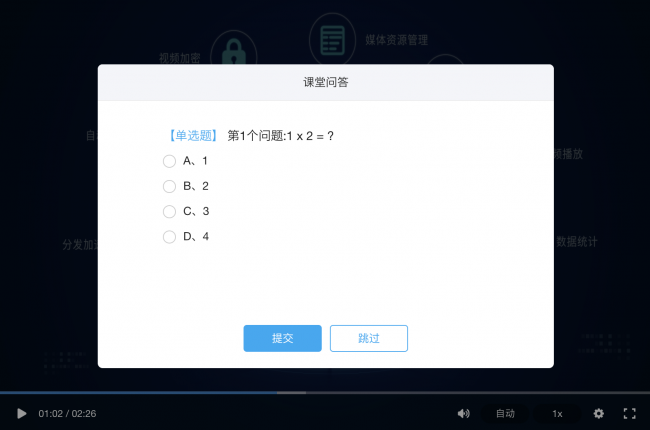 Polyv Cloud Video Platform supports implementing the quiz pop-up feature through the following two methods:
Method 1: Via the VOD Management Console
Log in to the VOD management console, click 【Video List】 → Select a video → Click 【Add Quiz】 in the right sidebar to enter the quiz settings page.
Set up quiz questions in the quiz settings pop-up window:
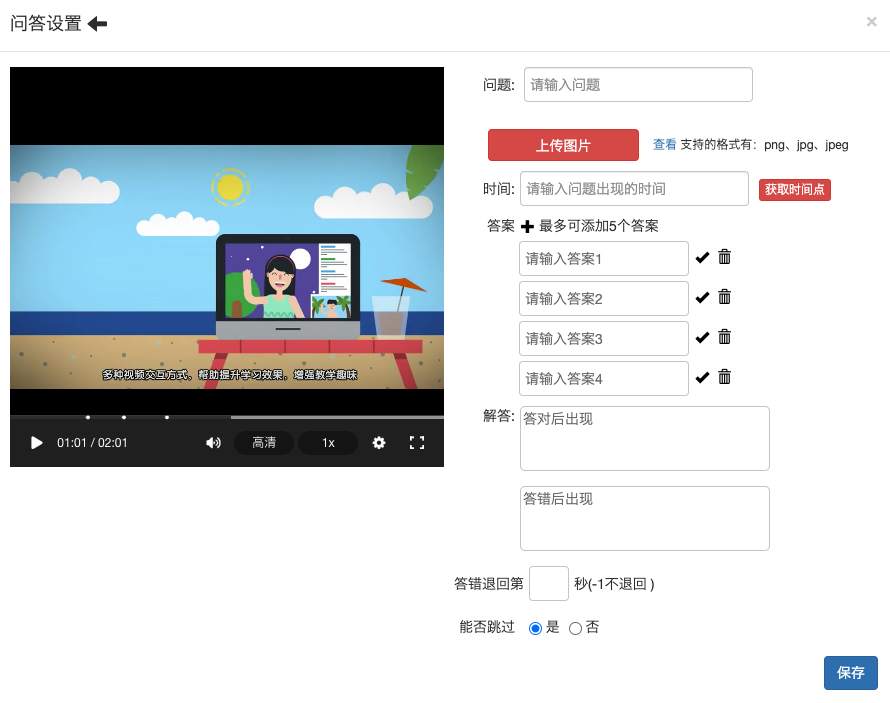
After setting up quiz questions in the management console, when the video plays to the specified time point, the player will display a pop-up window with the quiz question. Students must submit an answer before they can continue watching the video.
Method 2: Via the Player API
If your business scenario requires more flexible control, or if the question bank resides in your own business system, you can also implement this using the quiz API provided by the player.
Quiz-related Player APIs
| Name | Parameters & Type | Description |
|---|---|---|
| sendQuestion | (Array) | Sets quiz questions associated with the video |
| changeQuestion | (Number, Array) | Replaces quiz questions at a specified time point |
Events:
| Name | Description |
|---|---|
| onQuestionPopUp | Triggered when a question pops up |
| onQuestionSkip | Triggered when a question is skipped |
| onAnswerResult | Triggered after an answer is submitted |
Usage
After initializing the player, you can use the sendQuestion API to set the quiz questions to be displayed during the current video playback. By listening to quiz-related events, you can handle your own business logic. The changeQuestion API is used to modify the quiz questions displayed at a specified time point, for example, showing a different question when the player rewinds after a wrong answer.
Code example:
<div id="player"> </div>
<script src="//player.polyv.net/resp/vod-player/latest/player.js"></script>
<script>
  var player = polyvPlayer({
    wrap: '#player',
    width: 800,
    height: 533,
    vid: '88083abbf5bcf1356e05d39666be527a_8',
});
player.on('s2j_onPlayerInitOver',
function(e) {
    var question1 = [{
        "examId": "1699e49ffeb",
        "question": "第1个问题:1 x 2 = ?",
        "choices": [{
            "answer": "1"
        },
        {
            "answer": "2",
            "right_answer": 1
        },
        {
            "answer": "3"
        },
        {
            "answer": "4"
        }],
        "answer": "",
        "wrongAnswer": "",
        "skip": true,
        "wrongTime": 5,
        "showTime": 10
    }];
    player.sendQuestion(question1);
});
window.onQuestionSkip = function(data, vid) {
    console.log('onQuestionSkip', data, vid);
}
window.onQuestionPopUp = function(data, vid) {
    console.log('onQuestionPopUp', data, vid);
}
window.onAnswerResult = function(isRight, data, msg, seekTime, vid) {
    console.log('onAnswerResult',isRight, data, msg, seekTime, vid);
    if (!isRight) {
        var question2 = [{
            "examId": "1699e49ffef",
            "question": "第2个问题:2 x 2 = ?",
            "choices": [{
                "answer": "1"
            },
            {
                "answer": "2"
            },
            {
                "answer": "3"
            },
            {
                "answer": "4",
                "right_answer": 1
            }],
            "answer": "",
            "wrongAnswer": "",
            "skip": true,
            "wrongTime": 5,
            "showTime": 10
        }];
        player.changeQuestion(10, question2);
    }
}
</script>
Parameter Description
| Parameter Name | Required | Default | Description |
|---|---|---|---|
| examId | No | - | Generation rule: Long.toHexString(System.currentTimeMillis()), an 11-character string, e.g., 1699e49ffeb. After passing this value, records can be queried via the Quiz Result Query API. |
| showTime | No | - | Time when the question appears, in seconds |
| question | Yes | - | Question text |
| choices | Yes | - | Options |
| right_answer | Yes | - | Correct answer |
| answer | No | - | Explanation after a correct answer |
| wrongAnswer | No | - | Explanation after a wrong answer |
| wrongTime | No | -1 | Number of seconds to rewind after a wrong answer; -1 means no rewind |
| skip | No | true | Whether the question can be skipped to continue video playback |
| illustration | No | - | URL of the quiz image |
