


Weak Network Prompt
Background
When users use the mini program, they may encounter poor network conditions, which can cause video playback stuttering.
Weak Network Status Monitoring and Prompt Implementation
Starting from mini program base library version 2.21.0, the mini program officially provides an event wx.onNetworkWeakChange for monitoring weak network status changes. However, this API does not support calls within mini program plugins.
To address this issue, the polyv video-on-demand plugin provides an API for displaying weak network status prompts. A simple implementation method is to monitor the wx.onNetworkWeakChange event in the mini program, and call the plugin's API to display the prompt when the network becomes weak. The effect is shown in the figure below.
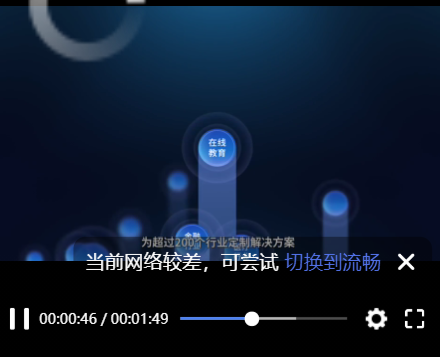
The integration process is as follows:
- The integrating mini program monitors the wx.onNetworkWeakChange event
- Call the showWeakNetworkTips API in the callback of wx.onNetworkWeakChange
Sample code:
wx.onNetworkWeakChange(function (res) {
  if (res.weakNet) {
    this.selectComponent('#polyvPlayer').showWeakNetworkTips();
    // 可以使用setTimeout延迟关闭提示
  }
}
If the weak network prompt API does not meet business requirements, you can combine wx.onNetworkWeakChange with the plugin's getQuality() API to obtain video quality data and implement a custom weak network prompt component.
API
polyvPlayerContext.showWeakNetworkTips(Object options, Object callbacks)
Usage Restrictions
This API is supported from version 0.16.1 onwards.
Description
This API displays a weak network prompt in the plugin's video area. The prompt text and position can be modified via parameters.
Usage notes:
- If the current quality is already the lowest, the quality switch button will not be displayed. This also applies to custom text.
- In specific situations such as switching between video and audio modes or changing quality, the prompt will be closed by the plugin's internal logic. Apart from the above situations, the display and hiding of the prompt are controlled by the business side.
- The weak network prompt requires user click to close, or can be closed by the business side calling the closeWeakNetworkTips API.
- Audio mode has no quality options, so the quality switch button will not be displayed.
Parameters
Object options
| Property | Type | Default | Required | Description |
|---|---|---|---|---|
| customNormalText | string | / | No | Weak network prompt text, custom white text part |
| customActiveText | string | / | No | Text for the weak network prompt quality switch button, click to lower quality, blue text part |
| customSuccessText | string | / | No | Text displayed when quality switch is successful |
| position | string | right-bottom | No | Position of the prompt display. Possible values: 'right-bottom' | 'right-top' | 'left-bottom' | 'left-top'. Display range: shown above the bottom control bar and below the top control bar |
Object callbacks
| Property | Type | Default | Required | Description |
|---|---|---|---|---|
| onWeakTipsClose | function | / | No | Callback triggered when the prompt is closed |
Sample Code
// 不设置参数
this.selectComponent('#polyvPlayer').showWeakNetworkTips();

// 设置自定义的文案和关闭时的回调
this.selectComponent('#polyvPlayer').showWeakNetworkTips({
  customNormalText: '当前网络不佳',
  customActiveText: ' 降低清晰度',
  customSuccessText: '已经成功切换啦!',
  position: 'right-top'
}, {
  onWeakTipsClose: () => {
    console.info('close!!!');
  }
});
polyvPlayerContext.closeWeakNetworkTips()
Usage Restrictions
This API is supported from version 0.16.1 onwards.
Description
Closes the weak network prompt.
Sample Code
this.selectComponent('#polyvPlayer').closeWeakNetworkTips();
polyvPlayerContext.getQuality()
Usage Restrictions
This API is supported from version 0.16.1 onwards.
Description
Gets the current quality data: the video quality array, the index of the current quality, and the text of the current quality. This API can be used to obtain the text of the next lower quality level.
Return Result
Object result
| Property | Type | Description |
|---|---|---|
| current | number | Index of the current quality |
| text | string | Text of the current quality |
| qualitys | Array | Array of quality text for the current vid |
Sample Code
const quality = this.selectComponent('#polyvPlayer').getQuality();
// 返回结果示例 {current: 0, text: "流畅", qualitys: ["超清", "高清", "流畅"]}
