


POLYV Video Upload SDK
The Polyv Mini Program Upload SDK provides a development toolkit for uploading media files to the Polyv Cloud Video Platform.
Features
- Quickly upload media files in various formats.
- Supports various upload settings, such as file title, description, tags, upload directory, and whether to enable courseware optimization processing.
Usage
Prerequisites
- Before using this SDK, you must activate the Polyv Cloud Video on Demand service. If you are not familiar with this service, please visit the product homepage for details: Cloud Video on Demand.
- Obtain the secretKey and other related information for user identity verification. You can find this information on the "Cloud Video on Demand Management Console -> Settings -> API Interface" page. Click here to log in to the console.
Preparation Before Development
- Configure the [request合法域名] in the WeChat Developer Console under Settings -> Development Settings -> Server Domain Names:
- api.polyv.net
- polyvupload.oss-cn-shenzhen.aliyuncs.com
- polyvupload.obs.cn-south-1.myhuaweicloud.com
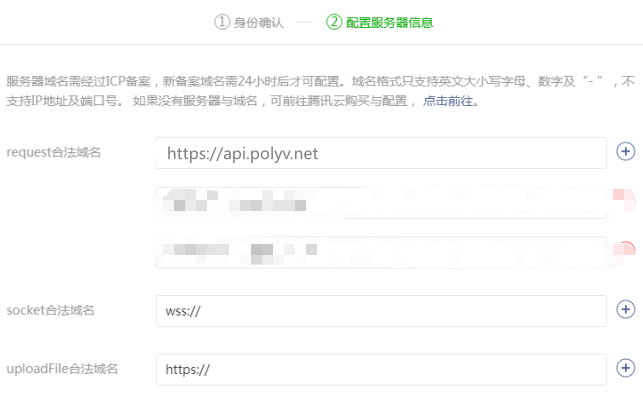
WeChat Base Library Version
- 1.9.6 or above
Notes
1. If the current file uses the async await syntax sugar, you need to enable enhanced compilation.
只要把“微信开发者工具”更新到 v1.02.1904282 以上,就不需要干 npm install regenerator 这之类的事情,只需要修改一个配置项就能使用 async/await 特性了。这个配置就在“工具栏?详情?本地设置”页面中的“增强编译”。
Integrating the SDK
Importing Resources
import PlvVideoUpload from '../../utils/polyv-upload-miniapp-sdk.min.js';
Quick Start
Initializing the Upload Instance
First, create a PlvVideoUpload instance.
const videoUpload = new PlvVideoUpload({
  events: {
      Error: (err) => {  // 错误事件回调
          console.log(err);
      },
      UploadComplete: () => {}  // 全部上传任务完成回调
  }
});
Call updateUserData() to set the account authorization verification information, and update it every 3 minutes.
// 授权验证信息3分钟内有效,当 sign 过期时需要调用该方法更新
videoUpload.updateUserData({
  userid: <userid> , // Polyv云点播账号的ID
  ptime: <timestamp> , // 时间戳
  sign: <sign> , // 是根据将secretkey和ts按照顺序拼凑起来的字符串进行MD5计算得到的值
  hash: <hash> , // 是根据将ts和writeToken按照顺序拼凑起来的字符串进行MD5计算得到的值
});
The ptime, sign, and hash must all be obtained from the server. The server-side code example (PHP) is as follows:
/*
 * userid、secretkey、writeToken 都可以在「云点播管理后台 -> 设置 -> API接口」页面中找到。
 */
$userid = "your userid";
$secretkey = "your sercrety";
$writeToken = "your writeToken";

$ptime = time() * 1000;
$sign = md5($secretkey . $ptime);
$hash = md5($ptime . $writeToken);
Adding Files to the Upload List
fileSetting = { // 文件上传相关信息设置
  title: <title>,  // 标题
  desc: <desc>,  // 描述
  cataid: <cataid>,  // 上传分类目录ID
  tag: <tag>,  // 标签
  luping: 0,  // 是否开启视频课件优化处理,对于上传录屏类视频清晰度有所优化:0为不开启,1为开启
  keepsource: 0  // 是否源文件播放(不对视频进行编码):0为编码,1为不编码
};
Call the addFile(file, events, fileSetting) method of the PlvVideoUpload instance to add a file to the file list. This method returns a UploadManager object:
var uploadManager = videoUpload.addFile(
  file, // file 为待上传的文件对象
  {
    FileStarted: function(uploadInfo) { // 文件开始上传回调
        console.log("文件上传开始: " + uploadInfo.fileData.title);
    },
    FileProgress: function(uploadInfo) { // 文件上传过程返回上传进度信息回调
        console.log("文件上传中: " + (uploadInfo.progress * 100).toFixed(2) + '%');
    },
    FileStopped: function(uploadInfo) { // 文件暂停上传回调
        console.log("文件上传停止: " + uploadInfo.fileData.title);
    },
    FileSucceed: function(uploadInfo) { // 文件上传成功回调
        console.log("文件上传成功: " + uploadInfo.fileData.title);
    },
    FileFailed: function(uploadInfo) { // 文件上传失败回调
        console.log("文件上传失败: " + uploadInfo.fileData.title);
    }
  },
  fileSetting
);
API Documentation
See the docs folder in the source code or click here to open.
Example Code
The demo folder in the source code contains examples:
- Example of importing the SDK. You need to modify the account information in the webpack.dev.config.js file under the build folder, then run
npm run devin the project root directory, and open the WeChat Developer Tools to access theexampledirectory.
Download Mini Program Upload SDK
Error Codes
Known error types for the Error event:
| code | Description |
|---|---|
| 102 | Insufficient user remaining space |
| 110 | Duplicate file |
| 111 | File type intercepted, not in acceptedMimeType |
| 112 | File upload has started or completed, modifying file information is prohibited |
Known error types for the FileFailed event:
| type | code | Description |
|---|---|---|
| InitUploadError | 3001 | Category does not exist |
| InitUploadError | 405 | Upload video initialization failed |
| InitUploadError | 406 | Video size cannot be 0 |
| InitUploadError | 408 | Account service status is abnormal, please contact customer service |
| UpdateTokenError | Failed to obtain token when updating upload token |
