


Ad Settings
Updated: 2023-12-09 15:34:06
The Polyv Web Player supports inserting ads into videos. The ad types include:
- Pre-roll Ad: Plays before the video starts.
- Post-roll Ad: Plays after the video ends.
- Pause Ad: Displays when the video is paused.
- Popup Ad: Displays as a popup at a specified time during video playback.
The Polyv Cloud Video Platform supports setting ads through the following two methods:
Method 1: Via the VOD Management Console
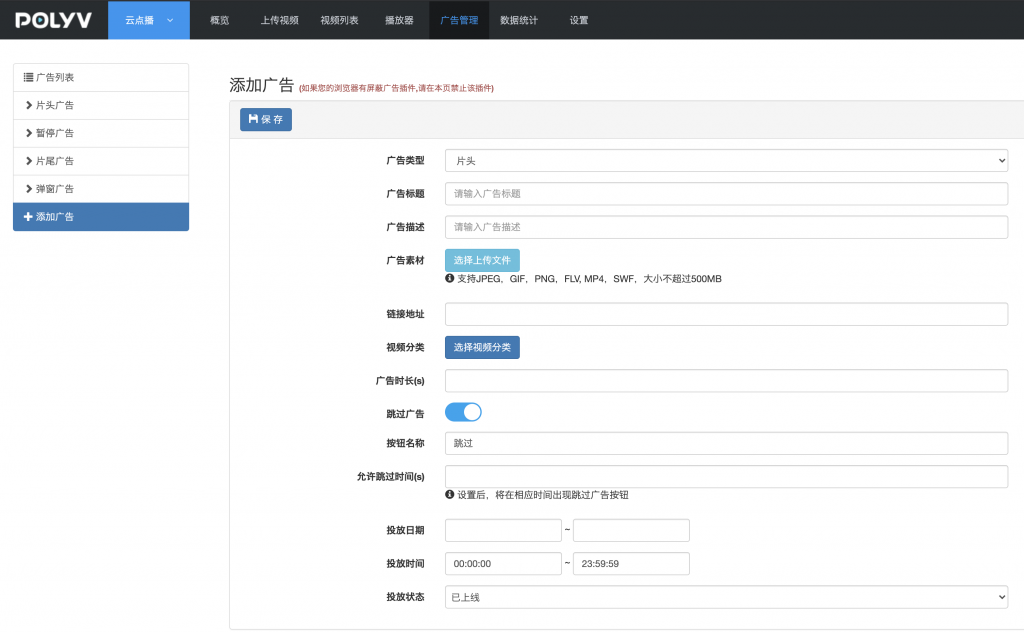
Log in to the VOD Management Console, click 【Ad Management】 → 【Add Ad】 to enter the ad settings page.
On the ad settings page, you can:
- Select the ad type: Pre-roll, Pause, Popup, or Post-roll.
- Set the ad title and description.
- Upload ad materials. Supported formats are JPEG, GIF, PNG, FLV, and MP4. The file size must not exceed 500MB.
- Add a link URL for the ad, allowing clicks to navigate to a specified page.
- Select the video categories where the ad should be played.
- Set the ad duration, whether it can be skipped, the text for the skip button, and when the skip button should appear.
- Set the ad delivery date, time period, and ad status.
Click here to view the video tutorial
Method 2: Via Player Parameters
In addition to setting ads in the management console, you can also achieve more flexible control through player parameters. When both the management console and player parameters are set, the player parameters take precedence.
The code example for setting ad parameters is as follows:
<div id="player"></div>
<script src="//player.polyv.net/resp/vod-player/latest/player.js"></script>
<script>
var player = polyvPlayer({
    wrap: '#player',
    width: 800,
    height: 533,
    vid: '88083abbf5bcf1356e05d39666be527a_8',
    adSkip: true, //是否显示跳过广告的按钮,默认为false
    adMatter: [{ // 广告参数详细配置
        location: 1, //广告位置: 1 片头广告,2 暂停广告,3 片尾广告,4 弹窗广告
        adtype: 1,  //广告资源类型: 1 图片广告,2 视频广告,3 swf广告(flash播放器生效)
        matterurl: 'https://myDomain.com/ad.mp4', //广告资源URL
        addrurl: 'http://www.polyv.net/', //广告点击跳转链接
        timesize: 5, //广告时长,单位:秒
        cataid: 1560331332756, //需播放广告的视频分类ID,默认为1
        poplocation: 1, //弹窗广告位置(1 右下角,2 右上角,3 左下角,4 左上角)
        popuptime: 45,//弹窗广告出现的时间(移动端无效),单位:秒
        skiptime: 1, //广告跳过按钮出现时间
        skipenabled: true,//是否显示跳过按钮
        skipbutton: '跳过'//跳过按钮提示文案
    }]
});
</script>
Notes:
- If the
adSkipparameter is set, theskipenabledparameter within theadMatterarray will not be read.
