


VOD VR Video Feature
Feature Description
The VOD VR (360-degree panoramic) video feature allows users to watch video content in a 360-degree panoramic view, providing an immersive viewing experience. Users can change their perspective by dragging or swiping to explore the panoramic environment within the video.
Value of VR VOD Video
- Immersive Experience: Offers users a lifelike viewing sensation, significantly enhancing user experience
- Full-Range Display: Showcases scenes and spaces that traditional videos cannot fully capture
- Enhanced Interactivity: Allows users to freely choose viewing angles, increasing engagement
- Wide Application Scenarios: Suitable for virtual tours, real estate showcases, education and training, live events, and more
- Differentiated Content: Helps content creators offer unique video content to attract more users
How to Preview VR Videos
Log in to the Polyv Video Cloud Management Console
Navigate to "Video List"
Select a video from the list and view the video settings on the right side
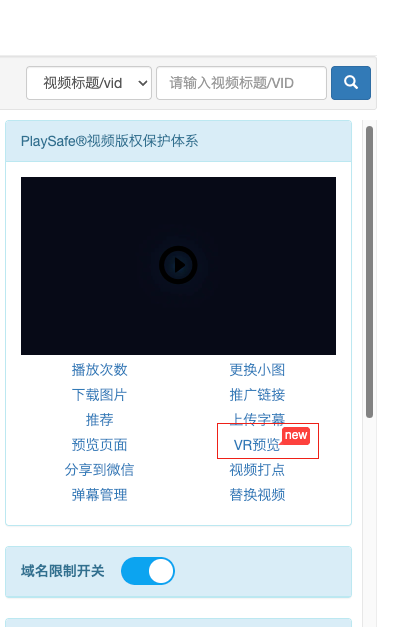
Click "VR Preview" to preview the VR video in your browser
How to Integrate VR Videos
Integration Code
<script src='https://player.polyv.net/resp/vod-player/latest/player.js'></script>
<div id='plv_video'></div>
<script>
  var player = polyvPlayer({
    'wrap': '#plv_video',
    'width': '600',
    'height': '338',
    'vid': 'xxx', // 您的视频vid
    'playsafe': '', // 播放加密视频的凭证, 取值参考文档: https://help.polyv.net/index.html#/vod/api/playsafe/token/create_token
    'usePanorama': true // 是否启用VR模式,默认false
  });
</script>
VR Configuration Parameters
| Parameter | Type | Default | Description |
|---|---|---|---|
| usePanorama | Boolean | false | Whether to enable VR mode |
| panoramaUseGyro | Boolean | false | Whether to use gyroscope control |
| panoramaCover | Boolean | false | Whether to use VR mode cover |
| panoramaDebug | Boolean | false | Whether to enable debug mode; displays rendering FPS when enabled |
Frequently Asked Questions
Q: What should I do if the VR video is blurry during playback?
A: Check the video resolution and bitrate. It is recommended to use a resolution of 2K or higher, with a bitrate of at least 10Mbps.
Q: What if the gyroscope control doesn't work on mobile devices?
A: The gyroscope feature requires an HTTPS environment, and some devices may require the user to manually grant permission.
Q: Why is the video loading slowly in VR mode?
A: VR video files are large and require a high-quality network connection. It is recommended to use a 5G or WiFi network for viewing.
Q: Some older Android devices cannot play VR videos properly?
A: Due to device compatibility issues, some older Android devices may not play VR videos correctly. If compatibility with older devices is needed, it is recommended to keep the video resolution below 3840x2160; otherwise, compatibility issues may result in audio-only playback with no video display.
Q: What should I do if the video stutters during playback?
A: VR videos generally have high resolution, and VR viewing mode demands significant performance. If the device performance is low, stuttering may occur. It is recommended to use a high-performance device or reduce the video resolution.
