


Player Logo Settings
Updated: 2023-12-09 15:34:06
The logo is a symbolic representation of a company's image. Setting a player logo helps the audience recognize and remember the brand, effectively supporting brand establishment and promotion.
The POLYV Cloud Video Platform supports two methods for setting the player logo:
Method 1: Via the Video Management Console
- Log in to the Cloud Video Management Console, click 【Player】 → Select an existing player (or create a new one) → 【Edit】 to enter the player settings page.
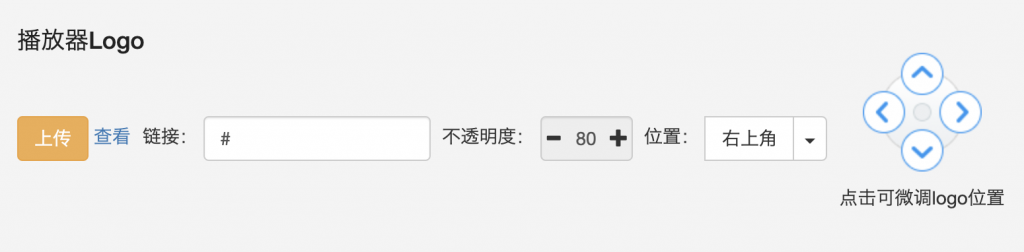
- In the Player Logo section, customize the settings. You can:
- Upload an image as the player logo
- View the current logo image
- Add a link URL for the logo, which redirects to a specified page when clicked
- Set the logo opacity and display position
Click here to watch the video tutorial
Method 2: Via Player Parameters
In addition to setting the player logo in the management console, you can also control it more flexibly through player parameters. When both the management console and player parameters are set, the player parameters take precedence.
The code example for logo parameter settings is as follows:
<div id="player"></div>
<script src="//player.polyv.net/resp/vod-player/latest/player.js"></script>
<script>
var player = polyvPlayer({
    wrap: '#player',
    width: 800,
    height: 533,
    vid: '88083abbf5bcf1356e05d39666be527a_8',
    logo: {
      logo_width: 200, //Logo宽 默认 'auto'
      logo_height: 'auto', //Logo高 默认 'auto'
      logo_url: 'http://www.polyv.net/test.png', // Logo图片URL
      logo_pos: 2, //Logo显示位置,取值范围为:{0,1,2,3,4},分别代表:隐藏、左上、右上、左下、右下
      logo_link: 'http://www.polyv.net/', // 点击Logo的跳转链接 (选填)
      logo_alpha: 50, //Logo透明度,取值范围:(0,100)
      logoOffset: '40,50',//Logo偏移量,单位:百分比。坐标原点为播放器左上角,只在Logo位置为左上、右上时生效
      logo_resize: true //默认值为false,为true时会根据播放器窗口大小动态调整Logo的尺寸,若设置了logo宽高则该参数不生效
   }
});
</script>
Notes:
- Supported logo image formats include: jpeg, png, gif. For better display, PNG format is recommended.
- If the logo image size is smaller than 200*200 pixels, it will be displayed at its original size. If larger than 200*200 pixels, it will be scaled proportionally.
- The implementation mechanisms of logo and watermark differ:
- The logo adds an image to the player window without affecting the original video file. The logo can be changed, repositioned, or turned off at any time.
- The watermark "presses" the image into the video stream during transcoding, becoming part of the video. Modifying watermark settings only affects newly uploaded videos and cannot alter watermarks on already published videos.
- On mobile H5 players, due to system or browser limitations, the logo may not display in some cases:
- On iOS devices, when playing videos in fullscreen, the system player is forced, and the player logo cannot be displayed.
- On Android devices, most domestic browser vendors hijack the
<video>tag during video playback, using the browser's built-in player (which has the highest video layer and cannot overlay page elements). In this case, the player logo also cannot be displayed.
