Notice on the Upcoming Discontinuation of Flash Player
Adobe will officially end support for Flash Player on December 31, 2020. After this date, Adobe will no longer release updates or security patches for Flash Player. To protect users' system security, Adobe recommends that all users uninstall Flash Player from their computers, and starting January 12, 2021, Flash-based content will be blocked from running in Adobe Flash Player. Additionally, major browser and operating system vendors such as Microsoft, Apple, Google, and Mozilla will also cease support for Flash Player before the end-of-life date. For details, see: Adobe Flash Player End-of-Life Info.
In recent years, open standards such as HTML5, WebGL, and WebAssembly have been maturing, and major browser vendors have integrated these open standards into their browsers, providing viable alternatives to Flash content.
As a professional video technology service provider, Polyv offers users a secure and easy-to-use web player service. Considering the compatibility of playback terminals, the Polyv web player supports both HTML5 and Flash playback modes. Although the vast majority of users already use the HTML5 player by default, we strongly recommend that you check the playback mode of the player on your website to avoid any impact on your business due to the discontinuation of Flash Player.
Inspection Guide
Currently, the code for embedding the Polyv web player on a page comes in the following forms:
Using multi-terminal embed code, the player reference URL is:
<script src='//player.polyv.net/script/polyvplayer.min.js'></script>, code example:<script src='//player.polyv.net/script/polyvplayer.min.js'></script> <div id='player'></div> <script> var player = polyvObject('#player').videoPlayer({ 'width':'600', 'height':'450', 'vid' : '88083abbf5bcf1356e05d39666be527a_8' , 'forceH5':true , // 是否默认使用H5播放器 }); </script>Users using this embed code need to check whether the forceH5 parameter is used:
- If the forceH5 parameter value is true, no modification is needed (the H5 player will be used by default, and it will automatically switch to the Flash player on low-version IE browsers that do not support HTML5).
- If not used, the code needs to be modified by adding the forceH5 parameter and setting its value to true; otherwise, the Flash player will be used by default. Once Flash becomes unavailable, it may impact your business.
Using H5 player embed code, the player reference URL is:
<script src="//player.polyv.net/resp/vod-player/latest/player.js"></script>, code example:<div id="player"></div> <script src="//player.polyv.net/resp/vod-player/latest/player.js"></script> <script> var player = polyvPlayer({ wrap: '#player', width: 800, height: 533, vid: '88083abbf5bcf1356e05d39666be527a_8' , }); </script>Users using the H5 player embed code do not need to make any modifications (the H5 player will be used by default, and it will automatically switch to the Flash player on low-version IE browsers that do not support HTML5).
HTML code, code example:
<object classid="clsid:D27CDB6E-AE6D-11cf-96B8-444553540000" height="324" id="polyvplayerf13e995735e25e0cd2c8b5d58bcdb9fa_f" width="600">
    <param name="movie" value="//player.polyv.net/videos/player.swf"></param>
    <param name="allowscriptaccess" value="always"></param>
    <param name="wmode" value="Transparent"></param>
    <param name="flashvars" value="vid=f13e995735e25e0cd2c8b5d58bcdb9fa_f"></param>
    <param name="allowFullScreen" value="true"></param>
    <embed allowfullscreen="true" allowscriptaccess="always" flashvars="vid=f13e995735e25e0cd2c8b5d58bcdb9fa_f" height="324" name="polyvplayerf13e995735e25e0cd2c8b5d58bcdb9fa_f" src="//player.polyv.net/videos/player.swf" type="application/x-shockwave-flash" width="600" wmode="Transparent"></embed>
</object>
HTML embed code is an older method that uses the Flash player. Users still using this code should modify it to the HTML5 embed code as soon as possible. For details, see: HTML5 Player Integration Documentation.
Flash code, code example:
//player.polyv.net/videos/player.swf?vid=f13e995735e25e0cd2c8b5d58bcdb9fa_f
或
//player.polyv.net/videos/f13e995735e25e0cd2c8b5d58bcdb9fa_f.swf
Flash embed code is also an older method that uses the Flash player. Users still using this code should modify it to the HTML5 embed code as soon as possible. For details, see: HTML5 Player Integration Documentation.
Upcoming Changes on the Polyv Platform
After Flash Player is discontinued, the Polyv platform will make the following functional adjustments accordingly:
- Cloud Video Management Console → Video List Page → Embed Code, will default to using the HTML5 player embed code, and the pure Flash player embed code will be removed.
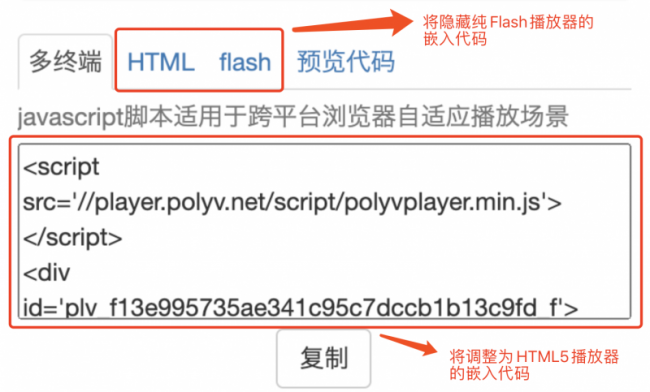
- Cloud Video Management Console → Settings → Video Settings → the [Prefer H5 Player] option will be hidden, and the H5 player will be preferred by default in the future.
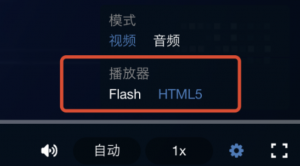
- H5 Player Control Bar → Settings → the [Switch to Flash] option will be hidden.