Smart Subtitle Callback Notification Guide
Feature Description
After triggering in smart subtitle processing stages (such as creation success, processing, pending review, pending publish, publish success, etc.), the system will send the current status of the smart subtitle task to the customer's service via HTTP callback, so that the subtitle task processing progress can be tracked.
Manage Smart Subtitles in the VOD Console
Additional Notes
- An HTTP status code 200 in response to the callback interface is considered a successful callback, and no retry will be initiated.
- An HTTP status code other than 200 in response to the callback interface is considered a failed callback. A retry will be initiated, but at most 3 retries will be attempted. If all three retries fail, no further callbacks for this event will be triggered.
- Please note that HTTP callback requests may arrive at the user's server out of order. For example, for a certain video, the user might first receive a callback for subtitle processing, and then a callback for subtitle task creation success. This is due to network conditions that cannot guarantee the order of request arrival. Polyv will not wait for a 200 response from the previous callback event before initiating the next event callback.
Callback Configuration
Log in to the VOD management console, go to Settings --> Callback Settings to configure the smart subtitle callback URL.
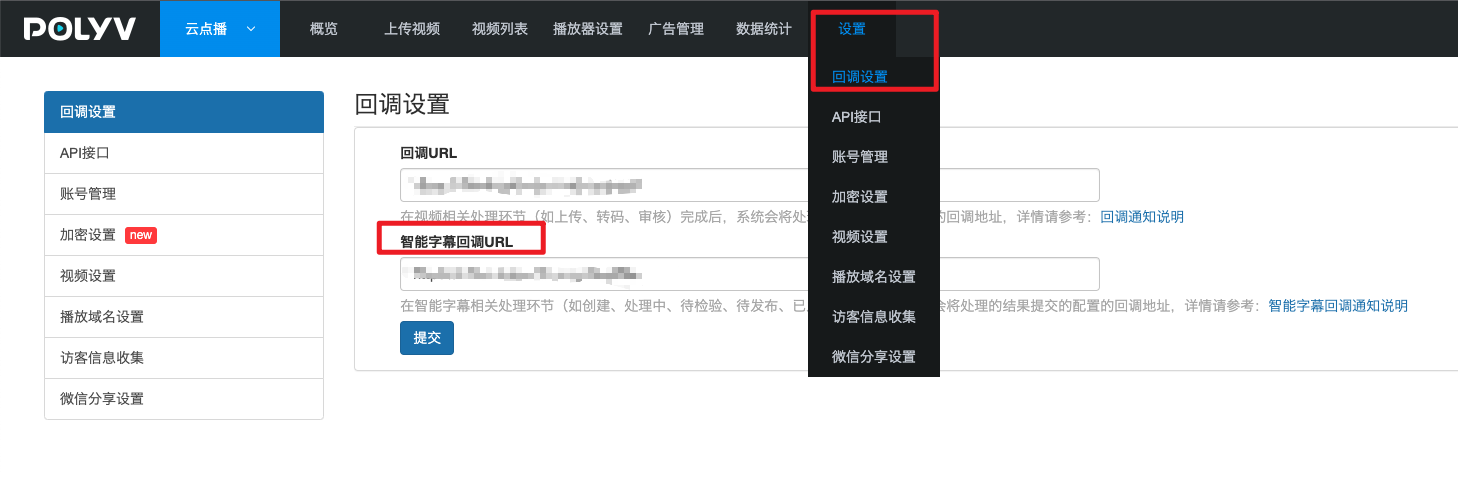
Users who have configured a smart subtitle callback URL will receive callback requests by default.
Callback Event Types
1. Smart Subtitle Task Creation Success
- Event Description: After the VOD server finishes creating a subtitle task, the Smart Subtitle Task Creation Success event is triggered.
- HTTP Request Method: POST.
- HTTP Request Parameter Format: application/json
Callback Parameters
| Name | Type | Required | Description |
|---|---|---|---|
| sign | string | Yes | See (Subtitle Callback Signature Parameters) |
| timestamp | long | Yes | Time when the event was triggered, in 13-digit timestamp format |
| callbackType | string | Yes | Callback type, fixed value: create_success |
| taskId | long | Yes | Subtitle task ID |
| vid | string | Yes | Video ID |
Callback Example
https://demo.ipolyv.cn/subtitle-task/callback/test

{
    "sign": "02EAD645ED22A87B35A9818BDE24A884125267C7",
    "timestamp": 1683622364265,
    "callbackType": "create_success",
    "taskId": 1777787830,
    "vid": "858584471d00e18997cdfe3hyx31adde_8",
}
2. Smart Subtitle Task Processing
- Event Description: The process of generating subtitles from the video begins, including extracting video audio, recognizing audio as text, etc.
- HTTP Request Method: POST.
- HTTP Request Parameter Format: application/json
Callback Parameters
| Name | Type | Required | Description |
|---|---|---|---|
| sign | string | Yes | See (Subtitle Callback Signature Parameters) |
| timestamp | long | Yes | Time when the event was triggered, in 13-digit timestamp format |
| callbackType | string | Yes | Callback type, fixed value: processing |
| taskId | long | Yes | Subtitle task ID |
| vid | string | Yes | Video ID |
Callback Example
https://demo.ipolyv.cn/subtitle-task/callback/test

{
    "sign": "02EAD645ED22A87B35A9818BDE24A884125267C7",
    "timestamp": 1683622364265,
    "callbackType": "processing",
    "taskId": 1777787830,
    "vid": "858584471d00e18997cdfe3hyx31adde_8",
}
3. Smart Subtitle Task Processing Failure
- Event Description: If a step fails during the subtitle generation process, this callback is triggered.
- HTTP Request Method: POST.
- HTTP Request Parameter Format: application/json
Callback Parameters
| Name | Type | Required | Description |
|---|---|---|---|
| sign | string | Yes | See (Subtitle Callback Signature Parameters) |
| timestamp | long | Yes | Time when the event was triggered, in 13-digit timestamp format |
| callbackType | string | Yes | Callback type, fixed value: process_fail |
| taskId | long | Yes | Subtitle task ID |
| vid | string | Yes | Video ID |
Callback Example
https://demo.ipolyv.cn/subtitle-task/callback/test

{
    "sign": "02EAD645ED22A87B35A9818BDE24A884125267C7",
    "timestamp": 1683622364265,
    "callbackType": "process_fail",
    "taskId": 1777787830,
    "vid": "858584471d00e18997cdfe3hyx31adde_8",
}
4. Smart Subtitle Task Pending Review
- Event Description: Receiving this callback indicates that the video subtitles have been fully generated. You can review the automatically generated subtitles for this video in the smart subtitle feature module of the Polyv VOD console.
- HTTP Request Method: POST.
- HTTP Request Parameter Format: application/json
Callback Parameters
| Name | Type | Required | Description |
|---|---|---|---|
| sign | string | Yes | See (Subtitle Callback Signature Parameters) |
| timestamp | long | Yes | Time when the event was triggered, in 13-digit timestamp format |
| callbackType | string | Yes | Callback type, fixed value: waiting_for_review |
| taskId | long | Yes | Subtitle task ID |
| vid | string | Yes | Video ID |
| link | string | Yes | Subtitle file URL |
Callback Example
https://demo.ipolyv.cn/subtitle-task/callback/test

{
    "sign": "02EAD645ED22A87B35A9818BDE24A884125267C7",
    "timestamp": 1683622364265,
    "callbackType": "waiting_for_review",
    "taskId": 1777787830,
    "vid": "858584471d00e18997cdfe3hyx31adde_8",
    "link": "https://img.videocc.net/usrt/8/833584471d/srt/03735b72-24a7-44c1-b751-24aabbf8903c.srt"
}
5. Smart Subtitle Task Pending Publish
- Event Description: This callback is triggered after subtitle review is completed, indicating that the subtitle can be published and applied to the corresponding video.
- HTTP Request Method: POST.
- HTTP Request Parameter Format: application/json
Callback Parameters
| Name | Type | Required | Description |
|---|---|---|---|
| sign | string | Yes | See (Subtitle Callback Signature Parameters) |
| timestamp | long | Yes | Time when the event was triggered, in 13-digit timestamp format |
| callbackType | string | Yes | Callback type, fixed value: waiting_for_publish |
| taskId | long | Yes | Subtitle task ID |
| vid | string | Yes | Video ID |
| link | string | Yes | Subtitle file URL |
Callback Example
https://demo.ipolyv.cn/subtitle-task/callback/test

{
    "sign": "02EAD645ED22A87B35A9818BDE24A884125267C7",
    "timestamp": 1683622364265,
    "callbackType": "waiting_for_publish",
    "taskId": 1777787830,
    "vid": "858584471d00e18997cdfe3hyx31adde_8",
    "link": "https://img.videocc.net/usrt/8/833584471d/srt/03735b72-24a7-44c1-b751-24aabbf8903c.srt"
}
6. Smart Subtitle Publish Success
- Event Description: Receiving this callback means the subtitle has been successfully applied to the corresponding video. However, you need to wait for a period (usually about 10 minutes for cache expiration) before the newly published subtitle can be selected when playing the video.
- HTTP Request Method: POST.
- HTTP Request Parameter Format: application/json
Callback Parameters
| Name | Type | Required | Description |
|---|---|---|---|
| sign | string | Yes | See (Subtitle Callback Signature Parameters) |
| timestamp | long | Yes | Time when the event was triggered, in 13-digit timestamp format |
| callbackType | string | Yes | Callback type, fixed value: publish_success |
| taskId | long | Yes | Subtitle task ID |
| vid | string | Yes | Video ID |
| link | string | Yes | Subtitle file URL |
Callback Example
https://demo.ipolyv.cn/subtitle-task/callback/test

{
    "sign": "02EAD645ED22A87B35A9818BDE24A884125267C7",
    "timestamp": 1683622364265,
    "callbackType": "publish_success",
    "taskId": 1777787830,
    "vid": "858584471d00e18997cdfe3hyx31adde_8",
    "link": "https://img.videocc.net/usrt/8/833584471d/srt/03735b72-24a7-44c1-b751-24aabbf8903c.srt"
}
Subtitle Callback Signature Parameter Description
Verifying the signature (sign) parameter can effectively prevent receiving forged callback requests. Users who have integrated subtitle callbacks must verify the signature parameter to avoid unnecessary issues.
Signature Generation Rules
- Perform SHA1 encryption on the string (secretKey + timestamp + timestamp + secretKey). For example: SHA1(mySecretKey16836223642651683622364265mySecretKey)
- Convert the SHA1 encrypted string to uppercase.
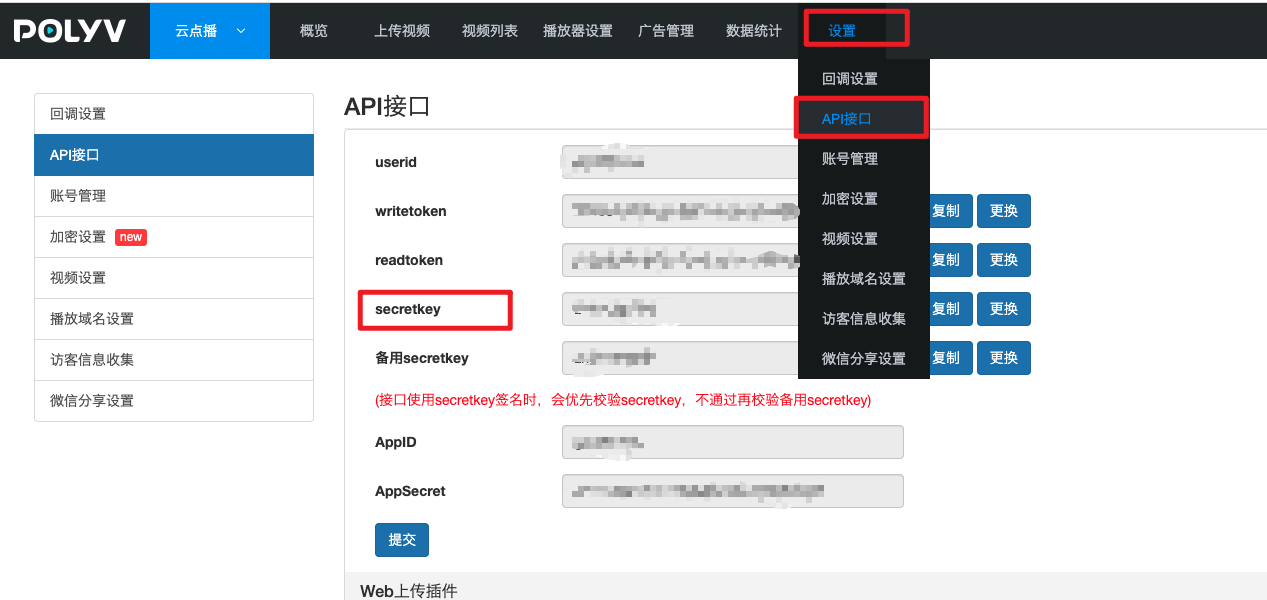
Where timestamp is a 13-digit timestamp obtained from the callback request parameters. The user's secretKey can be viewed in Settings --> API Interface.