


Quick Start Example
Prerequisites for Example Code
It is strongly recommended to use the VOD Java SDK for API integration. The VOD Java SDK provides unified encapsulation and optimization for API call logic, exception handling, data signing, and HTTP request thread pools.
Before integrating with the Polyv VOD API, ensure the B-end environment meets the following requirements:
Java environment installed.
The example code supports JDK 1.8 or higher.
Obtain credentials
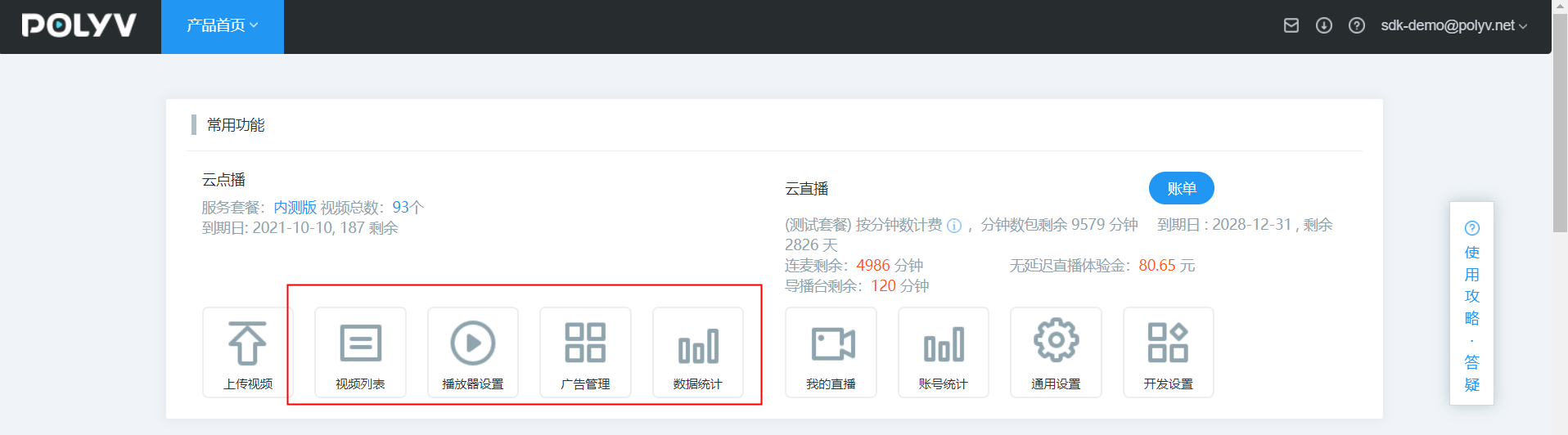
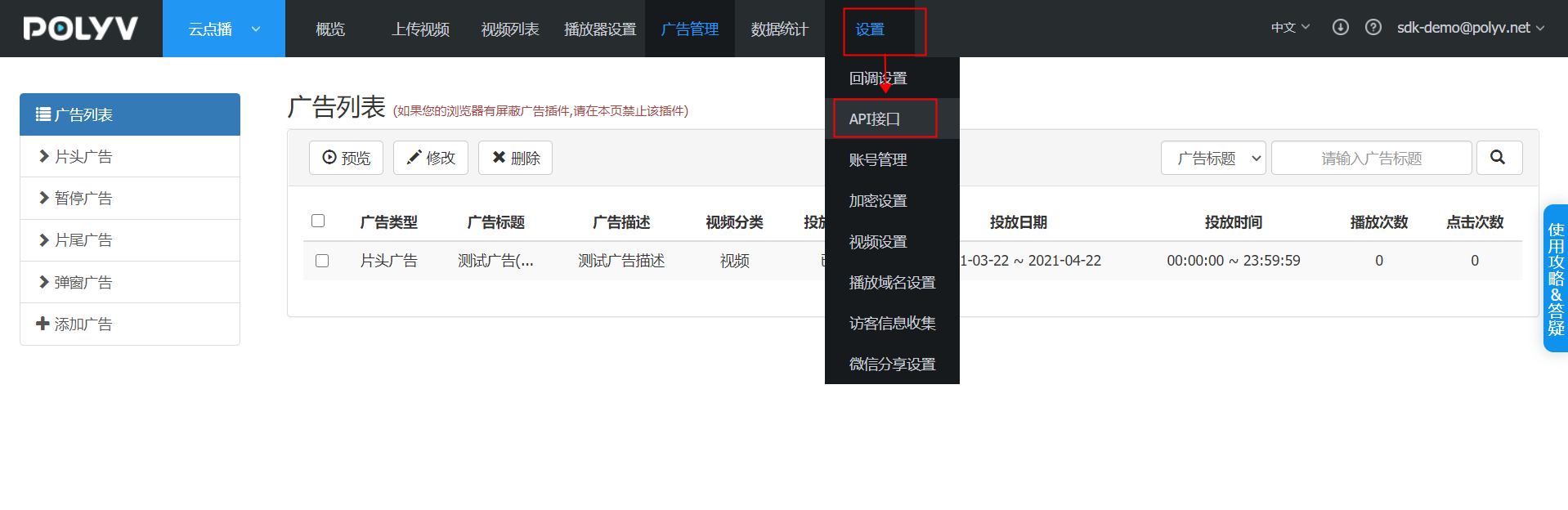
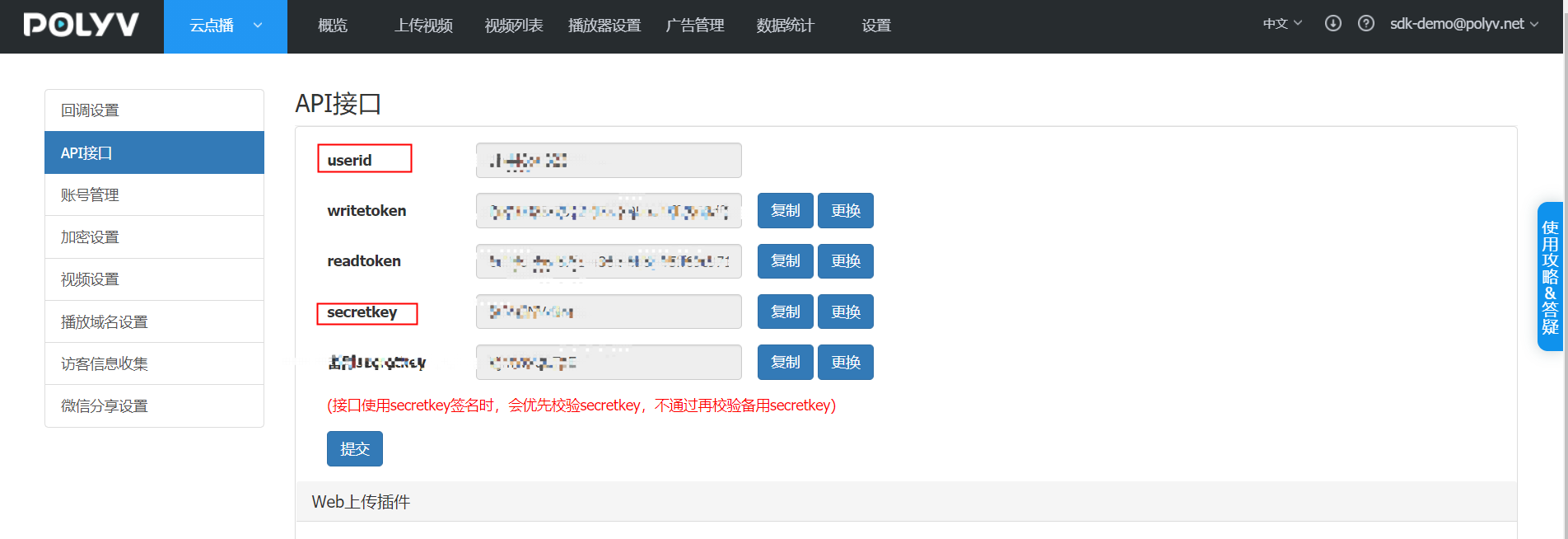
Register a Polyv account on the Polyv official website and obtain access key information (userid, writetoken, readtoken, secretkey).
1. Add Maven Dependency
Add the following dependency to your project's POM file:
    <properties>
        <maven.compiler.source>8</maven.compiler.source>
        <maven.compiler.target>8</maven.compiler.target>
        <httpclient.version>4.5.13</httpclient.version>
        <slf4j.version>1.7.30</slf4j.version>
        <lombok.version>1.18.16</lombok.version>
        <fastjson.version>1.2.70</fastjson.version>
        <junit.version>4.12</junit.version>
    </properties>

    <dependencies>
        <!-- 基本工具 -->
        <dependency>
            <groupId>org.apache.httpcomponents</groupId>
            <artifactId>httpclient</artifactId>
            <version>${httpclient.version}</version>
        </dependency>
        <dependency>
            <groupId>org.apache.httpcomponents</groupId>
            <artifactId>httpmime</artifactId>
            <version>${httpclient.version}</version>
        </dependency>
        <dependency>
            <groupId>org.slf4j</groupId>
            <artifactId>slf4j-api</artifactId>
            <version>${slf4j.version}</version>
        </dependency>
        <dependency>
            <groupId>org.slf4j</groupId>
            <artifactId>slf4j-simple</artifactId>
            <version>${slf4j.version}</version>
        </dependency>
        <dependency>
            <groupId>junit</groupId>
            <artifactId>junit</artifactId>
            <version>${junit.version}</version>
            <scope>test</scope>
        </dependency>
    </dependencies>
2. System Base Code
For the quick start base code, please download the relevant dependency source code. Click here to download the source code. After downloading, add it to your own source project. The HttpUtil.java and VodSignUtil.java in the test cases are included in the downloaded file.
It is strongly recommended to use the VOD Java SDK for API integration. The VOD Java SDK provides unified encapsulation and optimization for API call logic, exception handling, data signing, and HTTP request thread pools.
3. Execute Test Code
Test the Get User Space and Traffic API using the userid. The unit test code is as follows:
package net.polyv.vod.account;

import java.security.NoSuchAlgorithmException;
import java.util.HashMap;
import java.util.Map;

import org.junit.Test;
import org.slf4j.Logger;
import org.slf4j.LoggerFactory;

import net.polyv.VodBaseTest;
import net.polyv.util.HttpUtil;
import net.polyv.util.LiveSignUtil;
import net.polyv.util.VodSignUtil;

/**
 * @author: thomas
 **/

public class VodAccountTest extends VodBaseTest {

    private static final Logger log = LoggerFactory.getLogger(VodAccountTest.class);
    /**
     * 点播DEMO:获取用户空间及流量情况
     */
    @Test
    public void testGetAccountSpaceFlow() throws Exception, NoSuchAlgorithmException {
        //公共参数,填写自己的实际参数
        String secretKey = super.secretKey;
        String userId = super.userId;
        String ptime = String.valueOf(System.currentTimeMillis());
        //业务参数
        String url = "http://api.polyv.net/v2/user/"+userId+"/main";
        String date =  "2020-10-13";

        Map<String, String> requestMap = new HashMap<>();
        requestMap.put("userid", userId);
        requestMap.put("ptime", ptime);
        requestMap.put("requestId", LiveSignUtil.generateUUID());
        requestMap.put("date", date);
        requestMap.put("sign", VodSignUtil.getSign(requestMap, secretKey));
        String response = HttpUtil.get(url, requestMap);
        log.debug("测试获取用户空间及流量情况成功,{}", response);
        //do somethings
    }


}
After executing the code, the console should output the following key information, indicating successful integration:
测试获取用户空间及流量情况成功,{"code":200,"status":"success","message":"success","data":{"videoCount":47,"totalFlow":21474836480,"usedSpace":0,"usedFlow":0,"totalSpace":21474836480,"userId":"xxxxxx","email":"xxxxx"}}
