


Upload Video
Recommended for server-side upload: Java Upload SDK.
API Description and Constraints
- Upload a video.
- The API supports the HTTPS protocol.
- This API does not require the
signparameter. Instead, thewritetokenparameter is passed for signature verification. - API calls are subject to rate limits. See details.
- Pass the
vidparameter to replace an existing video (the original vid remains unchanged). See Replace Video below.
API Request Method and URL
POST
http://v.polyv.net/uc/services/rest?method=uploadfile
Supported Response Formats
JSON
Request Parameters
| Parameter Name | Required | Type and Scope | Description |
|---|---|---|---|
| writetoken | true | string | The user's write data key. For how to obtain it, refer to Get Key. |
| JSONRPC | true | string | JSON format, e.g., {"title": "Title", "tag":"Tag","desc":"Description"}. |
| Filedata | true | file | File type. Supported formats: .flv, .avi, .mpg, .mp4, .wmv, .mov, .3gp, .asf, etc. |
| fcharset | false | string | When set to 'ISO-8859-1', prevents garbled characters in the video filename. |
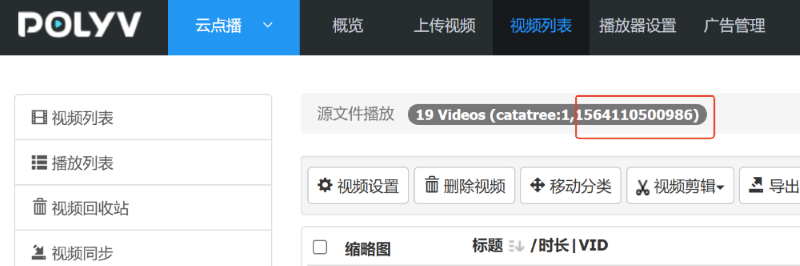
| cataid | false | long | Sets the category for the uploaded video. The category ID can be obtained from the "Category Video List" page in the admin console, as shown below. If not passed, the new video goes to the "Default Category"; when replacing a video, the original category is retained. |
| luping | false | int | Whether to optimize for screen recording. When set to 1, the uploaded video does not use the default compression encoding, and the video dimensions are not compressed, ensuring clarity. Default is 0. |
| format | false | string | Default returns JSON format. If format=xml, returns XML format. |
| jsonp | false | string | For example, normally returns {error:0,data:""}. With jsonp=a, returns a({error:0,data:""}). |
| fileMd5 | false | string | File checksum, a 32-character uppercase MD5 value. |
| watermark | false | string | Custom watermark image URL. The image format must be PNG. Supports HTTP and HTTPS. |
| watermarkLocation | false | string | Custom watermark image position. If this parameter is absent, the watermark display follows the category and account settings. 1: Top-left; 2: Top-right; 3: Bottom-left; 4: Bottom-right. |
| state | false | string | User-defined data. If submitted, it will be transparently returned in the Upload Completion Callback. |
| vid | false | string | The vid of the video to replace. Passing this parameter triggers Replace Video (original vid unchanged). If not passed, uploads as a new video. Supports two formats: full vid (e.g., 36e77ba39cc4768ab541cb6bf4f775a0_3) or 32-character video ID (e.g., 36e77ba39cc4768ab541cb6bf4f775a0). Can be placed in the URL parameters or in the JSONRPC message. See Replace Video below. |
How to obtain the category ID is shown in the image below:
Replace Video
Passing the vid parameter triggers Replace Video: The newly uploaded file will replace the existing video pointed to by this vid. The original vid remains unchanged, allowing the client to continue using the existing video identifier. The processing chain after replacement (re-transcoding, encryption, CDN cache refresh, etc.) is consistent with the "Replace Video" function in the VOD admin console.
Replacement Rules:
- Upon successful replacement, the vid returned by the API is the same as the original vid, and the video content is updated to the newly uploaded file.
- The following settings of the original video are automatically inherited and remain unchanged after replacement:
- Video external link (publish_url)
- Courseware (PPT), subtitles, sub-videos
- Playback password, Q&A settings, playback authorization, trial duration
- WeChat sharing page settings (share title, cover image, description, page template, bottom buttons, etc.)
- The following information is regenerated based on the new file and is not affected by the original video: resolution, bitrate levels, duration, source file size, video screenshots, playback URLs.
- Category: If
cataidis passed in the request, the video is moved to the specified category; if not passed, the original category is retained. - Storage space is calculated based on the difference in size between the old and new source files, without double-counting.
- After replacement, the video status returns to "Waiting for Encoding / Encoding". Upon completion, a notification is sent via the Upload Completion Callback (the
stateparameter is transparently returned). You can also use themd5checksumfield in the response to verify if the new file was uploaded completely.
Replacement Restrictions (consistent with the VOD admin console):
| Restriction Description | Return Error Code |
|---|---|
| The target video does not exist or does not belong to the account associated with the current writetoken. | 26 |
| Videos generated from live broadcast transcoding do not support replacement. | 27 |
| The current status of the video does not allow replacement (e.g., deleted, transcoding, pending review). | 28 |
| The video has an unfinished transcoding task. Please wait for it to complete before replacing. | 29 |
Note: Replacing a video will overwrite the original video content. The replacement cannot be undone. Please proceed with caution.
Replace Video Request Example:
vid in URL parameters:
http://v.polyv.net/uc/services/rest?method=uploadfile&vid=36e77ba39cc4768ab541cb6bf4f775a0_3
vid can also be passed in the JSONRPC message:
{"title": "新标题", "vid": "36e77ba39cc4768ab541cb6bf4f775a0_3"}
Notes
上传视频接口POST不能携带cookie
上传的视频不能大于 2G
返回错误列表
| Return Code | Description |
|---|---|
| 0 | No error. |
| 1 | User associated with writetoken not found. |
| 2 | File is empty or writetoken is empty. |
| 3 | Submitted JSON name JSONRPC is null. |
| 4 | Submitted file format is incorrect or video is larger than 2GB. |
| 5 | readtoken is empty. |
| 6 | Pagination input error. |
| 7 | vid cannot be empty. |
| 8 | Method name not found. |
| 14 | File MD5 checksum failed. |
| 15 | Backend processing error. |
| 16 | User's available storage space is full. |
| 26 | When replacing a video, the target video does not exist or does not belong to the current account. |
| 27 | When replacing a video, live transcoded videos do not support replacement. |
| 28 | When replacing a video, the current status of the video does not allow replacement. |
| 29 | When replacing a video, the video has an unfinished transcoding task. |
Response
<xml>
<error>0</error>
<total/>
<data>
<video>
<md5checksum>
<![CDATA[ 44b145c6bea7dd826191990dfb38d1fd ]]>
</md5checksum>
<tag>
<![CDATA[ 标签 ]]>
</tag>
<mp4>
<![CDATA[http://mpv.videocc.net/36e77ba39c/0/36e77ba39cc4768ab541cb6bf4f775a0_1.mp4]]>
</mp4>
<title>
<![CDATA[ upload上传视频 ]]>
</title>
<df>2</df>
<times>
<![CDATA[ 0 ]]>
</times>
<mp4_1>
<![CDATA[http://mpv.videocc.net/36e77ba39c/0/36e77ba39cc4768ab541cb6bf4f775a0_1.mp4]]>
</mp4_1>
<vid>
<![CDATA[ 36e77ba39cc4768ab541cb6bf4f775a0_3 ]]>
</vid>
<mp4_2>
<![CDATA[http://mpv.videocc.net/36e77ba39c/0/36e77ba39cc4768ab541cb6bf4f775a0_2.mp4]]>
</mp4_2>
<cataid>
<![CDATA[ 1 ]]>
</cataid>
<swf_link>
<![CDATA[http://player.polyv.net/videos/36e77ba39cc4768ab541cb6bf4f775a0_3.swf]]>
</swf_link>
<status>
<![CDATA[ 10 ]]>
</status>
<seed>1</seed>
<flv2>
<![CDATA[http://plvod01.videocc.net/36e77ba39c/0/36e77ba39cc4768ab541cb6bf4f775a0_2.flv]]>
</flv2>
<flv1>
<![CDATA[http://plvod01.videocc.net/36e77ba39c/0/36e77ba39cc4768ab541cb6bf4f775a0_1.flv]]>
</flv1>
<sourcefile>
<![CDATA[ ]]>
</sourcefile>
<playerwidth>
<![CDATA[ 600 ]]>
</playerwidth>
<hls/>
<default_video>
<![CDATA[http://plvod01.videocc.net/36e77ba39c/0/36e77ba39cc4768ab541cb6bf4f775a0_1.flv]]>
</default_video>
<duration>
<![CDATA[ 00:00:33 ]]>
</duration>
<filesize/>
<first_image>
<![CDATA[http://img.videocc.net/uimage/3/36e77ba39c/0/36e77ba39cc4768ab541cb6bf4f775a0_0.jpg]]>
</first_image>
<original_definition>
<![CDATA[ 672x378 ]]>
</original_definition>
<context>
<![CDATA[ 视频文档描述 ]]>
</context>
<previewVid>
<![CDATA[ m63c44pl69mm7435lp871mp3pn7n448l0_6 ]]>
</previewVid>
<playerheight>
<![CDATA[ 490 ]]>
</playerheight>
<ptime>
<![CDATA[ 2017-12-04 10:36:18 ]]>
</ptime>
</video>
</data>
</xml>
Java Request Example
For quick integration of the basic code, download the relevant dependency source code. Click here to download the source code. Add it to your own project after downloading. The HttpUtil.java in the test case is included in the downloaded file.
It is strongly recommended to use the VOD Java SDK for API integration. The VOD Java SDK provides a unified wrapper and optimization for API call logic, exception handling, data signing, and HTTP request thread pools.
private static final Logger log = LoggerFactory.getLogger(VodVideoUploadTest.class);
/**
 * 上传点播视频
 */
@Test
public void testUpload() throws Exception, NoSuchAlgorithmException {
    //业务参数
    String url = "http://v.polyv.net/uc/services/rest?method=uploadfile";
    String writeToken = super.writeToken;

    Map<String, String> requestMap = new HashMap<>();
    requestMap.put("writetoken", writeToken);
    requestMap.put("JSONRPC", "{\"title\": \"标题\", \"tag\":\"标签\",\"desc\":\"描述\"}");
    Map<String, File> fileMap = new HashMap<>();
    fileMap.put("Filedata",new File("E:\\polyv\\polyv.mp4"));
    String response = HttpUtil.postFile(url,requestMap,fileMap,null);
    log.debug("测试上传点播视频,{}", response);
    //do somethings
}
JSON Example
{
error: "0",
data: [
{
images_b: [
"http://img.videocc.net/uimage/3/36e77ba39c/d/36e77ba39c0e5dac84dba418d81a793d_0_b.jpg",
"http://img.videocc.net/uimage/3/36e77ba39c/d/36e77ba39c0e5dac84dba418d81a793d_1_b.jpg",
"http://img.videocc.net/uimage/3/36e77ba39c/d/36e77ba39c0e5dac84dba418d81a793d_2_b.jpg",
"http://img.videocc.net/uimage/3/36e77ba39c/d/36e77ba39c0e5dac84dba418d81a793d_3_b.jpg",
"http://img.videocc.net/uimage/3/36e77ba39c/d/36e77ba39c0e5dac84dba418d81a793d_4_b.jpg",
"http://img.videocc.net/uimage/3/36e77ba39c/d/36e77ba39c0e5dac84dba418d81a793d_5_b.jpg"
],
md5checksum: "44b145c6bea7dd826191990dfb38d1fd",
tag: "标签",
mp4: "http://mpv.videocc.net/36e77ba39c/d/36e77ba39c0e5dac84dba418d81a793d_1.mp4",
title: "标题",
df: 2,
times: "0",
mp4_1: "http://mpv.videocc.net/36e77ba39c/d/36e77ba39c0e5dac84dba418d81a793d_1.mp4",
vid: "36e77ba39c0e5dac84dba418d81a793d_3",
mp4_2: "http://mpv.videocc.net/36e77ba39c/d/36e77ba39c0e5dac84dba418d81a793d_2.mp4",
cataid: "1",
swf_link: "http://player.polyv.net/videos/36e77ba39c0e5dac84dba418d81a793d_3.swf",
source_filesize: 2295887,
status: "10",
seed: 1,
flv2: "http://plvod01.videocc.net/36e77ba39c/d/36e77ba39c0e5dac84dba418d81a793d_2.flv",
flv1: "http://plvod01.videocc.net/36e77ba39c/d/36e77ba39c0e5dac84dba418d81a793d_1.flv",
sourcefile: "",
playerwidth: "600",
hls: [
"http://hls.videocc.net/36e77ba39c/3/36e77ba39c0e5dac84dba418d81a793d_1.m3u8",
"http://hls.videocc.net/36e77ba39c/3/36e77ba39c0e5dac84dba418d81a793d_2.m3u8"
],
default_video: "http://plvod01.videocc.net/36e77ba39c/d/36e77ba39c0e5dac84dba418d81a793d_1.flv",
duration: "00:00:33",
filesize: [
0,
0
],
first_image: "http://img.videocc.net/uimage/3/36e77ba39c/d/36e77ba39c0e5dac84dba418d81a793d_0.jpg",
original_definition: "672x378",
context: "描述",
images: [
"http://img.videocc.net/uimage/3/36e77ba39c/d/36e77ba39c0e5dac84dba418d81a793d_0.jpg",
"http://img.videocc.net/uimage/3/36e77ba39c/d/36e77ba39c0e5dac84dba418d81a793d_1.jpg",
"http://img.videocc.net/uimage/3/36e77ba39c/d/36e77ba39c0e5dac84dba418d81a793d_2.jpg",
"http://img.videocc.net/uimage/3/36e77ba39c/d/36e77ba39c0e5dac84dba418d81a793d_3.jpg",
"http://img.videocc.net/uimage/3/36e77ba39c/d/36e77ba39c0e5dac84dba418d81a793d_4.jpg",
"http://img.videocc.net/uimage/3/36e77ba39c/d/36e77ba39c0e5dac84dba418d81a793d_5.jpg"
],
previewVid: "363c44pl69m0c8klm57kpl715k51l496k_6",
playerheight: "490",
ptime: "2017-12-04 11:12:50"
}
]
}
Field Description
| Field | Description |
|---|---|
| swf_link | Flash link address. |
| tag | Tag. |
| mp4 | Video address. |
| playerwidth | Video width. |
| title | Video title. |
| duration | Video duration. |
| first_image | Video screenshot. |
| times | View count. |
| context | Video description. |
| images | All screenshots. |
| previewVid | Preview video VID. |
| playerheight | Video height. |
| ptime | Upload time. |
| vid | Video ID. |
| cataid | Category ID, e.g., 1 for the root directory. |
| default_video | User's default playback video. |
| df | Video bitrate number. |
| flv1 | Smooth bitrate FLV format video address. |
| flv2 | High bitrate FLV format video address. |
| flv3 | Ultra-high bitrate FLV format video address. |
| mp4_1 | Smooth bitrate MP4 format video address. |
| mp4_2 | High bitrate MP4 format video address. |
| mp4_3 | Ultra-high bitrate MP4 format video address. |
| hls1 | Smooth bitrate HLS format video address. |
| hls2 | High bitrate HLS format video address. |
| hls3 | Ultra-high bitrate HLS format video address. |
| hlsIndex | Adaptive bitrate HLS playback address. |
| images_b | Large video screenshot address. |
| seed | 1 for encrypted video, 0 for non-encrypted. |
| status | Video status. |
| md5checksum | MD5 value of the video source file uploaded to the POLYV cloud platform. Can be used to verify if the upload was correct or complete. |
| Video Status Code | Meaning |
|---|---|
| 60/61 | Published |
| 10 | Waiting for Encoding |
| 20 | Encoding |
| 40 | Video Processing Failed |
| 50 | Pending Review |
| 51 | Review Failed |
| -1 | Deleted |
