


Callback Notification Usage Guide
Feature Description
After video-related processing steps (such as upload, transcoding, and review) are completed, the system submits the processing results to the configured callback URL to notify users of the progress and status, enabling further business operations.
Callback Configuration
Log in to the Cloud Video on Demand management console, navigate to Settings --> Callback Settings to configure the callback URL.
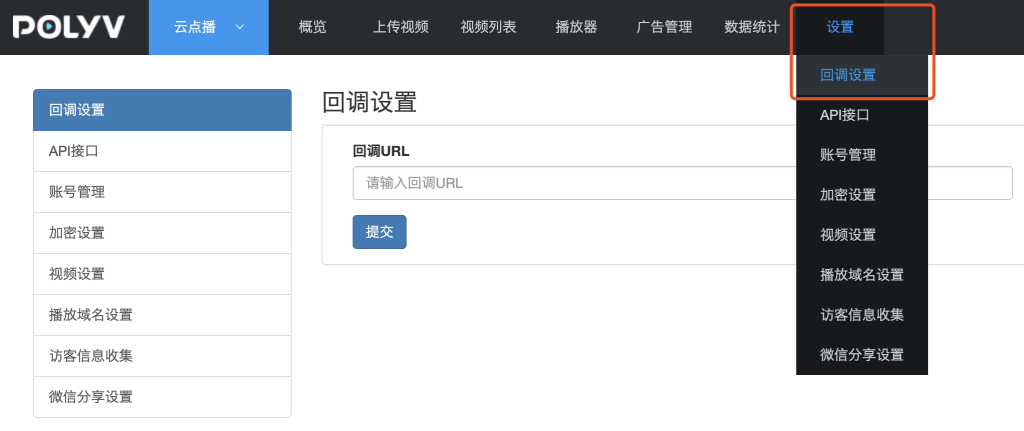
Event Types
The currently supported event notification types are as follows:
I. Video Upload Complete
After the VOD server finishes receiving the uploaded video file, a video upload complete event is generated. HTTP request method: GET.
Event Content
| Name | Description |
|---|---|
| sign | System signature, generated by concatenating the string "upload" with the vid and secretkey, then performing MD5 hashing. For example, if the vid value is e2e84a738302f20a4f6eb202976f5c63_e and the secretkey value is 7UagtQOq2A, the MD5 hash of the string uploade2e84a738302f20a4f6eb202976f5c63_e7UagtQOq2A yields the sign value: b245e3e65aa45b60dc02337b5cd914a7 |
| type | Callback type: upload (uploaded), invalidVideo (non-compliant video - when the uploaded video's information cannot be analyzed by the system). |
| vid | Video ID |
| state | User-defined data. If this field is submitted in the Upload Video API, Upload SDK, or Async Batch Upload Video, it will be transparently returned in the event completion callback. |
Callback Example
http://demo.ipolyv.cn/callback?sign=b245e3e65aa45b60dc02337b5cd914a7&type=upload&vid=e2e84a738302f20a4f6eb202976f5c63_e
II. Async Upload Processing Failure
This event is generated when the video synchronization function in the management console or the asynchronous upload method fails during processing.
Receiving this callback indicates that the remote video upload failed. Please check the source video's URL address.
HTTP request method: GET.
Event Content
| Name | Description |
|---|---|
| sign | System signature, generated by concatenating type, fileUrl, and secretkey in order, then performing MD5 hashing. For example: if the fileUrl value is "http://a.mp4"" and the secretkey value is kXmHMLeX6M, the MD5 hash of the string async_uploadhttp://a.mp4kXmHMLeX6M yields c2f168b96d882c1a03f1021c29208916 |
| type | Callback type, returns the fixed value: async_upload. |
| fileUrl | The URL address of the remote video submitted by the user. |
| title | The title of the remote video submitted by the user. |
| state | User-defined data. If this field is submitted in the Upload Remote Video API or Async Batch Upload Video, it will be transparently returned in the event completion callback. |
Callback Example
http://demo.ipolyv.cn/callback?sign=c2f168b96d882c1a03f1021c29208916&fileUrl=http://a.mp4&type=async_upload&title=test
III. Video Sync Failure
After a video is successfully uploaded, the system needs to synchronize the video source file uploaded to the edge node back to the central node. This event is generated if the synchronization fails.
HTTP request method: GET.
Event Content
| Name | Description |
|---|---|
| sign | System signature, generated by concatenating type, vid, and secretkey in order, then performing MD5 hashing. |
| type | Callback type, returns the fixed value: videoSyncedFail. |
| vid | Video ID |
Callback Example
http://demo.ipolyv.cn/callback?sign=b245e3e65aa45b60dc02337b5cd914a7&type=videoSyncedFail&vid=e2e84a738302f20a4f6eb202976f5c63_e
IV. Single Definition Transcoding Complete
This event is generated when a specific definition (e.g., HD mp4 format) of a video format finishes transcoding.
Once any definition of a video is transcoded and passes review, the video becomes playable (the video status updates to "Published"). If transcoding for other definitions is not yet complete, the player will automatically select the definition that has finished transcoding.
HTTP request method: GET.
Event Content
| Name | Description |
|---|---|
| sign | System signature, generated by concatenating type, format, vid, df, and secretkey in order, then performing MD5 hashing. For example, if the type value is encode, format value is mp4, vid value is e2e84a738302f20a4f6eb202976f5c63_e, df value is 1, and secretkey value is 7UagtQOq2A, the MD5 hash of the string encodemp4e2e84a738302f20a4f6eb202976f5c63_e17UagtQOq2A yields f6a7f9b3dce47c4c8d5bfbc96af79720 |
| type | Callback type: encode (transcoding complete), encode_failed (transcoding failed) |
| format | The video format after transcoding. Default is mp4 for non-encrypted videos, and hls for encrypted videos. |
| vid | Video ID |
| df | Video definition: 1 (Smooth), 2 (HD), 3 (Ultra HD) |
Callback Example
http://demo.ipolyv.cn/callback?sign=f6a7f9b3dce47c4c8d5bfbc96af79720&type=encode&format=mp4&vid=e2e84a738302f20a4f6eb202976f5c63_e&df=1
V. All Definitions Transcoding Complete
This event is generated when transcoding for all definitions of a video is complete.
Due to the large amount of returned content, the request method for this callback is POST.
Event Content
| Name | Description |
|---|---|
| sign | System signature, generated by concatenating eventType, vid, and secretkey in order, then performing MD5 hashing. Note: sign is not in the POST Body but is returned as a parameter in the callback URL. |
| eventType | Event type, fixed value: TranscodeComplete |
| status | Video transcoding status. Values: success (success), fail (failure). Returns success if at least one definition transcodes successfully. |
| vid | Video ID |
| videoInfos | Video transcoding details |
videoInfos is an array, with fields for each video stream as follows:
| Name | Description |
|---|---|
| status | Transcoding status for a single definition. Values: success (success), fail (failure) |
| format | The video format after transcoding. Default is mp4 for non-encrypted videos, and hls for encrypted videos. |
| df | Video definition: 1 (Smooth), 2 (HD), 3 (Ultra HD) |
| bitrate | Video bitrate |
| duration | Video duration, in seconds |
| size | Video size, in Bytes |
| resolution | Video resolution |
Callback Example
Content-Type:application/json
Request URL:http://demo.ipolyv.cn/callback?sign=f6a7f9b3dce47c4c8d5bfbc96af79720
HTTP POST Body:
{
  "eventType": "TranscodeComplete",
  "status": "success"
  "vid": "812a792458101ebf5ff6a1e5e76e1c58_8",
  "videoInfos": [
    {
      "duration": 883,
      "df": 1,
      "size": 15499011,
      "format": "mp4",
      "bitrate": 256,
      "resolution": "480x360",
      "status": "success"
    },
    {
      "duration": 883,
      "df": 2,
      "size": 27574109,
      "format": "mp4",
      "bitrate": 512,
      "resolution": "848x636",
      "status": "success"
    }
  ]
}
VI. Video Review Complete
After any definition of a video is transcoded, it must undergo intelligent review or manual review. Only videos that pass the review are playable. This event is generated when the review is complete.
HTTP request method: GET.
Event Content
| Name | Description |
|---|---|
| sign | System signature, generated by concatenating the string "manage" with type, vid, and secretkey, then performing MD5 hashing. For example, if the type value is pass, vid value is e2e84a738302f20a4f6eb202976f5c63_e, and secretkey value is 7UagtQOq2A, the MD5 hash of the string managepasse2e84a738302f20a4f6eb202976f5c63_e7UagtQOq2A yields 8ebb91d444ce53fafa3256670fb65d84 |
| type | Callback type: pass (review passed), nopass (review failed) |
| vid | Video ID |
Callback Example
http://demo.ipolyv.cn/callback?type=pass&vid=e2e84a738302f20a4f6eb202976f5c63_e&sign=8ebb91d444ce53fafa3256670fb65d84
VII. Video Deletion Complete
This event is generated when a video file is moved to the recycle bin or permanently deleted from the recycle bin.
HTTP request method: POST.
Event Content
| Name | Description |
|---|---|
| sign | System signature, generated by concatenating eventType and secretkey in order, then performing MD5 hashing: md5("DeleteMediaComplete"+secretKey). Note: sign is not in the POST Body but is returned as a parameter in the callback URL. |
| eventType | Callback type, fixed value: DeleteMediaComplete |
| operateTime | Operation time, e.g., 2020-01-20 07:49:17 |
| operator | Operator account |
| status | Operation status, success |
| deleteType | Deletion method: MoveToTrash (move to recycle bin), DeletePermanently (permanent deletion) |
| vids | The vids of the deleted videos. Multiple vids are returned for batch deletion. |
Callback Example
Content-Type:application/json
Request URL:http://demo.ipolyv.cn/callback?sign=f6a7f9b3dce47c4c8d5bfbc96af79720
HTTP POST Body:
{
  "eventType": "DeleteMediaComplete",
  "operateTime": "2020-01-20 07:49:17",
  "operator": "aaa@polyv.net",
  "status": "success",
  "deleteType": "MoveToTrash",
  "vids": "e2e84a738302f20a4f6eb202976f5c63_e,e2e84a738302f20a4f6eb202976f5c63_f"
}
VIII. Video Content Security Review Failed
This event is generated when AI intelligent scanning detects confirmed or suspected violating content in a video.
HTTP request method: POST.
Event Content
| Name | Description |
|---|---|
| sign | System signature, generated by concatenating eventType and secretkey in order, then performing MD5 hashing: md5("AIContentScanNotPassed"+secretKey). Note: sign is not in the POST Body but is returned as a parameter in the callback URL. |
| eventType | Callback type, fixed value: AIContentScanNotPassed |
| scanSource | Scan source: video (video), ppt (three-screen courseware) |
| vid | Video ID |
| scanResults | Array of scan results, containing one or more scan results. See the table below for details: |
Scan Result Information:
| Name | Description |
|---|---|
| imageUrl | URL of the detected image |
| scene | Detection scenario: porn (pornography detection), terrorism (terrorism/political sensitivity detection) |
| label | Classification of the detection result. When scene=porn, label values are: normal: Normal image sexy: Sexy image porn: Pornographic image When scene is terrorism, label values are: normal: Normal image politics: Politically sensitive image bloody: Bloody image weapon: Weapon others: Other |
| suggestion | Detection suggestion: review (requires manual review); block (confirmed violation) |
| rate | Probability that the detection result belongs to this classification, range [0.00-100.00] |
Callback Example
Content-Type:application/json
Request URL:http://demo.ipolyv.cn/callback?sign=6c5b14548fb9c06ee1b987debf88f639
HTTP POST Body:
{
  "eventType": "AIContentScanNotPassed",
  "scanSource": "video",
  "vid": "8205ac89d3699e1fc08cd8f9b8486748",
  "scanResults": [
    {
      "imageUrl": "http://img.videocc.net/uimage/8/8205ac89d3/8/8205ac89d3699e1fc08cd8f9b8486748_0_b.jpg",
      "scene": "porn",
      "label": "sexy",
      "suggestion": "block",
      "rate": 93.26
    }
  ]
}
IX. Courseware Conversion Complete
This event is generated when the conversion of uploaded courseware (PPT, PDF files) to images is complete.
HTTP request method: POST.
Event Content
| Name | Description |
|---|---|
| sign | System signature, generated by concatenating eventType and secretkey in order, then performing MD5 hashing: md5("CoursewareConvertComplete"+secretKey). Note: sign is not in the POST Body but is returned as a parameter in the callback URL. |
| eventType | Callback type, fixed value: CoursewareConvertComplete |
| status | success (conversion successful), convertFailed (conversion failed), auditNotPassed (content review failed) |
| vid | Video ID |
| convertedImages | Converted images, containing one or more image information. Not returned if conversion fails. See the table below for details: |
Converted Image Information:
| Name | Description |
|---|---|
| pageNo | Courseware page number, starting from 1 |
| pageTitle | Courseware page title. Empty if no page title is set in the PPT file. |
| pageImage | URL of the converted image |
| pageThumbnail | URL of the thumbnail |
Callback Example
Content-Type:application/json
Request URL:http://demo.ipolyv.cn/callback?sign=de9d5652a5682718c5662499c5e4e5bb
HTTP POST Body:
{
  "eventType": "CoursewareConvertComplete",
  "status": "success",
  "vid": "f13e995735d99df23a7728be335e7a41_f",
  "convertedImages": [
    {
      "pageNo": 1,
      "pageTitle": "第一页的标题",
      "pageImage": "https://doc-oss.polyv.net/images/2020/04/b0a8a0ed3425c117e6552cd027b6eb4b31243c9/b0a8a0e6d3425c117e6552cd027b6eb4b31243c9_0000.jpeg",
      "pageThumbnail": "https://doc-oss.polyv.net/images/2020/04/b0a8a0ed3425c117e6552cd027b6eb4b31243c9/b0a8a0e6d3425c117e6552cd027b6eb4b31243c9_0000_s.jpeg"
    },
    {
      "pageNo": 2,
      "pageTitle": "第二页的标题",
      "pageImage": "https://doc-oss.polyv.net/images/2020/04/b0a8a0ed3425c117e6552cd027b6eb4b31243c9/b0a8a0e6d3425c117e6552cd027b6eb4b31243c9_0001.jpeg",
      "pageThumbnail": "https://doc-oss.polyv.net/images/2020/04/b0a8a0ed3425c117e6552cd027b6eb4b31243c9/b0a8a0e6d3425c117e6552cd027b6eb4b31243c9_0001_s.jpeg"
    }
  ]
}
