Video Outline Callback Notification
Updated: 2026-08-12 09:50:58
Feature Description
When a video outline task reaches certain processing stages (e.g., analysis success, analysis failure), the system will send the current status of the video outline task to the customer's server via HTTP callback, allowing you to track the task's progress.
Additional Notes
- An HTTP status code 200 in the callback response is considered a successful callback, and no retry will be initiated.
- An HTTP status code other than 200 in the callback response is considered a failure, and the system will retry the callback up to 3 times. If all 3 retries fail, no further callbacks for this event will be triggered.
Callback Configuration
Callback configuration path:
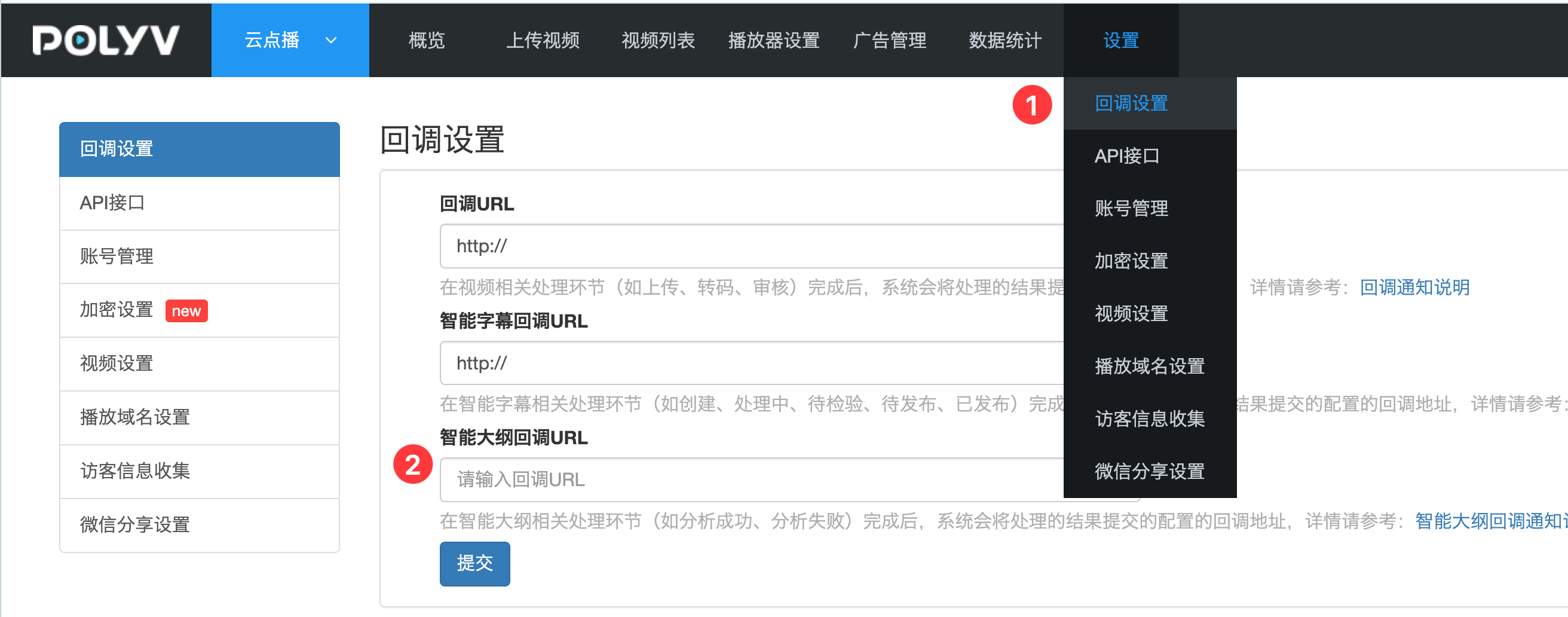
Only users who have configured a callback URL will receive callback requests.
Callback Event Types
1. Video Outline Task Processing Success
- Event Description: When the video outline analysis is complete, the Video Outline Task Processing Success callback event is triggered.
- HTTP Request Method: POST
- HTTP Request Parameter Format: application/json
Callback Parameters
| Name | Type | Required | Description |
|---|---|---|---|
| sign | string | Yes | See (Video Outline Callback Signature Parameter Description) |
| timestamp | long | Yes | The time when the event was triggered, in 13-digit timestamp format |
| callbackType | string | Yes | Callback type, fixed value: generate_success |
| taskId | long | Yes | Subtitle task ID |
| vid | string | Yes | Video ID |
| outlineInfo | string | Yes | Video outline information. See the "outlineInfo Field Description" below for details. |
outlineInfo Field Description
| Parameter Name | Type | Description |
|---|---|---|
| summary | List | Summary content. See the "summary Field Description" below for details. |
| badwords | List | List of triggered prohibited words |
| questions | List | List of Q&A data |
| introduction | String | Summary information for the entire video |
summary Field Description
| Parameter Name | Type | Description |
|---|---|---|
| id | long | Task ID |
| title | string | Segment title |
| startTime | string | Start time point |
| endTime | string | End time point |
| keyword | List | List of related keywords |
| summary | List | List of segment summary items |
| endIndex | long | Ending subtitle line number |
| startIndex | long | Starting subtitle line number |
Callback Example
https://demo-callback.com/video-outline-task/callback/test

{
  "sign": "02EAD645ED22A87B35A9818BDE24A884125267C7",
  "timestamp": 1683622364265,
  "callbackType": "generate_success",
  "taskId": 30,
  "vid": "d561fac50f0eeab9589e8bfa4e08c2b4_c",
  "outlineInfo":
    {
      "summary": [
        {
          "id": 160628,
          "title": "没有没有",
          "endTime": "00:00:08,780",
          "keyword": [
            "否定",
            "拒绝"
          ],
          "summary": [
            "说话者表示否定或拒绝"
          ],
          "endIndex": 0,
          "startTime": "00:00:08,220",
          "startIndex": 0
        }
      ],
      "badwords": [],
      "questions": [],
      "introduction": "本视频从00:00:08开始,对话正式开启。视频内容简短,主要包含对话开始部分,关键词为'没有'。"
    }
  }
2. Video Outline Task Processing Failure
- Event Description: When a step fails during the video subtitle generation process, this callback is triggered.
- HTTP Request Method: POST
- HTTP Request Parameter Format: application/json
Callback Parameters
| Name | Type | Required | Description |
|---|---|---|---|
| sign | string | Yes | See (Video Outline Callback Signature Parameter Description) |
| timestamp | long | Yes | The time when the event was triggered, in 13-digit timestamp format |
| callbackType | string | Yes | Callback type, fixed value: generate_fail |
| taskId | long | Yes | Subtitle task ID |
| vid | string | Yes | Video ID |
Callback Example
https://demo-callback.com/video-outline-task/callback/test

{
    "sign": "02EAD645ED22A87B35A9818BDE24A884125267C7",
    "timestamp": 1683622364265,
    "callbackType": "generate_fail",
    "taskId": 30,
    "vid": "c560fac50f0eeab9589e8bfa4e08c2b4_c",
}
Video Outline Callback Signature Parameter Description
Verifying the signature (sign) parameter can effectively prevent receiving forged callback requests. Users who have integrated video outline task callbacks must verify the signature parameter to avoid unnecessary issues.Signature Generation Rules
- Encrypt the string (secretKey + timestamp + timestamp + secretKey) using SHA1. For example: SHA1(mySecretKey16836223642651683622364265mySecretKey)
- Convert the SHA1 encrypted string to uppercase.
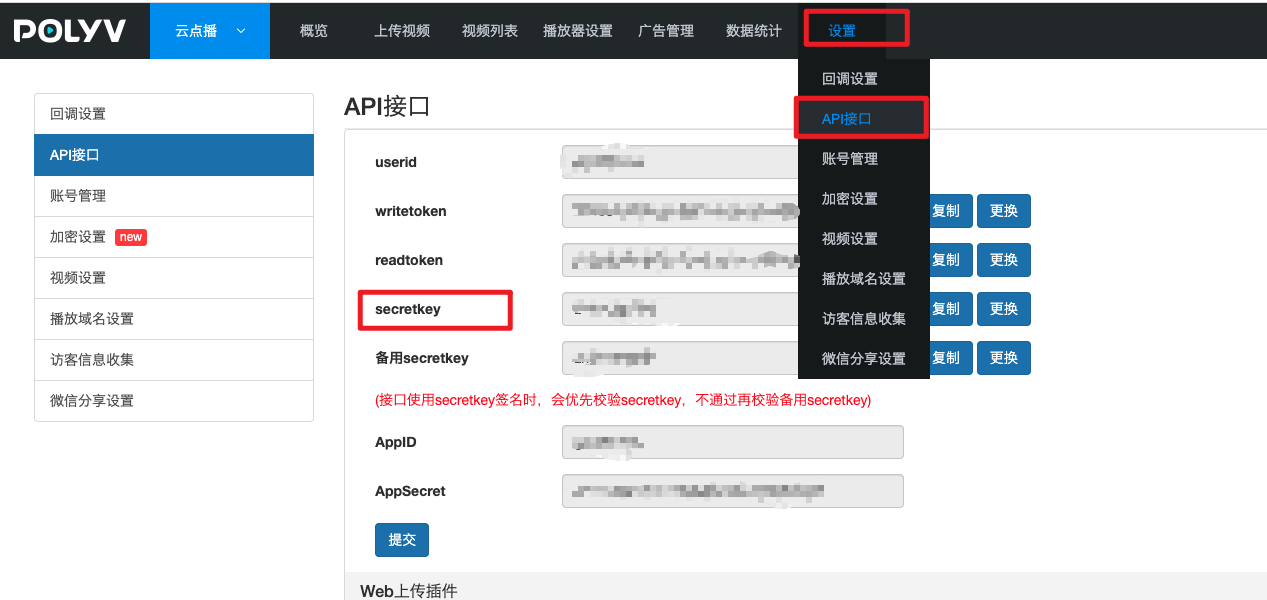
The timestamp is a 13-digit timestamp obtained from the callback request parameters. The user's secretKey can be found in Settings --> API Interface.