


Allow Participants to Share Screen Independently
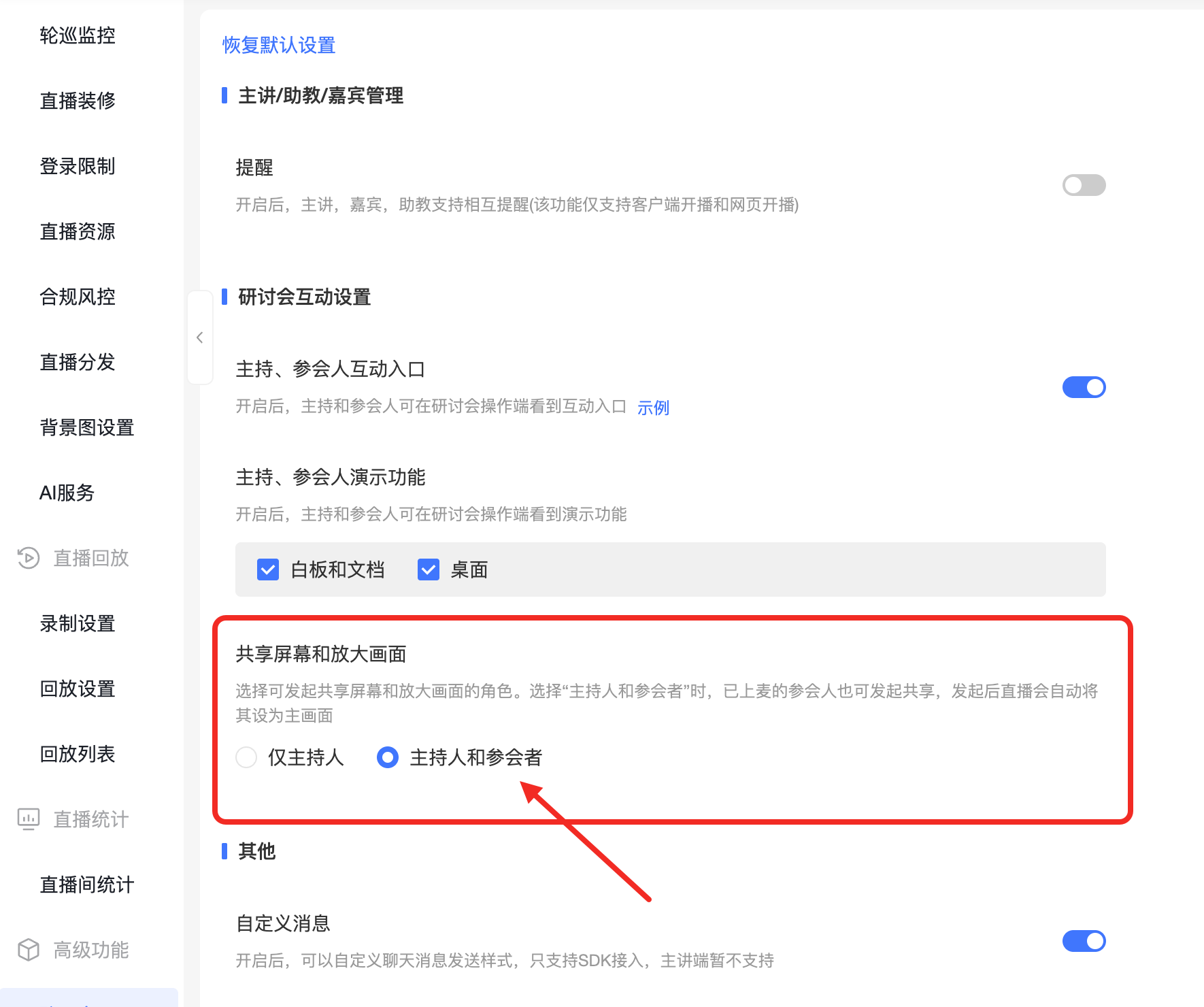
The seminar supports configuring sharing permissions for participants. After selecting [Host and Participants], participants who have been invited to the stage can start and end screen sharing on their own without waiting for the host to invite them one by one; once sharing starts, the shared screen is automatically set as the main live stream view.
This feature is suitable for meetings where multiple speakers take turns presenting slides, demonstrating operations, or sharing materials, reducing the host's authorization operations during each speaker switch.
1. Setting Sharing Permissions
Go to the seminar configuration in the channel, find [Share Screen and Enlarge View] in the [Seminar Interaction Settings] area, and select the permission scope according to the meeting's needs.
| Permission Scope | Usage |
|---|---|
| Host Only | The host controls presentation authorization. Participants need the host's authorization to share, suitable for meetings requiring a unified presentation order. |
| Host and Participants | The host and participants who have been invited to the stage can start and end sharing on their own without the host's repeated invitations. After a participant initiates sharing, the shared screen is automatically set as the main live stream view. |
To allow participants to share independently, select [Host and Participants] and save the configuration.
2. Participants Starting Sharing
- Enter the seminar as a participant and confirm you have been invited to the stage.
- Select screen sharing in the presentation features, then follow the on-screen prompts to choose the screen to share.
- Once sharing starts, the shared screen is automatically set as the main live stream view, without needing the host to specify it.
- After the sharing session ends, the participant can stop the sharing on their own.
Before sharing, close any windows unrelated to the meeting to avoid displaying chat messages, account information, or other content to the audience.
3. Frequently Asked Questions
Why do participants still need the host's invitation to share?
First, check whether the seminar's sharing permission is set to [Host Only]. If participants need to share independently, adjust the permission scope to [Host and Participants].
After starting sharing, do I still need to manually set the main live stream view?
Once participants are allowed to share independently, when a participant starts screen sharing, the shared screen is automatically set as the main live stream view, eliminating the need for manual setup.
Can regular viewers also share directly?
This feature is intended for hosts and participants. It does not grant sharing permissions to users who enter via a viewer link.
