Overview
If developers do not need Polyv SaaS's viewing condition verification, they can generate a viewer login token (hereinafter referred to as the login token) via the Polyv API. Once the login token is verified, the viewing condition restrictions can be bypassed to enter the live streaming page. For detailed usage, see the following documentation:
1. Processing Flow
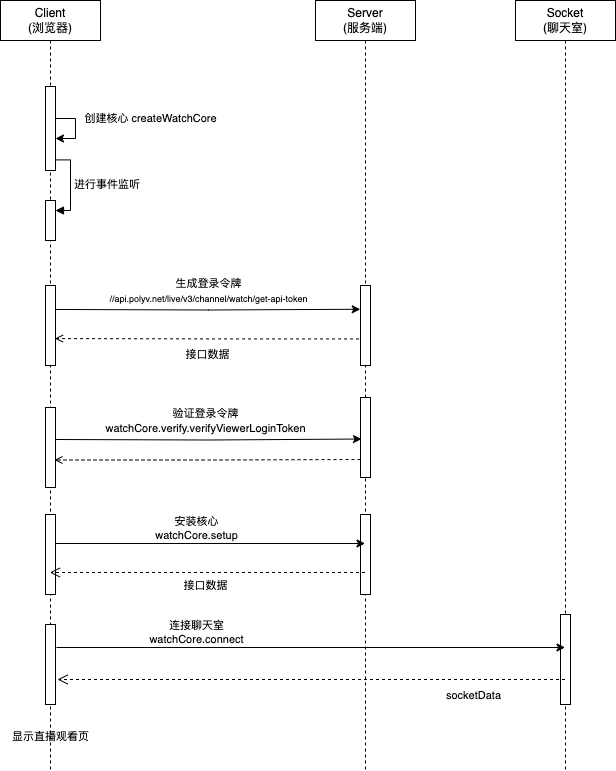
1.1 Step 1: Obtain the Login Token
Obtain the viewer login token via the Polyv API. See the API documentation: Get Viewer Token for Watching.
Since this API involves parameter signing with
appSecret, it is recommended to generate this token on the server side.
1.2 Step 2: Verify the Login Token
After generating the login token in Step 1, use the verifyViewerLoginToken method of the core instance's verification module to verify the login token. Once verified, proceed to install the core instance.
1.3 Step 3: Install the Core Instance
After verification in Step 2, install the core instance following the normal process. Note that the login token flow is only required before the first installation; it is not needed for subsequent installations.
2. Example Code
Below is an example code snippet for the JS-based flow:
import { send } from '@just4/ajax/ajax';
import md5 from 'md5';
import { createWatchCore } from '@polyv/live-watch-sdk';

/**
 * 生成签名
 * @param {Object} data 请求参数
 * @param {String} secret 签名密钥
 * @returns 签名串
 */
function getSign(data, secret) {
  let text = '';
  const keys = Object.keys(data).sort();

  for (const key of keys) {
    text += `${key}${data[key]}`;
  }
  const sign = md5(secret + text + secret);
  return sign.toUpperCase();
}

/**
 * 获取登录令牌
 * @param {string} channelId
 */
async function getLoginToken({ channelId }) {
  // 请求数据
  const reqData = {
    appId: '应用 id,从管理后台获取',
    timestamp: Date.now(),
    channelId,
    viewerId: '观众 id',
    nickname: '观众昵称',
  };
  // 应用密钥,从管理后台获取,建议获取登录令牌流程在服务端中进行,避免将应用密钥直接暴露在 js 中
  const appSecret = 'xxxxx';
  // 生成签名
  const sign = getSign(reqData, appSecret);
  reqData.sign = sign;

  // 通过 ajax 获取登录令牌
  const response = await send('//api.polyv.net/live/v3/channel/watch/get-api-token', {
    method: 'post',
    data: reqData,
  });
  const result = response.data;
  return result.data.token;
}

// 示例方法
async function example() {
  const channelId = '频道号';

  // 创建观看页 SDK 核心实例
  const watchCore = createWatchCore({ channelId });

  // 步骤1:获取登录令牌
  const loginToken = await getLoginToken({ channelId });

  // 步骤2:验证登录令牌
  await watchCore.verify.verifyViewerLoginToken(loginToken);

  // 步骤3:安装核心实例
  await watchCore.setup();
}
3. Sequence Diagram
The flow chart for the login token is as follows: