


Interactive Feature Initiator SDK
Overview
This project is the logic layer SDK for Polyv's live interactive feature initiator (i.e., the broadcasting end, management end, etc.). It can be used to develop the initiation interface for interactive features.
Usage
Installation
npm i -S @polyv/interactions-launch-sdk
Import
import * as InteractionsLaunchSDK from '@polyv/interactions-launch-sdk';
Global Initialization
Note: Regardless of which interactive feature is used, global initialization must be performed first. Global initialization only needs to be executed once.
Follow the steps below for global initialization:
Set the log printing level.
Logs will be printed to the console and uploaded to the Polyv server. The log upload service is enabled by default and can be disabled via
Logger.disableUploadLog(). Unless there is a specific reason, please keep log upload enabled to help us locate online issues.InteractionsLaunchSDK.Logger.setLogLevel(InteractionsLaunchSDK.Logger.LogLevel.TRACE);Use the
setChatInfo()method to pass in the Polyv chat room instance object and data.The interactive feature initiator SDK internally depends on the Polyv chat room service. You can quickly integrate this service based on the Polyv chat room SDK.
PolyvChatRoomis the global object provided by the chat room SDK. For more details, please refer to this document.setChatInfo()supports multiple calls. For example, after a chat room reconnection, thechatandsocketIdproperties need to be reset.
// 初始化聊天室 SDK var chatroom = new PolyvChatRoom({ version: '2.0', // 注意这里要使用 '2.0' roomId: '', // 房间号 userId: '', // 用户在聊天室的 uid pic: '', // 用户头像 nick: '', // 用户昵称 userType: '', // 用户类型:'teacher' 老师 / 'assistant' 助教 / 'manager' 管理员 token: '', // 校验码 // 其它具体参数信息请参考 polyv 聊天室 SDK });
// 在 connect 事件回调中拿到聊天室实例和 socketId 后再传入到互动 SDK 中 chatroom.chat.on('connect', () => { const socket = chatroom.chat.socket;
// 设置聊天室实例对象和数据
InteractionsLaunchSDK.setChatInfo({
  // 聊天室实例对象。
  chat: socket,
  // 连接聊天室的 socketId
  socketId: socket.id,
  // 用户在聊天室的 uid
  userId: '',
});
});
3. Use the `setChannelInfo()` method to initialize channel information.

 This method supports multiple calls. **Note: When `sessionId` changes (usually when the live broadcast status changes), this interface must be called to update the configuration.** For example, `setChannelInfo({ sessionId: 'new sessionId' })`.

 Additionally, when switching rooms, this interface can also be called to update `channelId` and `roomId`.

 ```javascript
 InteractionsLaunchSDK.setChannelInfo({
   channelId: '',
   roomId: '',
   // 频道类型。默认为 'normal'。
   channelType: '',
   // 直播场次 id
   sessionId: '',
 });
Set authorization. The SDK requires access tokens and other information when internally requesting channel API interfaces.
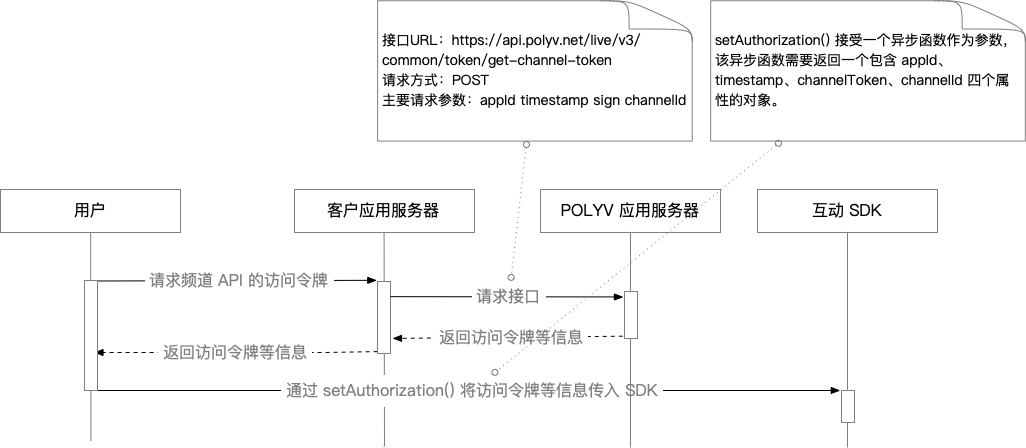
setAuthorization()accepts an asynchronous function as a parameter. This asynchronous function must return an object containing four properties: appId, timestamp, channelToken, and channelId.appIdis the account AppId;timestampis a 13-digit timestamp;channelIdis the channel number; for obtainingchannelToken, please refer to Obtaining the Channel API Access Token.Authorization flow introduction:
InteractionsLaunchSDK.setAuthorization(async () => {
  // 此处异步获取频道API的访问令牌,并返回互动 SDK 中实现授权所需的参数。
  return {
    appId: '',
    timestamp: '',
    channelId: '',
    channelToken: '',
  };
});
(Optional) If there is a need for custom domain names, set the custom domain.
InteractionsLaunchSDK.setCustomDomain({
  // 可选。聊天室接口域名。默认为 'apichat.polyv.net'
  chat: '',
  // 可选。直播业务域名。默认为 'api.polyv.net'
  api: '',
});
Instantiate the required interactive feature classes as needed.
// 以签到功能为例
// 1. 实例化 CheckIn 类
const checkInCore = new InteractionsLaunchSDK.CheckIn();
// 2. 注册事件监听函数
checkInCore.on('show-result', handler1);
API Documentation
Click <a href="https://help.polyv.net/live/js/new_sdk/interactions_launch_sdk/sdk/docs/index.html"" target="_blank" rel="noopener">here to view the API documentation.
Feature Practices
Only reference document links for each feature are provided here.
- AnswerCard: Reference Document
- CheckIn: Reference Document
- Timer: Reference Document
- LotteryNew: Reference Document
- Notice: Reference Document
- Questionnaire: Reference Document
- RunAnswer: Reference Document
Version Updates
None
