


Interactive Receiver SDK
1. Introduction
A powerful, flexible, and easy-to-use new version of the Polyv Interactive Receiver SDK, supporting rich interactive scenarios such as check-in, lottery, questionnaires, and coupons. Developers can use this SDK to integrate interactive features or customize interactive feature interfaces based on this SDK.
2. Overall Architecture
┌─────────────────────────────────────────────────────────────┐
│                     业务应用层                                │
├─────────────────────────────────────────────────────────────┤
│  签到模块   抽奖模块   问卷模块   优惠券模块   ...其他功能模块      │
├─────────────────────────────────────────────────────────────┤
│                   核心模块 (Core)                            │
│  ┌─────────────┐ ┌─────────────┐ ┌─────────────┐            │
│  │ Socket 通信  │ │ API 请求    │ │ 日志监控      │            │
│  └─────────────┘ └─────────────┘ └─────────────┘            │
├─────────────────────────────────────────────────────────────┤
│              保利威直播平台基础服务                             │
└─────────────────────────────────────────────────────────────┘
3. 🚀 Quick Start
3.1 Install the Core Module Package
@polyv/interaction-core is the core module package of the SDK, encapsulating socket communication, API requests, and logging functionalities.
// pnpm
pnpm add @polyv/interaction-core

// npm
npm i @polyv/interaction-core
3.2 Import
UMD Method
Where rc-20250814 is the version number, please import according to the actual version number.
<script src="https://websdk.videocc.net/interaction-core/rc-20250814/index.umd.js"></script>

<script>
const InteractionCore = window.PolyvInteractionCore;
</script>
NPM Method
import { InteractionCore, type TrackEventData } from '@polyv/interaction-core';
3.3 Initialization
Instantiate the InteractionCore class, passing parameters such as getSocket and getViewerToken:
const interactionCore = new InteractionCore({
  // 搭配保利威聊天室 SDK 使用,返回 SocketIOClient.Socket 实例
  getSocket: () => {
    return socket;
  },
  getChannelInfo: () => {
    return {
      // 频道 ID
      channelId: '',
      // 场次 ID
      sessionId: '',
      // 保利威账号 ID
      accountId: '',
      // 观看页地址
      watchUrl: '',
      // 邀请海报选择页地址
      inviteUrl: '',
      // 频道直播状态
      liveStatus: '',
    };
  },
  getChannelConfig: () => {
    return {
      // 是否启用观看页营销埋点
      watchEventTrackEnabled: false,
      // 商品库事件上报开关
      productTrackEnabled: false,
    };
  },
  getUserInfo: () => {
    return {
      // 用户 userId
      userId: '',
      // 用户 unionId
      unionId: '',
      // 用户昵称
      nick: '',
      // 用户头像地址
      pic: '',
      // 用户授权方式
      authType: '',
      // 微信 openid
      wxOpenId: '',
      // 微信 unionId
      wxUnionId: '',
    };
  },
  getViewerToken: () => {
    return {
      // 授权 token
      viewerToken: '',
    };
  },
  getSourceInfo: () => {
    return {
      // 来源类型
      sourceType: '',
      // 来源 ID
      sourceId: '',
    };
  },
  domainInfo: {
    // 观看页域名
    watchPageDomain: '',
    // 直播 api 域名
    polyvApiDomain: '',
    // 聊天室 api 域名
    chatApiDomain: '',
    // 静态资源域名
    staticDomain: '',
  },
});
3.4 Obtaining viewerToken
When this SDK calls backend APIs, it requires a viewerToken. The interaction flow is as follows:
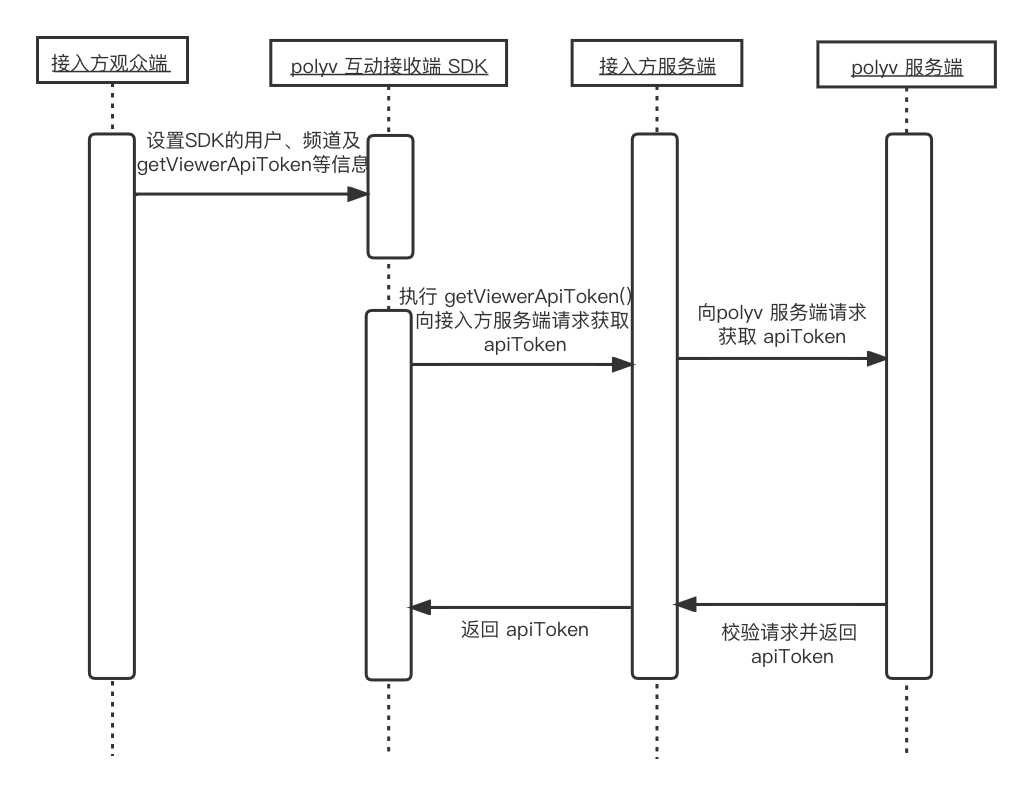
In this flow, it is necessary to call the polyv server-side API. Since the parameters of this API involve sensitive information such as appId and appSecret, it must be requested by the integrator's server, not directly from the frontend.
After obtaining the viewerToken, pass it to the interactionCore during initialization via the getViewerToken method.
const interactionCore = new InteractionCore({
  // 其他配置...
  getViewerToken: () => {
    return {
      viewerToken: 'your-viewer-token-here',
    };
  },
  // 其他配置...
});
4. API Methods
4.1 Setup Core
Initialize the core instance and start listening to Socket events.
API Method: setup(): void
Example:
interactionCore.setup();
4.2 Get Socket Instance
API Method: getSocket(): Promise<undefined | Socket>
Return Value Description: Socket instance, type Promise<undefined | Socket>
Example:
const socket = await interactionCore.getSocket();
console.log('Socket 状态:', socket?.connected);
4.3 Get Chat Token via Socket Instance
API Method: getChatToken(): Promise<undefined | string>
Return Value Description: Chat token, type Promise<undefined | string>
Example:
const token = await interactionCore.getChatToken();
console.log('聊天令牌:', token);
4.4 Send Socket Data
API Method: emitSocket(socketData: unknown, socketType?: SocketEventType, options?: Object): Promise<D>
Parameter Description:
- socketData: Socket data, type
unknown, required - socketType: Socket type, default: message, type
SocketEventType, optional, default'message' - options: Option configuration, type
Object, optional, detailed type description below
| Parameter Name | Description | Type | Required | Default Value |
|---|---|---|---|---|
checkCode |
Whether to check the code return, default: true | boolean |
No | - |
Return Value Description: Returned data, type Promise<D>
Example:
const result = await interactionCore.emitSocket({
  EVENT: 'GET_USER_INFO'
});
console.log('用户信息:', result);
4.5 Add Socket Event Listener
Add a Socket event handler for a specified application.
API Method: addSocketHandles(appName: string, handlers: SocketEventStoreHandlers, socketType?: SocketEventType): void
Parameter Description:
- appName: Application name, type
string, required - handlers: Message event handler object, type
SocketEventStoreHandlers, required - socketType: Socket event type, default: message, type
SocketEventType, optional, default'message'
Example:
interactionCore.addSocketHandles('lottery', {
  LOTTERY_START: (data) => {
    console.log('抽奖开始:', data);
  }
});
4.6 Get Channel Info
API Method: getChannelInfo(): Promise<ChannelInfo>
Return Value Description: Channel info, type Promise<ChannelInfo>, detailed type description below
| Property Name | Description | Type |
|---|---|---|
channelId |
Channel ID | string |
sessionId |
Session ID | string |
liveStatus |
Live status | string |
accountId |
Polyv account ID | string |
watchUrl |
Watch page URL | string |
inviteUrl |
Invitation URL | string |
Example:
const channelInfo = await interactionCore.getChannelInfo();
console.log('频道ID:', channelInfo.channelId);
4.7 Get Channel Config
API Method: getChannelConfig(): Promise<undefined | ChannelConfig>
Return Value Description: Channel config, type Promise<undefined | ChannelConfig>
Example:
const config = await interactionCore.getChannelConfig();
console.log('是否开启商品推送:', config?.productTrackEnabled);
4.8 Get User Info
API Method: getUserInfo(): Promise<UserInfo>
Return Value Description: User info, type Promise<UserInfo>, detailed type description below
| Property Name | Description | Type |
|---|---|---|
userId |
User ID | string |
unionId |
Unique ID | string |
nick |
User nickname | string |
pic |
User avatar | string |
authType |
User login method | string |
wxUnionId |
WeChat unionId | string |
wxOpenId |
WeChat openId | string |
Example:
const userInfo = await interactionCore.getUserInfo();
console.log('用户昵称:', userInfo.nick);
4.9 Get Domain Info
API Method: getDomainInfo(): Required<DomainInfo>
Return Value Description: Domain info, type Required<DomainInfo>
Example:
const domainInfo = interactionCore.getDomainInfo();
console.log('直播API域名:', domainInfo.polyvApiDomain);
4.10 Generate QR Code URL for Redirection
API Method: generateQrcodeUrl(url: string): string
Parameter Description:
- url: QR code content, type
string, required
Return Value Description: QR code image URL
Example:
const qrUrl = interactionCore.generateQrcodeUrl('https://example.com');
console.log('二维码地址:', qrUrl);
4.11 Send Event Log
API Method: trackEvent(data: TrackEventData): Promise<void>
Parameter Description:
- data: Event data, type
TrackEventData, required, detailed type description below
| Parameter Name | Description | Type | Required | Default Value |
|---|---|---|---|---|
event_id |
Event name | string |
Yes | - |
event_type |
Event type | string |
Yes | - |
spec_attrs |
Event properties, cannot be an empty object | Record<string, unknown> |
Yes | - |
Example:
await interactionCore.trackEvent({
  event_id: 'lottery_participate',
  event_type: 'user_behavior',
  spec_attrs: { lotteryId: 'lottery123' }
});
5. Feature Modules
| Module | Documentation | Description |
|---|---|---|
| Check-in Module | CheckIn | Check-in initiation, participation, status query |
| Lottery Module | Lottery | Conditional lottery, instant lottery, prize management |
| Questionnaire Module | Questionnaire | Questionnaire survey, in-class test |
| Coupon Module | Coupon | Coupon claiming, management |
| Platform Lottery Module | LuckyLottery | Lucky draw with grid wheel, spinning wheel |
6. UI Components
| Module | Documentation | Description |
|---|---|---|
| Check-in Component | CheckIn | Respond to check-in activities initiated by the host/assistant |
| Lottery Component | Lottery | Conditional lottery |
| Questionnaire Component | Questionnaire | Respond to questionnaires initiated by the host/assistant |
| Coupon Component | Coupon | Live room coupon feature, supports coupon claiming, viewing, and widget display |
| Platform Lottery Component | LuckyLottery | Lucky draw with grid wheel, spinning wheel |
| Prize Claim Component | RewardReceive | General prize claim form, supports form and QR code |
