


Interactive Feature Receiver SDK
Overview
This project is the logic layer SDK for the interactive feature receiver (audience side) of Polyv's live streaming. Developers can use this SDK to integrate interactive features or customize the interactive feature UI based on this SDK.
Usage
Installation
npm i -S @polyv/interactions-receive-sdk
Import
Online File Import
// script 标签引入,根据版本号引入JS版本。
<script src="https://websdk.videocc.net/interactions-receive-sdk/0.24.0/lib/polyv-ir.umd.js"></script>

<script>
    const { updateConfig } = window.PolyvIRSDK;
</script>
Import via ES Module (Recommended)
import { updateConfig } from '@polyv/interactions-receive-sdk';
Initialization
Before using any specific feature module of this SDK (including UI components), you must call the updateConfig method to pass configuration information, including channel info, viewer info, and the Socket.IO instance for connecting to the chat room.
// 账号 appSecret
const appSecret = '';
// 账号 appId
const appId = '';
const userInfo = {
  // 昵称
  nick: '观众昵称',
  // 头像
  pic: 'https://example.com/avatar.jpg',
  // 观众id
  userId: '1',
};
const channelInfo = {
  // 频道号
  channelId: '',
  // 房间号
  roomId: '',
  // 频道场次id
  sessionId: '',
};

updateConfig({
  // 观众信息
  userInfo: userInfo,
  // 频道信息
  channelInfo: channelInfo,
  // 此处传入 socketio 实例,具体获取方式请看下文
  socket: socket,
  // viewerApiToken 更新函数
  getViewerApiToken: (callback) => {
    myViewerApiTokenGetter(callback);
  },
})

async function myViewerApiTokenGetter(cb) {
    var params = {
        appId: appId, // 账号appId
        channelId: channelId, // 频道号
        timestamp: new Date().getTime(),// 时间戳
        viewerId: userId, // 观看者用户Id
    };
    params.sign = getSign(params, appSecret);
    $.ajax({
        url: "https://api.polyv.net/live/v3/channel/watch/get-api-token",
        type: "POST",
        async: false,
        data: params,
        success: (data) => {
            const token = data.data.token;
            cb({viewerApiToken: token});
        },
    });
}

function getSign(obj, appSecret) {
    const arr = Object.keys(obj)
        .filter((item) => item !== 'sign')
        .sort(); // 拿到除sign外字母顺序排列的key
    let query = '';
    arr.forEach((key) => {
        let value = obj[key];
        if (typeof value === 'object') {
            value = JSON.stringify(value);
        }
        query += key + value;
    });
    // md5 加密
    return md5(appSecret + query + appSecret)
        .toString()
        .toUpperCase();
}
After configuration, you can call it again with new configuration parameters (partial updates are allowed). For example:
- When a viewer changes their nickname, you need to update the
nickfield in theuserInfoparameter. - When the live session ID is updated, you need to update the
sessionIdfield in thechannelInfoparameter.
userInfo Parameter
userInfo refers to viewer information. Some interactive features will require this when requesting server data. It must be an object parameter with the following fields:
| Property | Type | Description |
|---|---|---|
| nick | string | Viewer nickname (must be unique) |
| pic | string | Viewer avatar |
| userId | string | Viewer ID (refers to the user ID in the client's business system, must be unique) |
channelInfo Parameter
channelInfo refers to channel information. It must be an object parameter with the following fields:
| Property | Type | Description |
|---|---|---|
| channelId | string | Live channel ID |
| roomId | string | Room ID. Generally, the room ID is the same as the channel ID. If the channel has the chat room sub-room feature enabled, the specific sub-room ID must be provided. |
| sessionId | string | Channel session ID. Each time a channel starts a live stream, a new session ID is generated. Various interactive data generated during the live stream is associated with this session ID. |
Tips
- You can obtain the current channel session ID via the
sessionIdfield in the'CHANNEL_DATA_INIT'event parameter of the Polyv Live SDK.
socket Parameter
This parameter is the object for sending and receiving WebSocket messages. It is mainly used to establish a long connection with the Polyv backend to enable various real-time interactive features.
To obtain this parameter, this project must be used in conjunction with one of the following two SDKs:
Refer to the example code below for specific methods of obtaining it.
Example Code
- Using with Polyv Chat Room SDK
const chatroom = new PolyvChatRoom({
  // 相关参数
});

// 配置互动功能SDK
updateConfig({
  // 此处传入 socketio 实例
  socket: chatroom.chat.socket,
  userInfo: userInfo,
  channelInfo: channelInfo,
  getViewerApiToken,
});
- Using with Polyv Live SDK
const liveSdk = new PolyvLiveSdk({
  // 相关参数
});

// 配置互动功能SDK
updateConfig({
  // 此处传入 socketio 实例
  socket: liveSdk.socket,
  userInfo: userInfo,
  channelInfo: channelInfo,
  getViewerApiToken,
});
getViewerApiToken Parameter
This SDK requires an apiToken when calling backend APIs. The interaction flow for obtaining the apiToken is as follows:
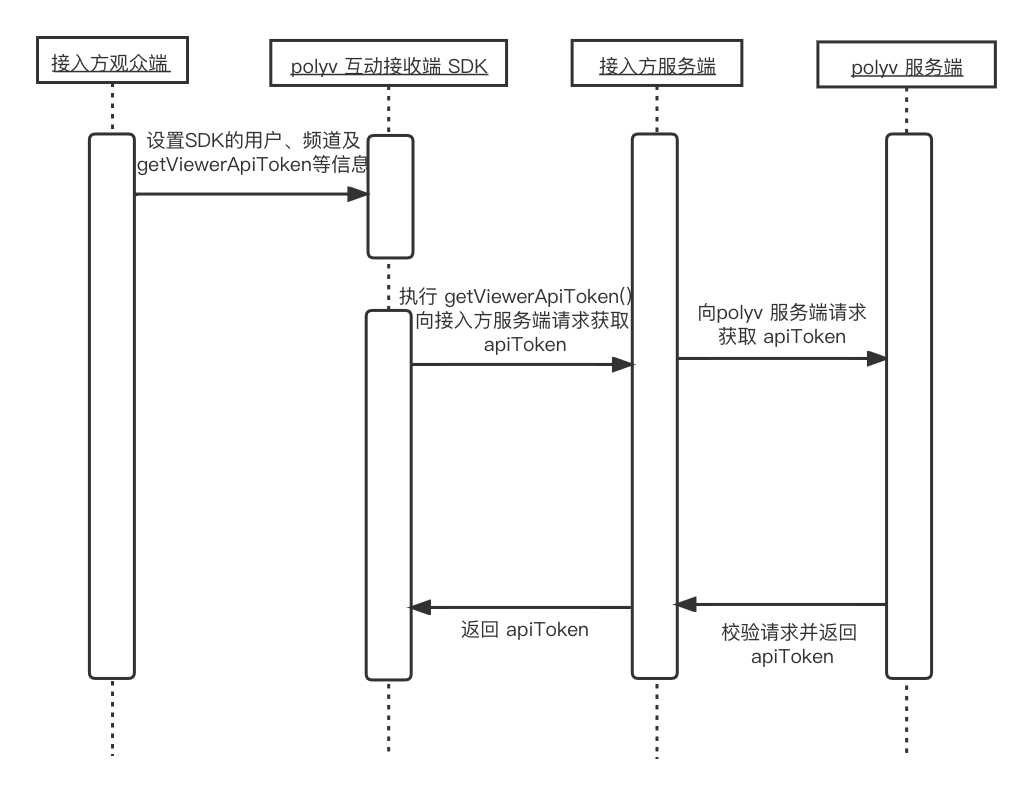
In this flow, the Polyv server-side API needs to be called. Since the parameters of this API involve sensitive information such as appId and appSecret, it must be requested by the integrator's server, not directly from the frontend.
getViewerApiToken is an asynchronous function used to request the integrator's API to obtain the apiToken, which is then returned to the SDK by calling the callback callback function. Since the apiToken has a certain validity period, this function may be executed multiple times during the SDK's runtime.
async function getViewerApiToken(callback) {
  const viewerApiToken = await api.post('[接入方获取token接口]');
  // 回调函数更新SDK内token
  callback({ viewerApiToken });
};

updateConfig({
  // 其他配置参数
  getViewerApiToken,
});
API Documentation
Click <a href="https://help.polyv.net/live/js/new_sdk/interactions_receive_sdk/sdk/docs/index.html"" target="_blank" rel="noopener">here to view the API documentation.
Feature Modules
After configuration, you can instantiate and use the SDK for each module. See the detailed documentation for each module.
- Answer Card: Answer Card SDK Documentation
- Check-In: Check-In SDK Documentation
- Lottery: Lottery SDK Documentation
- Announcement: Announcement SDK Documentation
- Questionnaire: Questionnaire SDK Documentation
- Push Card: Push Card SDK Documentation
- Conditional Lottery: Conditional Lottery SDK Documentation
- Image & Text Live: Image & Text Live SDK Documentation
- Product Library: Product Library SDK Documentation
