


Marquee
Feature Introduction
Video is now used across various industries. However, video copyright issues remain a major challenge for most people. Screen recording is one of the hardest aspects of video piracy to prevent. How to prevent screen recording has become a common concern.
Therefore, POLYV has specifically developed a video feature to enhance screen recording prevention—the Video Marquee feature.
The marquee feature allows you to customize the specific effects of the marquee according to personal preferences, ensuring the feature prevents screen recording without affecting the visitor's viewing experience or the overall aesthetics of the video.
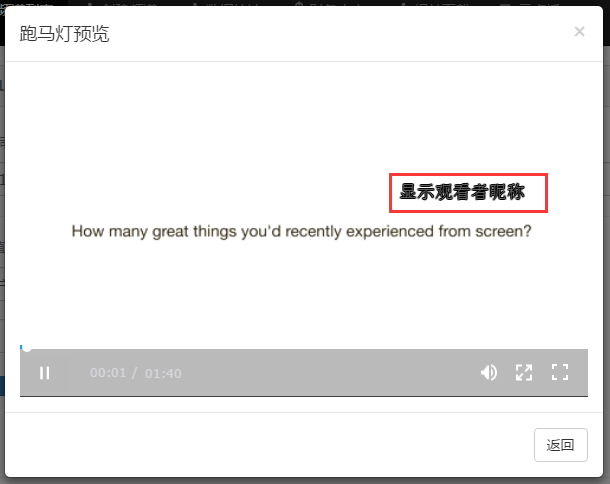
You can also use the interface provided by POLYV to set text to move irregularly across the video. For example, you can use code to obtain the visitor's ID and display it as a marquee on top of the video. This significantly increases the cost of screen recording for pirates while also strongly deterring them.
Backend Settings
Live Streaming Backend --> Select Channel --> Player Management --> Anti-Screen Recording Marquee
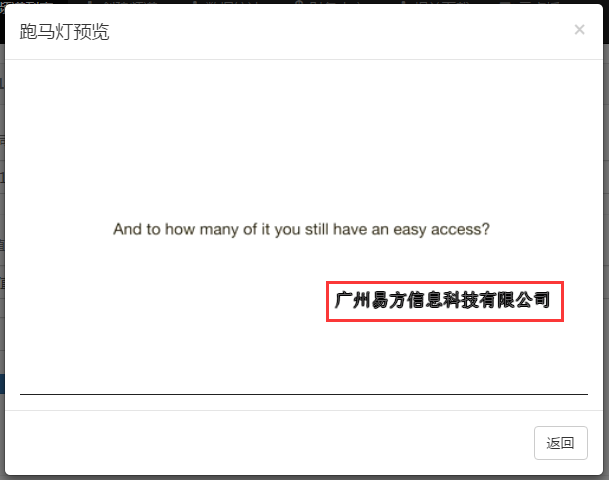
Fixed Value and Login Username
可设置参数
| Parameter | Description |
|---|---|
| Marquee Content | The content displayed in the marquee. For login username, the param2 parameter needs to be set. |
| Font Size | The font size of the marquee content. It is not recommended to set it below size 12. |
| Font Color | The font color of the marquee content, in hexadecimal format. |
| Transparency | The transparency of the marquee content, maximum is 99%. |
| Display Mode | The display mode of the marquee. 滚动 scrolls continuously from right to left. 闪烁 flashes at random positions within the screen. |
| Dual Marquee | When enabled, an additional marquee with the same content is loaded. This marquee is invisible to the naked eye but can be displayed after special processing for traceability. |
| Custom Scaling | When enabled, the marquee content can scale with the player size. |
- When embedding externally, using the login username requires setting the param2 parameter, otherwise an error will occur.
- Fixed Value and Login Username allow quick setup for displaying the marquee, but their security is lower than Custom Marquee. For high anti-screen recording requirements, please use Custom Marquee and enable the anti-screen recording feature.
效果
Custom Marquee
If you need to use a custom marquee, you must set the marquee link in the live streaming backend, for example: http://www.mywebsite.com/validate.php
- Backend returns JSON Example code for the user's HTTP protocol interface (e.g., http://www.mywebsite.com/validate.php):
// validate.php
<?php
$username= "elvis";// 用户昵称, 若值为中文需要urlencode('张三'),从session获取
$vid = $_GET["vid"];
$uid = $_GET["uid"];
$t = $_GET["t"];
$code = $_GET["code"];  // 可选
$callback = isset($_GET["callback"])?$_GET["callback"]:null; //未提交callback时则设为空
$msg='播放错误(测试)';
$fontSize=50;
$fontColor='0xFFFF00';
$speed=50;
$filter='on';
$setting=3;
$alpha=0.9;
$filterAlpha=0.9;
$filterColor='0xFF0000';
$blurX=2;
$blurY=2;
$interval=2;
$lifeTime=5;
$tweenTime=5;
$strength=100;
$show='on';
$str="vid=".$vid."&uid=".$uid."&username=".$username."&code=".$code."&t=".$t."&msg=".$msg."&fontSize=".$fontSize."&fontColor=".$fontColor."&speed=".$speed."&filter=".$filter."&setting=".$setting."&alpha=".$alpha."&filterAlpha=".$filterAlpha."&filterColor=".$filterColor."&blurX=".$blurX."&blurY=".$blurY."&interval=".$interval."&lifeTime=".$lifeTime."&tweenTime=".$tweenTime."&strength=".$strength."&show=".$show;
$sign=md5($str);    //加密规则,md5加密,
$array = Array("show"=>$show,"sign"=>$sign,"username"=>$username,"msg"=>$msg,"fontSize"=>$fontSize,"fontColor"=>$fontColor,"speed"=>$speed,"filter"=>$filter,"setting"=>$setting,"alpha"=>$alpha,"filterAlpha"=>$filterAlpha,"filterColor"=>$filterColor,"blurX"=>$blurX,"blurY"=>$blurY,"interval"=>$interval,"lifeTime"=>$lifeTime,"tweenTime"=>$tweenTime,"strength"=>$strength);
$validateJson = json_encode($array);

if($callback != ''){
    echo $callback."(".$validateJson.")";
} else{
    echo $validateJson;
}
?>
Note: If the interface returns Chinese content, please modify the encoding to UTF-8.
The following is an example of the interface return:
{
  "username":"elvis",
  "sign":"6ab63590797e513d1b6c46b407413478",
  "msg":"Errormessage!",
  "fontSize":"40",
  "fontColor":"0xFFE900",
  "speed":"200",
  "filter":"on",
  "setting":"3",
  "alpha":"1",
  "filterAlpha":"1",
  "filterColor":"0x3914AF",
  "blurX":"2",
  "blurY":"2",
  "tweenTime":"1",
  "interval":"5",
  "lifeTime":"3",
  "strength":"4",
  "show":"on"
}
Parameter Explanation:
| Parameter Name | Meaning | Optional Values | Parameter Type | Required | Default Value |
|---|---|---|---|---|---|
| username | Username, can be the student's ID or any defined value, cannot be empty | String | Yes | ||
| sign | 32-bit lowercase value calculated using MD5 encryption algorithm | String | Yes | ||
| msg | Error message for the marquee | String | Yes | ||
| fontSize | Font size of the marquee text | Integer | Yes | 30 | |
| fontColor | Font color of the marquee text | Contains three 8-bit RGB color components; e.g., 0x000000 for black | String | Yes | 0x000000 Black |
| speed | Time required for the marquee text to move a specified pixel distance | Integer (unit: seconds/10) | Yes | 200 | |
| filter | Whether to apply an outline | "on": outline, "off": no outline | String | Yes | off |
| setting | Marquee style | 1: Scrolls continuously from right to left. 2: Flashes at random positions within the screen. 3: Scrolls continuously from right to left with fade in/out. 4: Scrolls within the top and bottom 15% of the video area. 5: Randomly flashes text within the top and bottom 15% of the video area. 6: Enhanced version of style 1, better encryption, recommended. 7: Enhanced version of style 2, better encryption, recommended. | Integer | Yes | 1 |
| alpha | Transparency of the marquee text | Range: 0.1~1 | Float | Yes | 1 |
| filterAlpha | Transparency of the marquee outline | Range: 0~1 | Float | Yes | 1 |
| filterColor | Color of the marquee outline | Contains three 8-bit RGB color components; e.g., 0x000000 for black | String | Yes | 0x000000 Black |
| blurX | Horizontal blur amount for the marquee outline | Range: 0~255 | Integer | Yes | 2 |
| blurY | Vertical blur amount for the marquee outline | Range: 0~255 | Integer | Yes | 2 |
| interval | Interval time for hiding the marquee text | Integer (unit: seconds) | Yes | 5 | |
| lifeTime | Display time for the marquee text | Integer (unit: seconds) | Yes | 3 | |
| tweenTime | Fade in/out time for the marquee text | Integer (unit: seconds) | Yes | 1 | |
| strength | Outline strength for the marquee | Range: 0~255 | Integer | Yes | 4 |
| show | Whether to display the marquee, default is display | String | Yes | off |
ps: For parameters of numeric type, ensure non-zero values are passed.
Parameter Details
sign
The calculation rule for sign is: concatenate the values of the following parameters into a string and perform MD5 calculation. The signature requires all the following parameters to be concatenated, even if the value is not set.
  $str="vid=".$vid."&uid=".$uid."&username=".$username."&code=".$code."&t=".$t."&msg=".$msg."&fontSize=".$fontSize."&fontColor=".$fontColor."&speed=".$speed."&filter=".$filter."&setting=".$setting."&alpha=".$alpha."&filterAlpha=".$filterAlpha."&filterColor=".$filterColor."&blurX=".$blurX."&blurY=".$blurY."&interval=".$interval."&lifeTime=".$lifeTime."&tweenTime=".$tweenTime."&strength=".$strength."&show=".$show;
  $sign=md5($str);
  例如:当vid="vid",uid="uid",username="suki",code="abc",t="143020010115550947",msg="Errormessage!",fontSize="40",fontColor="0xFFE900",speed="200",filter="on",setting="3",alpha="1",filterAlpha="1",filterColor="0x3914AF",blurX="2",blurY="2",interval="5",lifeTime="3",tweenTime="1",strength="4",show="on"时,
  拼凑起来去MD5计算的字符串为
  vid=vid&uid=uid&username=suki&code=abc&status=1&t=143020010115550947&msg=Errormessage!&fontSize=40&fontColor=0xFFE900&speed=200&filter=on&setting=3&alpha=1&filterAlpha=1&filterColor=0x3914AF&blurX=2&blurY=2&interval=5&lifeTime=3&tweenTime=1&strength=4&show=on
  则sign为MD5计算后32位小写的值:8e0cdbf64c0ce98d0ef76e845f70418c
- Player Invocation
When a webpage calls the POLYV player to play a video, the JS uses AJAX to request the user's interface. Cross-origin requests are required, and the parameters vid, uid, code, and t will be included (e.g., http(s)://www.mywebsite.com/validate.php?vid=vid&uid=uid&code=abc&t=143020010115550947).
Here, code is a parameter in the playback code with a custom value (as shown below, this parameter can be omitted from the playback code, in which case its value defaults to empty); t is a random number generated by the player.
Example Code:
<script src='https://player.polyv.net/resp/live-h5-player/latest/liveplayer.min.js'></script>
<div id='player'></div>
<script>
var player = polyvLivePlayer({
    wrap: '#player',
    width: 800,
    height: 533,
    uid: 'uid',
    vid: 'vid',
    code : 'myCodeValue'
});
</script>
Cross-Origin
- To allow Flash on PC to make cross-origin requests to the user's interface, the user must add a crossdomain.xml file to the root directory of their website domain.
- The H5 player has cross-origin issues. This can be resolved by adding the following configuration in PHP:
header("Access-Control-Allow-Origin: *");
Please refer to Player Cross-Origin
Tips
- Playing in fullscreen mode on mobile web may cause the marquee to become ineffective.
