


Callback Notification Usage Guide
Updated: 2024-12-16 19:20:19
Feature Description
After a video source file retrieval is completed, the system submits the processing result to the configured callback URL to notify the user of the progress and status, enabling further business operations.
Callback Configuration
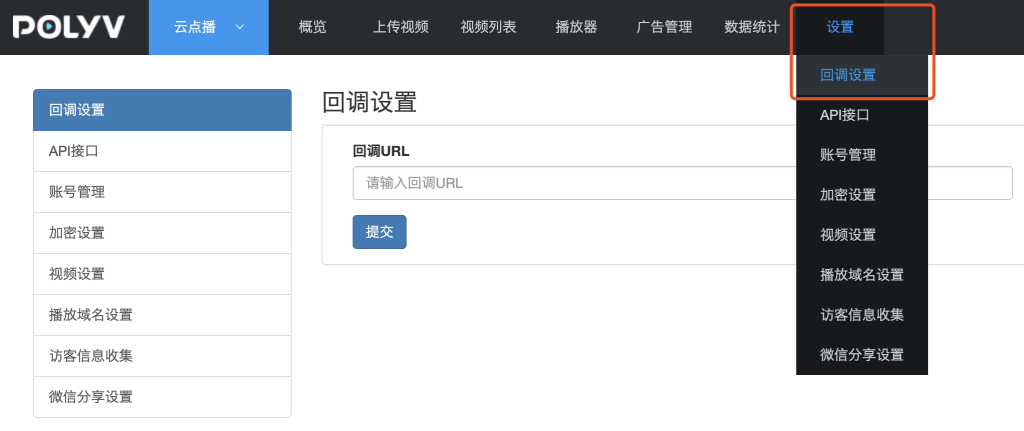
Log in to the Cloud Video on Demand management console, go to Settings --> Callback Settings to configure the callback URL.
Event Types
The currently supported event notification types are as follows:
I. Video Source File Retrieval Success/Failure Notification
After a user creates a retrieval task, a notification is sent each time a video retrieval is completed. HTTP request method: GET.
Event Content
| Name | Description |
|---|---|
| sign | System signature, generated by concatenating the string "restore_success" or "restore_fail" with the taskId, vid, and secretkey, then performing MD5 computation. For example, if the taskId is 16661c08b9564c1ea6f4544ccd568e58, the vid is 1b448be32370f4822ac40fd926112a66_1, and the secretkey is 7UagtQOq2A, the string restore_success16661c08b9564c1ea6f4544ccd568e581b448be32370f4822ac40fd926112a66_17UagtQOq2A is MD5 hashed, resulting in the sign value: f2e19f4250cb773a06bf1a435a8c9795 |
| type | Callback type: restore_success (retrieval success), restore_fail (retrieval failure) |
| vid | Video ID |
| taskId | Task ID |
| url | Video source file download link |
Callback Example
http://demo.ipolyv.cn/callback?sign=f2e19f4250cb773a06bf1a435a8c9795&type=restore_success&vid=1b448be32370f4822ac40fd926112a66_1&url=https%3A%2F%2Fvideo-dl-2.videocc.net%2F1b448be323%2F6%2F1b448be32370f4822ac40fd926112a66.mp4%3Fauth_key%3D1694663401-3iwFnV2uJx-ac59aff03d-c71c8c4e01284d892c2dc9ad1ee57272&taskId=16661c08b9564c1ea6f4544ccd568e58
