Independent Authorization
Feature Path
【My Live】 --> 【Channel Settings】 --> 【Viewing Condition Settings】 --> 【Independent Authorization】
Feature Description
When opening the live streaming viewing page, the URL must carry specified parameters. After the live streaming system verifies the request is legitimate, the user directly enters the live viewing page. The parameters passed by the user are set as the viewer information on the viewing page. The viewer account returned by the interface must be unique, meaning the same account cannot be logged in from two places simultaneously. The account that logged in earlier will be kicked out.
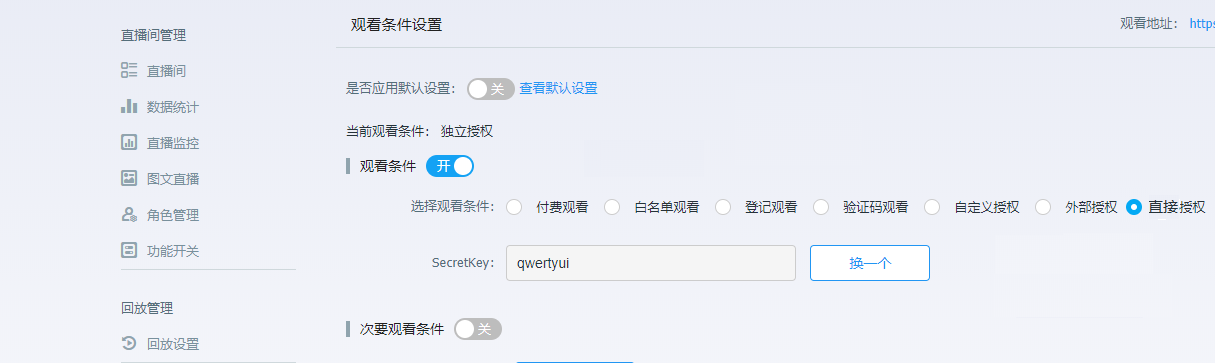
- Secretkey: Used to generate the verification signature.
Detailed Independent Authorization Process
After setting the channel to independent authorization, obtain the secretkey for the user's independent authorization viewing condition via the backend or API interface.
When requesting the Polyv live streaming viewing page, relevant parameters must be included, such as: https://live.polyv.cn/watch/1965681?userid=1b448be323&ts=1498547407000&sign=dd9dc9e42ad7c0204398e925a4ee0f46&nickname=viewerTests&avatar=http://livestatic.videocc.net/assets/wimages/missing_face.png
The live streaming system will compare the value of the
signparameter submitted by the user to determine its validity. After a successful request, the link becomes invalid (sign can only be used successfully once). If valid, the live streaming system will usenickname,userid, andavatarto enter the Polyv live streaming viewing page. The chat area will display the viewer's nickname and avatar. If verification fails, an error page is displayed.
Request Parameter Description
| Parameter Name | Required | Type | Description |
|---|---|---|---|
| userid | true | String | Viewer ID. If a duplicate ID exists, the viewer who logged in first will be kicked out of the live room. [Only supports English uppercase/lowercase letters, numbers, and underscores. Maximum length is 64 characters. Characters exceeding 64 will be truncated and not recorded]. Note that the 'i' in userid is lowercase |
| ts | true | Long | Current 13-digit millisecond timestamp, valid for 3 minutes |
| sign | true | String | Signature for verification. The generation rule is MD5 encryption of secretkey + userid + secretkey + ts |
| nickname | true | String | Viewer nickname, requires URL-safe base64 encoding |
| avatar | false | String | URL of the viewer's avatar |
| vid | false | String | Playback video ID. If you need to play a specific playback video, pass this parameter, e.g., e07738ddd6 This value can be obtained from the Query Video Library List interface's videoId |
| param4 | false | String | Custom parameter for tracking viewer watch logs. Must be base64 encoded first, then URL-encoded |
| param5 | false | String | Custom parameter for tracking viewer watch logs. Must be base64 encoded first, then URL-encoded |
| failRedirectUrl | false | String | URL to redirect to if independent authorization verification fails. If not provided, redirects to the default failure page |
| secretData | false | String | Stores the string of target parameters encrypted using SM2 |
| actor | false | String | Viewer's personalized title |
Parameter Encryption
Supports SM2 encryption. The list of parameters that can be encrypted: userid, nickname, param4, param5
| Parameter Name | Supports Encryption | Type | Description |
|---|---|---|---|
| userid | Y | String | Viewer user ID, encryption optional |
| nickname | Y | String | Viewer nickname, encryption optional |
| param4 | Y | String | Parameter 4, encryption optional |
| param5 | Y | String | Parameter 5, encryption optional |
| secretData | N | String | Stores the encrypted string of target parameters |
Encryption Style
secretData stores the encrypted value. Value before encryption: userid={userid}&nickname={nickname}
watch_url?userid=xx&nickname=xx&ts={ts}&sign=md5(secretkey + userid + secretkey + ts)&secretData=SM2(userid={userid}&nickname={nickname}¶m4={param4}¶m5={param5})
Parameter Assembly
Signature: The actual values of the parameters involved in encryption are used for the signature. The signing method remains unchanged.
Note that after encryption, the parameter length increases. Considering the total length limit of browser GET request parameters, the length of parameter values needs to be controlled. A total parameter length of 1k characters is supported by most browsers.
Decryption
The decrypted parameters will replace the corresponding outer parameter values. If there is no corresponding parameter after decryption or the value is empty and not filled, the original value is retained. Outer parameters can be filled with random values as placeholders, e.g., userid=test&nickname=test¶m4=test¶m5=test
For example:
Scenario 1: SM2(userid={userid}&nickname={nickname}) After decryption, the outer plaintext parameters userid and nickname will be replaced.
Scenario 2: SM2(userid={userid}&nickname={nickname}¶m4={param4}) After decryption, the outer plaintext parameters userid, nickname, and param4 will be replaced.
Scenario 3: SM2(userid={userid}&nickname={nickname}¶m5={param5}) After decryption, the outer plaintext parameters userid, nickname, and param5 will be replaced.
Scenario 4: SM2(userid={userid}&nickname={nickname}¶m4={param4}¶m5={param5}) After decryption, the outer plaintext parameters userid, nickname, param4, and param5 will be replaced.
Code Example (Java)
    //TODO 设置为独立授权的SecretKey
    private static final String DIRECT_SECRET_KEY = "******";

    public static void main(String[] args) throws UnsupportedEncodingException, NoSuchAlgorithmException {
        // TODO 设置直播观看页地址
        //      如果使用定制域名,可在“查询频道信息”接口中获取到频道的观看地址 watchUrl
        //      https://help.polyv.net/index.html#/live/api/v4/channel/operate/get_channel_detail
        String url = "https://live.polyv.cn/watch/";

        //TODO 设置为独立授权的频道号
        String channelId = "2292421";

        //TODO 设置观众id,同一个观众id,后面进入的会把前面的观众挤出频道
        String userId = "sadboy";

        String ts = String.valueOf(System.currentTimeMillis());

        //url安全的base64编码
        String nickname = "保利威";
        nickname = new String(org.apache.commons.codec.binary.Base64.encodeBase64URLSafe(nickname.getBytes(StandardCharsets.UTF_8)), StandardCharsets.UTF_8);

        String avatar = "http://live.polyv.net/assets/images/avatars/9avatar.jpg";
        String sign = DIRECT_SECRET_KEY+userId+DIRECT_SECRET_KEY+ts;
        sign = LiveSignUtil.md5Hex(sign);
        url += channelId+"?userid="+userId+"&ts="+ts+"&sign="+sign+"&nickname="+nickname+"&avatar="+avatar;
        //浏览器直接访问url即可进入直播间
        System.out.println(url);
    }
Code Example (PHP)
<?php
$secretkey = "qwertyui"; //后台secretKey
$userid = "test" . rand(0, 5); //直播的用户ID
$ts = time() * 1000; //当前时间
$sign = md5($secretkey . $userid . $secretkey . $ts); //用于校验的sign
$nickname = urlencode(base64_encode("保利威")); //学员的昵称
$avatar = "http://live.polyv.net/assets/images/avatars/9avatar.jpg"; //学员的头像
$url = "https://live.polyv.cn/watch/108008";
$callbackUrl = $url . "?userid=" . $userid . "&nickname=" . $nickname . "&avatar=" . $avatar . "&ts=" . $ts . "&sign=" . $sign;
?>
<html>
<head>
<meta http-equiv="Content-Type" content="text/html; charset=utf-8"/>
<title>login</title>
</head>
<body>
<div id="btn">
<input type="button" onclick="openurl()" value="独立授权观看" class="btn" >
</div>
<script>
function openurl(){
location.href="<?php
echo $callbackUrl ?>";
};
</script>
</form>
</body>
</html>
Display Effect
http://demo.ipolyv.cn/wfy/directAuth.php
Notes
- Ensure the uniqueness of the submitted
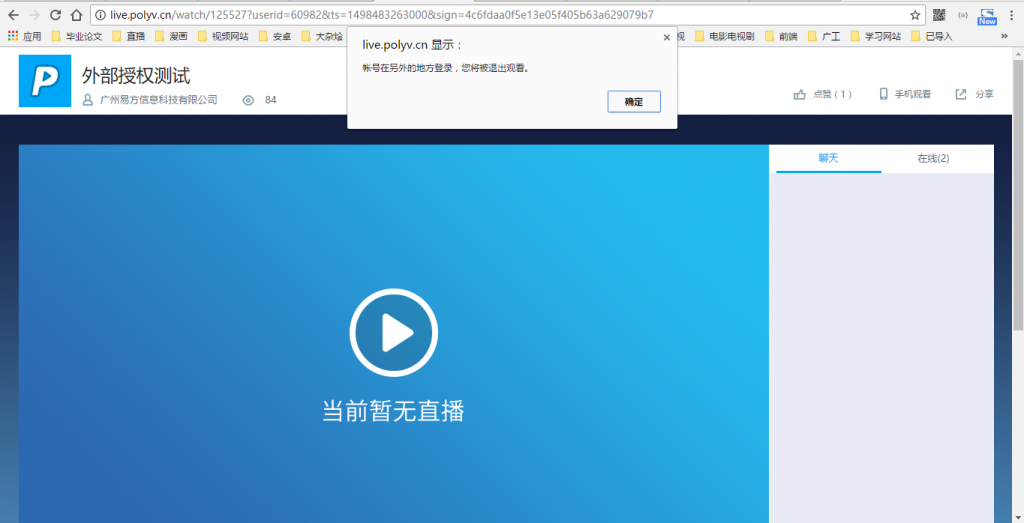
userid. When multiple viewers use the sameuseridto enter the viewing page, the viewer who logged in earlier will be kicked out by the later one. The viewing page will display the message: "Account logged in from another location. You will be logged out of the viewing session." As shown below: