


SM2 Encryption Guide
Updated: 2024-08-14 09:51:53
Algorithm Parameter Description
- Key Pair Generation
- Uses the SM2 default curve sm2p256v1
- SM2 recommended curve parameters (from https://github.com/ZZMarquis/gmhelper))
- Private key is compressed, public key is uncompressed
- Encryption Mode
- Uses C1C2C3 mode
- Encryption result byte[] is converted to Hex string
Public Key Configuration Instructions
Go to the new admin console to configure and view the SM2 public key
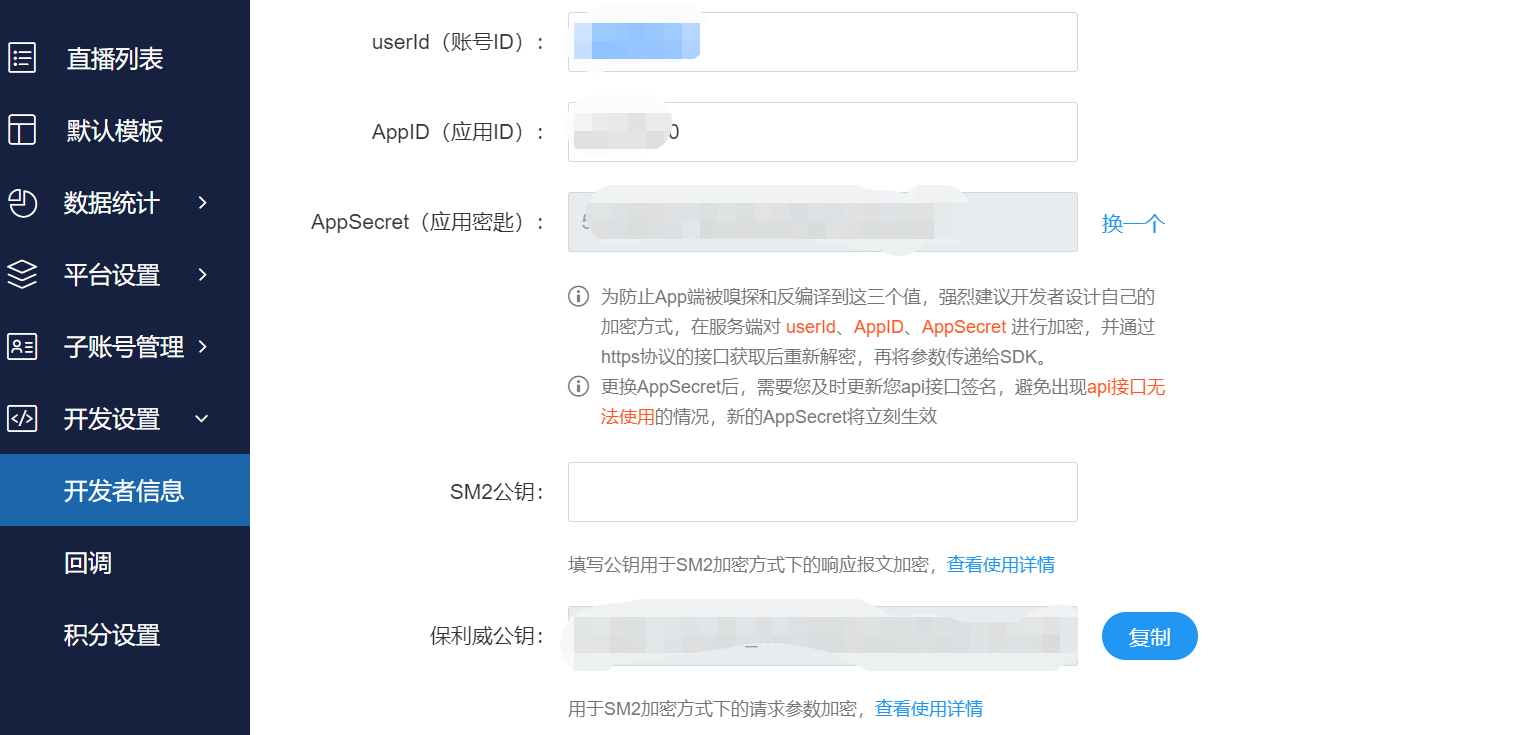
Request Parameter Encryption Instructions
Note: Encrypt using the Polyv SM2 public key
Enabling Request Parameter Encryption
Carry the parameter x-e-type:2 in the request header, where the value 2 indicates SM2 encryption
GET Encrypted Request Parameter Rules
GET request parameter encryption is currently not supported
POST JSON Request Parameter Encryption Rules
- Encrypt the entire JSON message in the body using the Polyv public key SM2
- The POST request body is the encrypted ciphertext
POST FORM Form Request Parameter Encryption Rules
Note: Signature-related parameters appId, timestamp, sign are not encrypted
- Generate the signature sign from the original parameters
- Package the business parameters, excluding the signature verification parameters appId, sign, timestamp, in JSON format
{
    "channelId": 2376543,
    "pageNumber": 1,
    "pageSize": 10
}
- Encrypt the JSON message using the Polyv public key SM2 to obtain the ciphertext ABCDEF
SM2Util.encrypt(respEncryptKey, SM2Engine.Mode.C1C2C3, xparam)
- Remove the pre-encryption business parameters, and add the encryption field xparam=ABCDEF to the form
http://api.polyv.net/xxx?appId=xxx&sign=xxx×tamp=xxx&xparam=ABCDEF
Encrypted Parameter Request Response Description
- When request parameter decryption is successful, the interface responds with the corresponding business code normally
- When request parameter decryption fails, the HTTP response code is 400, with error business code 10001
{
    "code": 400,
    "status": "error",
    "error": {
        "code": 10001,
        "desc": "参数错误"
    },
    "success": false
}
Response Message Encryption Instructions
Note: The user generates an SM2 key pair (keep the private key safe), configures the SM2 public key on the Polyv platform. After enabling response encryption, the data field in the response message will be encrypted.
Enabling Response Parameter Encryption
Carry the parameter encryptResponseType:2 in the request parameters, where the value 2 indicates SM2 encryption
Response Message Encryption Rules
- If no key is configured or an incorrect key is configured, the response result is plaintext without encryption
- Only the data field in the JSON is encrypted when the response code is 200 and the business is successful
- When the response code is not 200 and the business fails, the error is plaintext without encryption
- The user decrypts the response message using the corresponding SM2 key pair
- Example of an encrypted response message
{
    "code": 200,
    "status": "success",
    "data": "043D1BF16CB1C2629348A7B18F9C51036C9466F3E198F75C6ABDE83A428E2893",
    "success": true
}
SM2 Encryption and Decryption Algorithm Example Code
<dependency>
    <groupId>cn.hutool</groupId>
    <artifactId>hutool-all</artifactId>
    <version>5.5.2</version>
</dependency>
<dependency>
    <groupId>org.bouncycastle</groupId>
    <artifactId>bcprov-jdk15on</artifactId>
    <version>1.70</version>
</dependency>
import java.nio.charset.StandardCharsets;
import org.bouncycastle.crypto.engines.SM2Engine;
import org.bouncycastle.jcajce.provider.asymmetric.ec.BCECPublicKey;
import cn.hutool.crypto.BCUtil;
import cn.hutool.crypto.ECKeyUtil;
import cn.hutool.crypto.SmUtil;
import cn.hutool.crypto.asymmetric.KeyType;
import cn.hutool.crypto.asymmetric.SM2;

public class SM2Util {

    /**
     * 生成密钥对
     * @return
     */
    public static SM2KeyPair generateKeyPair() {
        SM2 sm2 = SmUtil.sm2();
        //这里会自动生成对应的随机秘钥对 , 注意! 这里一定要强转,才能得到对应有效的秘钥信息
        byte[] privateKey = BCUtil.encodeECPrivateKey(sm2.getPrivateKey());
        //这里公钥不压缩  公钥的第一个字节用于表示是否压缩  可以不要
        byte[] publicKey = ((BCECPublicKey) sm2.getPublicKey()).getQ().getEncoded(false);
        SM2KeyPair sm2KeyPair = new SM2KeyPair();
        sm2KeyPair.setPrivateKey(Util.byteToHex(privateKey));
        sm2KeyPair.setPublicKey(Util.byteToHex(publicKey));
        return sm2KeyPair;
    }

    /**
     * 加密
     * @param publicKey
     * @param mode
     * @param text
     * @return byte2Hex
     */
    public static String encrypt(String publicKey, SM2Engine.Mode mode, String text) {
        SM2 sm2 = SmUtil.sm2();
        sm2.setPublicKeyParams(ECKeyUtil.toSm2PublicParams(publicKey));
        sm2.setMode(mode);
        byte[] encrypt = sm2.encrypt(text.getBytes(StandardCharsets.UTF_8), KeyType.PublicKey);
        return Util.byteToHex(encrypt);
    }

    /**
     * 解密
     * @param privateKey
     * @param mode SM2Engine.Mode
     * @param text hexString
     * @return
     */
    public static String decrypt(String privateKey, SM2Engine.Mode mode, String text) {
        SM2 sm2 = SmUtil.sm2();
        sm2.setPrivateKeyParams(ECKeyUtil.toSm2PrivateParams(privateKey));
        sm2.setMode(mode);
        byte[] encrypt = sm2.decrypt(Util.hexToByte(text), KeyType.PrivateKey);
        return new String(encrypt);
    }


}
