


直播快速对接方案
Updated: 2026-01-16 10:37:33
Live Streaming Quick Integration Guide
Advantage: Short development cycle, rapid launch.
Overview:
- Fast delivery, approximately 1 week;
- Customers need minimal code to complete all delivery tasks;
- Comprehensive business scenario support, covering all POLYV business scenarios;
- Customer management backend integrates with POLYV's business system via API, Java SDK, and Single Sign-On;
- Uses POLYV's web-based broadcasting and client-based broadcasting for broadcaster-side integration;
- Uses SaaS H5 viewing page for viewer-side integration, does not support business logic or UI customization;
Applicable Scenarios
- Customers with limited technical capabilities;
- Customers needing to quickly achieve a business closed loop;
- Customers without customization requirements;
Business Diagram:
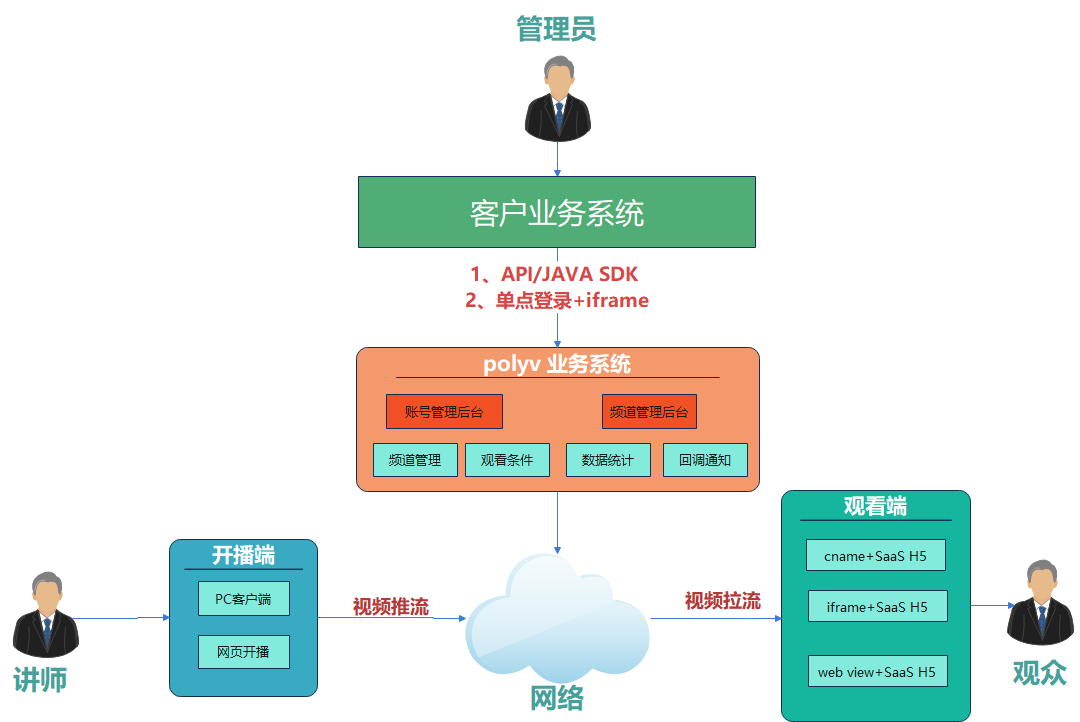
Backend Management
| Platform | Documentation | Description | Example |
|---|---|---|---|
| Single Sign-On | SSO for Account Backend, Channel Backend, Role Backend, Instructor Broadcast Page | Through SSO, customers can connect their business system with the POLYV business system, allowing direct access to the POLYV backend for channel-level and account-level operations without entering a username and password. | SSO DEMO |
| Server API | DOC | Customer business systems can directly integrate with the POLYV business system via API calls. | API Online Test Tool |
| Live Streaming Java SDK | DOC | When developing a backend using Java, integrate the Java SDK for API calls to reduce integration time. (The SDK encapsulates request parameters, signatures, exceptions, etc. See documentation for details.) | Usage Guide |
Broadcaster Side (Stream Push)
| Platform | Entry | Supported Range | Applicable Scenarios |
|---|---|---|---|
| PC Client Broadcasting | Enter via Channel Backend | Supports Windows/Mac systems | Download and start broadcasting directly. Includes a three-in-one client: Live Assistant, Cloud Classroom, and Large Class. |
| Web Broadcasting | Enter via Channel Backend | Supports all platforms, use Chrome web browser for broadcasting. | Provides web-based rapid integration for broadcasting services. |
Viewer Side (Stream Pull)
| Platform | Applicable Scenarios | Documentation Reference |
|---|---|---|
| cname + SaaS H5 | Customers use cname to redirect to the POLYV SaaS viewing page. The domain appears to be the customer's own business system, but it actually points to the POLYV viewing page. | Reference Document |
| web view + SAAS H5 | A lightweight integration solution for mobile apps. The app loads the SaaS viewing page via web view for viewer-side integration. | |
| iframe + SaaS H5 | Customers embed the POLYV SaaS viewing page using an iframe. The domain appears to be the customer's own business system, but the embedded page is the POLYV viewing page. | Reference Document |
