


直播定制化对接方案
Updated: 2026-01-16 10:37:33
Live Streaming Custom Integration Solution
Advantages: Custom development of business logic and UI
Introduction:
- Slower delivery speed, approximately 1 month;
- The client has strong technical capabilities and can implement SDK technical integration and UI layer business logic code writing for each platform;
- The client's management backend integrates with POLYV's business system via API, JAVA SDK, and Single Sign-On;
- Uses POLYV's web-based broadcasting and client-based broadcasting for broadcaster-side integration;
- Uses platform-specific SDKs for viewer-side integration, supporting custom development of business logic and UI;
- SDK features on different platforms may not fully align with the SaaS H5 viewing page; specific issues require case-by-case analysis.
Applicable Scenarios
- Clients with strong technical capabilities;
- Clients who can accept a one-month timeline for business integration;
- Clients with strong requirements for custom business logic and UI development.
Business Diagram
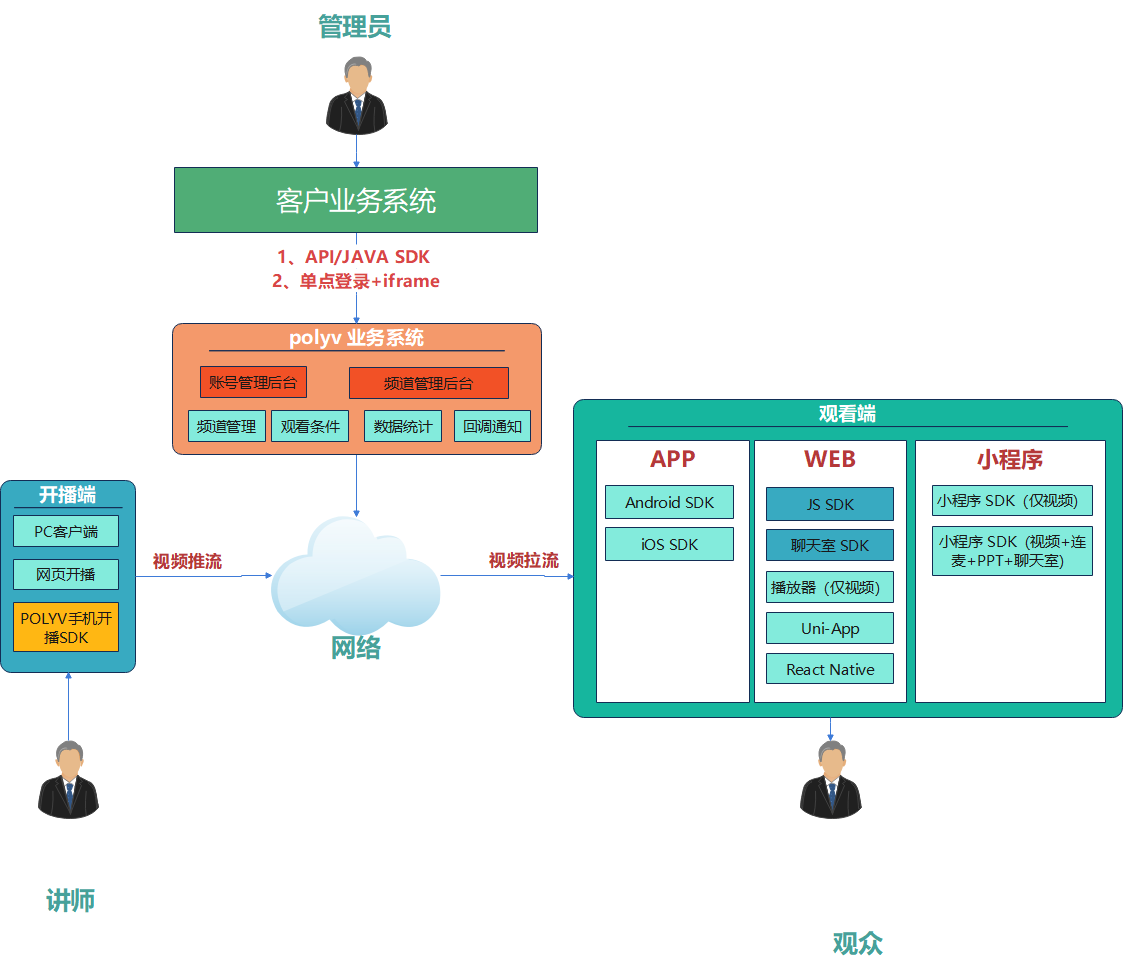
Backend Management
| Platform | Documentation | Usage Instructions | Example |
|---|---|---|---|
| Single Sign-On | Single Sign-On for Account Backend, Channel Backend, Role Backend, Instructor Broadcasting Page | Through Single Sign-On, the client's business system can connect with the POLYV business system. The client system can directly access the POLYV backend for channel-level and account-level operations without entering a username and password. | Single Sign-On DEMO |
| Server API | DOC | The client's business system can directly connect with the POLYV business system via API calls. | API Online Testing Tool |
| Live Java SDK | DOC | When developing a backend using Java, integrate the Java SDK for API calls to reduce integration time. (The SDK encapsulates request parameters, signatures, exceptions, etc. See the documentation for details.) | Usage Instructions |
Broadcaster Side (Streaming Out)
| Platform | Entry | Supported Scope | Applicable Scenario |
|---|---|---|---|
| PC Client Broadcasting | Enter via Channel Backend | Supports Windows/macOS systems | Download and start broadcasting directly. Includes a three-in-one client: Live Assistant, Cloud Classroom, and Large Class. |
| Web Broadcasting | Enter via Channel Backend | Supports all platforms, uses Chrome web broadcasting; | Provides web-based rapid integration for broadcasting capabilities. |
| Polyv Mobile Broadcasting SDK | Integration | Uses multi-scenario Android SDK for instructor broadcasting/streaming. | Provides a rapid integration solution for Android live streaming, Documentation. |
| Polyv Mobile Broadcasting SDK | Integration | Uses multi-scenario iOS SDK for instructor broadcasting/streaming. | Provides a rapid integration solution for iPhone live streaming, Documentation. |
Viewer Side (Streaming In)
| Platform | Documentation | Applicable Scenario | Description | |
|---|---|---|---|---|
| APP | Android | Use the multi-scenario Android SDK to implement live streaming viewing in an app. | Provides a rapid integration solution for Android live streaming, including chat room and some interactive features. Highly customizable and allows secondary development. You can modify the UI style based on the default DEMO provided by POLYV to implement custom features. | |
| iOS | Use the multi-scenario iOS SDK to implement live streaming viewing in an app. | Provides a rapid integration solution for iPhone live streaming, including chat room and some interactive features. Highly customizable and allows secondary development. You can modify the UI style based on the default DEMO provided by POLYV to implement custom features. | ||
| Uni-app | Cloud Classroom / Live Commerce. |
iOS and Android offline packaging project for building custom base frameworks or official releases for uni-app projects (including multi-scenario plugins). DCloud Plugin Download |
||
| WEB | Viewing Page SDK (Recommended) | Consistent with the POLYV SaaS viewing page, includes player, chat room, PPT, interactive features, etc. | The Viewing Page SDK is a logic-layer SDK. Building a feature-rich live viewing page quickly based on this SDK can be challenging. Therefore, the POLYV development team provides an open-source live viewing page project based on this SDK. Integrators can refer to the project code or perform secondary development based on it. | |
| Player (Video Only) | Implements only the video live streaming function, without chat room interface. | POLYV Live provides quick integration code to help you rapidly implement the live player. | ||
| Mini Program | Mini Program Playback Plugin | DOC | Mini Program Playback Plugin | The POLYV Cloud Live Mini Program Playback Plugin provides an out-of-the-box live player, offering strong support for quickly integrating live streaming capabilities into Mini Programs. |
| Mini Program SDK (Playback + Chat + Co-hosting + Interaction) | DOC | Mini Program SDK (Playback + Chat + Co-hosting + Interaction) | Complete functionality, provides UI layer source code, allows flexible combination of business logic. | |
