


External Authorization
Feature Overview
When you need viewers to log into your organization's user system and pass verification before entering the live streaming page, external authorization can be used. The verification of whether a viewer can watch is implemented by your organization, while the viewing page opened after successful verification is implemented by Polyv.
For verified viewers, the URL to open the live streaming page must include specified parameters. After the live streaming system verifies the request's legitimacy, it will call the custom authorization verification API set by the customer in the backend. Only after passing both verifications can the viewer enter the live streaming page. The viewer account returned by the API must be unique, meaning the same account cannot be logged in from two locations simultaneously; the earlier logged-in account will be kicked out.
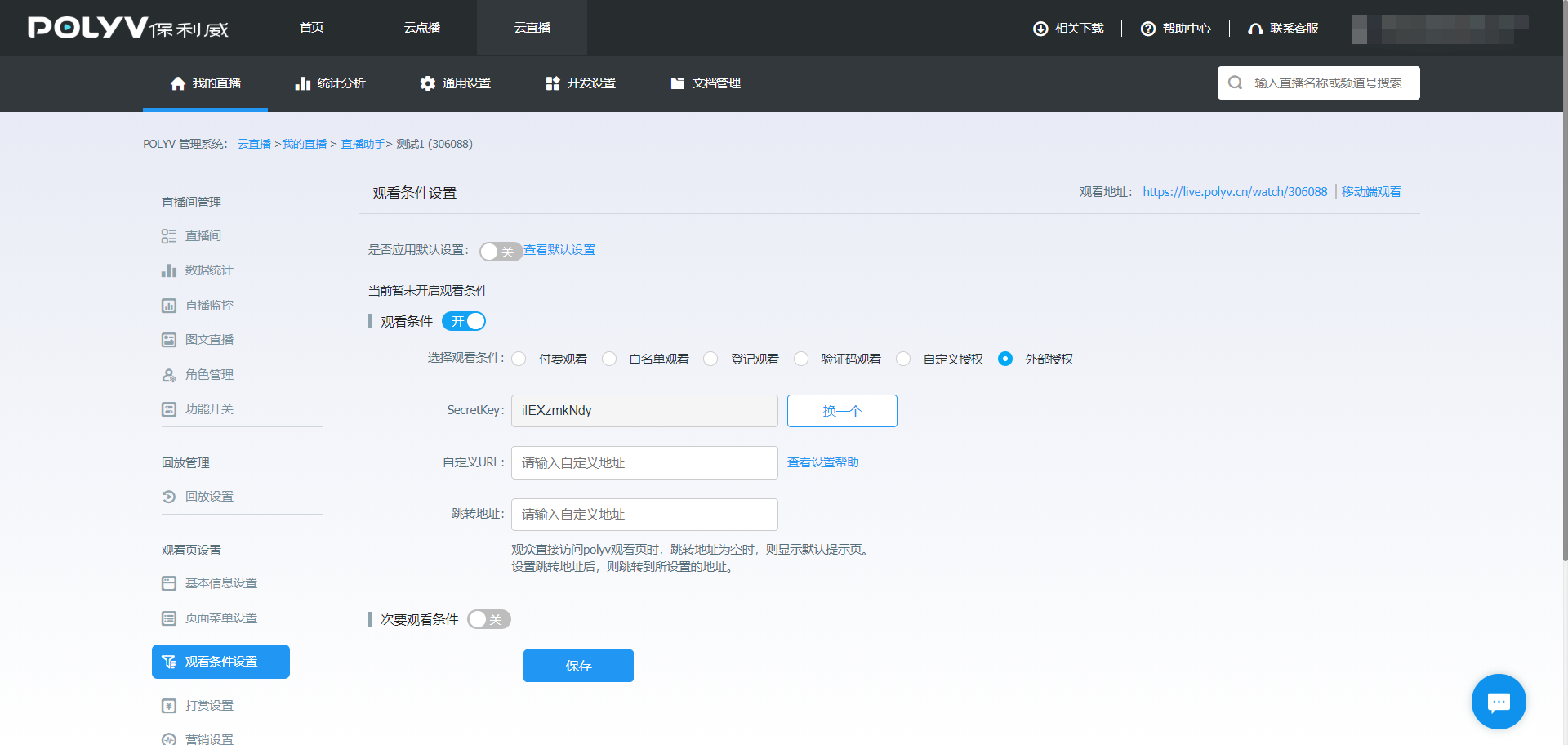
- Secretkey: Used to generate the signature for verification.
- Custom URL: The API endpoint used for external authorization verification.
- Redirect URL: When viewers directly access the Polyv viewing page, they will be redirected to this address. If the redirect URL is empty, a default prompt page will be displayed.
Display Effect
https://demo.ipolyv.cn/chenwb/open.php
Detailed External Authorization Process
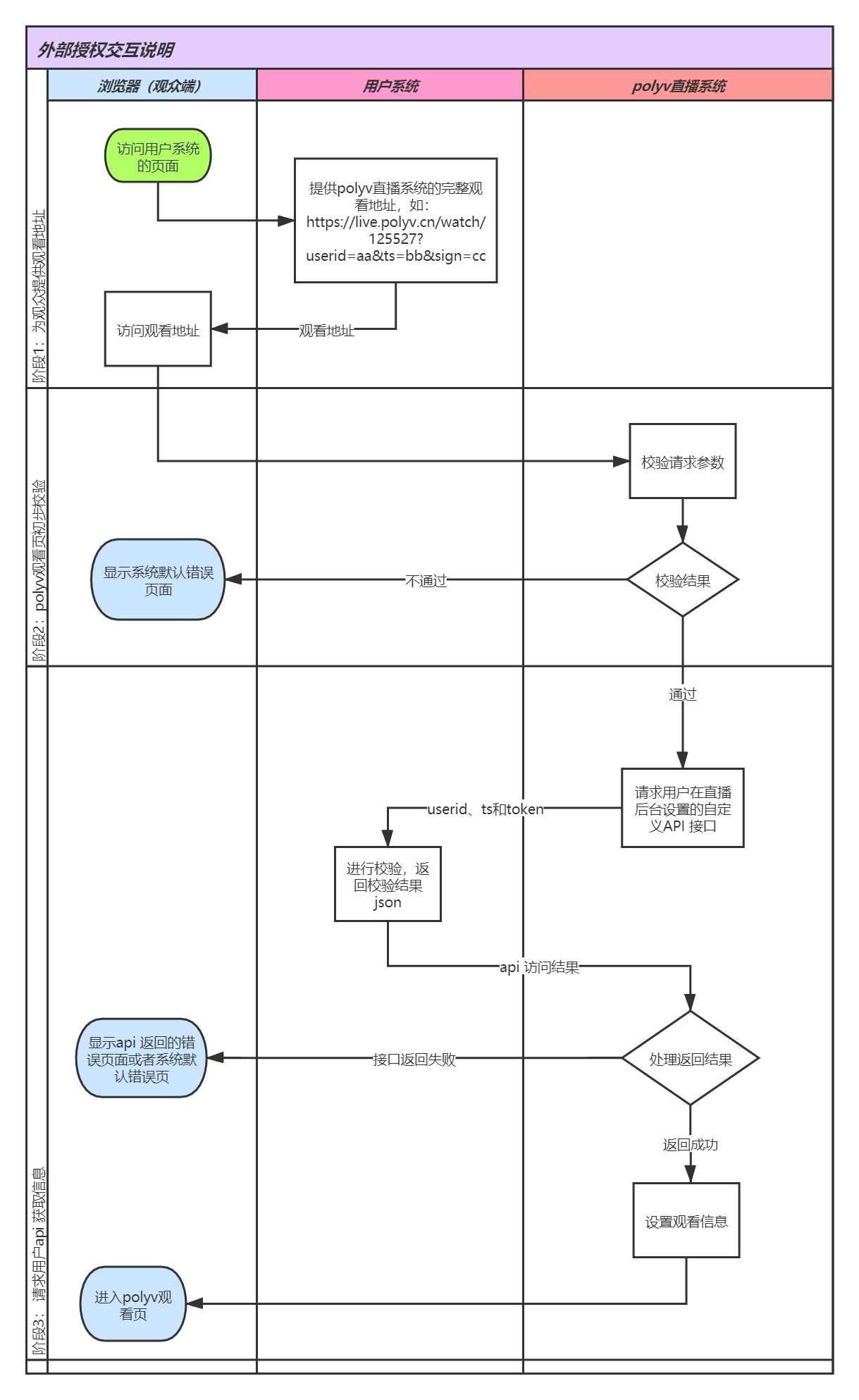
Fill in the user's authorization verification API endpoint in the Custom URL field. This must be a complete URL without parameters (cannot be a local server address like
localhost, and must not contain a?). Example: http://myWebsite.com/authWhen requesting the Polyv live streaming viewing page, the following parameters must be included:
userid(User ID, supports only English letters, numbers, and underscores),ts(current time in milliseconds timestamp), andsign(signature for verification, generated by MD5 encryption ofsecretkey + userid + secretkey + ts). Example: https://live.polyv.cn/watch/125527?userid=6b3a43&ts=1498547407000&sign=dd9dc9e42ad7c0204398e925a4ee0f46The live streaming system will perform MD5 encryption on the string
secretkey + userid + secretkey + tsand compare it with the value of thesignparameter submitted by the user to determine validity. After a successful request, the link becomes invalid (thesigncan only be used successfully once). If valid, the live streaming system will call the user's API endpoint, passing theuserid,ts,channelId, andtokenparameters via a GET request. If invalid, an error message will be displayed.After the user's API endpoint receives the
userid,ts, andtokenparameters, it performs signature verification. If verification passes, it returns the student's relevant information and the optional viewing permissionwatchAccess(see "Response Parameter Description for User System Returning Viewer Information") to the live streaming system.The live streaming system receives the data returned by the user's API endpoint. If verification is successful, it proceeds to the Polyv live streaming viewing page, where the chat area will display the student's nickname and avatar. If
watchAccessistrial, the live streaming system will determine whether to enter a trial based on the channel's external authorization trial configuration. If verification fails, an error message will be displayed.
Interaction Diagram
Parameter Description
Parameters for Requesting the Viewing Page
The user submits the following parameters to the live streaming viewing page (e.g., https://live.polyv.cn/watch/125527?userid=test&ts=1565948760108&sign=b0b6eb22b6fa5e5684873052c27a6cef)). The live streaming system will verify the sign to determine its validity. After a successful request, the link becomes invalid (the sign can only be used successfully once).
| Parameter | Required | Description |
|---|---|---|
| userid | true | Viewer ID. Duplicate IDs will cause the earlier viewer to be kicked out. [Supports only English letters, numbers, and underscores, max 64 characters. Characters beyond 64 will be truncated and not recorded.] |
| ts | true | 13-digit millisecond timestamp |
| sign | true | Signature for user verification (lowercase letters). Encryption rule: MD5(secretkey + userid + secretkey + ts) |
| vid | false | Playback video ID. Required if you want to play a specific playback video, e.g., e07738ddd6. This value can be obtained from the videoId returned by the Query Video Library List API. |
Parameters for the Viewing Page Requesting Viewer Information API
The viewing page requests the custom URL set by the user in the backend to obtain viewer information. The following parameters are included in the request.
| Parameter | Required | Description |
|---|---|---|
| userid | true | Viewer ID. Duplicate IDs will cause the earlier viewer to be kicked out. [Supports only English letters, numbers, and underscores, max 64 characters.] |
| channelId | true | Channel ID |
| ts | true | Current time in 13-digit millisecond timestamp |
| token | true | Signature for verification. Generation rule: MD5 encryption of the string secretkey + userid + secretkey + ts (lowercase letters). |
Response Parameter Description for User System Returning Viewer Information
| Field | Type | Required | Description |
|---|---|---|---|
| status | int | true | Request result. 1 indicates success, 0 indicates failure. |
| userid | string | true | Viewer ID. [Supports only English letters, numbers, and underscores, max 64 characters.] |
| nickname | string | true | Viewer nickname |
| marqueeName | string | false | Custom marquee field. This field will be passed back via the code parameter in URL Custom Marquee. |
| avatar | string | true | Viewer avatar URL. Avatar size: 200x200, file size not exceeding 30KB. |
| actor | string | false | Viewer title |
| actorFColor | string | false | Viewer title font color. Optional. Use CSS Hex value with #. |
| actorBgColor | string | false | Viewer title background color. Optional. Use CSS Hex value with #. |
| param4 | string | false | Custom parameter for tracking viewer watch logs. |
| param5 | string | false | Custom parameter for tracking viewer watch logs. |
| errorUrl | string | false | Redirect URL when the request fails (will include channelId and userid). |
| userTags | string array | false | Viewer business tags, used for targeted questionnaire pop-up matching (only effective in external authorization scenarios). Supports one or more tags. After the customer creates a questionnaire and configures matching conditions, viewers carrying any matching tag will see the corresponding questionnaire pop-up. If no tag is carried or the field is empty, no pop-up occurs. |
| watchAccess | string | false | External authorization viewing permission. allow: Full viewing; trial: Determines whether to enter a trial based on the channel's external authorization trial configuration. If not passed, empty, or other values, it is treated as allow. This field only takes effect when status is 1. |
Response Examples
Success Example
{
    "status":1,
    "userid":"2qwerty",
    "nickname":"testNick",
    "actor":"paul",
    "actorFColor":"#123123",
    "actorBgColor":"#FFFFFF",
    "param4":"param4test",
    "userTags":["vip","registered"],
    "watchAccess":"trial",
    "avatar":"http://live.polyv.net/assets/images/avatars/9avatar.jpg"
}
Error Example
{
    "status":0,
    "errorUrl":"http://test.com"
}
External Authorization Trial
The channel can configure the external authorization trial switch, trial duration, trial validity end time, and redirect URL after the trial ends via the Modify Channel Information API. The corresponding fields are as follows:
| Field | Description |
|---|---|
| extTrialWatchEnabled | External authorization trial switch. Y: Enabled, N: Disabled. |
| extTrialWatchTime | Trial duration, in minutes. |
| extTrialWatchEndTime | Trial validity end time. If not passed, it means permanently valid. |
| extTrialRedirectUrl | Redirect URL after the trial is exhausted. |
The above fields belong to the channel configuration and do not need to be returned in the customer's external authorization API response. The customer's external authorization API only needs to express the current viewer's viewing permission via watchAccess:
| watchAccess | Handling Method |
|---|---|
| allow | Full viewing, not subject to external authorization trial duration limits. |
| trial | Determines whether to enter a trial based on the channel's external authorization trial configuration. |
| Not passed, empty, or other values | Treated as allow, maintaining the original external authorization logic. |
The priority of status is higher than watchAccess: If status is not 1, it is still treated as an external authorization failure. watchAccess only takes effect when status is 1. If watchAccess is trial but the channel has not enabled the external authorization trial, the trial configuration has expired, or the configuration is incomplete, the trial restriction will not be applied.
Status Refresh After Payment or Business Completion
After the customer completes payment, registration, information supplementation, or authentication, the viewer should be able to request the customer's external authorization API again and receive watchAccess=allow. For example:
{
    "status":1,
    "userid":"2qwerty",
    "nickname":"testNick",
    "watchAccess":"allow",
    "avatar":"http://live.polyv.net/assets/images/avatars/9avatar.jpg"
}
Within the same browser session, if a trial record already exists for the current live stream, when the viewer returns to the original viewing page and re-fetches the channel viewing information, the live streaming system will request the customer's external authorization API again. This refresh does not require the trial duration to be exhausted, nor does it require the channel to still be live. When the customer returns allow, the viewer switches to full viewing. If trial is returned or the API call fails, the current trial status is maintained.
The customer's external authorization API should support repeated, idempotent calls and query the latest business status based on userid. Repeated refreshes within a short period may be merged, and the customer should not rely on each viewing page request generating an external authorization callback. If the same browser session is still valid, there is no need to regenerate a viewing address with ts and sign. If the session expires, the browser changes, or the device changes, the complete external authorization process must be re-executed.
Code Example (Java)
Note: LiveSignUtil belongs to the Live SDK. If you are not using the Live SDK, you can use the "MD5 Signature Method" in point 3 below.
- User System Generates Viewing Link
    public static void main(String[] args) {
        //TODO 设置频道号
        String channelId = "2275495";

        //TODO 设置externalKey
        String secret = "";

        // TODO 设置直播观看页地址
        //      如果使用定制域名,可在“查询频道信息”接口中获取到频道的观看地址 watchUrl
        //      https://help.polyv.net/index.html#/live/api/v4/channel/operate/get_channel_detail
        String url = "https://live.polyv.cn/watch/"+channelId;

        // TODO 根据实际情况设置userid
        String userid = "sadboy";

        String ts = String.valueOf(System.currentTimeMillis());
        String signText = secret+ userid +secret+ts;
        try {
            String sign = LiveSignUtil.md5Hex(signText);
            url += "?userid="+userid+"&ts="+ts+"&sign="+sign;
            log.info(url);
        } catch (NoSuchAlgorithmException e) {
            e.printStackTrace();
        } catch (UnsupportedEncodingException e) {
            e.printStackTrace();
        }
    }
- User Server Verifies Polyv Live System Callback
@Slf4j
@Controller
@RequestMapping(value = "/polyv")
public class PolyvController {

//TODO 修改secretKey
private static final String secret = "******";

    @GetMapping("external")
    @ResponseBody
    public Map<String, Object> external(String channelId,String userid, Long ts, String token) {
        Assert.assertNotBlack(userid);
        Assert.assertNotBlack(token);
        Assert.assertNotNull(ts);
        HashMap<String, Object> map = new HashMap<>();
        long timeMillis = System.currentTimeMillis();
        long diffTime = Math.abs(timeMillis - ts);
        //1、时间戳判断
        if (diffTime > 5 * 60 * 1000) {
            log.error("时间戳验证错误");
            map.put("status", 0);
            //抛出异常时,如果设置errorUrl,则会跳转到 errorUrl ,如果未返回 errorUrl,则先查询 外部授权参数
            // externalRedirectUri,externalRedirectUri不为空则跳转externalRedirectUri地址,externalRedirectUri为空则跳转保利威默认页面
            map.put("errorUrl", "https://www.polyv.net");
            return map;
        }
        //2、签名判断
        String signText = secret + userid + secret + ts;
        String sign = null;
        try {
            sign = LiveSignUtil.md5Hex(signText);
        } catch (NoSuchAlgorithmException e) {
            e.printStackTrace();
        } catch (UnsupportedEncodingException e) {
            e.printStackTrace();
        }
        if (sign == null || !sign.equals(token)) {
            log.error("签名验证错误");
            map.put("status", 0);
            //抛出异常时,如果设置errorUrl,则会跳转到 errorUrl ,如果未返回 errorUrl,则先查询 外部授权参数
            // externalRedirectUri,externalRedirectUri不为空则跳转externalRedirectUri地址,externalRedirectUri为空则跳转保利威默认页面
            map.put("errorUrl", "https://www.polyv.net");
            return map;
        }
        //TODO 业务逻辑处理,后续需根据具体需求进行数据库操作
        //3、正常返回
        map.put("status", 1);
        map.put("userid", userid);
        map.put("nickname", "保利威测试用户");
        map.put("marqueeName", "保利威测试跑马灯");
        map.put("actor", "学生");
        map.put("actorFColor", "#2469f3");
        map.put("actorBgColor", null);
        map.put("param4", null);
        map.put("param5", null);
        // 未完成付费或业务流程时返回trial,完成后返回allow
        map.put("watchAccess", "trial");
        map.put("avatar", "https://help.polyv.net/favicon.ico");
        return map;
    }


}
- MD5 Signature Method
    /**
     * 对字符串做MD5加密,返回加密后的字符串。
     * @param text 待加密的字符串。
     * @return 加密后的字符串。
     * @throws NoSuchAlgorithmException 签名异常
     *  @throws UnsupportedEncodingException 编码异常
     */
    public static String md5Hex(String text) throws NoSuchAlgorithmException, UnsupportedEncodingException {

            MessageDigest messageDigest = MessageDigest.getInstance("MD5");
            byte[] inputByteArray = text.getBytes(LiveConstant.UTF8);
            messageDigest.update(inputByteArray);
            byte[] resultByteArray = messageDigest.digest();
            return byteArrayToHex(resultByteArray).toLowerCase();

    }

    /**
     * 将字节数组换成成16进制的字符串
     * @param byteArray 字节
     * @return 字符串
     */
    public static String byteArrayToHex(byte[] byteArray) {
        // 初始化一个字符数组用来存放每个16进制字符
        char[] hexDigits = {'0', '1', '2', '3', '4', '5', '6', '7', '8', '9', 'A', 'B', 'C', 'D', 'E', 'F'};
        // new一个字符数组,这个就是用来组成结果字符串的(一个byte是八位二进制,也就是2位十六进制字符(2的8次方等于16的2次方))
        char[] resultCharArray = new char[byteArray.length * 2];
        // 遍历字节数组,通过位运算(位运算效率高),转换成字符放到字符数组中去
        int index = 0;
        for (byte b : byteArray) {
            resultCharArray[index++] = hexDigits[b >>> 4 & 0xf];
            resultCharArray[index++] = hexDigits[b & 0xf];
        }
        // 字符数组组合成字符串返回
        return new String(resultCharArray);
    }
Code Example (PHP)
<?php
header("Content-type:application/json;charset=UTF-8"); //媒体格式类型为JSON数据格式
$secretkey = "aDrOt0Cpy8";
$userid    = isset($_GET["userid"]) ? $_GET["userid"] : "";
$ts        = isset($_GET["ts"]) ? $_GET["ts"] : "";
$channelId = isset($_GET["channelId"]) ? $_GET["channelId"] : "";
$token     = isset($_GET["token"]) ? $_GET["token"] : "";
$sign      = md5($secretkey . $userid . $secretkey . $ts);

//用户进行授权验证,返回对应的数据(json格式)
if ($sign == $token) {
    //验证正确
    $array1 = array(
        "status"   => 1, //返回状态
        "userid"   => $userid, //学员唯一标识
        "nickname" => "保利威", //学员昵称
        "marqueeName" => "polyv", //自定义跑马灯字段
        "avatar"   => "http://live.polyv.net/assets/images/avatars/9avatar.jpg", //学员头像
        "actor"   => "VIP",  // 学员头衔,可以不传递
        "actorFColor"   => "#5C96E5",  // 学员头衔字体颜色,可以不传递
        "actorBgColor"   => "#FFFFFF",  // 学员头衔背景颜色,可以不传递
        "watchAccess" => "trial" // 未完成付费或业务流程时返回trial,完成后返回allow
    );
    $json1 = json_encode($array1);
    echo $json1;
} else {
    //验证错误
    $array0 = array(
        "status"   => 0,
        "errorUrl" => "http://xxx.xx.xxxx/error.html", //验证错误跳转的自定义页面
    );
    $json0 = json_encode($array0);
    echo $json0;
}
Important Notes
- Ensure the uniqueness of the
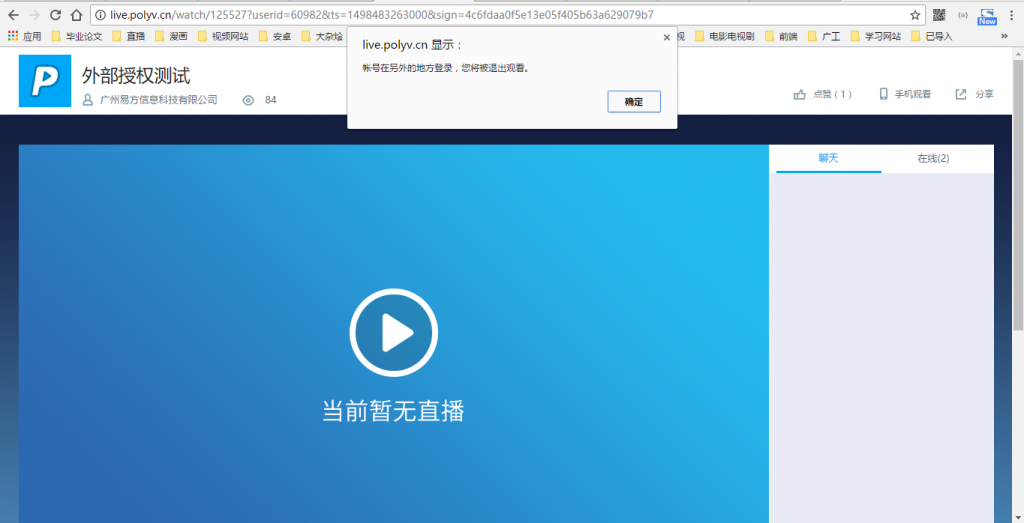
useridreturned by the custom verification API. If multiple viewers use the sameuseridto enter the viewing page, the earlier logged-in viewer will be kicked out by the later one. The viewing page will display the message: "Account logged in from another location. You will be logged out." As shown below:
The custom verification API endpoint must be a complete URL address and cannot be a local server address like
localhost.The data format returned by the custom verification API to the live streaming system must be JSON.
If both
nicknameandmarqueeNameare passed,marqueeNamewill be used as the statistical field for the user nickname in the watch logs.watchAccessonly takes effect whenstatusis1. The customer's API should support repeated, idempotent calls and return the latest viewing permission based onuserid.
Error Messages
- user not found: Error requesting the custom verification API, or the API returned an incorrect format.
- invalid sign: Signature error. The generation rule for
signis MD5 encryption ofsecretkey + userid + secretkey + ts. - sign expired: Signature expired. Each
signcan only be used once and must be regenerated after use.
