


Custom Authorization
Feature Path
我的直播 --> 频道设置 --> 观看条件设置 --> 自定义授权
Feature Description
When a live streaming viewing page is opened, the live streaming system calls the customer system's verification interface. The customer defines the verification logic. Only after successful verification can the user access the Polyv live streaming viewing page. The viewer account returned by the interface is unique, meaning the same account cannot be logged in from two locations simultaneously. The earlier logged-in account will be kicked out.
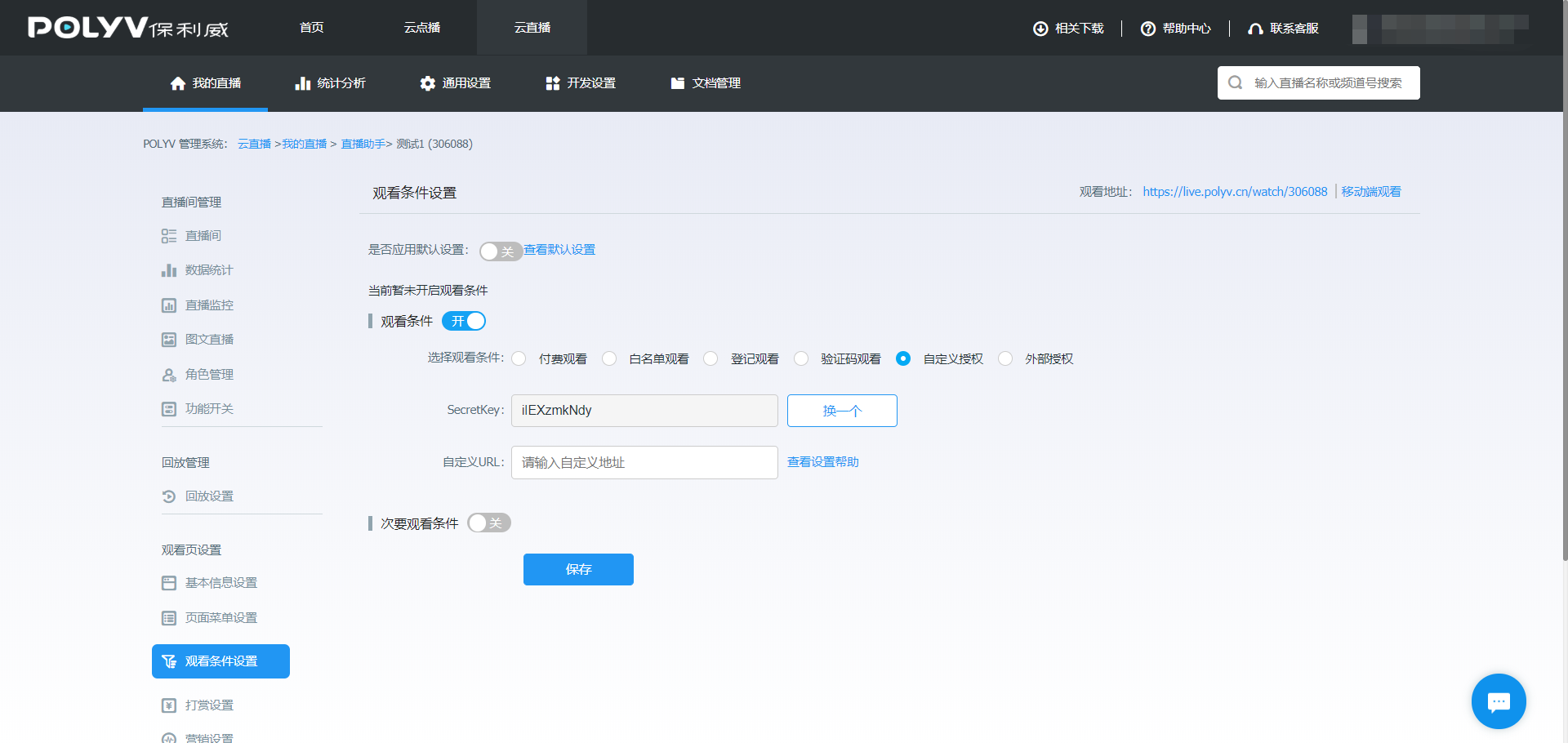
- Secretkey: Used to generate the verification signature.
- Custom URL: The API endpoint for custom authorization verification.
Detailed Custom Authorization Flow
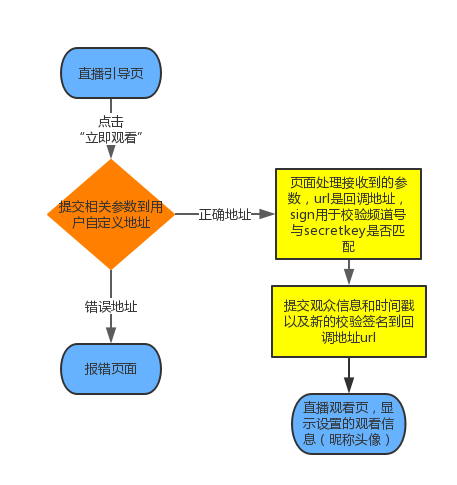
Enter your authorization verification API endpoint in the Custom URL field. Provide a complete URL without parameters (cannot be a local server address like localhost, and must not contain a
?). Example:http://myWebsite.com/authThe live streaming system submits parameters including
id(live channel ID),ts(current time in milliseconds),sign(verification signature), andurl(callback URL) to your custom API endpoint. You must perform MD5 encryption on the stringsecretkey + id + secretkey + tsand compare the result with thesignparameter value to verify legitimacy.After passing verification and your custom logic, your system submits parameters including
userid(unique viewer identifier, supports only English letters, numbers, and underscores),nickname(nickname),avatar(avatar),actor(user title name, optional),actorFColor(user title font color, optional, use CSS Hex value with#),actorBgColor(user title background color, optional, use CSS Hex value with#),vid(playback video ID),ts(current time in milliseconds), andsign(verification signature) to the callback URL.The live streaming system verifies the signature and determines whether to allow the viewer to watch. Upon successful verification, the viewer enters the live streaming page, and the chat area displays the viewer's nickname and avatar. After one successful request, the link becomes invalid.
Flowchart below
Submitted Parameters Description
| Parameter | Description |
|---|---|
| id | Live channel ID, e.g., 10000 |
| ts | Current time in milliseconds (long integer), e.g., 1466648001977 |
| sign | Verification signature, generated by MD5 encryption of the string secretkey + id + secretkey + ts |
| url | Callback URL address; after verification and processing, the user is redirected to this URL |
| vid | Playback video ID, optional. Submitted to the custom address when accessing the viewing page via a playback link, e.g., e07738ddd6 |
The live streaming system submits the above parameters to your custom API endpoint. You must perform MD5 encryption on the string secretkey + id + secretkey + ts and compare the result with the sign parameter value to verify legitimacy.
Callback URL Parameters Description
| Parameter | Description |
|---|---|
| userid | User ID. If duplicate IDs exist, the earlier logged-in viewer is kicked out. [Supports only English letters, numbers, and underscores, max 64 characters. Characters beyond 64 are truncated and not recorded.] |
| nickname | The user's nickname, base64-encoded and then URL-encoded. Note: The nickname before encoding must not contain characters like &, <, ", ', or XSS scripts, otherwise it will be escaped. |
| marqueeName | Custom marquee field, base64-encoded and then URL-encoded. This field is returned via the code parameter in URL Custom Marquee. |
| avator | User avatar, complete image URL string. |
| actor | User title name, optional. |
| actorFColor | User title custom font color, optional. |
| actorBgColor | User title custom background color, optional. |
| vid | Playback video ID, optional. Example: e07738ddd6. This value can be obtained from the videoId returned by the Query Video Library List API. |
| ts | Current system time in milliseconds (long integer), e.g., 1466648001977. |
| sign | Verification signature, generated by MD5 encryption of the string secretkey + id + secretkey + ts + secretkey + userid. |
After passing the first verification step, your interface must submit the above parameters to the callback URL. The live streaming system verifies the signature and determines whether to allow the user to watch. After one successful request, the link becomes invalid.
Code Example (Java)
Note: LiveSignUtil is part of the Live SDK. If not using the Live SDK, refer to the "MD5 Signature Method" in the second point below.
@Slf4j
@Controller
@RequestMapping(value = "/polyv")
public class PolyvController {

    private static final String SECRET = "******";

    @GetMapping("custom")
    public String custom(String id, Long ts, String sign, String url) throws UnsupportedEncodingException {
        Assert.assertNotBlack(id);
        Assert.assertNotNull(ts);
        Assert.assertNotBlack(sign);
        Assert.assertNotBlack(url);
        long timeMillis = System.currentTimeMillis();
        long diffTime = Math.abs(timeMillis - ts);
        //1、时间戳判断
        if (diffTime > 5 * 60 * 1000) {
            log.error("时间戳验证错误");
            return "";
        }
        String signText = SECRET + id + SECRET + ts;
        try {
            signText = LiveSignUtil.md5Hex(signText);
        } catch (NoSuchAlgorithmException e) {
            e.printStackTrace();
        } catch (UnsupportedEncodingException e) {
            e.printStackTrace();
        }
        if (signText == null || !signText.equals(sign)) {
            return "";
        }
        String viewerId = "sadboy";
        String nickname = URLEncoder.encode(new BASE64Encoder().encode("保利威".getBytes(StandardCharsets.UTF_8)), "GBK");
        String marqueeName = URLEncoder.encode(new BASE64Encoder().encode("跑马灯".getBytes(StandardCharsets.UTF_8)),
                "GBK");
        String avatar = "http://live.polyv.net/assets/images/avatars/9avatar.jpg"; //学员的头像
        String mySign = SECRET + id + SECRET + timeMillis + SECRET + viewerId;
        try {
            mySign = LiveSignUtil.md5Hex(mySign);
        } catch (NoSuchAlgorithmException e) {
            log.error("签名异常", e);
        }
        url += "?userid=" + viewerId + "&nickname=" + nickname + "&marqueeName=" + marqueeName + "&avatar=" + avatar +
                "&ts=" + timeMillis + "&sign=" + mySign;
        return "redirect:" + url;
    }

}
Code Example (PHP)
<?php
$secretkey = "jlw42byyJ6"; //后台secretKey,在自定义授权地址设置页面
$id        = $_GET["id"]; //直播的频道id
$ts        = $_GET["ts"]; //当前时间
$sign      = $_GET["sign"]; //用于检验的签名
$url       = $_GET["url"]; //回调的url
$md5       = md5($secretkey . $id . $secretkey . $ts); //若md5字符串与sign不符合,则不做任何处理
if (!($sign == $md5)) {
    return;
}
$userid       = "eciyhturt8"; //学员唯一标识
$nickname     = urlencode(base64_encode("保利威")); //学员的昵称
$marqueeName     = urlencode(base64_encode("polyv")); //自定义跑马灯内容
$avatar       = "http://live.polyv.net/assets/images/avatars/9avatar.jpg"; //学员的头像
$callbackTs   = time() * 1000; //当前的系统时间
$callbackSign = md5($secretkey . $id . $secretkey . $callbackTs . $secretkey . $userid); //用于检验的签名
$callbackUrl  = $url . "?userid=" . $userid . "&nickname=" . $nickname . "&marqueeName=" . $marqueeName. "&avatar=" . $avatar . "&ts=" . $callbackTs . "&sign=" . $callbackSign; //新的直播页面url
//打开新的直播页面url
echo "<script language='javascript' type='text/javascript'>location.href='" . $callbackUrl . "'</script>"
?>
Display Effect
http://live.polyv.cn/watch/104400
Important Notes
- Ensure the uniqueness of the
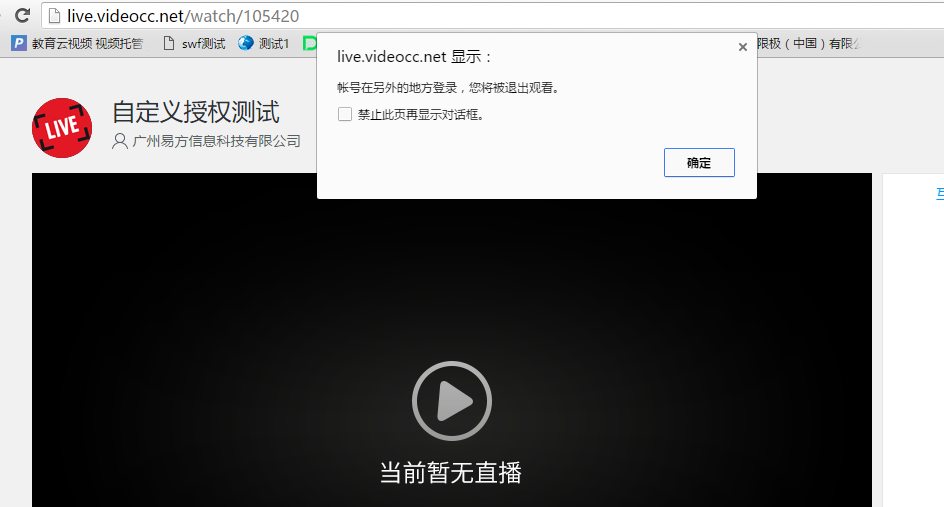
useridreturned by your custom verification interface. If multiple viewers use the sameuseridto enter the viewing page, the earlier logged-in viewer will be kicked out by the later one. The viewing page will display: "Account logged in from another location. You will be logged out." As shown below:
The viewer's nickname must be base64-encoded and then URL-encoded; otherwise, the nickname may display garbled characters on the viewing page.
The viewer's nickname cannot be empty. If empty, the Polyv system will use the default nickname
xxx viewer/number.
