


直播服务端 API 概述
Live Subtitle Real-time Callback Integration Guide
Once configured in the management console, the system will send a callback request to the specified URL when a batch of subtitle data is generated or aggregated, pushing the subtitle content to your server.
The backend configuration is shown in the image below:
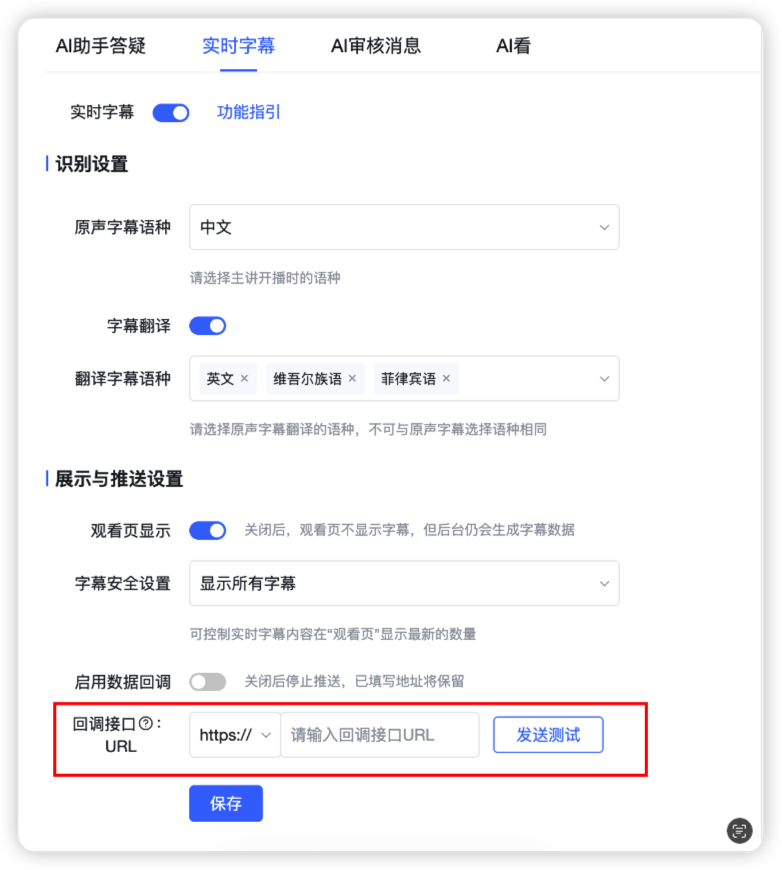
How to Fill in the callbackUrl
- Content: A complete URL accessible from the public internet, e.g.,
https://api.example.com/polyv/subtitles/callback - Request Method: Must support
POST - Data Format: Must support parsing
multipart/form-data(form format, not JSON Body) - Response Requirement: It is recommended to respond within 10 seconds; any 2xx response is considered successful (response body content is not strictly validated)
Callback Request Description
Request Method
POST
Content-Type
multipart/form-data
Timeout and Retry
- Timeout: 10 seconds
- Retry: Automatically retries on failure, up to 3 times
- Idempotency Recommendation: Due to possible retries, please use
roomId + sessionId + index(or another business unique key) for deduplication/idempotency handling
Request Parameters
| Parameter | Required | Type | Description |
|---|---|---|---|
| roomId | Yes | string | Channel ID (Room ID) |
| sessionId | Yes | string | Current live stream/session ID |
| subtitles | Yes | string | JSON string of the subtitle array (see field description below) |
| timestamp | Yes | number | 13-digit request timestamp (milliseconds, Date.now()) |
| sign | Yes | string | Signature for authentication and anti-tampering (see signature verification below) |
subtitles Field Description
subtitles is a JSON string that, when parsed, becomes an array. Each element represents a subtitle segment object. Example:
[
  {
    "text": "红不再是地产与金融的鼓舞,中环的键盘声中,一场重构全球资本格局的科技革命正在发生。",
    "language": "Chinese",
    "index": 0,
    "relativeTime": 0,
    "duration": 7610
  }
]
The subtitle segment fields are as follows (if new fields are added, please ignore them following the "backward compatibility" principle):
| Field | Required | Type | Description |
|---|---|---|---|
| text | Yes | string | Subtitle text |
| language | Yes | string | Language, currently supported (Chinese name in parentheses): Chinese (Chinese), English (English), Tagalog (Tagalog), Thai (Thai), Cantonese (Cantonese), Korean (Korean), Japanese (Japanese), Indonesian (Indonesian), Vietnamese (Vietnamese), Malay (Malay), Portuguese (Portuguese), Turkish (Turkish), Arabic (Arabic), Spanish (Spanish), Hindi (Hindi), French (French), German (German), Uyghur (Uyghur) |
| index | Yes | number | Subtitle index (incremental, used for sorting/idempotency) |
| relativeTime | Yes | number | Relative time (milliseconds) |
| duration | Yes | number | Duration (milliseconds) |
Signature (sign) Generation and Verification
To ensure the callback request has not been tampered with, the system includes sign in the request. You can verify the signature using the same algorithm:
- Signature Key (appSecret):
polyvlog - Signature Algorithm: MD5 (output uppercase hexadecimal)
- Fields Involved in Signing: All request fields except
signitself (for this callback, these areroomId,sessionId,subtitles,timestamp)
Signature Algorithm Steps
- Take all parameters (including
timestamp, excludingsign), sort them in ascending order by key (equivalent to JS'sObject.keys(data).sort()). - Concatenate the strings in order:
key + value(if the value is an object,JSON.stringify; in this callback,subtitlesitself is a string). - Add the key to the beginning and end of the concatenated string:
appSecret + 拼接串 + appSecret - Compute the MD5 of the result from the previous step, get the hexadecimal string, and convert it to uppercase. This is the
sign.
Node.js Signature Verification Example
const crypto = require('crypto');

function sortKeyAndValues(data) {
  return Object.keys(data).sort().reduce((acc, key) => {
    if (key === 'sign') return acc;
    const v = data[key];
    return acc + key + (v && typeof v === 'object' ? JSON.stringify(v) : String(v));
  }, '');
}

function createApiSign(appSecret, data) {
  const md5 = crypto.createHash('md5');
  md5.update(`${appSecret}${sortKeyAndValues(data)}${appSecret}`, 'utf8');
  return md5.digest('hex').toUpperCase();
}

// 验签
function verifySign(body) {
  const { sign } = body;
  const expect = createApiSign('polyvlog', body);
  return String(sign).toUpperCase() === expect;
}
Timestamp Verification Recommendation (Optional but Recommended)
To prevent replay attacks, it is recommended to verify that the difference between timestamp and the current server time does not exceed 30 minutes (in milliseconds).
Request Example (curl)
The following example shows the format of the system callback request (multipart/form-data form fields):
curl -X POST 'https://api.example.com/polyv/subtitles/callback' \
  -F 'roomId=123456' \
  -F 'sessionId=test_session_id' \
  -F 'subtitles=[{"text":"hello","language":"English","index":0,"relativeTime":0,"duration":1000}]' \
  -F 'timestamp=1700000000000' \
  -F 'sign=YOUR_SIGN'
Response Requirements
- Success: Return HTTP 2xx (recommended
200), the response body can be JSON or plain text - Failure: Returning a non-2xx status is considered a failure and will trigger a retry
Example of a recommended successful JSON response:
{
  "code": 200,
  "status": "success",
  "message": "ok",
  "data": ""
}
Common Integration Issues
- Cannot receive parameters/parameters are empty: Please confirm that your backend supports parsing
multipart/form-data(Express's defaultjson/urlencodedmiddleware cannot parse this format). - Signature verification fails:
- Confirm that
timestampis in milliseconds; - Confirm that the concatenation order is ascending by key;
- Confirm that the MD5 output needs to be converted to uppercase;
- Confirm that the fields involved in signing do not include
signitself, and thatsubtitlesis treated as a "raw string" when participating in signing.
- Confirm that
