


Live Room Participant Speech Notification
Updated: 2022-08-04 14:22:14
Purpose
When a participant speaks, the message is first filtered for keywords. If a keyword is detected, Polyv will submit the speech information, among other data, to the user-defined callback URL via the POST method for notification.
Callback parameters:
| Parameter | Type | Description |
|---|---|---|
| logList | string | JSON format array of objects |
| timestamp | number | Current timestamp |
| sign | string | Signature verification. Prepend and append "polyvlog". The middle part consists of the data's key-value pairs, with keys sorted alphabetically in ascending order. Perform MD5 encoding and convert to uppercase. For example, if the parameters are {roomId:'200060', channelId:'005200060', user:{nick:'yang'}}, the signature is md5/('polyvlog'+'channelId'+'005200060'+'roomId'+'200060'+'user'+JSON.stringify({nick:'yang'})+'polyvlog').toLocaleUpperCase(); |
Notes
- The callback aggregates data within a 1-minute interval for unified notification.
- Both old and new backend versions are supported.
- Due to the high frequency of callbacks, which may put pressure on the client server, communication with the client in advance is required.
- The interface returns a JSON object containing a
codefield. A value of 200 indicates success. If 200 is not returned, the system will retry 3 times. After 3 failed attempts, the log is discarded.
logList Parameter JSON Object Array Format
| Parameter | Type | Description |
|---|---|---|
| channelId | string | Channel ID |
| id | string | Speech ID |
| userId | string | User ID |
| nick | string | User nickname |
| msgSource | string | Message source: "speak" for regular speech, "image" for sending an image |
| content | string | Message content |
| sessionId | string | Session ID |
| timestamp | number | 13-digit timestamp of the speech message |
| keyword | string | Triggered keyword |
How to Configure
Configure via the backend:
Log in to your account - Go to [Cloud Live] - Click [Development Settings] - Click [Callback Settings] - Live Status Change Callback URL
Note: The submitted interface address must start with http:// or https://
Backend Configuration Reference Images
New backend configuration:
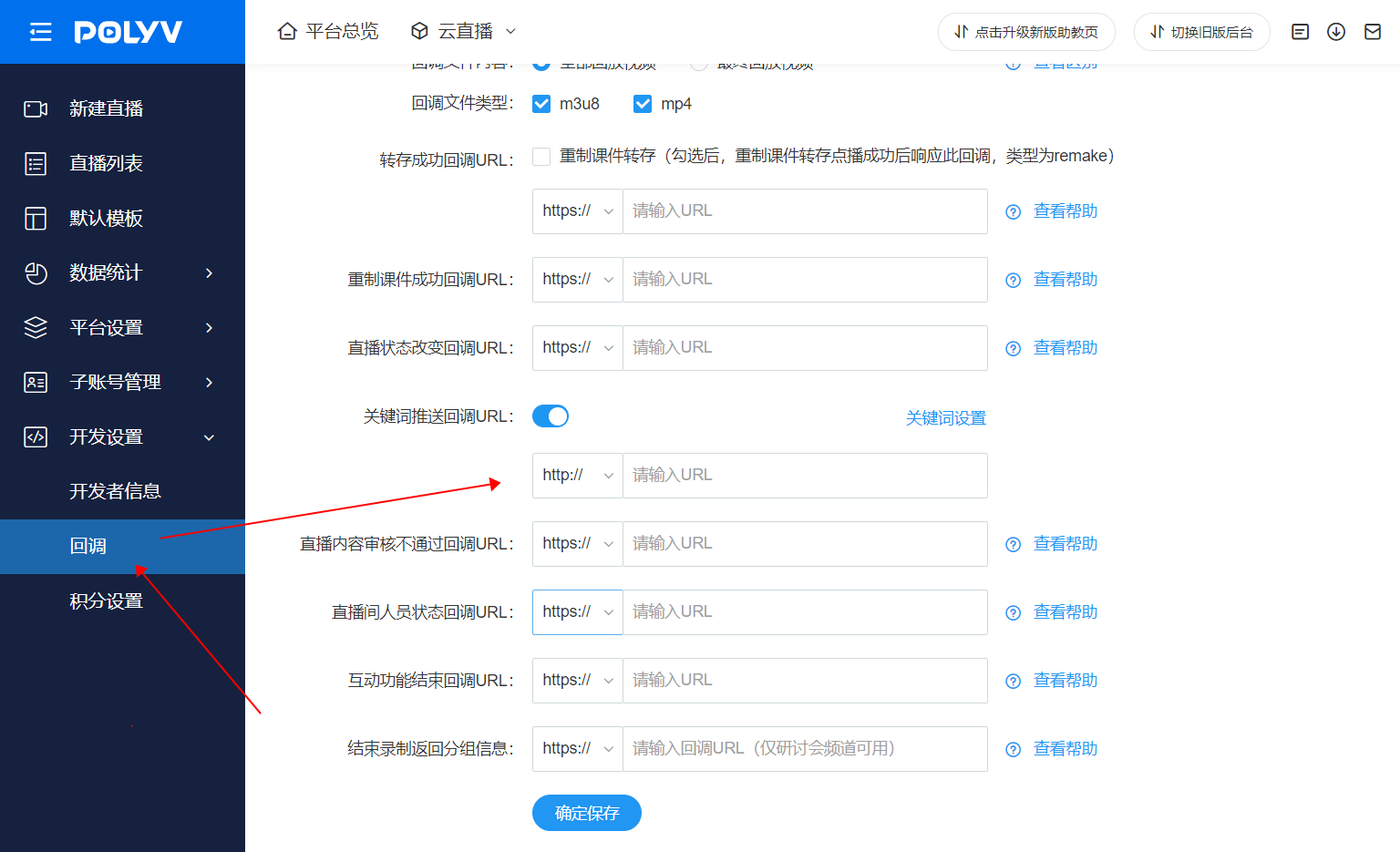
If you cannot find the corresponding setting, it may be due to insufficient account permissions. For assistance, please contact the online customer service at the bottom right corner.
