


Live Room Participant Status Callback Notification
Purpose
For institutions that need near-real-time awareness of whether students and teachers have entered the classroom on time, and if not, need to notify students by phone to attend class. With this feature, when the participant status in a channel's live room changes, the server will send a POST request to the callback URL set by the customer, submitting the data to the user-defined callback interface for notification.
Parameters included in the callback (sent via form-data request):
| Parameter | Type | Description |
|---|---|---|
| logList | string | JSON array of objects |
| timestamp | number | Current timestamp |
| sign | string | Signature verification. Prepend and append "polyvlog". The middle consists of data keys and values, with keys sorted alphabetically in ascending order. After MD5 encoding, convert to uppercase. For example, if the parameters are {roomId:'200060', channelId:'005200060', user:{nick:'yang'}}, the signature is md5/('polyvlog'+'channelId'+'005200060'+'roomId'+'200060'+'user'+JSON.stringify({nick:'yang'})+'polyvlog').toLocaleUpperCase(); |
Notes
- The callback aggregates data within a 1-minute interval for unified delivery.
- Both new and old backend versions are supported.
- Due to the high frequency of callbacks, which may put pressure on the customer's server, prior communication with the customer is required.
- The interface returns a JSON object containing a
codefield. A value of 200 indicates success. If 200 is not returned, the system will retry 3 times; after 3 failed attempts, the log is discarded.
logList Parameter JSON Object Array Format
| Parameter | Type | Description |
|---|---|---|
| channelId | string | Channel ID |
| groupId | string | Group ID, optional |
| viewerId | string | Participant ID |
| nickName | string | User nickname |
| logType | number | Log type. 21: Accept mic connection, 22: End mic connection, 31: Accept screen sharing, 32: End screen sharing, 11: Enter live room, 12: Exit live room, 41: Start class, 42: End class, 101: List of participants in the live room when class starts, 102: List of participants in the live room when class ends |
| interactType | string | Enumeration corresponding to logType (it is recommended to use logType directly). login: Enter live room, disconnect: Exit live room, startClass: Start class or list of participants when class starts, finishClass: End class or list of participants when class ends |
| logTime | number | Log timestamp |
| ipAddress | string | IP address, optional |
| userAgent | string | UA information, optional |
| referer | string | Referer information - request source, optional |
| viewerCount | number | Current number of participants |
| timestamp | number | 13-digit millisecond timestamp |
| sessionId | string|null | Current session |
| userOrigin | string | User source, optional |
| content | string | When logType is 101 or 102, this is the OSS address of the participant list. The participant list can be obtained from this address, and the returned data format is the same as the logList format. |
| role | string | User identity. teacher: Instructor, guest: Guest, slice: Cloud classroom audience, viewer: General audience, student: General audience, assistant: Teaching assistant, attendee: Host or participant in a seminar scenario, listener: Audience in a seminar scenario |
| inClass | number | Whether the channel is live. 1: Currently live, 2: Not live. This field may not exist in some callbacks. |
How to Configure
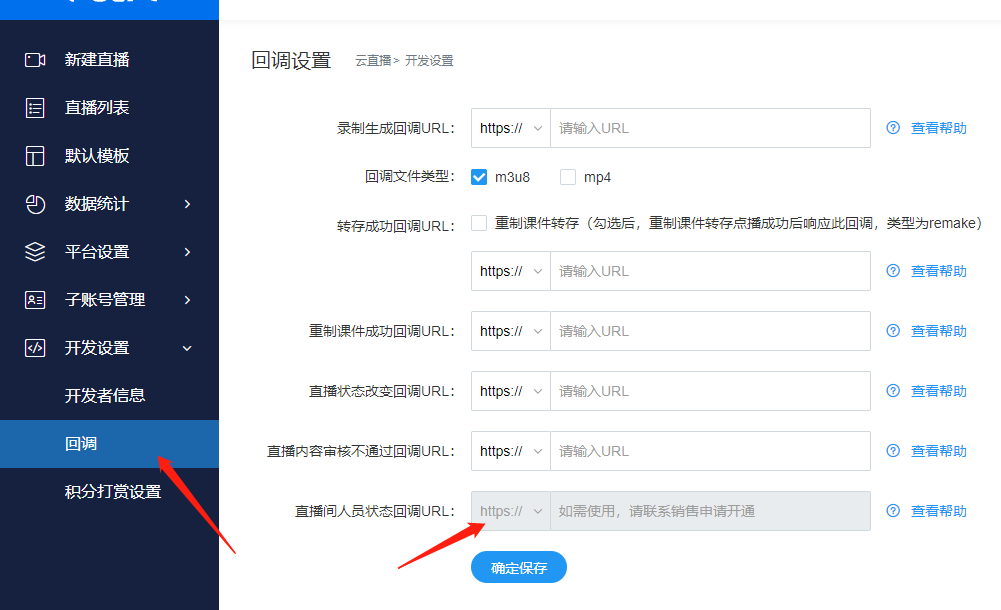
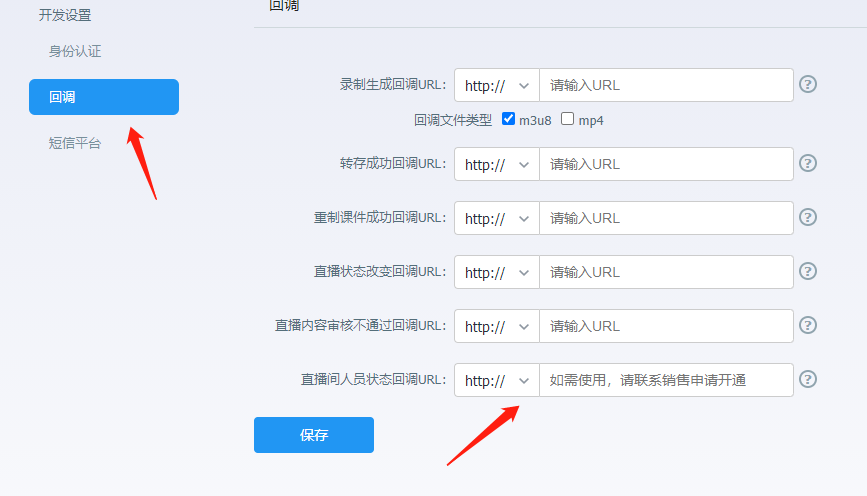
Configure via the backend:
Log in to your account - Go to [Cloud Live] - Click [Development Settings] - Click [Callback Settings] - Live Room Participant Status Callback URL
Note: The submitted interface address must start with http:// or https://
Backend Configuration Reference Images
New backend configuration:
Old backend configuration:
If the corresponding setting cannot be found, it may be due to insufficient account permissions. For assistance, please contact the online customer service in the bottom right corner.
