Live Streaming Key Information Callback
Purpose
During a live stream, this callback reports the instructor's actions and network status (currently only supports the instructor; support for guests and other roles will be added gradually).
Details
After setting the interface URL, if a channel under your account is live streaming, certain operations performed by the instructor and the instructor's current network status will be submitted to the user-defined callback interface via POST for notification.
Callback Parameter Description
Parameters included in the callback (sent via form-data parameters):
| Parameter | Type | Description |
|---|---|---|
| logList | string | JSON format array of objects |
| timestamp | number | Current timestamp |
| sign | string | Signature verification. Prepend and append "polyvlog". The middle consists of the data's keys and values, sorted alphabetically by key. After MD5 encoding, convert to uppercase. For example, if the parameters are {roomId:'200060', channelId:'005200060', user:{nick:'yang'}}, the signature is md5/('polyvlog'+'channelId'+'005200060'+'roomId'+'200060'+'user'+JSON.stringify({nick:'yang'})+'polyvlog').toLocaleUpperCase(); |
Notes
- The callback aggregates data within 1 second before sending.
- Supported by both old and new backend versions.
- As callbacks can be frequent and may put pressure on the client server, communication with the client in advance is required.
- The interface returns a JSON object containing a
codefield.200indicates success. If200is not returned, it will retry 3 times. After 3 failed attempts, the log is discarded.
logList Parameter JSON Object Array Format
| Parameter | Type | Description |
|---|---|---|
| EVENT | string | Operation event type, explained below |
| sessionId | string | Session ID |
| roomId | string | Channel number |
| userOrigin | string | Information source: client indicates the client, webClient indicates web broadcasting |
| timestamp | number | Timestamp when the data was generated |
EVENT Types
Currently, EVENT includes AV_DEVICE_INFO, PPT_OPERATION, and NETWORK_STATUS. The data format differs for each type.
AV_DEVICE_INFO
Data format for AV_DEVICE_INFO:
| Parameter | Type | Description |
|---|---|---|
| audio | Object | Audio information |
| video | Object | Video information |
audio parameters include:
| Parameter | Type | Description |
|---|---|---|
| switch | boolean | Audio stream master switch status |
| microphone | Object | One audio source type: Microphone |
| speaker | Object | One audio source type: System sound. Only has a switch status |
| media | Object | One audio source type: Multimedia file audio. Only has a switch status |
audio.microphone parameters include:
| Parameter | Type | Description |
|---|---|---|
| deviceId | string | Unique device identifier |
| deviceName | string | String describing the device (e.g., "Microphone Array") |
| switch | boolean | Whether the current audio track includes this device's audio |
| volume | number | Volume setting |
audio.speaker parameters include:
| Parameter | Type | Description |
|---|---|---|
| switch | boolean | Switch status |
audio.media parameters include:
| Parameter | Type | Description |
|---|---|---|
| switch | boolean | Switch status |
video parameters include:
| Parameter | Type | Description |
|---|---|---|
| switch | boolean | Video stream master switch status |
| camera | Object | One video capture type: Camera |
| screen | Object | One video capture type: Screen sharing |
video.camera parameters include:
| Parameter | Type | Description |
|---|---|---|
| switch | Boolean | Switch status |
| deviceList | Array[Object] | List of camera devices |
video.camera.deviceList parameters include:
| Parameter | Type | Description |
|---|---|---|
| deviceId | string | Unique device identifier |
| deviceName | string | String describing the device (e.g., "External USB Webcam") |
video.screen parameters include:
| Parameter | Type | Description |
|---|---|---|
| displaySurface | string | Indicates the type of screen sharing being captured. Possible values: browser (single browser tab), monitor (screen), window (application window) |
| switch | boolean | Switch status |
PPT_OPERATION
Data format for PPT_OPERATION:
| Parameter | Type | Description |
|---|---|---|
| operation | string | Operation type: open (open PPT), switchpage (switch page), switchAnimation (switch animation) |
| fileId | string | Unique file identifier |
| fileName | string | File name |
| pageId | number | Page ID |
| step | number | Page switching step |
NETWORK_STATUS
Data format for NETWORK_STATUS:
| Parameter | Type | Description |
|---|---|---|
| networkQuality | number | Network quality, divided into 6 levels (0-6): 0: Unknown; 1: Excellent; 2: Good; 3: Fair; 4~5: Poor, adjust promptly; 6: Disconnected. |
| networkDelay | number | Round-trip time from the streaming end to the cloud, in ms. Lower values are better: rtt < 50ms indicates low audio/video delay; rtt > 200ms indicates high audio/video delay. |
| uplinkLossRate | number | Uplink packet loss rate, range [0, 1] (optional; required if uplinkVideoLossRate and uplinkAudioLossRate are not returned) |
| uplinkVideoLossRate | number | Uplink video packet loss rate, range [0, 1] (optional; required if uplinkLossRate is not returned) |
| uplinkAudioLossRate | number | Uplink audio packet loss rate, range [0, 1] (optional; required if uplinkLossRate is not returned) |
| downlinkLossRate | number | Downlink packet loss rate, range [0, 1] (optional; required if downlinkVideoLossRate and downlinkAudioLossRate are not returned) |
| downlinkVideoLossRate | number | Downlink video packet loss rate, range [0, 1] (optional; required if downlinkLossRate is not returned) |
| downlinkAudioLossRate | number | Downlink audio packet loss rate, range [0, 1] (optional; required if downlinkLossRate is not returned) |
| uplinkAudios | Array[Object] | Uplink audio stream information |
| uplinkAudios[index].volume | number | Audio stream volume, range [0, 100] |
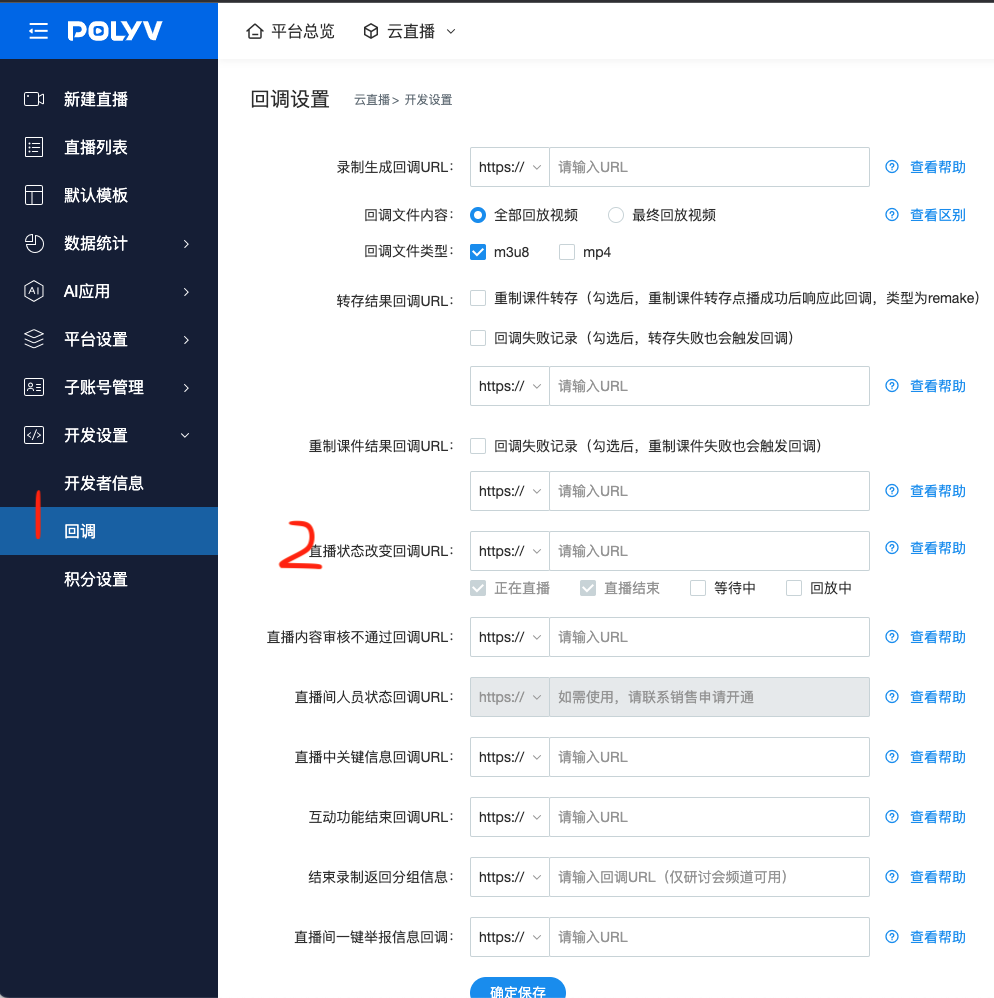
How to Set Up
Configure via the backend:
Log in to your account - Go to [Cloud Live] - Click [Development Settings] - Click [Callback Settings] - Live Status Change Callback URL
Note: The submitted interface URL must start with http:// or https://.
Backend Setup Reference Image
Backend setup: