


Interactive Feature End Callback Notification
Updated: 2026-02-28 11:00:37
Purpose
When an interactive feature ends, the basic information of that feature will be sent as a callback to the configured interface URL.
Details
After setting the interface URL, if an interactive feature is initiated during a live broadcast on your channel, the basic information of that feature will be submitted via POST to the user-defined callback URL for notification upon its completion. Currently supported interactive features include:
- Lottery
- Questionnaire
- Check-in
- Scantron (Answer Sheet)
Notes
- Callbacks will aggregate data within a 1-minute interval before being sent.
- The interface returns a JSON object containing a
codefield, where200indicates success. If a200is not returned, the system will retry 3 times; after 3 failed attempts, the log will be discarded.
Parameters Included in the Callback (Sent via form-data):
| Parameter | Type | Description |
|---|---|---|
| logList | string | JSON array of objects |
| timestamp | number | Current Unix timestamp |
| sign | string | Signature verification. Prepend and append "polyvlog". The middle part consists of key-value pairs sorted alphabetically by key. Perform MD5 encoding and convert to uppercase. For example, with parameters {roomId:'200060', channelId:'005200060', user:{nick:'yang'}}, the signature is md5('polyvlog' + 'channelId' + '005200060' + 'roomId' + '200060' + 'user' + JSON.stringify({nick:'yang'}) + 'polyvlog').toLocaleUpperCase(); |
logList Parameter JSON Object Array Format
| Parameter | Type | Description |
|---|---|---|
| channelId | String | Channel ID |
| sessionId | String | Session ID |
| interactType | String | Interactive feature type (lottery: lottery, questionnaire: questionnaire, check-in: checkin, scantron: scantron) |
| interactId | String | Feature ID |
| startTime | String | Feature start time, format: 13-digit timestamp, e.g., 1640573613931 |
| endTime | String | Feature end time, format: 13-digit timestamp, e.g., 1640573613931 |
| logType | Integer | Log type 21: Accept mic connection 22: End mic connection 11: Enter live room 12: Exit live room 41: Start class 42: End class 51: End questionnaire 61: End scantron 71: End check-in 81: End lottery |
| event | String | Feature status (end: ended) |
How to Configure
Configure via the backend:
Log in to your account - Go to [Cloud Live] - Click [Developer Settings] - Click [Callback Settings] - Interactive Feature End Callback URL
Note: The submitted interface URL must start with http:// or https://.
Backend Configuration Reference Image
New backend configuration:
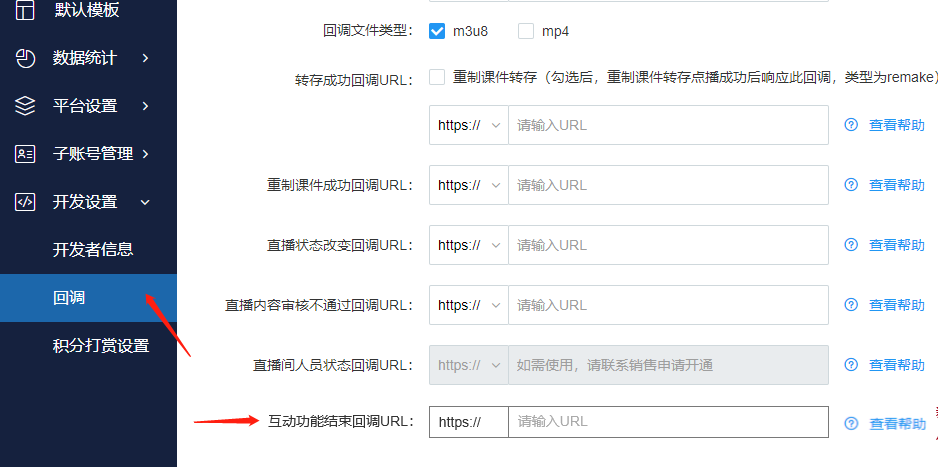
- The old backend does not support setting this callback feature.
- If you cannot find the corresponding setting, it may be due to insufficient account permissions. For assistance, please contact the online customer service in the bottom right corner.
