Single Sign-On Backend
Description
单点登录可以实现在登录已有系统的状态下,免登录操作进入保利威的账号、保利威的直播子账号、频道、助教,做直播相关设置
Applicable Scenarios
POLYV backend single sign-on is divided into four types: Account, Live Sub-account, Channel, and Teaching Assistant. The integration method for accounts and sub-accounts is the same.
Account: Enters the account backend, obtains the highest administrator privileges, and manages all channels and sub-channels. Suitable for login redirection of institutional administrators.
Live Sub-account: Enters the account backend, and based on the corresponding account role permissions configured in the backend, has different operational backend function permissions. Suitable for login redirection of employees with different roles in the institution.
Channel: Enters the channel backend, only obtains administrator privileges for the current channel, and can manage the current channel and its sub-channels. Suitable for login redirection of instructors.
Teaching Assistant: Can only enter the teaching assistant page to assist the instructor in managing the chat room, initiating interactive functions, etc., during the live broadcast. Suitable for login redirection of teaching assistants and assistants.
Guest: Can only enter the guest co-hosting page to assist the instructor in answering questions, completing the live broadcast, etc.
Instructor: Can only enter the live broadcast page to directly start the live broadcast interface, initiate interactive functions, etc. Suitable for login redirection of instructors and hosts.
Important Notes
1. To distinguish between the new backend and the old backend, please click here.
2. The redirect parameter for the post-SSO jump address distinguishes between the new backend and the old backend. Please redirect according to the actual situation.
3. The default domain for the new live broadcast backend is https://console.polyv.net, and the default domain for the old live broadcast backend is https://live.polyv.net. If you have performed CNAME customization, you can replace the default domain in the redirect parameter with the CNAME-configured domain.
4. To access the SSO online demo, please click here.
Flowchart
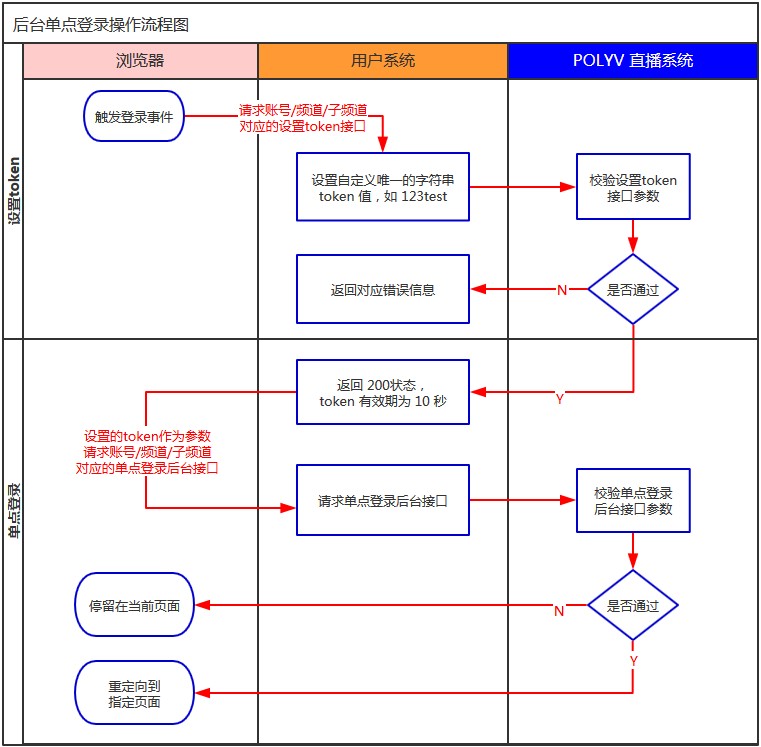
Account Single Sign-On
1. Set SSO Token
2. Account Authorization Login
The account-level authorization URL is https://console.polyv.net/v2/sso/userLogin.do. The concatenated URL is https://console.polyv.net/v2/sso/userLogin.do?userId={userId}&token={token}&redirect={redirect}. Open the authorization URL in your browser. The request parameters are described below:
Parameter Description
| Parameter | Required | Type | Description |
|---|---|---|---|
| userId | true | String | Account ID |
| token | true | String | Token value set in step 1, valid within 10 seconds and for one-time verification |
| redirect | false | String | Redirect URL after authorization, use url encoding. Refer to Account-level redirect values. Default is the live list page. |
Account-level redirect values (before URL encoding)
| Version | Value | Description |
|---|---|---|
| New Backend | https://console.polyv.net/live/index.html#/channel | Live list page. Supports parameters hideTop and hideLeft to hide top and left menu items, e.g., https://console.polyv.net/live/index.html#/channel?hideTop=true&hideLeft=true |
| Old Backend | https://live.polyv.net/#/channel | Live list page |
| Old Backend | https://live.polyv.net/#/develop/appId | Live backend development settings |
Request Example
https://console.polyv.net/v2/sso/userLogin.do?userId=1b448be323&token=yourToken&redirect=https%3A%2F%2Fconsole.polyv.net%2Flive%2Findex.html
Java Request Example
For quick integration, download the relevant dependency source code. Click here to download the source code. Add it to your own project. The test cases include HttpUtil.java and LiveSignUtil.java in the downloaded file.
    //账号单点登录
    @Test
    public void testAccountSSO() throws IOException, NoSuchAlgorithmException {
        //公共参数,填写自己的实际参数
        String appId = super.appId;
        String appSecret = super.appSecret;
        String userId = super.userId;
        String timestamp = String.valueOf(System.currentTimeMillis());
        //自定义的token,只能使用一次,且10秒内有效
        String token = UUID.randomUUID().toString().replaceAll("-", "");
        String url = "https://api.polyv.net/live/v3/user/set-sso-token";

        //1、设置频道单点登录token
        Map<String, String> requestMap = new HashMap<>();
        requestMap.put("appId", appId);
        requestMap.put("timestamp", timestamp);
        requestMap.put("token", token);
        requestMap.put("sign", LiveSignUtil.getSign(requestMap, appSecret));
        String response = HttpUtil.postFormBody(url, requestMap);
        //TODO 判断response返回是否成功

        //2、生成账号授权登录地址
        String redirectUrl = "https://console.polyv.net/live/index.html";
        String authURL = "https://console.polyv.net/v2/sso/userLogin.do";
        authURL +=
        "?userId=" + userId + "&token=" + token + "&redirect=" + URLEncoder.encode(redirectUrl, "utf-8");
        log.info("账号单点登录设置成功,跳转地址为:{}", authURL);
    }
Sub-account Single Sign-On
1. Set SSO Token
Set Sub-account SSO Token The request parameter childEmail is the sub-account email, e.g., wcc@polyv.net
2. Sub-account Authorization Login
The sub-account level authorization URL is https://console.polyv.net/v2/sso/userLogin.do. The concatenated URL is https://console.polyv.net/v2/sso/userLogin.do?userId={userId}&token={token}&redirect={redirect}&childEmail={childEmail}. Open the authorization URL in your browser. The request parameters are described below:
Parameter Description
| Parameter | Required | Type | Description |
|---|---|---|---|
| userId | true | String | Account ID |
| token | true | String | Token value set in step 1, valid within 10 seconds and for one-time verification |
| childEmail | true | String | Email of the live sub-account |
| redirect | false | String | Redirect URL after authorization, use url encoding. Refer to Sub-account level redirect values. Default is the live list page. |
Sub-account level redirect values (before URL encoding)
| Version | Value | Description |
|---|---|---|
| New Backend | https://console.polyv.net/live/index.html | Live list page |
| Old Backend | https://live.polyv.net/#/channel | Live list page |
| Old Backend | https://live.polyv.net/#/develop/appId | Live backend development settings |
Request Example
https://console.polyv.net/v2/sso/userLogin.do?userId=1b448be323&token=yourToken&redirect=https%3A%2F%2Fconsole.polyv.net%2Flive%2Findex.html&childEmail=wcc@polyv.net
Java Request Example
For quick integration, download the relevant dependency source code. Click here to download the source code. Add it to your own project. The test cases include HttpUtil.java and LiveSignUtil.java in the downloaded file.
    //子账号单点登录
    @Test
    public void testChildAccountSSO() throws IOException, NoSuchAlgorithmException {
        //公共参数,填写自己的实际参数
        String appId = super.appId;
        String appSecret = super.appSecret;
        String userId = super.userId;
        String timestamp = String.valueOf(System.currentTimeMillis());
        //自定义的token,只能使用一次,且10秒内有效
        String token = UUID.randomUUID().toString().replaceAll("-", "");
        String url = "https://api.polyv.net/live/v3/user/set-sso-token";
        //子账号邮箱
        String childEmail = "wzk@polyv.net";

        //1、设置频道单点登录token
        Map<String, String> requestMap = new HashMap<>();
        requestMap.put("appId", appId);
        requestMap.put("timestamp", timestamp);
        requestMap.put("token", token);
        requestMap.put("childEmail", childEmail);
        requestMap.put("sign", LiveSignUtil.getSign(requestMap, appSecret));
        String response = HttpUtil.postFormBody(url, requestMap);
        //TODO 判断response返回是否成功

        //2、生成子账号授权登录地址
        String redirectUrl = "https://console.polyv.net/live/index.html";
        String authURL = "https://console.polyv.net/v2/sso/userLogin.do";
        authURL += "?userId=" + userId + "&childEmail=" + childEmail + "&token=" + token + "&redirect=" +
        URLEncoder.encode(redirectUrl, "utf-8");
        log.info("子账号单点登录设置成功,跳转地址为:{}", authURL);
    }
Channel Single Sign-On
1. Set SSO Token
2. Channel Authorization Login
The channel-level authorization URL is https://console.polyv.net/teacher/auth-login. The concatenated URL is https://console.polyv.net/teacher/auth-login?channelId={channelId}&token={token}&redirect={redirect}. Open the authorization URL in your browser. The request parameters are described below:
Parameter Description
| Parameter | Required | Type | Description |
|---|---|---|---|
| channelId | true | String | Channel ID |
| token | true | String | Token value set in step 1, valid within 10 seconds and for one-time verification |
| redirect | false | String | Redirect URL after authorization, use url encoding. Refer to Channel-level redirect values. Default is the live room info page. |
| failRedirect | false | String | Redirect URL after authorization failure, use url encoding. |
Channel-level redirect values (before URL encoding)
| Version | Value | Description |
|---|---|---|
| New Backend | https://console.polyv.net/live/#/teacher/{channelId}/base-info/channel-info | Live room info page. Replace {channelId} with the corresponding channel ID. |
| New Backend | https://console.polyv.net/live/#/teacher/{channelId}/channel-statistics | Live room statistics page. Replace {channelId} with the corresponding channel ID. |
| Old Backend | https://live.polyv.net/#/teacher/{channelId}/monitoring | Live room monitoring page. Replace {channelId} with the corresponding channel ID. |
| Old Backend | https://live.polyv.net/#/teacher/{channelId}/room/detail | Live room info page. Replace {channelId} with the corresponding channel ID. |
| Old Backend | https://live.polyv.net/#/teacher/{channelId}/statistic | Live room statistics page. Replace {channelId} with the corresponding channel ID. |
Request Example
https://console.polyv.net/teacher/auth-login?channelId=1965681&token=yourToken&redirect=https%3A%2F%2Fconsole.polyv.net%2Flive%2F%23%2Fteacher%2F1965681%2Fbase-info%2Fchannel-info
Java Request Example
For quick integration, download the relevant dependency source code. Click here to download the source code. Add it to your own project. The test cases include HttpUtil.java and LiveSignUtil.java in the downloaded file.
    //频道单点登录
    @Test
    public void testChannelSSO() throws IOException, NoSuchAlgorithmException {
        //公共参数,填写自己的实际参数
        String appId = super.appId;
        String appSecret = super.appSecret;
        String userId = super.userId;
        String timestamp = String.valueOf(System.currentTimeMillis());
        //自定义的token,只能使用一次,且10秒内有效
        String token = UUID.randomUUID().toString().replaceAll("-", "");
        //频道号
        String channelId = "1965681";
        String url = String.format("http://api.polyv.net/live/v2/channels/%s/set-token", channelId);

        //1、设置频道单点登录token
        Map<String, String> requestMap = new HashMap<>();
        requestMap.put("appId", appId);
        requestMap.put("timestamp", timestamp);
        requestMap.put("token", token);
        requestMap.put("sign", LiveSignUtil.getSign(requestMap, appSecret));
        String response = HttpUtil.postFormBody(url, requestMap);
        //TODO 判断response返回是否成功

        //2、生成频道授权登录地址
        String redirectUrl = String.format("https://console.polyv.net/live/#/teacher/%s/base-info/channel-info",
        channelId);
        String authURL = "https://console.polyv.net/teacher/auth-login";
        authURL +=
        "?channelId=" + channelId + "&token=" + token + "&redirect=" + URLEncoder.encode(redirectUrl, "utf-8");
        log.info("频道单点登录设置成功,跳转地址为:{}", authURL);
    }
Teaching Assistant Single Sign-On
1. Set SSO Token
Set Sub-channel SSO Token The request parameter accountId is the teaching assistant account ID, e.g., 0041965681
2. Teaching Assistant Authorization Login
The teaching assistant level authorization URL is https://console.polyv.net/teacher/auth-login. The concatenated URL is https://console.polyv.net/teacher/auth-login?channelId={channelId}&token={token}&redirect={redirect}. Open the authorization URL in your browser. The request parameters are described below:
Parameter Description
| Parameter | Required | Type | Description |
|---|---|---|---|
| channelId | true | String | Teaching assistant account, e.g., 0041965681. Do not remove the leading 00. |
| token | true | String | Token value set in step 1, valid within 10 seconds and for one-time verification |
| redirect | false | String | Redirect URL after authorization, use url encoding. Refer to Teaching assistant level redirect values. Default is the old teaching assistant page. |
| failRedirect | false | String | Redirect URL after authorization failure, use url encoding. |
Teaching assistant level redirect values (before URL encoding)
| Version | Value | Description |
|---|---|---|
| New Backend | https://console.polyv.net/assistant/?accountId={channelId} | New teaching assistant page. Replace {channelId} with the corresponding teaching assistant account, e.g., 0041965681. |
| Old Backend | https://live.polyv.net/assistant.html | Old teaching assistant page. If the new teaching assistant page is enabled, it will automatically redirect to the new version. |
Request Example
https://console.polyv.net/teacher/auth-login?channelId=0041965681&token=yourToken&redirect=https%3A%2F%2Fconsole.polyv.net%2Fassistant%2F%3FaccountId%3D0041965681
Java Request Example
For quick integration, download the relevant dependency source code. Click here to download the source code. Add it to your own project. The test cases include HttpUtil.java and LiveSignUtil.java in the downloaded file.
    //助教单点登录
    @Test
    public void testAssistantSSO() throws IOException, NoSuchAlgorithmException {
        //公共参数,填写自己的实际参数
        String appId = super.appId;
        String appSecret = super.appSecret;
        String userId = super.userId;
        String timestamp = String.valueOf(System.currentTimeMillis());
        //自定义的token,只能使用一次,且10秒内有效
        String token = UUID.randomUUID().toString().replaceAll("-", "");
        //助教账号
        String accountId = "0041965681";
        String url = String.format("http://api.polyv.net/live/v2/channels/%s/set-account-token", accountId);

        //1、设置助教单点登录token
        Map<String, String> requestMap = new HashMap<>();
        requestMap.put("appId", appId);
        requestMap.put("timestamp", timestamp);
        requestMap.put("token", token);
        requestMap.put("sign", LiveSignUtil.getSign(requestMap, appSecret));
        String response = HttpUtil.postFormBody(url, requestMap);
        //TODO 判断response返回是否成功

        //2、生成助教授权登录地址
        String redirectUrl = "https://console.polyv.net/assistant/?accountId=" + accountId;
        String authURL = "https://console.polyv.net/teacher/auth-login";
        authURL +=
        "?channelId=" + accountId + "&token=" + token + "&redirect=" + URLEncoder.encode(redirectUrl, "utf-8");
        log.info("助教单点登录设置成功,跳转地址为:{}", authURL);
    }
Guest Single Sign-On
1. Set SSO Token
Set Sub-channel SSO Token The request parameter accountId is the guest account ID, e.g., 0021965681
2. Guest Authorization Login
The guest level authorization URL is https://console.polyv.net/teacher/auth-login. The concatenated URL is https://console.polyv.net/teacher/auth-login?channelId={channelId}&token={token}&redirect={redirect}. Open the authorization URL in your browser. The request parameters are described below:
Parameter Description
| Parameter | Required | Type | Description |
|---|---|---|---|
| channelId | true | String | Guest account, e.g., 0021965681. Do not remove the leading 00. |
| token | true | String | Token value set in step 1, valid within 10 seconds and for one-time verification |
| redirect | true | String | Redirect URL after authorization, use url encoding. Refer to Guest level redirect values. |
| failRedirect | false | String | Redirect URL after authorization failure, use url encoding. |
Guest level redirect values (before URL encoding)
| Value | Description |
|---|---|
| https://console.polyv.net/web-start/?channelId={channelId} | Guest page. Replace {channelId} with the corresponding guest account, e.g., 0021965681. |
Request Example
https://console.polyv.net/teacher/auth-login?channelId=0021965681&token=yourToken&redirect=https%3A%2F%2Fconsole.polyv.net%2Fweb-start%2F%3FchannelId%3D0021965681
Java Request Example
For quick integration, download the relevant dependency source code. Click here to download the source code. Add it to your own project. The test cases include HttpUtil.java and LiveSignUtil.java in the downloaded file.
    //嘉宾单点登录
    @Test
    public void testGuestSSO() throws IOException, NoSuchAlgorithmException {
        //公共参数,填写自己的实际参数
        String appId = super.appId;
        String appSecret = super.appSecret;
        String userId = super.userId;
        String timestamp = String.valueOf(System.currentTimeMillis());
        //自定义的token,只能使用一次,且10秒内有效
        String token = UUID.randomUUID().toString().replaceAll("-", "");
        //嘉宾账号
        String accountId = "0021965681";
        String url = String.format("http://api.polyv.net/live/v2/channels/%s/set-account-token", accountId);

        //1、设置嘉宾单点登录token
        Map<String, String> requestMap = new HashMap<>();
        requestMap.put("appId", appId);
        requestMap.put("timestamp", timestamp);
        requestMap.put("token", token);
        requestMap.put("sign", LiveSignUtil.getSign(requestMap, appSecret));
        String response = HttpUtil.postFormBody(url, requestMap);
        //TODO 判断response返回是否成功

        //2、生成嘉宾授权登录地址
        String redirectUrl = "https://console.polyv.net/web-start/?channelId=" + accountId;
        String authURL = "https://console.polyv.net/teacher/auth-login";
        authURL +=
        "?channelId=" + accountId + "&token=" + token + "&redirect=" + URLEncoder.encode(redirectUrl, "utf-8");
        log.info("嘉宾单点登录设置成功,跳转地址为:{}", authURL);
    }
Instructor Single Sign-On
1. Set SSO Token
2. Instructor Authorization Login
The instructor level authorization URL is https://console.polyv.net/teacher/auth-login. The concatenated URL is https://console.polyv.net/teacher/auth-login?channelId={channelId}&token={token}&redirect={redirect}. Open the authorization URL in your browser. The request parameters are described below:
Parameter Description
| Parameter | Required | Type | Description |
|---|---|---|---|
| channelId | true | String | Channel ID, e.g., 1965681 |
| token | true | String | Token value set in step 1, valid within 10 seconds and for one-time verification |
| redirect | true | String | Redirect URL after authorization, use url encoding. Refer to Instructor level redirect values. |
| failRedirect | false | String | Redirect URL after authorization failure, use url encoding. [Note: If an instructor is already broadcasting on the channel during login, it will also trigger the authorization failure redirect.] |
Instructor level redirect values (before URL encoding)
| Value | Description |
|---|---|
| https://console.polyv.net/web-start/?channelId={channelId} | Instructor broadcast page. Replace {channelId} with the corresponding channel ID, e.g., 1965681. |
Request Example
https://console.polyv.net/teacher/auth-login?channelId=1965681&token=yourToken&redirect=https%3A%2F%2Fconsole.polyv.net%2Fweb-start%2F%3FchannelId%3D1965681
Java Request Example
For quick integration, download the relevant dependency source code. Click here to download the source code. Add it to your own project. The test cases include HttpUtil.java and LiveSignUtil.java in the downloaded file.
    @Test
    public void testTeacherSSO() throws IOException, NoSuchAlgorithmException {
        //公共参数,填写自己的实际参数
        String appId = super.appId;
        String appSecret = super.appSecret;
        String timestamp = String.valueOf(System.currentTimeMillis());
        //频道号
        String channelId = "1965681";
        //自定义的token,只能使用一次,且10秒内有效
        String token = UUID.randomUUID().toString().replaceAll("-", "");
        String url = String.format("http://api.polyv.net/live/v2/channels/%s/set-token", channelId);

        //1、设置频道单点登录token
        Map<String, String> requestMap = new HashMap<>();
        requestMap.put("appId", appId);
        requestMap.put("timestamp", timestamp);
        requestMap.put("token", token);
        requestMap.put("sign", LiveSignUtil.getSign(requestMap, appSecret));
        String response = HttpUtil.postFormBody(url, requestMap);
        //TODO 判断response返回是否成功

        //2、生成讲师授权登录地址
        String redirectUrl = "https://console.polyv.net/web-start/?channelId=" + channelId;
        String authURL = "https://console.polyv.net/teacher/auth-login";
        authURL +=
        "?channelId=" + channelId + "&token=" + token + "&redirect=" + URLEncoder.encode(redirectUrl, "utf-8");
        log.info("讲师单点登录地址设置成功,跳转地址为:{}", authURL);
    }
MR Console Single Sign-On
1. Set SSO Token
2. MR Console Authorization Login
The authorization URL is https://console.polyv.net/teacher/mr-auth-login. The concatenated URL is https://console.polyv.net/teacher/mr-auth-login?channelId={channelId}&token={token}&mrLiveLoginType={mrLiveLoginType}&redirect={redirect}. Open the authorization URL in your browser. The request parameters are described below:
Parameter Description
| Parameter | Required | Type | Description |
|---|---|---|---|
| channelId | true | String | Channel ID, e.g., 3265597 |
| token | true | String | Token value set in step 1, valid within 10 seconds and for one-time verification |
| redirect | true | String | Redirect URL after authorization, use url encoding. Refer to MR Console redirect values. |
| mrLiveLoginType | false | String | Login mode cloud: Cloud mode client: Local mode If not passed, and the user has only one mode permission, the existing mode is used. If the user has both mode permissions, the default is [Cloud mode]. |
MR Console redirect values (before URL encoding)
| Value | Description |
|---|---|
| https://live.polyv.net/mr-controller/scene?channelId={channelId} | MR Console page. Replace {channelId} with the corresponding MR channel ID, e.g., 3265597. |
Request Example
https://console.polyv.net/teacher/mr-auth-login?channelId=3265597&token=57e46132c74b4e398aeaeccc5340b1ab&redirect=https%3A%2F%2Flive.polyv.net%2Fmr-controller%2Fscene%3FchannelId%3D3265597
Java Request Example
//MR控制台单点登录
@Test
public void testMrControllerSSO() throws IOException, NoSuchAlgorithmException {
    //公共参数,填写自己的实际参数
    String appId = super.appId;
    String appSecret = super.appSecret;
    String timestamp = String.valueOf(System.currentTimeMillis());
    //频道号
    String channelId = "3265597";
    //自定义的token,只能使用一次,且10秒内有效
    String token = UUID.randomUUID().toString().replaceAll("-", "");
    String url = String.format("http://api.polyv.net/live/v2/channels/%s/set-token", channelId);

    //1、设置频道单点登录token
    Map<String, String> requestMap = new HashMap<>();
    requestMap.put("appId", appId);
    requestMap.put("timestamp", timestamp);
    requestMap.put("token", token);
    requestMap.put("sign", LiveSignUtil.getSign(requestMap, appSecret));
    String response = HttpUtil.postFormBody(url, requestMap);
    //TODO 判断response返回是否成功

    //2、生成MR控制台授权登录地址
    String redirectUrl = "https://live.polyv.net/mr-controller/scene?channelId=" + channelId;
    String authURL = "https://console.polyv.net/teacher/mr-auth-login";
    authURL +=
    "?channelId=" + channelId + "&token=" + token + "&redirect=" + URLEncoder.encode(redirectUrl, "utf-8");
    log.info("MR控制台单点登录地址设置成功,跳转地址为:{}", authURL);
}
Distinguishing New and Old Backends
New Backend Screenshot
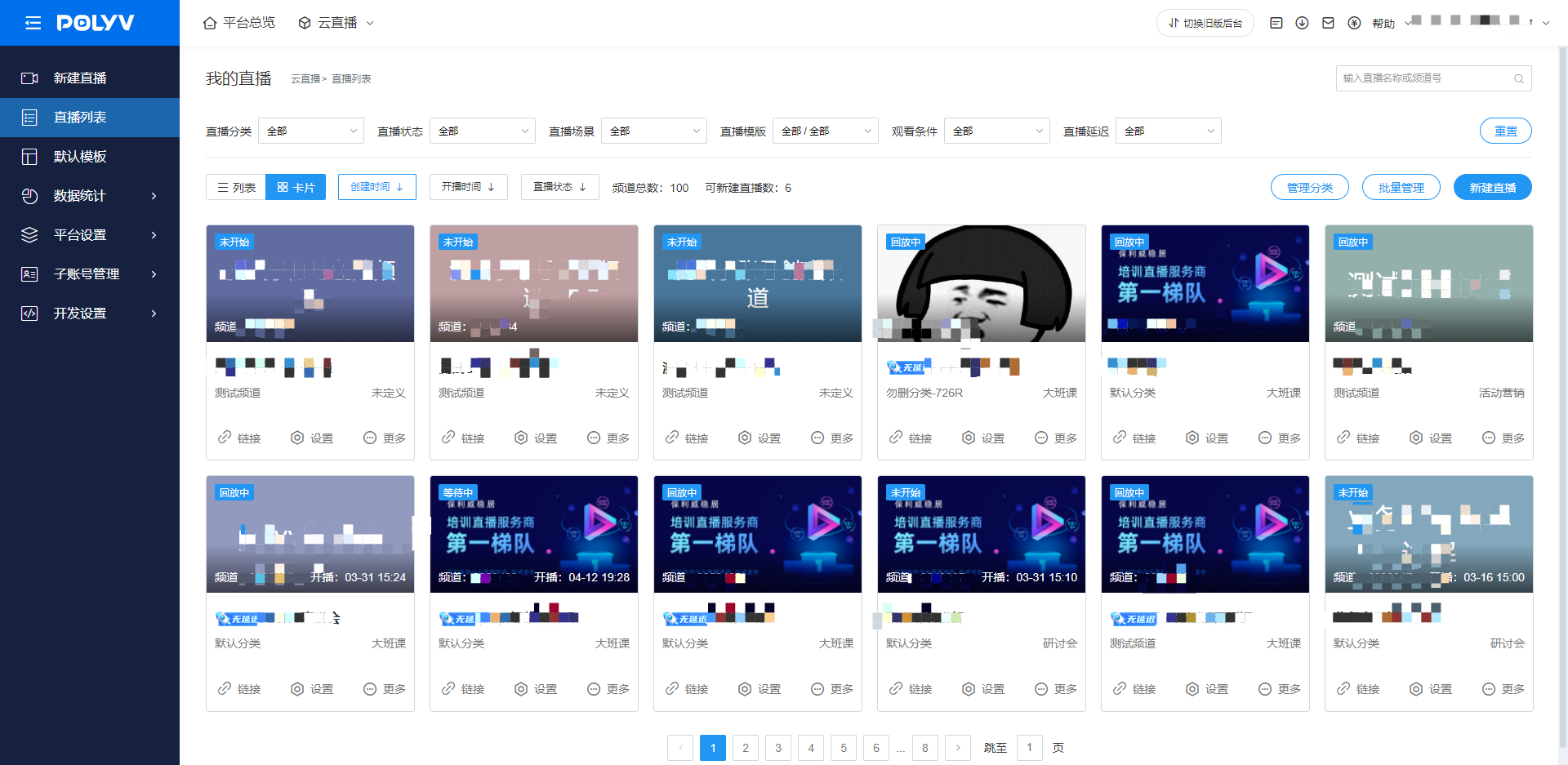
Old Backend Screenshot