


Single Sign-On Backend
Description
单点登录可以实现在登录已有系统的状态下,免登录操作进入保利威的账号、保利威的直播子账号、频道、子频道后台,做直播相关设置
Applicable Scenarios
Polyv backend single sign-on is divided into four types: Account, Live Sub-account, Channel, and Sub-channel.
- Account: Logs into the account backend, granting the highest administrator privileges to manage all channels and sub-channels. Suitable for login redirection of institutional administrators.
- Live Sub-account: Logs into the account backend, with different backend operation permissions based on the configured account role permissions. Suitable for login redirection of employees with different roles within the institution.
- Channel: Logs into the channel backend, granting administrator privileges only for the current channel, allowing management of the current channel and its sub-channels. Suitable for login redirection of instructors.
- Sub-channel: Only allows access to the teaching assistant page, assisting the instructor in managing the chat room and initiating interactive functions during the live stream. Suitable for login redirection of teaching assistants and aides.
Important Notes
The interface domain names mentioned in this document, https://live.polyv.net (old version live backend) or https://console.polyv.net (new version live backend), are the default domains for Polyv SaaS. If the customer has customized a CNAME, the corresponding CNAME domain must be used for API calls to avoid affecting the single sign-on functionality.
How to Operate
1. Operation Flow
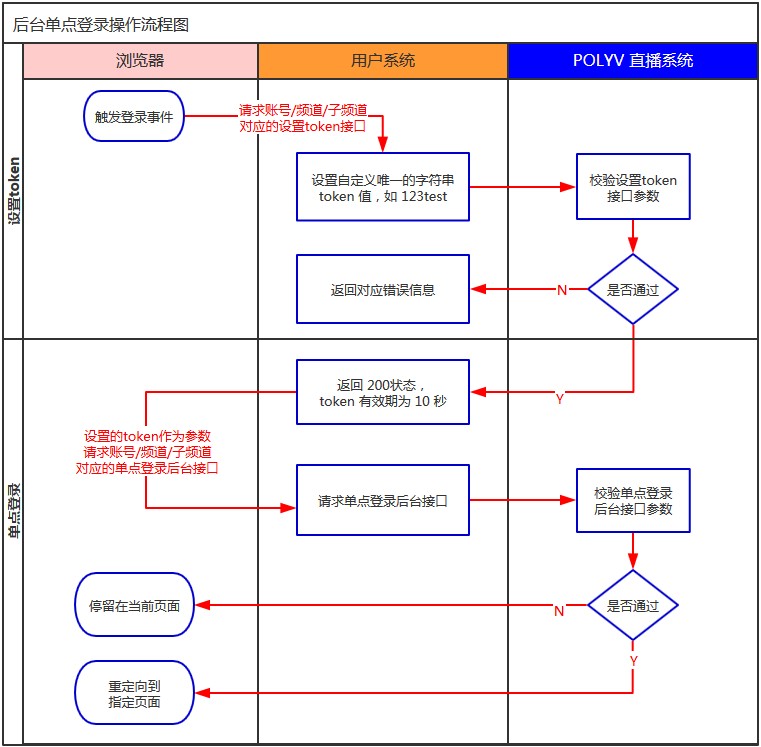
2. API Call Description
| Operation Type | Set Token API (Click to view detailed API call) | Single Sign-On Backend API |
|---|---|---|
| Account | https://api.polyv.net/live/v3/user/set-sso-token | https://{后台域名}/v2/sso/userLogin.do |
| Live Sub-account | https://api.polyv.net/live/v3/user/set-sso-token | https://{后台域名}/v2/sso/userLogin.do |
| Channel | https://api.polyv.net/live/v2/channels/{channelId}/set-token | https://{后台域名}/teacher/auth-login |
| Sub-channel | https://api.polyv.net/live/v2/channels/{accountId}/set-account-token | https://{后台域名}/teacher/auth-login |
Note: {Backend Domain} in the table above refers to the currently used backend domain (if using the old version live backend, the domain is live.polyv.net; if using the new version live backend, the domain is console.polyv.net; if the customer has customized a CNAME, the corresponding CNAME domain must be used for API calls).
3. Operation Steps
Step 1: Set Single Sign-On Token Parameters
API URL
1.根据操作类型(账号、频道、子频道)选择对应的设置token接口URL
    账号:https://api.polyv.net/live/v3/user/set-sso-token
    直播子账号:https://api.polyv.net/live/v3/user/set-sso-token
    频道:https://api.polyv.net/live/v2/channels/{channelId}/set-token
    子频道:https://api.polyv.net/live/v2/channels/{accountId}/set-account-token
2.接口说明
    支持格式:JSON
    请求方式:POST
    请求数限制:TRUE
    接口URL中的{channelId}为频道号
    token 参数请勿过于简单,建议使用16位随机字符串
    支持https协议
Request Parameters
| Parameter Name | Required | Type | Description |
|---|---|---|---|
| appId | true | String | Obtained from the API settings, the appId registered in the live streaming system |
| timestamp | true | String | Current 13-digit millisecond timestamp, valid for 3 minutes |
| token | true | String | A unique string |
| sign | true | String | Signature, a 32-character uppercase MD5 value |
| childEmail | false | String | Email of the live sub-account (required only when calling sub-account single sign-on) |
Successful Response JSON Example
{
    "code": 200,
    "status": "success",
    "message": "",
    "data": "success"
}
Failed Response JSON Example
Missing appId
{
    "code": 400,
    "status": "error",
    "message": "appId is required.",
    "data": ""
}
API Response Field Description
| Parameter Name | Description |
|---|---|
| code | Request status code |
| status | Request status |
| message | Error message |
| data | Returns "success" string on success |
Step 2: After successfully calling the Set Token API, call the Single Sign-On Backend API for authorization login.
API URL
1.根据操作类型(账号、频道、子频道)选择对应的单点登录后台接口URL
    账号:https://live.polyv.net/v2/sso/userLogin.do
    直播子账号:https://live.polyv.net/v2/sso/userLogin.do
    频道:https://live.polyv.net/teacher/auth-login
    子频道:https://live.polyv.net/teacher/auth-login
2.接口说明
    支持格式:JSON
    请求方式:GET
    请求数限制:TRUE
    用于获取token后授权登录直播后台
    支持https协议
Request Parameters for Account Operation Type
| Parameter Name | Required | Type | Description |
|---|---|---|---|
| userId | true | String | Account ID |
| token | true | String | Token string set via Account Token, valid for 10 seconds and single-use |
| redirect | true | String | Redirect URL after successful authorization, e.g., Polyv Live Backend, use URL encoding |
| childEmail | false | String | Email of the live sub-account (required only when calling sub-account single sign-on) |
Request Parameters for Channel/Sub-channel Operation Type
| Parameter Name | Required | Type | Description |
|---|---|---|---|
| channelId | true | String | Channel ID or Sub-channel ID |
| token | true | String | Token string set via Channel Token or Sub-channel Token, valid for 10 seconds and single-use |
| redirect | true | String | Redirect URL after successful authorization, use URL encoding, e.g., Studio Switcher or Statistics & Analysis or Webcast: https://live.polyv.net/web-start/?channelId={频道号} or Teaching Assistant Page: https://live.polyv.net/assistant.html Note: If CNAME is configured, replace live.polyv.net with the CNAME domain |
Successful Response Example
- Account / Live Sub-account
Upon successful verification, it will redirect to the corresponding webpage; otherwise, an error will be returned.
- Channel / Sub-channel
Upon successful verification, it will redirect to the corresponding webpage; otherwise, it will default to redirecting to the corresponding backend. If verification fails, it will redirect to the channel login page.
Request Example
<?php
function settoken(){
//接口需要的参数
// 注意点:需替换的参数有:$appId、$appSecret、$channelId、$token(token是我们自己设置的)
$appId = "";
$appSecret = "";
$token = "2222222";
$timestamp=time()*1000;
$userId="";
$channelId="";
$nickname="王老师";
$childEmail="xxx@polyv.net"
$params = array(
'appId'=>$appId,
'childEmail'=>$childEmail, // 子账号单点登录才需要该参数
'token'=>$token,
'timestamp'=>$timestamp
);
//计算sign
foreach ($params as $key=>$value){
$arr[$key] = $key;
}
sort($arr);
$str = $appSecret;
foreach ($arr as $k => $v) {
$str = $str.$arr[$k].$params[$v];
}
$restr = $str.$appSecret;
$sign = strtoupper(md5($restr));
//根据操作类型(账号、直播子账号、频道、子频道)设置对应的后台单点登录接口及定向地址。
$redirect = urlencode("https://live.polyv.net/#/teacher/$channelId/chatReview/");
$callbackUrl="https://live.polyv.net/teacher/auth-login?channelId=$channelId&token=$token&redirect=$redirect";
//根据操作类型(账号、直播子账号、频道、子频道)设置单点登录的token
$url="{设置token接口URL}?appId=$appId×tamp=$timestamp&token=$token&sign=$sign&nickname=";
//输出接口请求结果
$result=json_decode(file_get_contents($url),true);
if($result["code"] == 200){
echo "location.href='" . $callbackUrl . "'";
}
}
?>
<script language="JavaScript">
function bt_click(){
<?php
settoken();
?>
}
</script>
<input type="button" name="show" id="show" value="提交" onClick="bt_click();"/>
