


Polyv PC VOD SDK Integration Documentation
Updated: 2025-06-13 14:43:21
This document describes the steps and instructions for local integration of the Polyv C++/C# playback SDK.
Clone the Project
Use git to clone the project.
git clone https://github.com/polyv/polyv-player-sdk-demo.git
External Dependencies
- This demo UI depends on the Qt5 or Qt6 framework. Please download it from the Qt distribution site.
- Python compilation processing script. Please download and install it from the official website.
- CMake
- OpenSSL 1.0.2 or later
- curl
- Note: openssl and curl are included in the thirdparty folder of this repository. If there are conflicts, please replace them as needed.
Local Integration
- plv-player-sdk folder: Contains SDK header files, lib, dll, and dylib files. Pulled using PlvPlayerSDK.cmake.
- mac
- x86_64
- include
- lib
- arm64
- include
- lib
- x86_64
- windows
- x86
- include
- lib
- x64
- include
- lib
- x86
- mac
Coding Conventions
Note: The conditional compilation macro for the Windows platform is _WIN32, not WIN32.
| Platform | Macro |
|---|---|
| Windows | _WIN32 |
| Mac | __APPLE__ |
C++ Demo Built with CMake
- It is recommended to use Visual Studio 2022 for development. This demo was developed using Visual Studio 2022.
CMake GUI
- Use
CMake GUIto configurebuild目录and the required dependencies.

- Set QTDIR to specify the Qt path. (e.g., C:\Qt\5.15.2\msvc2019_64)
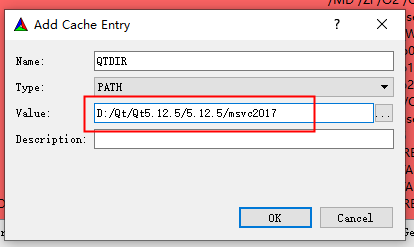
CMake Bash
mkdir build
cd build

# 以下指令请根据平台选择执行
# Demo工程使用了QT库, 须指定QTDIR
# build in Windows
cmake .. -G "Visual Studio 17 2022" -A x64 -DQTDIR=C:/Qt/5.15.2/msvc2019_64

# build in Macos
cmake -S .. -B . -G "Xcode" -D CMAKE_OSX_DEPLOYMENT_TARGET:STRING=10.15 -DQTDIR:PATH=/Users/polyv/Qt/5.15.2/clang_64
C# Demo Opened with Visual Studio
- The C# demo only supports Windows.
- It is recommended to use Visual Studio 2022 for development.
- test/C#: Open polyv-player-demo-csharp.sln directly.
