


10 Minutes to Master a Live Stream
Objective
This document will guide you step by step to quickly complete the full business process of a live stream within 10 minutes. It is suitable for business scenarios where you need to quickly set up a live room, configure relevant information, complete the live stream, and then view detailed viewing data to optimize the live stream process.
Note: Each channel created will have 4 default teaching assistant sub-channels. Sub-channels are used to assist the main instructor in teaching or interacting with users. You can also create your own sub-channels, such as customer service, class advisor, guest, etc. See the scenarios below for details: "Live Teaching Scenario with Sub-channels" and "Pure Video Scenario with Sub-channels".
Live Teaching Scenario
This scenario is suitable for general online teaching scenarios, acting as a virtual classroom. It includes settings such as channel creation, channel initialization, warm-up images/videos, guide images, instructor information, and live document upload. You can refer to the code below, copy it directly, and modify it to suit your course information.
Note: Each channel will have 4 default sub-channels. You can obtain all sub-channel information from the return object of the sample code.
Effect Display
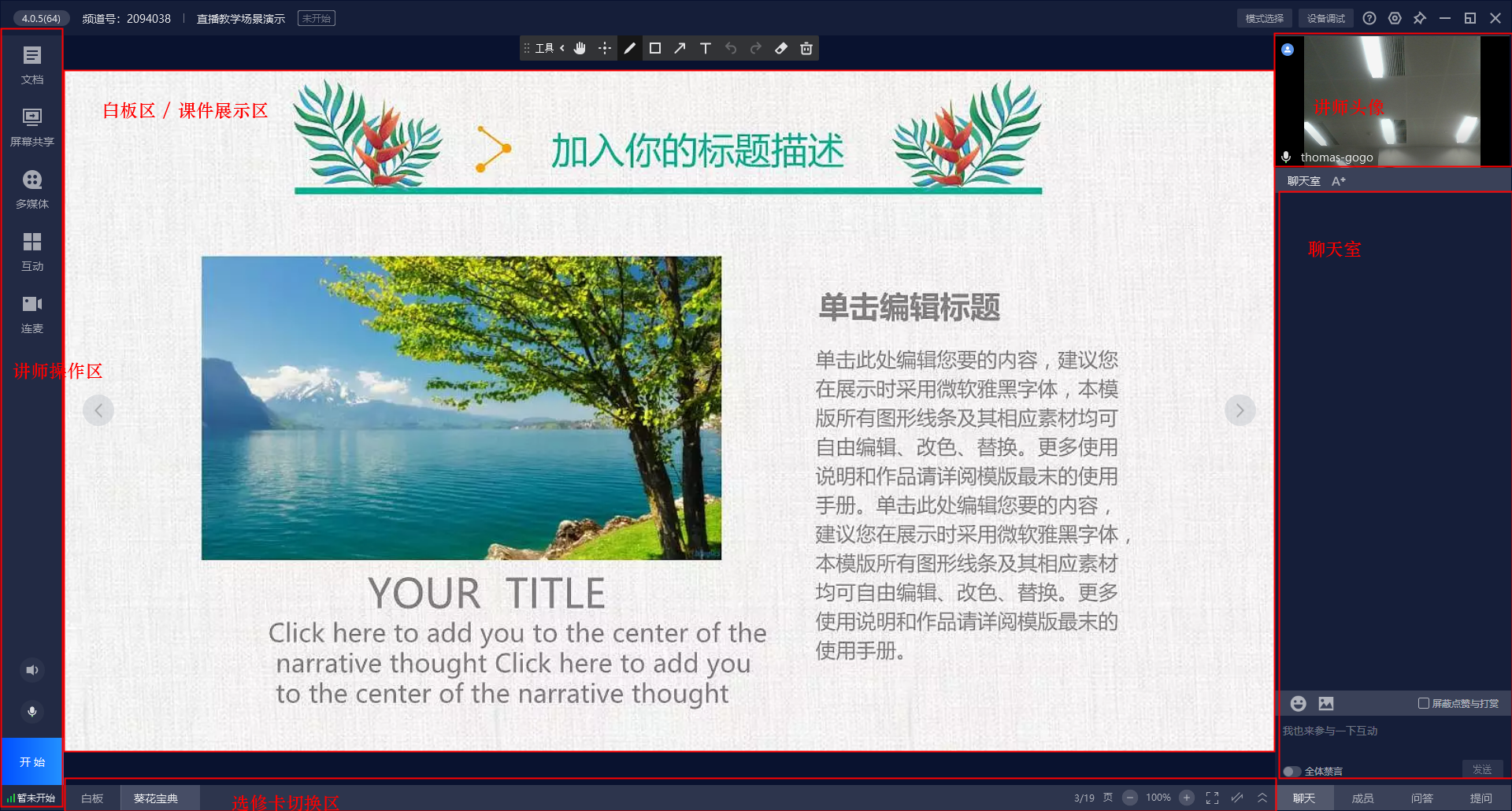
Instructor End Effect:
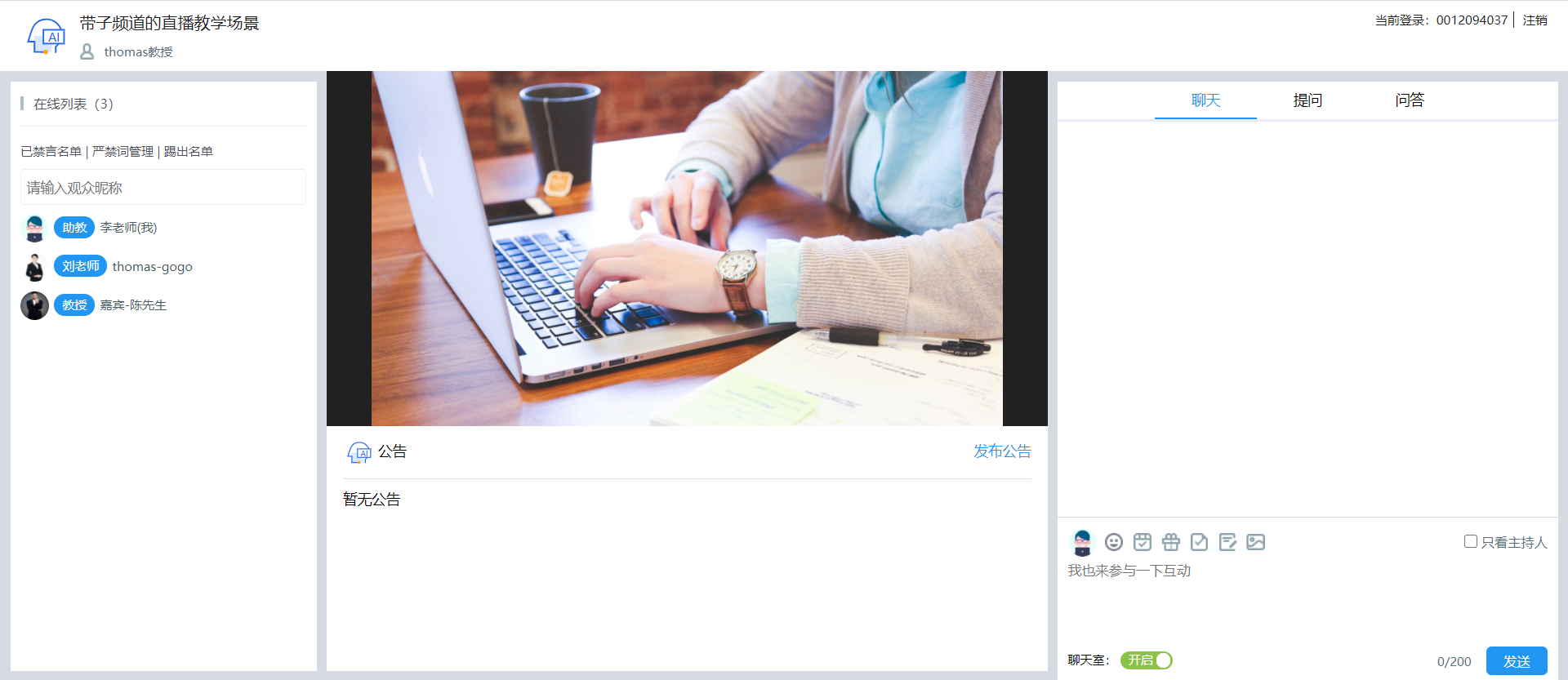
Teaching Assistant End:
- Teaching assistants can view the live stream status.
- Teaching assistants can view chat room member information.
- Teaching assistants can manage prohibited words, muted users, and user kicks in the chat room.
- Teaching assistants can assist the instructor in communicating with users regarding questions and Q&A.
- Teaching assistants can participate in the chat to liven up the class atmosphere.
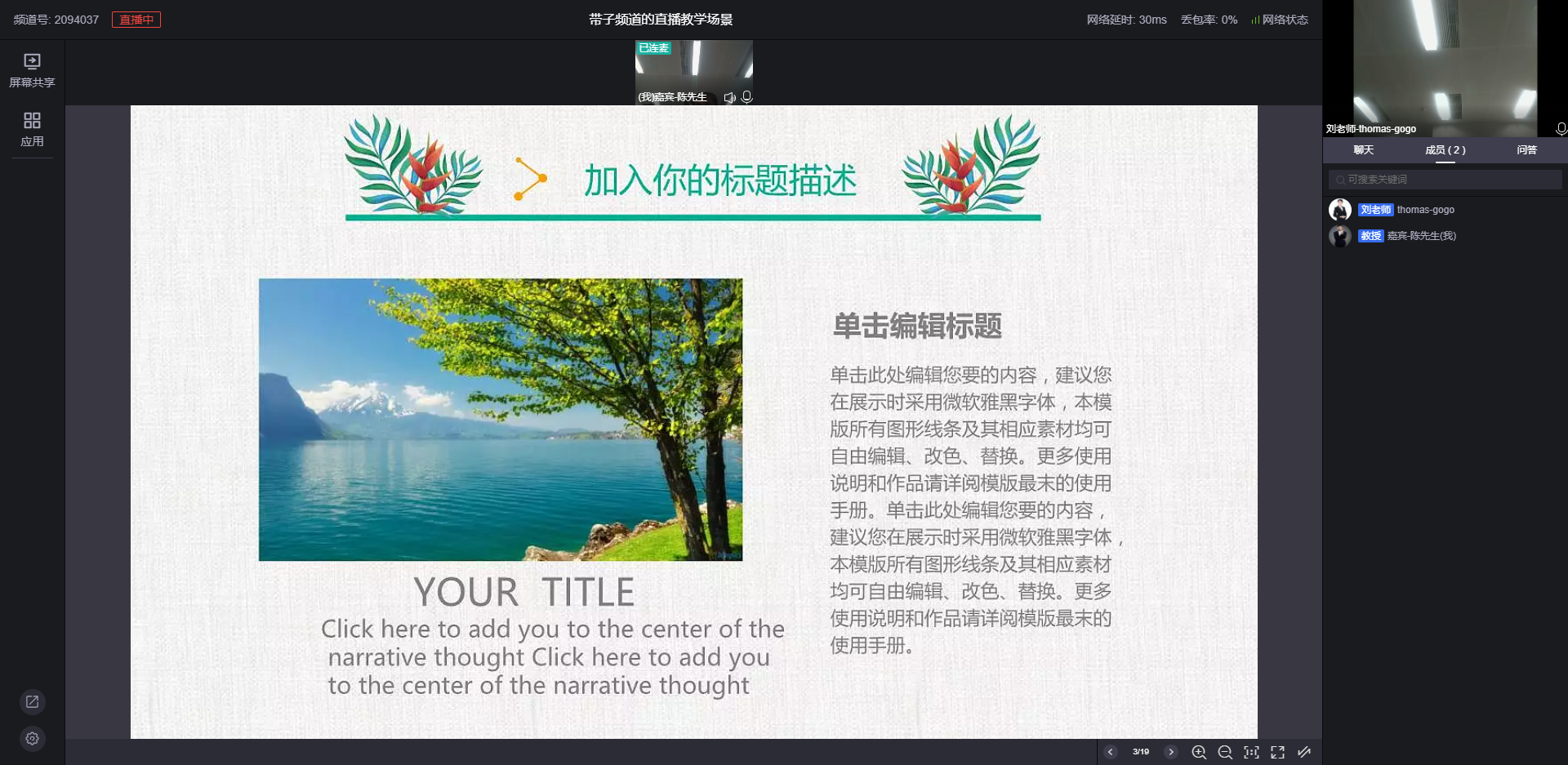
Guest End:
Guests enter the live room via co-hosting by default to interact with the instructor.
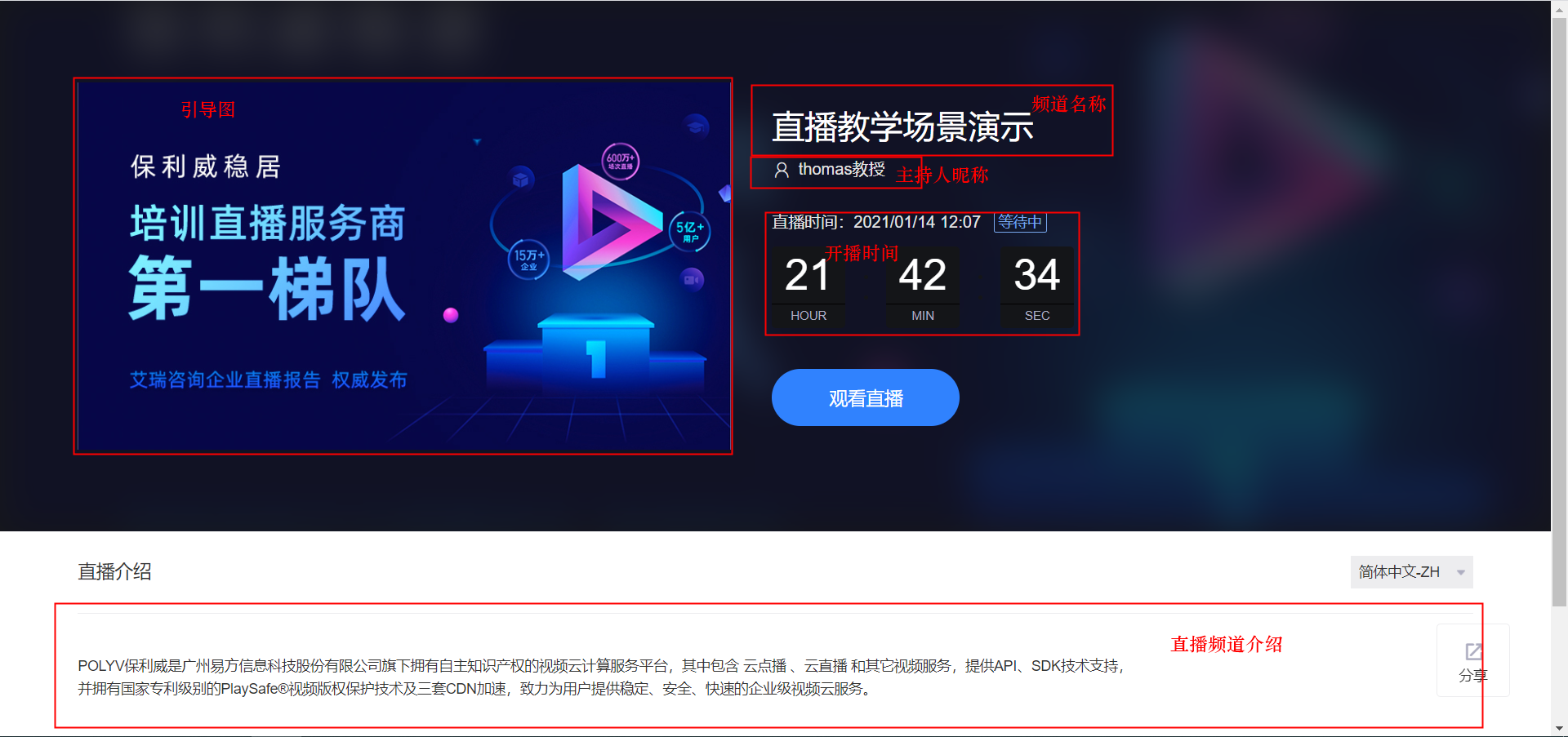
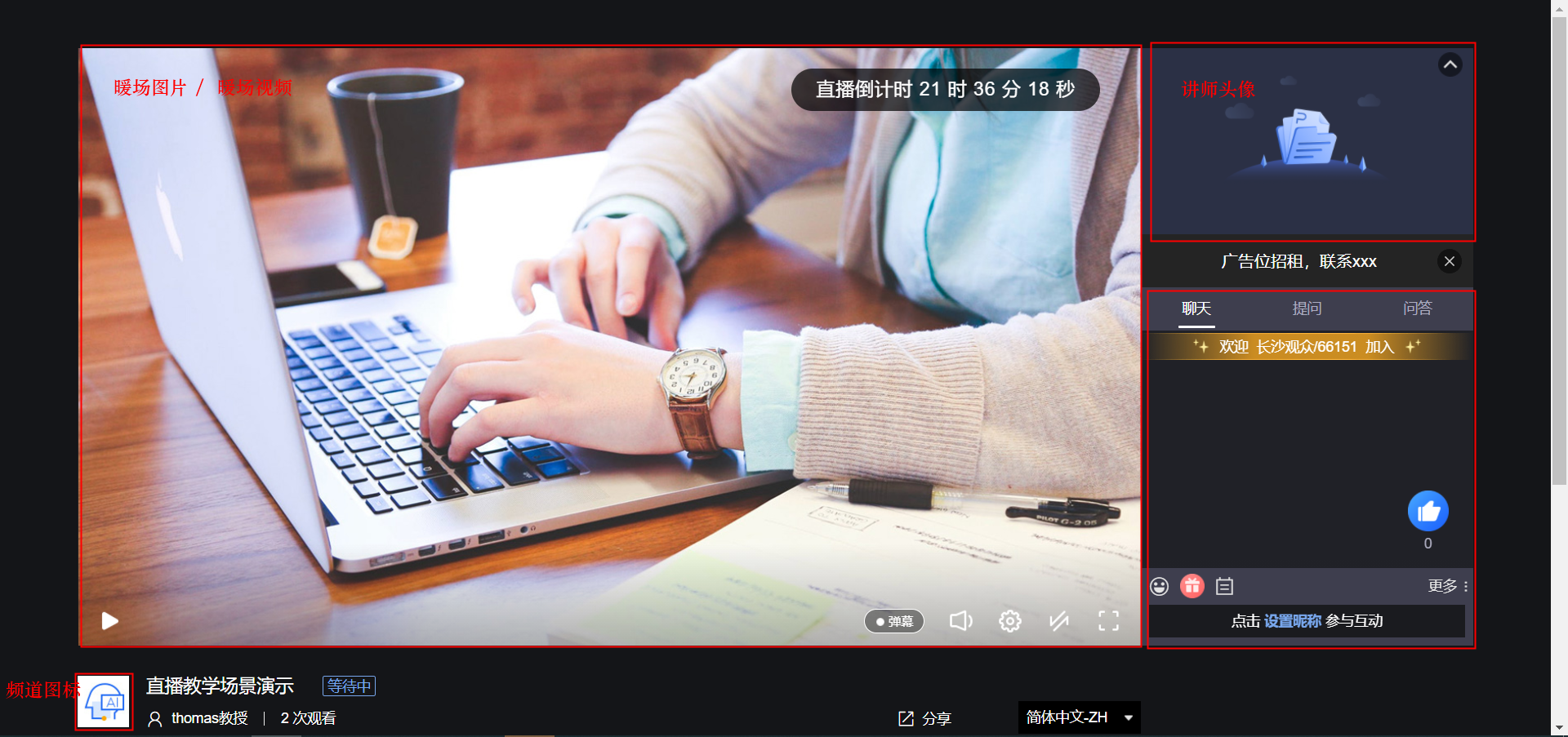
Viewer End Effect:
Experience Link: https://live.polyv.cn/watch/2094038
Process
The sample code below will automatically select which APIs to call based on the set parameters. By default, it will call APIs for channel creation, channel initialization settings, etc. If you do not need a specific feature, simply remove the relevant code. For example, if you do not need to create sub-channels, remove liveCreateSonChannelListRequest.setSonChannels(sonChannels); from the sample code. Note: If both a warm-up video and a warm-up image are set, the warm-up video will override the warm-up image.
graph LR
style A fill:#00ae9d,stroke:#323232,stroke-width:1px
style B fill:#f29952,stroke:#323232,stroke-width:1px
style C fill:#608913,stroke:#323232,stroke-width:1px
style D fill:#2ca9e0,stroke:#323232,stroke-width:1px
style E fill:#fbdd2d,stroke:#323232,stroke-width:1px
style F fill:#90d6ab,stroke:#323232,stroke-width:1px
style G fill:#2ca9e0,stroke:#323232,stroke-width:1px
style H fill:#e7372a,stroke:#323232,stroke-width:1px
style I fill:#40c1dd,stroke:#323232,stroke-width:1px
style J fill:#bf83ff,stroke:#323232,stroke-width:1px
A[创建频道] --> B[频道初始化设置]
B --> C[暖场图片设置]
B --> D[暖场视频设置]
B --> E[设置讲师信息]
B --> J[创建子频道]
B --> F[设置课件]
subgraph "频道设置(可多选)"
C
D
E
F
J
end
C --> G[封装频道返回]
D --> G
E --> G
J --> G
F --> G
G --> H[开始直播]
H --> I["结束直播,获取观看数据"]
Code Example
     /**
     * 快速创建带子频道的三分屏频道,适用于直播教学场景
     * @throws IOException IO异常
     * @throws NoSuchAlgorithmException 系统异常
     */
//    @Test
    public void testQuickCreatePPTAndSonChannel() throws IOException, NoSuchAlgorithmException {
        //初始化系统,请配置自己的账号信息,正式使用时请全局统一设置
        String userId = "xxx";
        String appId = "xxx";
        String appSecret = "xxx";
        LiveGlobalConfig.init(appId, userId, appSecret);
        log.debug("--初始化完成--");

        QuickCreatePPTChannelRequest quickCreatePPTChannelRequest = new QuickCreatePPTChannelRequest();
        QuickCreateChannelResponse quickCreateChannelResponse;
        String path = LiveChannelQuickCreatorTest.class.getResource("/file/PPT.pptx").getPath();
        Calendar instance = Calendar.getInstance();
        instance.set(Calendar.DAY_OF_MONTH, instance.get(Calendar.DAY_OF_MONTH) + 1);
        //创建频道
        //频道相关基础设置-频道名
        quickCreatePPTChannelRequest.setName("带子频道的直播教学场景")
                //频道相关基础设置-频道密码
                .setChannelPasswd(getRandomString(6))
                //频道相关基础设置-连麦人数
                .setLinkMicLimit(5)
                //频道相关基础设置-主持人名称
                .setPublisher("thomas教授")
                //频道相关基础设置-是否无延迟
                .setPureRtcEnabled(LiveConstant.Flag.YES.getFlag())
                //频道相关基础设置-开播时间
                .setStartTime(instance.getTime().getTime())
                //==========================================
                //频道初始化设置-频道图标地址
                .setCoverImg("https://wwwimg.polyv.net/assets/dist/images/v2020/page-home/brand-advantage/row-2-3.svg")
                //频道初始化设置-引导图地址
                .setSplashImg(
                        "https://wwwimg.polyv.net/assets/dist/images/v2020/news-info-md/product-dynamic-bg_v3.jpg")
                //频道初始化设置-频道描述
                .setDesc("POLYV保利威是易方信息科技股份有限公司旗下拥有自主知识产权的视频云计算服务平台,其中包含 云点播 、云直播 " +
                        "和其它视频服务,提供API、SDK技术支持,并拥有国家专利级别的PlaySafe®视频版权保护技术及三套CDN加速,致力为用户提供稳定、安全、快速的企业级视频云服务。")
                //频道初始化设置-设置暖场图
                .setCoverImage("https://s1.videocc.net/live-watch/assets/img/default-splash-img.07657078.jpg")
                //频道初始化设置-点击暖场图跳转的地址
                .setCoverHref("http://www.baidu.com")
                //频道初始化设置-设置暖场视频
//              .setWarmUpFlv("http://www.w3school.com.cn/example/html5/mov_bbb.mp4")
                //==========================================
                //聊天室讲师信息-昵称
                .setNickname("thomas-gogo")
                //聊天室讲师信息-讲师头衔
                .setActor("刘老师")
                //聊天室讲师信息-讲师头像
                .setAvatar(
                        "https://ss3.bdstatic.com/70cFv8Sh_Q1YnxGkpoWK1HF6hhy/it/u=2069606413,3553249962&fm=26&gp=0" +
                                ".jpg")
                //==========================================
                // 讲课文档设置-讲课文档,当前支持DOC、PPT、PDF
                .setFile(new File(path))
                //讲课PPT设置-转换类型(‘common’:转普通图片, ‘animate’:转动画效果)
                .setType("common")
                //讲课PPT设置-文档名称
                .setDocName("直播教学课件");
//                //讲课PPT设置-文档转换完成后的回调地址,不需要不传
//                .setCallbackUrl("http://www.baidu.com/callback")


        LiveCreateSonChannelListRequest liveCreateSonChannelListRequest = new LiveCreateSonChannelListRequest();
        List<LiveCreateSonChannelListRequest.SonChannel> sonChannels = new ArrayList<LiveCreateSonChannelListRequest.SonChannel>();
        sonChannels.add(setSonChannelsInfo1());
        sonChannels.add(setSonChannelsInfo2());
        liveCreateSonChannelListRequest.setSonChannels(sonChannels);

        quickCreateChannelResponse = new LiveChannelQuickCreatorServiceImpl().quickCreatePPTSence(quickCreatePPTChannelRequest,
                liveCreateSonChannelListRequest);
        Assert.assertNotNull(quickCreateChannelResponse);
        log.debug("快速创建三分屏频道成功,{}", JSON.toJSONString(quickCreateChannelResponse));
        log.debug("网页开播地址:https://live.polyv.net/web-start/login?channelId={}  , 登录密码: {}",
                quickCreateChannelResponse.getLiveChannelBasicInfoResponse().getChannelId(),
                quickCreatePPTChannelRequest.getChannelPasswd());
        log.debug("网页观看地址:https://live.polyv.cn/watch/{} ",
                quickCreateChannelResponse.getLiveChannelBasicInfoResponse().getChannelId());
        log.debug("嘉宾进入直播间地址:http://live.polyv.net/web-start/guest?channelId={} ,登录密码: {} ",
                quickCreateChannelResponse.getSonChannelInfos().get(0).getAccount(),
                sonChannels.get(0).getPasswd());
        log.debug("助教进入直播间地址:https://live.polyv.net/teacher.html , 登录频道: {}, 登录密码: {}",
                quickCreateChannelResponse.getSonChannelInfos().get(1).getAccount(),
                sonChannels.get(1).getPasswd());
        /**
         * todo : B端客户的业务逻辑,将quickCreateChannelResponse的相关信息保持到自己的DB中组织业务逻辑
         */

        /**
         * todo : 采用网页开播或者客户端开播,直播结束后 ,可以拉取用户观看直播的观看数据,对观看效果做进一步的分析,改进直播流程和细节
         */
        //打印观看日志
        printViewLog(quickCreateChannelResponse.getLiveChannelBasicInfoResponse().getChannelId());
    }

 /**
     * 设置子频道信息-嘉宾
     * @return 子频道列表
     */
    private LiveCreateSonChannelListRequest.SonChannel setSonChannelsInfo1() {
        LiveCreateSonChannelListRequest.SonChannel sonChannel1 = new LiveCreateSonChannelListRequest.SonChannel();
        //设置子频道信息,子频道代表助教、嘉宾信息
        sonChannel1
                //子频道角色-默认不传为助教,传Guest为嘉宾
                .setRole("Guest")
                //子频道昵称
                .setNickname("嘉宾-陈先生")
                //子频道登录密码
                .setPasswd(getRandomString(10))
                //子频道头衔
                .setActor("教授")
                //子频道头像
                .setAvatar(
                        "https://ss0.bdstatic.com/70cFuHSh_Q1YnxGkpoWK1HF6hhy/it/u=2480846186,1530344&fm=15&gp=0.jpg");
        return sonChannel1;
    }

    /**
     * 设置子频道信息-助教
     * @return 子频道列表
     */
    private LiveCreateSonChannelListRequest.SonChannel setSonChannelsInfo2() {
        LiveCreateSonChannelListRequest.SonChannel sonChannel2 = new LiveCreateSonChannelListRequest.SonChannel();
        sonChannel2.setRole(null)
                .setNickname("助教-王小姐")
                .setPasswd(getRandomString(10))
                .setActor("王老师")
                .setAvatar("https://ss3.bdstatic.com/70cFv8Sh_Q1YnxGkpoWK1HF6hhy/it/u=356414612,1103487565&fm=15&gp=0" +
                        ".jpg");
        return sonChannel2;
    }

    /**
     * 打印频道观看日志
     * @param channelId
     * @throws IOException
     * @throws NoSuchAlgorithmException
     */
    private void printViewLog(String channelId) throws IOException, NoSuchAlgorithmException {
        LiveListChannelViewlogRequest liveListChannelViewlogRequest = new LiveListChannelViewlogRequest();
        LiveListChannelViewlogResponse liveListChannelViewlogResponse;
        Calendar instance = Calendar.getInstance();
        instance.set(Calendar.DAY_OF_MONTH, instance.get(Calendar.DAY_OF_MONTH) + 2);
        //依据频道号和起止时间查询观看日志
        liveListChannelViewlogRequest.setChannelId(channelId)
                .setStartTime(new Date())
                .setEndTime(instance.getTime());
        liveListChannelViewlogResponse = new LiveChannelViewdataServiceImpl().listChannelViewlog(
                liveListChannelViewlogRequest);
        Assert.assertNotNull(liveListChannelViewlogResponse);
        if (liveListChannelViewlogResponse != null) {
            //to do something ......
            log.debug("测试分页查询频道观看日志成功,{}", JSON.toJSONString(liveListChannelViewlogResponse));
        }
    }
Request Description
| Parameter Name | Required | Type | Description |
|---|---|---|---|
| name | true | String | Custom channel name, typically the course topic, meeting topic, training topic, etc., e.g., Financial System Training, Wuzhen Summit. |
| channelPasswd | true | String | Custom channel password. The B-end instructor uses this password to enter the live room and start broadcasting. Length must not exceed 16 characters and must contain both letters and numbers. |
| linkMicLimit | false | Integer | Number of co-hosts. -1 <= value <= account-level co-host limit. -1: Use the account's default co-host limit. Maximum 16 people. (Note: The account-level co-host limit must be set by the platform administrator to take effect.) |
| publisher | false | String | Host name. |
| pureRtcEnabled | false | String | Whether to enable low-latency live streaming. 'Y' means enabled, default is 'N'. |
| coverImg | false | String | Channel icon URL. |
| splashImg | false | String | Guide image URL. |
| startTime | false | Long | Live stream start time, 13-digit timestamp. Set to 0 to disable the display of the live stream start time. |
| desc | false | String | Live stream introduction. |
| nickname | false | String | Instructor nickname. |
| actor | false | String | Instructor title. Required when the instructor nickname is not empty. |
| avatar | false | String | Avatar image URL. |
| coverImage | false | String | Warm-up image URL. Recommended image size: 800x450. Supports PNG, JPEG, GIF formats. |
| coverHref | false | String | Browser redirect URL when the warm-up image is clicked. |
| warmUpFlv | false | String | Warm-up video URL (http address). Mobile devices do not support FLV video files; MP4 video files are recommended. |
| file | false | File | Uploaded file must not exceed 50MB. Supported formats: ppt, pdf, pptx, doc, docx, wps, xls, xlsx. |
| type | false | String | Conversion type ('common': convert to normal images, 'animate': convert to animated effects). Default is normal if not specified. Only ppt and pptx can be converted to animated effects; other file types will be automatically converted to normal. If file-to-animation conversion fails, the type will be changed to normal. |
| docName | false | String | Document name (if not provided, the filename of the uploaded ppt file will be used as the document name. Document name must not exceed 100 characters). |
| callbackUrl | false | String | Callback URL for successful document upload and conversion. |
Response Description
| Parameter Name | Type | Description |
|---|---|---|
| liveChannelBasicInfoResponse | LiveChannelBasicInfoResponse | Channel information See LiveChannelBasicInfoResponse Parameter Description |
| sonChannelInfos | Array | Sub-channel information See LiveSonChannelInfoResponse Parameter Description |
LiveChannelBasicInfoResponse Parameter Description
| Parameter Name | Type | Description |
|---|---|---|
| channelId | String | Channel ID |
| name | String | Channel name |
| channelPasswd | String | Channel password |
| publisher | String | Host name |
| startTime | Date | Live stream start time, null if disabled |
| pageView | Integer | Cumulative page views |
| likes | Integer | Number of likes on the viewing page |
| coverImg | String | Channel icon URL |
| splashImg | String | Channel guide image URL |
| splashEnabled | String | Guide page switch (value is Y/N) |
| desc | String | Live stream introduction |
| consultingMenuEnabled | String | Consultation/Question switch (value is Y/N) |
| maxViewerRestrict | String | Maximum online viewer limit switch (value is Y/N) |
| maxViewer | Integer | Maximum online viewers |
| watchStatus | String | Viewing page status of the channel. Values: live (streaming), end (stream ended), playback (playback), waiting (waiting for stream) |
| watchStatusText | String | Viewing page status description: Streaming, Playback, Ended, Not Started |
| userCategory | UserCategory | Information about the category the channel belongs to See UserCategory Parameter Description |
| authSettings | Array | List of live stream viewing conditions See AuthSetting Parameter Description |
LiveSonChannelInfoResponse Parameter Description
| Parameter Name | Type | Description |
|---|---|---|
| account | String | Sub-channel ID |
| userId | String | POLYV user ID, consistent with the official POLYV website. Path: Official Website -> Login -> Live Stream (Development Settings) |
| channelId | String | Channel ID |
| passwd | String | Sub-channel password |
| nickname | String | Sub-channel name |
| stream | String | Sub-channel stream name (invalid when used alone) |
| status | String | Sub-channel status |
| createdTime | Date | Sub-channel creation time |
| lastModified | Date | Sub-channel last modification time |
| sort | Integer | Sequence number of the sub-channel within the channel |
| avatar | String | Sub-channel avatar |
| pageTurnEnabled | String | Sub-channel page turning permission (only one sub-channel can have this) |
| notifyEnabled | String | Announcement publishing permission (Y/N) |
| checkinEnabled | String | Check-in permission (Y/N) |
| voteEnabled | String | Voting initiation permission (Y/N) |
| role | String | Sub-channel role |
| pushUrl | String | Sub-channel push URL (refer to the backend director console for sub-channel push) |
UserCategory Parameter Description
| Parameter Name | Type | Description |
|---|---|---|
| categoryId | Integer | Category ID |
| categoryName | String | Category name |
| userId | String | POLYV user ID, consistent with the official POLYV website. Path: Official Website -> Login -> Live Stream (Development Settings) |
| rank | Integer | Category sort value |
AuthSetting Parameter Description
| Parameter Name | Type | Description |
|---|---|---|
| channelId | String | Channel ID |
| userId | String | POLYV user ID, consistent with the official POLYV website. Path: Official Website -> Login -> Live Stream (Development Settings) |
| rank | Integer | Used to set two viewing conditions for one channel. Value is 1 or 2 (1 is the primary condition, 2 is the secondary condition). |
| globalSettingEnabled | String | Whether to enable global settings (Y/N) |
| enabled | String | Whether to enable viewing conditions (Y/N) |
| authType | String | Viewing condition type (1. No restriction none 2. Verification code code 3. Paid viewing pay 4. Whitelist viewing phone 5. Registration viewing info 6. Share viewing wxshare 7. Custom authorization custom 8. External authorization external) |
| authTips | String | Whitelist viewing prompt message |
| payAuthTips | String | Paid viewing prompt message |
| authCode | String | Verification code for verification code viewing mode |
| qcodeTips | String | QR code prompt for verification code viewing mode |
| qcodeImg | String | QR code image for verification code viewing mode |
| price | Float | Price for paid viewing |
| watchEndTime | Date | Deadline for paid viewing. Null means: one-time payment, permanently valid. |
| validTimePeriod | Integer | Validity duration for paid viewing (days) |
| customKey | String | Key for custom authorization viewing |
| customUri | String | Interface address for custom authorization viewing |
| externalKey | String | Key for external authorization viewing |
| externalUri | String | Interface address for external authorization viewing |
| externalRedirectUri | String | Redirect address for users directly accessing the viewing page under external authorization viewing |
Pure Video Scenario
This scenario is suitable for non-teaching situations, such as live commerce, conference live streaming, or annual party live streaming. The difference from the live teaching scenario is the page layout for the broadcaster and viewer. The live teaching scenario presents the instructor's avatar, courseware, whiteboard, and chat room to the end-user in a three-panel layout. In contrast, the pure video scenario can only display one of the instructor's camera, documents, or computer screen at a time. Typically, it directly shows the feed from the instructor's camera.
Note: Each channel will have 4 default sub-channels. You can obtain all sub-channel information from the return object of the sample code.
Effect Display
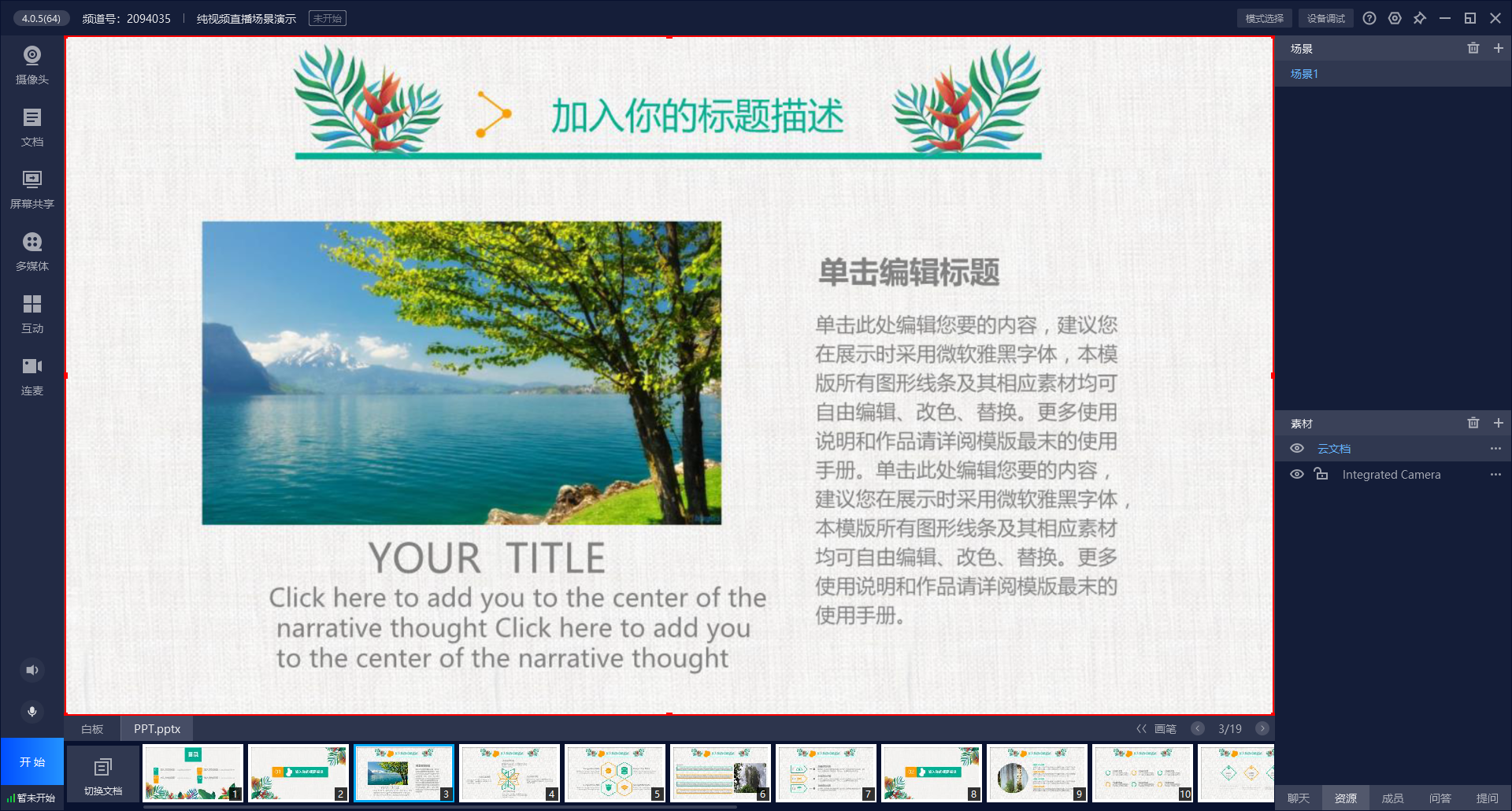
Instructor End Effect (Presenting a document to end-users):
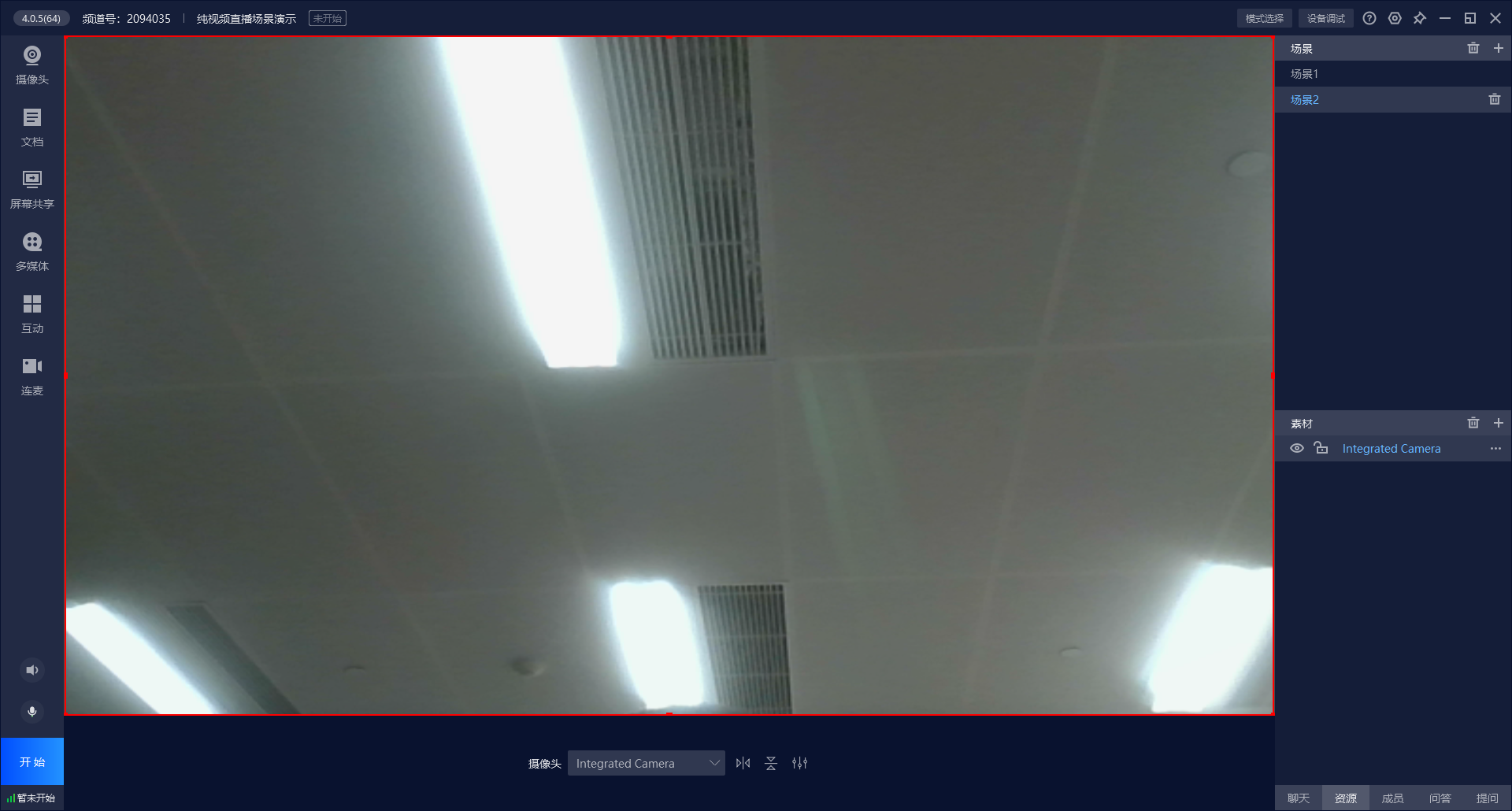
Instructor End Effect (Presenting the instructor's camera feed to end-users):
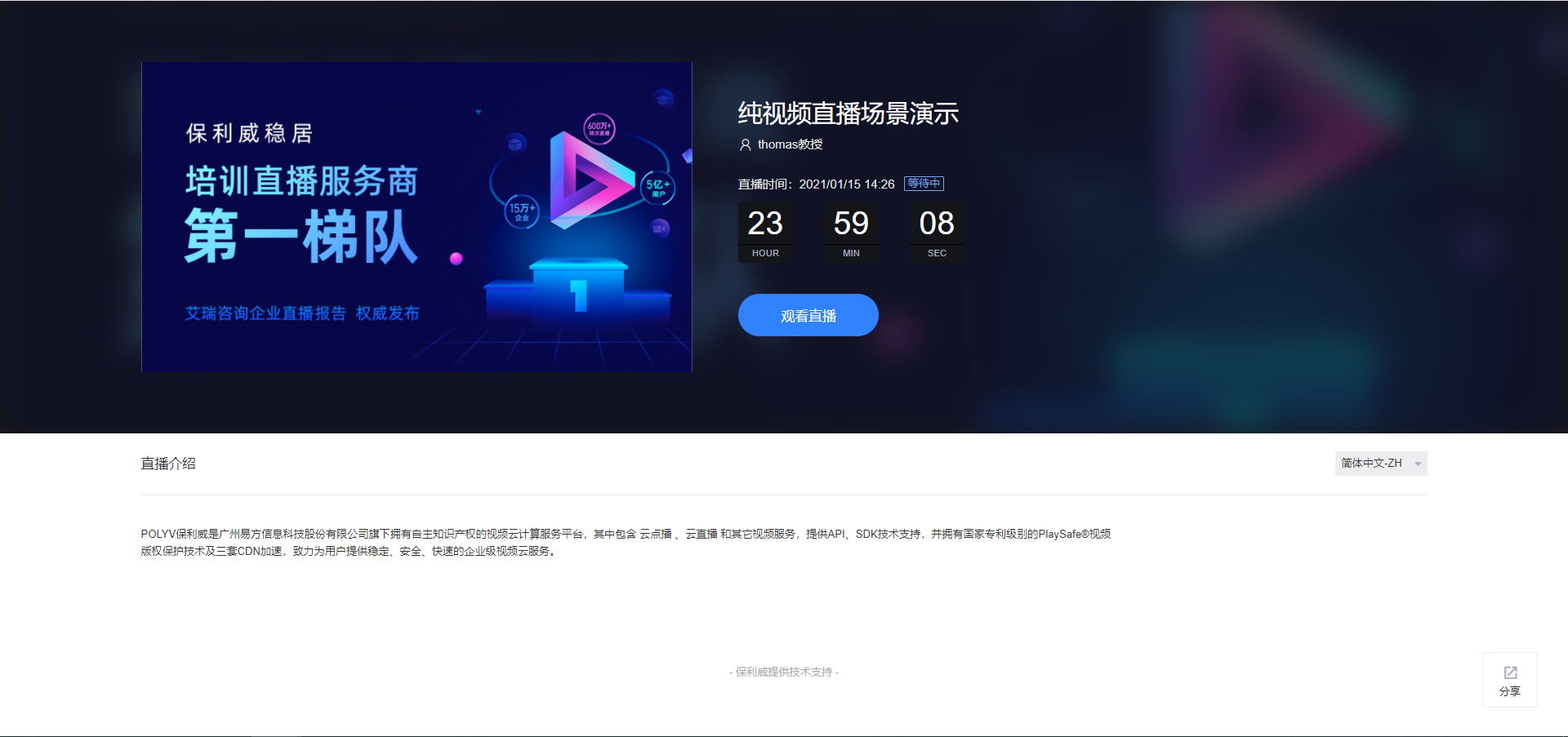
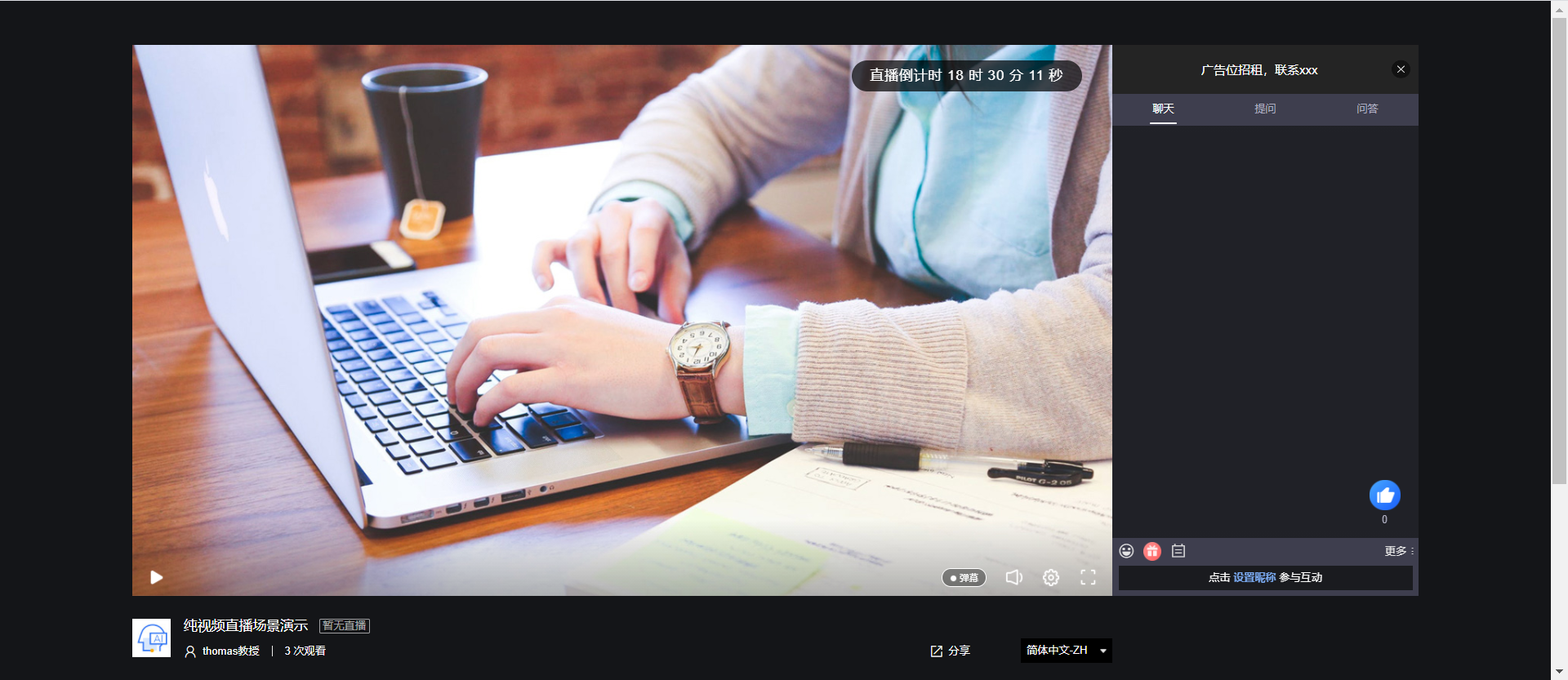
Viewer End Effect:
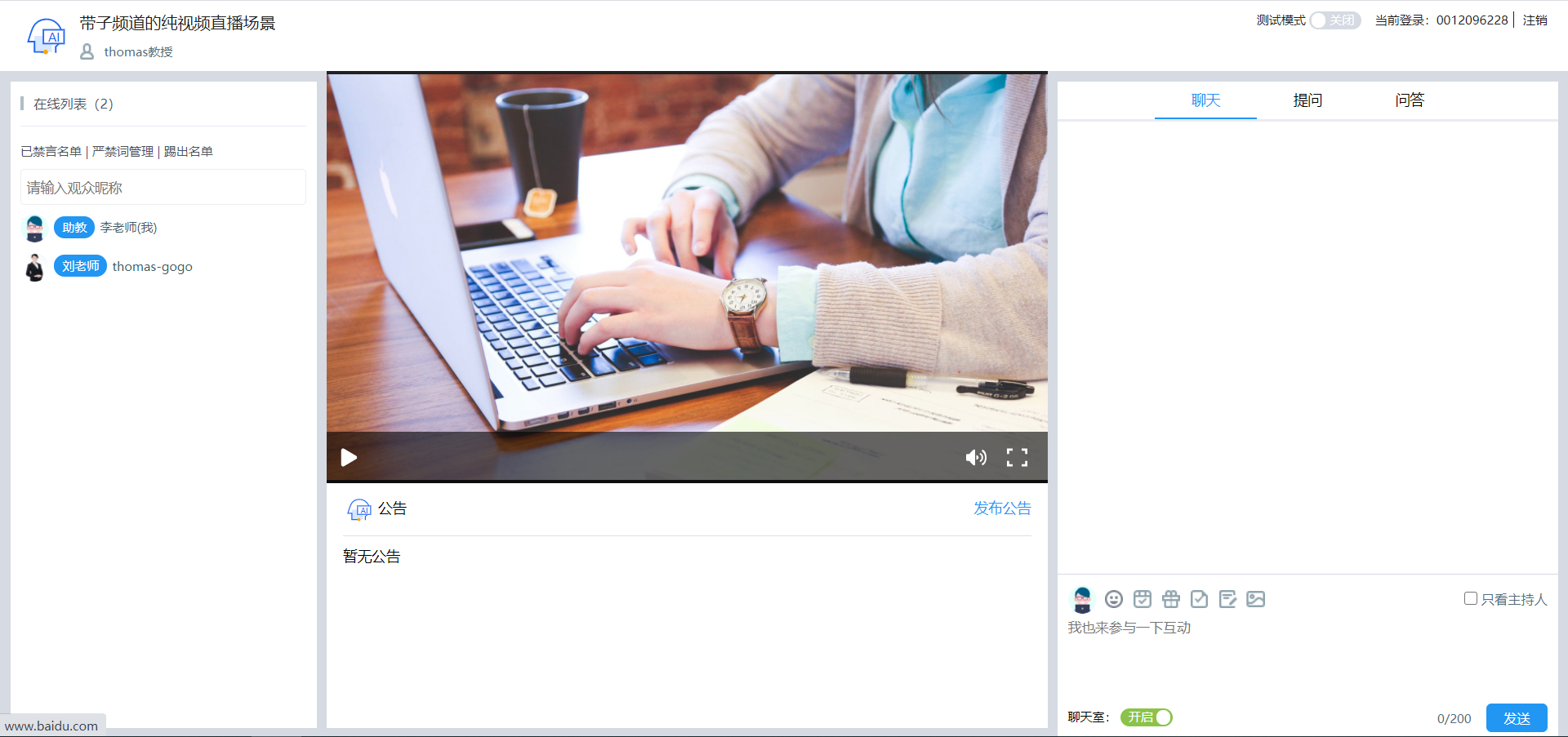
Teaching Assistant End:
Teaching assistants can view the live stream status.
Teaching assistants can view chat room member information.
Teaching assistants can manage prohibited words, muted users, and user kicks in the chat room.
Teaching assistants can assist the instructor in communicating with users regarding questions and Q&A.
Teaching assistants can participate in the chat to liven up the class atmosphere.
Process
In the following process, only "Channel Creation" and "Channel Initialization" are mandatory. All other steps are optional. If parameters for warm-up images/videos, instructor information, or live PPT upload are not set, the corresponding APIs will not be called. Only one of the warm-up video or warm-up image is effective. If both are set, the warm-up video will override the warm-up image.
graph LR
style A fill:#00ae9d,stroke:#323232,stroke-width:1px
style B fill:#f29952,stroke:#323232,stroke-width:1px
style C fill:#608913,stroke:#323232,stroke-width:1px
style D fill:#2ca9e0,stroke:#323232,stroke-width:1px
style E fill:#fbdd2d,stroke:#323232,stroke-width:1px
style F fill:#90d6ab,stroke:#323232,stroke-width:1px
style G fill:#2ca9e0,stroke:#323232,stroke-width:1px
style H fill:#e7372a,stroke:#323232,stroke-width:1px
style I fill:#40c1dd,stroke:#323232,stroke-width:1px
style J fill:#bf83ff,stroke:#323232,stroke-width:1px
A[创建频道] --> B[频道初始化设置]
B --> C[暖场图片设置]
B --> D[暖场视频设置]
B --> E[设置讲师信息]
B --> J[创建子频道]
B --> F[设置课件]
subgraph "频道设置(可多选)"
C
D
E
F
J
end
C --> G[封装频道返回]
D --> G
E --> G
J --> G
F --> G
G --> H[开始直播]
H --> I["结束直播,获取观看数据"]
Code Example
/**
 * 快速创建纯视频频道,适合直播带货、会议、年会、活动拍摄、大会直播等直播业务场景
 * 约束:2、同时设置暖场图片和暖场视频只生效暖场视频。
 * @throws IOException IO异常
 * @throws NoSuchAlgorithmException 系统异常
 */
//    @Test
public void testQuickCreateVideoAndSonChannel() throws IOException, NoSuchAlgorithmException {
        //初始化系统,请配置自己的账号信息,正式使用时请全局统一设置
        String userId = "xxx";
        String appId = "xxx";
        String appSecret = "xxx";
        LiveGlobalConfig.init(appId, userId, appSecret);
        log.debug("--初始化完成--");

        QuickCreateVideoChannelRequest quickCreateVideoChannelRequest = new QuickCreateVideoChannelRequest();
        QuickCreateChannelResponse quickCreateChannelResponse;
        Calendar instance = Calendar.getInstance();
        instance.set(Calendar.DAY_OF_MONTH, instance.get(Calendar.DAY_OF_MONTH) + 1);
        //创建频道

        //频道相关基础设置-频道名
        quickCreateVideoChannelRequest.setName("带子频道的纯视频直播场景")
        //频道相关基础设置-频道密码
        .setChannelPasswd(getRandomString(6))
        //频道相关基础设置-连麦人数
        .setLinkMicLimit(5)
        //频道相关基础设置-观看页显示的主讲人描述
        .setPublisher("thomas教授")
        //频道相关基础设置-是否无延迟
        .setPureRtcEnabled(LiveConstant.Flag.YES.getFlag())
        //频道相关基础设置-开播时间
        .setStartTime(instance.getTime().getTime())
        //==========================================
        //频道初始化设置-频道图标地址
        .setCoverImg("https://wwwimg.polyv.net/assets/dist/images/v2020/page-home/brand-advantage/row-2-3.svg")
        //频道初始化设置-引导图地址
        .setSplashImg(
        "https://wwwimg.polyv.net/assets/dist/images/v2020/news-info-md/product-dynamic-bg_v3.jpg")
        //频道初始化设置-频道描述
        .setDesc("POLYV保利威是易方信息科技股份有限公司旗下拥有自主知识产权的视频云计算服务平台,其中包含 云点播 、云直播 " +
        "和其它视频服务,提供API、SDK技术支持,并拥有国家专利级别的PlaySafe®视频版权保护技术及三套CDN加速,致力为用户提供稳定、安全、快速的企业级视频云服务。")
        //频道初始化设置-设置暖场图
        .setCoverImage("https://s1.videocc.net/live-watch/assets/img/default-splash-img.07657078.jpg")
        //频道初始化设置-点击暖场图跳转的地址
        .setCoverHref("http://www.baidu.com")
        //频道初始化设置-设置暖场视频
//              .setWarmUpFlv("http://www.w3school.com.cn/example/html5/mov_bbb.mp4")
        //==========================================
        //聊天室讲师信息-昵称
        .setNickname("thomas-gogo")
        //聊天室讲师信息-讲师头衔
        .setActor("刘老师")
        //聊天室讲师信息-讲师头像
        .setAvatar(
        "https://ss3.bdstatic.com/70cFv8Sh_Q1YnxGkpoWK1HF6hhy/it/u=2069606413,3553249962&fm=26&gp=0" +
        ".jpg");

        LiveCreateSonChannelListRequest liveCreateSonChannelListRequest = new LiveCreateSonChannelListRequest();
        List<LiveCreateSonChannelListRequest.SonChannel> sonChannels = new ArrayList<>();
        //纯视频场景只能创建助教,不允许创建嘉宾
        sonChannels.add(setSonChannelsInfo2());
        liveCreateSonChannelListRequest.setSonChannels(sonChannels);

        //请求服务器,创建带子频道的纯视频频道
        quickCreateChannelResponse = new LiveChannelQuickCreatorServiceImpl().quickCreateVideoSence(quickCreateVideoChannelRequest,
        liveCreateSonChannelListRequest);

        Assert.assertNotNull(quickCreateChannelResponse);
        log.debug("快速创建纯视频直播频道成功,{}", JSON.toJSONString(quickCreateChannelResponse));
        //无延迟纯视频模式只支持客户端开播
        if (LiveConstant.Flag.YES.getFlag().equals(quickCreateVideoChannelRequest.getPureRtcEnabled())) {
        log.debug("客户端开播地址:https://live.polyv.net/start-client.html?channelId={}  , 登录密码: {}",
        quickCreateChannelResponse.getLiveChannelBasicInfoResponse().getChannelId(),
        quickCreateVideoChannelRequest.getChannelPasswd());
        } else {
        log.debug("网页开播地址:https://live.polyv.net/web-start/login?channelId={}  , 登录密码: {}",
        quickCreateChannelResponse.getLiveChannelBasicInfoResponse().getChannelId(),
        quickCreateVideoChannelRequest.getChannelPasswd());
        }
        log.debug("网页观看地址:https://live.polyv.cn/watch/{} ",
        quickCreateChannelResponse.getLiveChannelBasicInfoResponse().getChannelId());

        //无延迟纯视频模式只支持客户端助教视频连麦
        if (LiveConstant.Flag.YES.getFlag().equals(quickCreateVideoChannelRequest.getPureRtcEnabled())) {
        log.debug("助教客户端进入直播间地址:https://live.polyv.net/teacher.html , 登录频道: {}, 登录密码: {}",
        quickCreateChannelResponse.getSonChannelInfos().get(0).getAccount(),
        sonChannels.get(0).getPasswd());
        } else {
        log.debug("助教进入直播间地址:https://live.polyv.net/teacher.html , 登录频道: {}, 登录密码: {}",
        quickCreateChannelResponse.getSonChannelInfos().get(0).getAccount(),
        sonChannels.get(0).getPasswd());
        }

        /**
         * todo : B端客户的业务逻辑,将quickCreateChannelResponse的相关信息保持到自己的DB中组织业务逻辑
         */

        /**
         * todo : 采用网页开播或者客户端开播,直播结束后 ,可以拉取用户观看直播的观看数据,对观看效果做进一步的分析,改进直播流程和细节
         */
        //打印观看日志
        printViewLog(quickCreateChannelResponse.getLiveChannelBasicInfoResponse().getChannelId());
        }


/**
 * 设置子频道信息-助教
 * @return 子频道列表
 */
private LiveCreateSonChannelListRequest.SonChannel setSonChannelsInfo2() {
        LiveCreateSonChannelListRequest.SonChannel sonChannel2 = new LiveCreateSonChannelListRequest.SonChannel();
        sonChannel2.setRole(null)
        .setNickname("助教-王小姐")
        .setPasswd(getRandomString(10))
        .setActor("王老师")
        .setAvatar("https://ss3.bdstatic.com/70cFv8Sh_Q1YnxGkpoWK1HF6hhy/it/u=356414612,1103487565&fm=15&gp=0" +
        ".jpg");
        return sonChannel2;
        }


/**
 * 打印频道观看日志
 * @param channelId
 * @throws IOException
 * @throws NoSuchAlgorithmException
 */
private void printViewLog(String channelId) throws IOException, NoSuchAlgorithmException {
        LiveListChannelViewlogRequest liveListChannelViewlogRequest = new LiveListChannelViewlogRequest();
        LiveListChannelViewlogResponse liveListChannelViewlogResponse;
        Calendar instance = Calendar.getInstance();
        instance.set(Calendar.DAY_OF_MONTH, instance.get(Calendar.DAY_OF_MONTH) + 2);
        //依据频道号和起止时间查询观看日志
        liveListChannelViewlogRequest.setChannelId(channelId)
        .setStartTime(new Date())
        .setEndTime(instance.getTime());
        liveListChannelViewlogResponse = new LiveChannelViewdataServiceImpl().listChannelViewlog(
        liveListChannelViewlogRequest);
        Assert.assertNotNull(liveListChannelViewlogResponse);
        if (liveListChannelViewlogResponse != null) {
        //to do something ......
        log.debug("测试分页查询频道观看日志成功,{}", JSON.toJSONString(liveListChannelViewlogResponse));
        }
        }
Request Description
| Parameter Name | Required | Type | Description |
|---|---|---|---|
| name | true | String | Custom channel name, typically the course topic, meeting topic, training topic, etc., e.g., Financial System Training, Wuzhen Summit. |
| channelPasswd | true | String | Custom channel password. The B-end instructor uses this password to enter the live room and start broadcasting. Length must not exceed 16 characters and must contain both letters and numbers. |
| linkMicLimit | false | Integer | Number of co-hosts. -1 <= value <= account-level co-host limit. -1: Use the account's default co-host limit. Maximum 16 people. (Note: The account-level co-host limit must be set by the platform administrator to take effect.) |
| publisher | false | String | Description of the main speaker displayed on the viewing page. |
| pureRtcEnabled | false | String | Whether to enable low-latency live streaming. 'Y' means enabled, default is 'N'. |
| coverImg | false | String | Channel icon URL. |
| splashImg | false | String | Guide image URL. |
| desc | false | String | Live stream introduction. |
| startTime | false | Long | Live stream start time, 13-digit timestamp. Set to 0 to disable the display of the live stream start time. |
| coverImage | false | String | Warm-up image URL. Recommended image size: 800x450. Supports PNG, JPEG, GIF formats. |
| coverHref | false | String | Browser redirect URL when the warm-up image is clicked. |
| warmUpFlv | false | String | Warm-up video URL (http address). Mobile devices do not support FLV video files; MP4 video files are recommended. |
| nickname | false | String | Instructor nickname. |
| actor | false | String | Instructor title. Required when the instructor nickname is not empty. |
| avatar | false | String | Avatar image URL. |
Response Description
| Parameter Name | Type | Description |
|---|---|---|
| liveChannelBasicInfoResponse | LiveChannelBasicInfoResponse | Channel information See LiveChannelBasicInfoResponse Parameter Description |
| sonChannelInfos | Array | Sub-channel information See LiveSonChannelInfoResponse Parameter Description |
LiveChannelBasicInfoResponse Parameter Description
| Parameter Name | Type | Description |
|---|---|---|
| channelId | String | Channel ID |
| name | String | Channel name |
| channelPasswd | String | Channel password |
| publisher | String | Host name |
| startTime | Date | Live stream start time, null if disabled |
| pageView | Integer | Cumulative page views |
| likes | Integer | Number of likes on the viewing page |
| coverImg | String | Channel icon URL |
| splashImg | String | Channel guide image URL |
| splashEnabled | String | Guide page switch (value is Y/N) |
| desc | String | Live stream introduction |
| consultingMenuEnabled | String | Consultation/Question switch (value is Y/N) |
| maxViewerRestrict | String | Maximum online viewer limit switch (value is Y/N) |
| maxViewer | Integer | Maximum online viewers |
| watchStatus | String | Viewing page status of the channel. Values: live (streaming), end (stream ended), playback (playback), waiting (waiting for stream) |
| watchStatusText | String | Viewing page status description: Streaming, Playback, Ended, Not Started |
| userCategory | UserCategory | Information about the category the channel belongs to See UserCategory Parameter Description |
| authSettings | Array | List of live stream viewing conditions See AuthSetting Parameter Description |
LiveSonChannelInfoResponse Parameter Description
| Parameter Name | Type | Description |
|---|---|---|
| account | String | Sub-channel ID |
| userId | String | POLYV user ID, consistent with the official POLYV website. Path: Official Website -> Login -> Live Stream (Development Settings) |
| channelId | String | Channel ID |
| passwd | String | Sub-channel password |
| nickname | String | Sub-channel name |
| stream | String | Sub-channel stream name (invalid when used alone) |
| status |
