


pod 'PLVLiveScenesSDK', '1.6.0'
- FAQ
FAQ
1 Significance of Setting a Unique User Identifier
The unique user identifier is called viewerId in multi-scene projects, sometimes also referred to as userId (different from the userId in the Polyv backend development settings, where userId refers to the developer account ID; please distinguish).
The user nickname is called viewerName in multi-scene projects, sometimes also referred to as nickName.
Data statistics can include the unique user identifier and user nickname, and can also be used as login information for the chatroom. It is recommended that customers set this.
Setting a unique user identifier has the following advantages:
- Effectively locate issues reported by users.
- Significantly reduce communication costs with users.
- Effectively improve the efficiency of the SDK side in troubleshooting issues unilaterally.
- Aggregate error logs for a specific user identifier.
2 Running Enterprise-Signed Apps on iOS 9 and Later
Starting from iOS 9, Apple has imposed stricter restrictions on running enterprise-signed apps. Therefore, after installing an enterprise-signed app on iOS 9, it cannot be launched directly. By default, when running an enterprise-signed app on iOS 9, a prompt like this will appear:
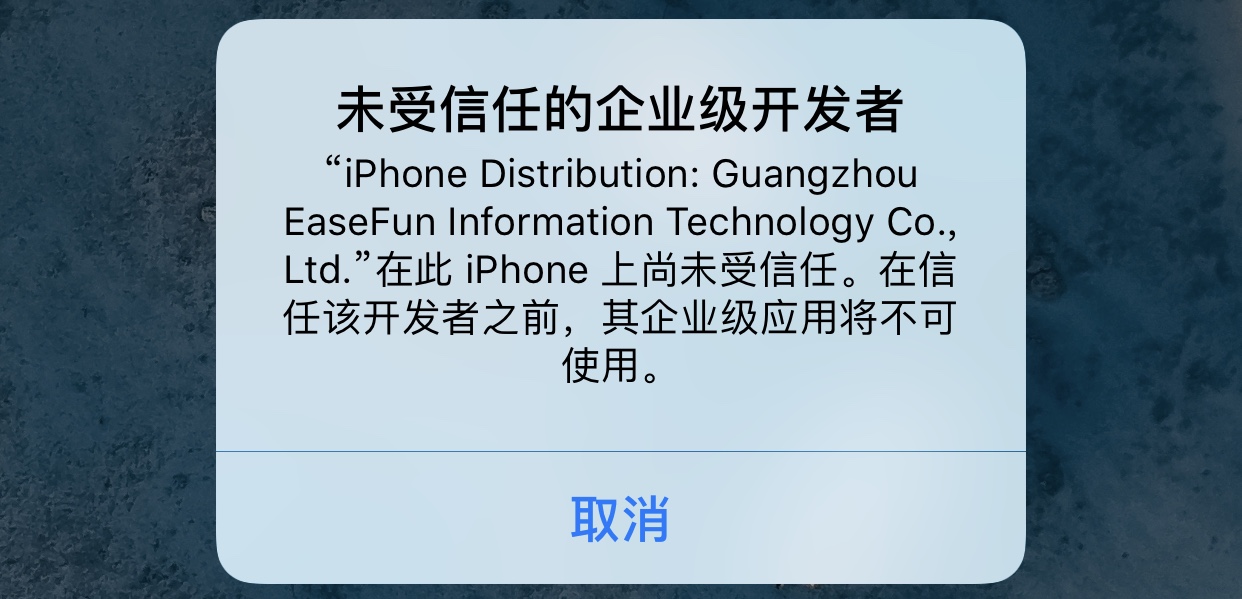
As you can see, the app no longer launches directly like in previous versions; instead, a security prompt appears. At this point, if you confirm that the app you want to run is safe, you can follow these steps to configure it:
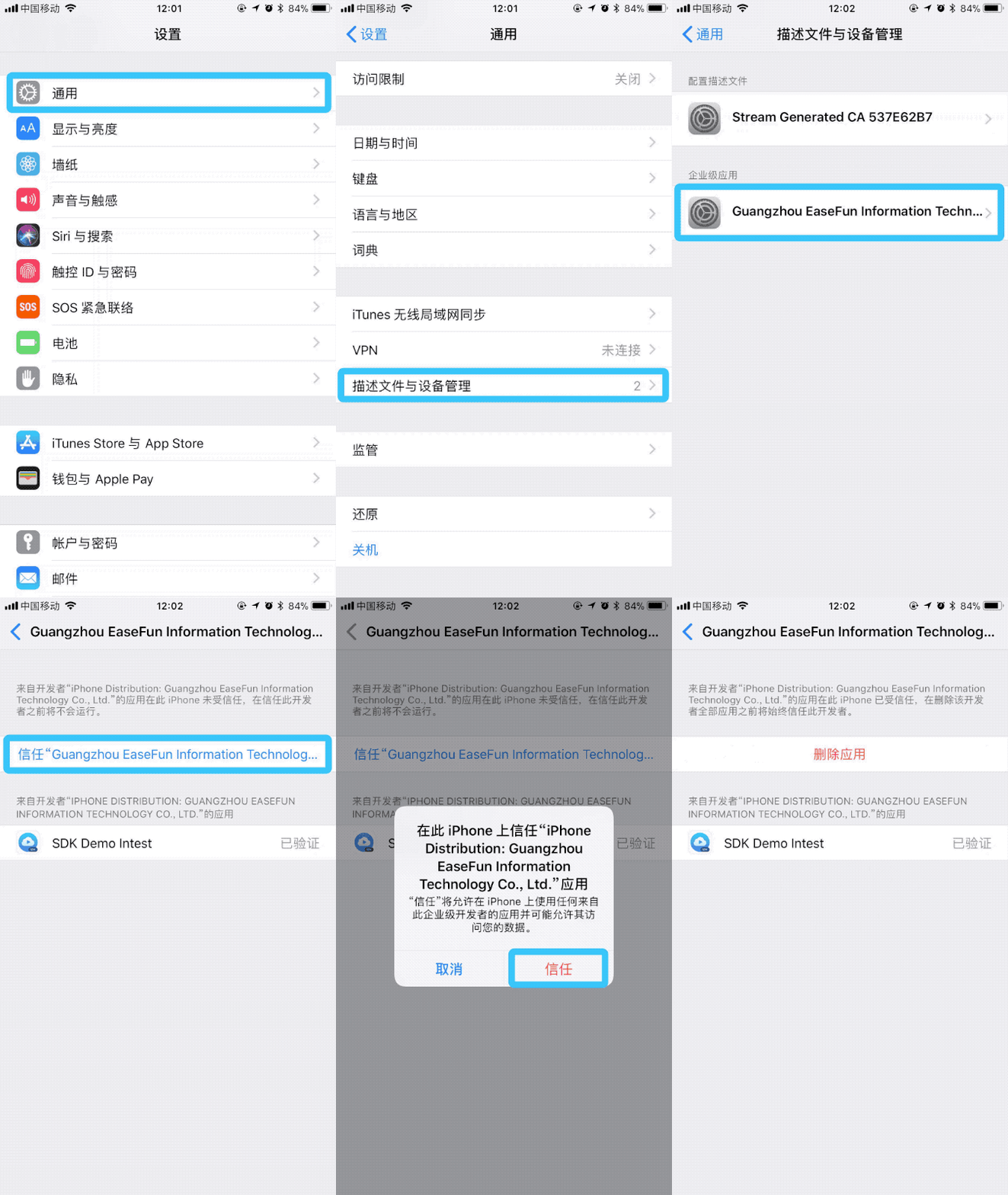
Open 设置 - 通用 - 描述文件与设备管理 in the system (called: 设备管理 after iOS 9.2). Here, you will see a profile description file with text similar to the prompt that just appeared. Then, click on the corresponding profile description file to enter, and click the button 信任 to allow the system to run apps with this certificate.
After that, you can return to the desktop and re-run the app; you will find that the app can now open normally.
The complete steps are shown in the following image:
3 CocoaPods Usage Guide
CocoaPods is a dependency manager for Objective-C, which automates and simplifies the process of using third-party libraries in projects.
3.1 Installing CocoaPods
You can install CocoaPods using the RubyGems toolkit with the following command:
$ sudo gem install cocoapods
However, sometimes running this command may result in an error:
$ ERROR: While executing gem ... (Gem::FilePermissionError) $ You don't have write permissions for the /usr/bin directory.
The reason is "/usr/bin is protected by system integrity protection and is not writable by anyone, even root." Therefore, CocoaPods should be installed in the /usr/local/bin path using the following command:
$ sudo gem install -n /usr/local/bin cocoapods
The install command with the -n parameter indicates "Directory where executables are located". The parameter meaning can be queried with the command "gem help install" ".
3.2 Updating the Index
After installing CocoaPods, execute pod setup to update all project Podspec files to the local ~/.cocoapods/ directory.
$ pod setup
All project Podspec files are hosted on https://github.com/CocoaPods/Specs.git. When CocoaPods executes pod install and pod update, it will first update the Podspec index by default. If the update is too slow, you can change the repo address to a domestic mirror, such as the gitcafe mirror with the following command:
$ pod repo remove master $ pod repo add master https://gitcafe.com/akuandev/Specs.git $ pod repo update
You can also change it to the oschina mirror http://git.oschina.net/akuandev/Specs.git。.
If the user cannot find the latest SDK version during pod operations, as shown in the screenshot:
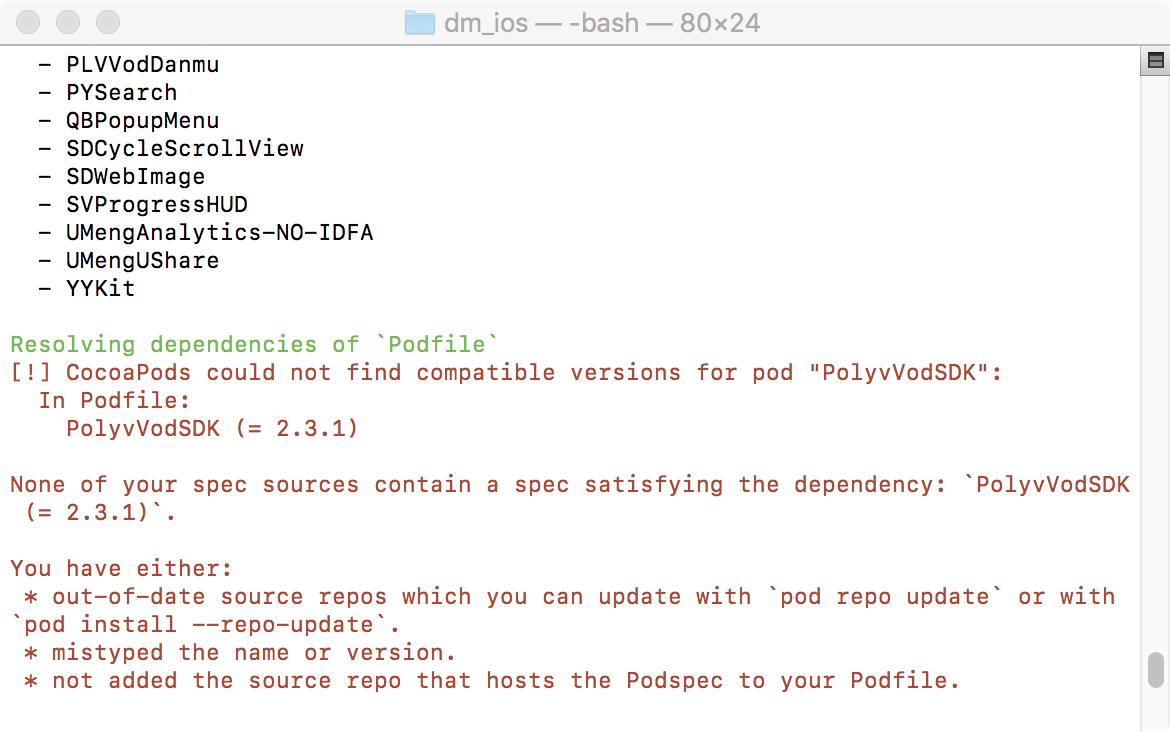
This situation indicates that the index is too old and needs updating. Execute the command pod repo update, or include the parameter –-repo-update when running pod install.
3.3 Difference Between pod install and pod update
After executing pod install , CocoaPods will generate a file named Podfile.lock. Podfile.lock locks the current versions of each dependency library. If you execute pod install multiple times afterward, the versions will not change; only pod update will modify Podfile.lock. This ensures that when multiple people collaborate, third-party library upgrades do not cause inconsistencies in the versions of third-party libraries used by each person.
pod install only requests libraries according to the Podfile requirements. If the library version numbers change, the fetch will fail. However, pod update updates all libraries to fetch the latest versions. Every time you change the Podfile, you need to re-execute the pod update command.
3.4 Checking CocoaPods Version
$ pod --version
3.5 Homebrew & RubyGems
Homebrew is a package management tool for the Mac platform, providing many Linux tools not available on Mac. Official website: https://brew.sh. The official website has installation commands:
$ /usr/bin/ruby -e "$(curl -fsSL https://raw.githubusercontent.com/Homebrew/install/master/install)"
After installing Homebrew, you can use the Homebrew command brew to install RubyGems with the following command:
$ brew install ruby
RubyGems official website: https://rubygems.org.
4 Instructions for Integrating Multi-Scene SDK and VOD SDK Simultaneously
4.1 Integrating Multi-Scene SDK v1.6.0 with VOD SDK v2.16.3
When integrating using the following statement:
pod 'PLVLiveScenesSDK', '1.6.0'
pod 'PolyvVodSDK', '2.16.3'
The following error will occur:
The 'XXXXX' target has frameworks with conflicting names: alicloudhttpdns.framework, alicloudutils.framework, and utdid.framework.
The solution is as follows:
# pod 'PLVLiveScenesSDK', '1.6.0'
# pod 'PolyvVodSDK', '2.16.3'

#注释上述代码,替换为下列代码

pod 'PLVLiveScenesSDK', '1.6.0', :subspecs => ['BaseSDK','Core', 'Player']
pod 'AgoraRtcEngine_iOS', '2.9.0.107'
pod 'PLVSocketIOClientSwift', '~> 0.1.0'
# 不使用use_Farmeworks!时使用pod "PLVSocket", "~> 0.2.0"  替换pod "PLVSocketIOClientSwift"
pod "UCloudRtcSdk", "1.9.1"
pod "TXLiteAVSDK_Professional", "8.3.9884"
pod "AliyunOSSiOS", "~> 2.10.8"
pod "PLVModel", "~> 1.0.4"

pod 'PolyvVodSDK', '~> 2.16.3', :subspecs => ['Core', 'Player']
pod 'SSZipArchive', '~> 2.1.5'
pod 'WCDB', '~> 1.0.6'
pod 'PLVAliHttpDNS', '~> 1.10.0'
The cause of the error is that the Multi-Scene SDK and VOD SDK both depend on frameworks such as alicloudhttpdns.framework. Polyv's Multi-Scene SDK and VOD SDK support subspecs pod integration, allowing flexible integration of the Multi-Scene SDK and VOD SDK by importing the dependency library only once.
If an older version of the VOD SDK conflicts with Multi-Scene SDK v1.6.0 regarding PLVIJKPlayer, it is recommended to upgrade the older VOD SDK to version 2.16.3. If the issue persists, contact Polyv technical support for assistance.
5 Changes in Chatroom Module Upgrade to v1.7.0
5.1 SDK
Note: If you upgrade the SDK and directly upgrade our Common layer code, you do not need to pay attention to the SDK layer changes. If you only upgrade the SDK without upgrading the Common layer source code, or if you do not use the Common layer source code, you need to make corresponding modifications for the following changes.
5.1.1 PLVChatroomManager
API changes for sending text messages and quote messages:
// 该方法被移除
- (BOOL)sendSpeakMessage:(PLVSpeakMessage *)message needIdCallback:(BOOL)needIdCallback;
// 替换为以下方法
- (BOOL)sendSpeakMessage:(PLVSpeakMessage *)message callback:(void (^ _Nullable)(NSString *msgId))callback;

// 以下两个方法被移除
- (BOOL)sendSpeakMessage:(PLVSpeakMessage *)message replyMsgId:(NSString * _Nullable)replyMsgId needIdCallback:(BOOL)needIdCallback;
- (BOOL)sendSpeakMessage:(PLVSpeakMessage *)message replyMsgId:(NSString * _Nullable)replyMsgId needIdCallback:(BOOL)needIdCallback callback:(void (^ _Nullable)(NSString *msgId))callback;
// 替换为以下两个方法
- (BOOL)sendQuoteMessage:(PLVQuoteMessage *)message;
- (BOOL)sendQuoteMessage:(PLVQuoteMessage *)message callback:(void (^ _Nullable)(NSString *msgId))callback;

// 该方法被移除
- (BOOL)sendImageEmotionMessage:(PLVImageEmotionMessage *)message callback:(void (^ _Nullable)(PLVImageEmotionMessage *message))callback;
// 替换为以下方法
- (BOOL)sendImageEmotionMessage:(PLVImageEmotionMessage *)message;
5.1.2 PLVSocketManager
The callback for receiving image emoji (emotion) messages has changed as follows:
- (void)socketMananger_didReceiveMessage:(NSString *)subEvent
                                    json:(NSString *)jsonString
                              jsonObject:(id)object {
    NSDictionary *jsonDict = (NSDictionary *)object;
    if (![jsonDict isKindOfClass:[NSDictionary class]]) {
        return;
    }
    if ([subEvent isEqualToString:@"EMOTION"]) {   // someone logged in chatroom
        //1.7.0以前的版本接收到图片表情消息的位置
    }
}

- (void)socketMananger_didReceiveEvent:(NSString *)event subEvent:(NSString *)subEvent json:(NSString *)jsonString jsonObject:(id)object {
    NSDictionary *jsonDict = PLV_SafeDictionaryForValue(object);
    if ([event isEqualToString:@"emotion"]) {// someone send a image emotion
       //1.7.0以后(含1.7.0版本)接收到图片表情消息的位置
   }
}
5.2 Common
If you upgrade the SDK and Common layer source code and also upgrade the Scene layer source code, you do not need to pay attention to the following changes. If you only upgrade the SDK and Common layer source code without upgrading the Scene layer source code, or if you do not use the Scene layer source code, you need to make corresponding modifications for the following changes.
5.2.1 PLVChatroomPresenter
PLVChatroomPresenterProtocolhas the following two delegate method changes:/// 以下回调被删除 - (void)chatroomPresenter_sendImageEmotionMessageStatus:(PLVImageEmotionMessage *)message; /// 以下回调有更改 - (void)chatroomPresenter_loadImageEmotionsSuccess:(NSArray <NSDictionary *> *)dictArray; /// 改为 - (void)chatroomPresenter_loadImageEmotionsSuccess;API changes are as follows:
// 该方法被移除
- (PLVChatModel * _Nullable)chatModelWithMsgStateForSendSpeakMessage:(NSString *)content replyChatModel:(PLVChatModel * _Nullable)replyChatModel;
// 可用以下方法代替
- (PLVChatModel * _Nullable)sendSpeakMessage:(NSString *)content replyChatModel:(PLVChatModel * _Nullable)replyChatModel;

// 该方法被删除
- (PLVChatModel * _Nullable)sendImageEmotionId:(NSString *)imageId;
// 改为以下方法
- (PLVChatModel * _Nullable)sendImageEmotionId:(NSString *)imageId imageUrl:(NSString *)imageUrl;

// 该方法被删除,改为直接调用 [[PLVChatroomManager sharedManager] sendCloseRoom:close];
- (BOOL)sendCloseRoom:(BOOL)closeRoom;
The following property changes:
@property (nonatomic, assign) BOOL specialRole;
// 布尔属性 specialRole 改为对外只读,无需外部配置
@property (nonatomic, assign, readonly) BOOL specialRole;

// 以下属性删除,改为直接通过 [PLVChatroomManager sharedManager].closeRoom 读取
@property (nonatomic, assign, readonly) BOOL closeRoom;

// 新增以下属性,可用于获取图片表情资源数组
@property (nonatomic, strong, readonly) NSArray *imageEmotionArray;
Internal logic changes:
// Scene 层无需再调用 ViewModel 的以下方法加载图片表情资源,Common 层的 PLVChatroomPresenter 初始化时会自动调用
- (void)loadImageEmotions;
5.3 Scene
If you upgrade the SDK, Common layer, and Scene layer ViewModel source code and also upgrade the UI part source code, you do not need to pay attention to the following changes. If the Scene layer does not upgrade the UI part source code and only upgrades the chatroom ViewModel, you need to make corresponding modifications for the following changes.
5.3.1 PLVLCChatroomViewModel
The delegate method of the protocol
PLVLCChatroomViewModelProtocolhas the following changes:// 该方法被删除 - (void)chatroomViewModel_loadEmotionSuccess; // 改为以下方法代替 - (void)chatroomViewModel_loadImageEmotionSuccess:(NSArray<NSDictionary *> *)dictArray; // 新增以下方法,加载图片表情资源失败时触发 - (void)chatroomViewModel_loadImageEmotionFailure;
5.3.2 PLVECChatroomViewModel
The delegate method of the protocol
PLVECChatroomViewModelProtocolhas the following changes:// 删除以下图片表情资源加载相关的回调,因为直播带货场景没有图片表情消息功能 - (void)chatroomViewModel_loadEmotionSuccess;
5.3.3 PLVLSChatroomViewModel
The delegate method of the protocol
PLVLSChatroomViewModelProtocolhas the following changes:// 该方法被删除 - (void)chatroomViewModel_loadEmotionSuccess; // 改为以下方法代替 - (void)chatroomViewModel_loadImageEmotionSuccess:(NSArray<NSDictionary *> *)dictArray; // 新增以下方法,加载图片表情资源失败时触发 - (void)chatroomViewModel_loadImageEmotionFailure; // 新增以下方法,当发送消息包含违禁词或图片违规时触发 - (void)chatroomViewModel_didSendProhibitMessgae;
5.3.4 PLVSAChatroomViewModel
The delegate method of the protocol
PLVSAChatroomViewModelProtocolhas the following changes:// 该方法被删除 - (void)chatroomViewModel_loadEmotionSuccess; // 改为以下方法代替 - (void)chatroomViewModel_loadImageEmotionSuccess:(NSArray<NSDictionary *> *)dictArray; // 新增以下方法,加载图片表情资源失败时触发 - (void)chatroomViewModel_loadImageEmotionFailure; // 新增以下方法 // 重发公聊消息后触发 - (void)chatroomViewModelDidResendMessage:(PLVSAChatroomViewModel *)viewModel; // 当发送消息包含违禁词或图片违规时触发 - (void)chatroomViewModelDidSendProhibitMessgae:(PLVSAChatroomViewModel *)viewModel;The following properties have been deleted:
// 以下属性删除,改为直接通过 [PLVChatroomManager sharedManager].closeRoom 读取
@property (nonatomic, assign, readonly) BOOL closeRoom;
The following API changes:
// 该方法被删除,改为直接调用 [[PLVChatroomManager sharedManager] sendCloseRoom:close];
- (BOOL)sendCloseRoom:(BOOL)closeRoom;

// 该方法被删除
- (BOOL)resendSpeakMessage:(NSString *)content replyChatModel:(PLVChatModel * _Nullable)replyChatModel;
// 改为以下方法
- (BOOL)resendSpeakMessage:(PLVChatModel *)model replyChatModel:(PLVChatModel * _Nullable)replyChatModel;

// 该方法被删除
- (BOOL)resendImageMessage:(UIImage *)image imageId:(NSString *)imageId;
// 改为以下方法
- (BOOL)resendImageMessage:(PLVChatModel *)model;

// 该方法被删除
- (BOOL)resendImageEmotionMessage:(NSString *)imageId imageUrl:(NSString *)imageUrl;
// 改为以下方法
- (BOOL)resendImageEmotionMessage:(PLVChatModel *)model;
