


4 Video Playback
4.1 Pre-Playback Preparation
4.1.1 Deploying the Player
The player class in the VOD SDK is PLVVodPlayerViewController, while the player class with a default skin provided in the open-source component, PLVVodSkinPlayerController, is a subclass of PLVVodPlayerViewController. The base class from the SDK is used here as an example. To play a video, first create a PLVVodPlayerViewController object on the page, along with a UIView object to hold the player. The code example is as follows:
#import “PLVVodPlayerViewController.h”

@interface UIViewController ()
@property (nonatomic, strong) PLVVodPlayerViewController *player;
@property (nonatomic, weak) UIView *playerPlaceholder;
@end

@implementation UIViewController

- (void)viewDidLoad {
  [super viewDidLoad];

  PLVVodPlayerViewController *player = [[PLVVodPlayerViewController alloc] init];
  [player addPlayerOnPlaceholderView:self.playerPlaceholder rootViewController:self];
  self.player = player;
}

@end
The player can automatically implement auto-layout within the playerPlaceholder, as well as switch between half-screen and full-screen modes.
4.1.2 Passing Playback Credentials Externally
Starting from iOS VOD SDK version 2.17.0, support is provided for playing encrypted videos by passing playback credentials externally, preventing illegal pirates from exploiting vulnerabilities to create playback credentials without identity information.
- The Token is used to decrypt videos encrypted by Polyv. Passing the Token locally will better enhance video security.
- When using this feature, customers must ensure the security of the Token during transmission in their own APIs, such as API encryption.
For the complete process of playing encrypted videos, please refer to Best Practices for Playing Encrypted Videos.
First, you need to integrate the iOS VOD SDK version 2.17.0 or above.
Modify the podfile to include the VOD SDK:
source 'https://github.com/CocoaPods/Specs.git'
source 'https://gitee.com/polyv_ef/plvspecs.git'

project 'PolyvVodSDKDemo.xcodeproj'
platform :ios, '8.0'
inhibit_all_warnings!

target 'PolyvVodSDKDemo' do
    # ......
    # PLVVodSDK
    pod 'PolyvVodSDK', '~>2.17.0'
end
Secondly, use the API for passing the Token locally. View the API in the VOD header file PLVVodPlayerViewController.h as follows:
/// 请求自定义keyToken。
/// 播放加密视频时,若设置此block将优先使用block获取的值来解密视频;没有设置此block则sdk自动处理解密;
/// 请在调用setVideo:方法前设置此block
/// sdk在处理播放加密视频、切换清晰度、切换线路、播放错误内部重试机制 过程的时候,将会通过此block向外界获取keyToken
@property (nonatomic, copy) NSString *(^requestCustomKeyTokenBlock)(NSString *vid);
After initializing the player, set the requestCustomKeyTokenBlock. Whenever the SDK needs a keytoken, it will obtain it by executing this block, as shown in the example below:
- (void)viewDidLoad {
    [super viewDidLoad];
    // Do any additional setup after loading the view.

    PLVVodSkinPlayerController *player = [[PLVVodSkinPlayerController alloc] initWithNibName:nil bundle:nil];
    [player addPlayerOnPlaceholderView:self.playerPlaceholder rootViewController:self];
    self.player = player;

    // 当需要使用自定义keytoken的时候解开以下注释,每当sdk需要使用keytoken的时候,将会通过此block来向开发者获取
    [self.player setRequestCustomKeyTokenBlock:^NSString *(NSString *vid) {
        __block NSString *token = nil;
        dispatch_semaphore_t signal = dispatch_semaphore_create(0);
        // 调用自定义接口获取凭证Token,服务端接口定义可参考本文档最下方注意事项
        [[[NSURLSession sharedSession] dataTaskWithRequest:request
                                         completionHandler:^(NSData * _Nullable data, NSURLResponse * _Nullable response, NSError * _Nullable error) {
            if (!error) {
                token = @"解析返回数据中的token字段";
                dispatch_semaphore_signal(signal);
            } else {
                dispatch_semaphore_signal(signal);
            }
        }] resume];
        dispatch_semaphore_wait(signal, DISPATCH_TIME_FOREVER);
        return token;
    }];
}
4.2 Video Playback
The VOD SDK encapsulates video data in the class PLVVodVideo, and passes the video data to the player through the PLVVodVideo object. PLVVodVideo contains data such as video ID, video title, and video duration.
Note: After setting the video property for the player, the player's property values will be applied immediately. Therefore, the player's property configuration should be performed before assigning the PLVVodVideo object.
// video 模型 @property (nonatomic, strong) PLVVodVideo *video;
When setting the video property directly, the "default quality" set in the backend will be used. The example code for playing a video is as follows:
self.player.video = video; // video 为 PLVVodVideo 对象
[self.player play]; // 开始播放
[self.player pause]; // 暂停播放
Here, self.player is the player PLVVodPlayerViewController mentioned in the code example in section 4.1.
4.2.1 Setting Video Quality
To set a custom video quality, use the -setVideo:quality: method. The current playback quality of the video can be obtained through the read-only property quality.
// 清晰度
typedef NS_ENUM(NSInteger, PLVVodQuality) {
PLVVodQualityAuto, // 自动
PLVVodQualityStandard = 1, // 流畅
PLVVodQualityHigh, // 高清
PLVVodQualityUltra // 超清
};

// 当前清晰度
@property (nonatomic, assign, readonly) PLVVodQuality quality;

/**
指定/切换 PLVVodVideo 对象,及其清晰度
@param video PLVVodVideo 对象
@param quality 清晰度
*/
- (void)setVideo:(PLVVodVideo *)video quality:(PLVVodQuality)quality;
Switching between qualities provided by the VOD backend is also supported during playback. To switch quality, simply call the -switchQuality: method. To find out which qualities are supported by the video, read the qualityCount property of the PLVVodVideo object to get the available qualities.
/**
切换码率,若码率不符合则自动切换到附近的清晰度
@param quality 清晰度
*/
- (void)switchQuality:(PLVVodQuality)quality;
4.2.2 Switching Lines
Switching lines refers to changing the CDN service provider accessed by the video. Polyv provides multiple line switching options for encrypted VOD videos. Setting this property completes the line switch. The line source can be selected from the availableRouteLines property of the PLVVodVideo object.
// 路由线路,仅对加密视频有效,传入 POVVodVideo 对象中 availableRouteLines 数组的元素
@property (nonatomic, copy) NSString *routeLine;
4.2.3 Setting Playback Speed
The player supports variable speed playback, with normal playback speed being 1.0. Developers can change the playback speed by modifying this value, or obtain the current playback speed of the player through this value.
// 播放速度
@property (nonatomic, assign) double playbackRate;
4.2.4 Setting Playback Volume
The playback volume of the player is set via the playbackVolume property. This volume is different from the system volume, with a value ranging from 0 to the current system volume. Developers can obtain the current playback volume of the player through this value.
// 播放音量
@property (nonatomic, assign) double playbackVolume;
4.2.5 Seeking Playback Progress
The player performs seek operations by setting the currentPlaybackTime property. Similarly, developers can obtain the current playback time through this value.
// 当前播放时间
@property (nonatomic, assign) NSTimeInterval currentPlaybackTime;
By calculating currentPlaybackTime and duration (media duration), the current playback progress can be determined.
4.2.6 Switching Between Full-Screen and Half-Screen
Full-screen mode includes both portrait and landscape full-screen. Users can call the player's method -setPlayerFullScreen: to set whether the player is in full-screen mode. The enum property fullScreenOrientation is used to set the full-screen orientation, which can automatically select portrait or landscape based on the video's aspect ratio, or be fixed to one orientation. The default is to automatically select portrait/landscape based on the video's aspect ratio.
typedef NS_ENUM(NSInteger, PLVVodFullScreenOrientation) {
    // 根据视频宽高比自动判断,当宽高比 >=1 时,横向全屏;当宽高比 <1 时,竖向全屏
    PLVVodFullScreenOrientationAuto = 0,
    // 竖向全屏
    PLVVodFullScreenOrientationPortrait,
    // 横向全屏
    PLVVodFullScreenOrientationLandscape,
};

// 设置全屏方向
@property (nonatomic, assign) PLVVodFullScreenOrientation fullScreenOrientation;

// 设置播放器是否处于全屏模式
- (void)setPlayerFullScreen:(BOOL)full;
The following read-only property fullscreen can be used to obtain the current full-screen status of the player, along with the corresponding full-screen status change callback.
// 当前是否全屏
@property (nonatomic, assign, readonly) BOOL fullscreen;
// 全屏状态变化回调
@property (nonatomic, copy) void (^didFullScreenSwitch)(BOOL fullScreen);
For usage examples of the above methods, refer to PLVVodPlayerSkin. It is recommended to directly use the player PLVVodSkinPlayerController provided with the player skin PLVVodPlayerSkin for integration.
4.2.7 Setting Video Scaling Mode
The video scaling mode is similar to the definition of contentMode in UIView, and can be referenced accordingly.
// 拉伸模式
typedef NS_ENUM(NSInteger, PLVVodMovieScalingMode) {
  PLVVodMovieScalingModeNone,
  PLVVodMovieScalingModeAspectFit,
  PLVVodMovieScalingModeAspectFill,
  PLVVodMovieScalingModeFill
};

// 拉伸模式
@property (nonatomic, assign) PLVVodMovieScalingMode scalingMode;
4.3 Playback Status
4.3.1 User Playback/Dwell Time
The read-only property viewerWatchDuration represents the time the App user has spent playing the current video. This duration is only counted when the user is actively playing; paused time is not included.
The read-only property viewerStayDuration represents the time the App user has spent on this video since opening the player.
Note: Both of the above property values reset to zero when switching videos.
// 用户播放时间
@property (nonatomic, assign, readonly) NSTimeInterval viewerWatchDuration;

// 用户停留时间
@property (nonatomic, assign, readonly) NSTimeInterval viewerStayDuration;
4.3.2 Media Duration and Buffer Progress
The read-only property duration can be used to obtain the media duration of the current video, while the read-only property playableDuration represents the duration of the cached (playable) video. Dividing playableDuration by duration yields the current buffer progress.
// 媒体时长
@property (nonatomic, assign, readonly) NSTimeInterval duration;

// 可播放时长
@property (nonatomic, assign, readonly) NSTimeInterval playableDuration;
4.3.3 Capturing a Screenshot of the Current Moment
The player can capture a screenshot of the current moment using the -snapshot method. The method declaration is as follows:
// 当前时刻的视频截图
- (UIImage *)snapshot;
4.3.4 Gesture Types and Callbacks
The player supports recognizing multiple gestures and exposes the recognized gesture types and response event callbacks. Developers can implement gesture events based on actual needs. For specific usage, refer to PLVVodSkinPlayerController. If certain views should not respond to the player's gestures, set the doNotReceiveGestureViews array to add views that ignore gesture event responses.
// 手势识别类型
typedef NS_ENUM(NSInteger, PLVVodGestureType) {
    PLVVodGestureTypeUnknown,      // 未知
    PLVVodGestureTypeTap,          // 点击
    PLVVodGestureTypeDoubleTap,    // 双击
    PLVVodGestureTypeLeftPan,      // 左滑
    PLVVodGestureTypeRightPan,     // 右滑
    PLVVodGestureTypeLeftSideUpPan,   // 左侧上滑
    PLVVodGestureTypeLeftSideDownPan, // 左侧下滑
    PLVVodGestureTypeRightSideUpPan,  // 右侧上滑
    PLVVodGestureTypeRightSideDownPan,// 右侧下滑
    PLVVodGestureTypeLongPress, 	 // 长按
    PLVVodGestureTypeLongPressEnd  // 长按取消
};

// 识别手势类型
@property (nonatomic, assign, readonly) PLVVodGestureType gestureType;

// 手势识别回调
@property (nonatomic, copy) void (^gestureCallback)(PLVVodPlayerViewController *player, UIGestureRecognizer *recognizer, PLVVodGestureType gestureType);

// 手势识别时忽略的视图
@property (nonatomic, strong) NSArray *doNotReceiveGestureViews;
The player PLVVodSkinPlayerController implements all the response events for the above gestures:
- Single tap: Show player skin
- Double tap: Play or pause
- Swipe left/right: Seek playback progress
- Swipe up/down on the left side: Adjust brightness
- Swipe up/down on the right side: Adjust volume
- Long press/release: Fast forward/cancel fast forward
To disable the long press gesture, set the disableLongPressGesture property to YES. The fast-forward speed during long press can be modified via the longPressPlaybackRate property, with a default value of 2.0.
// 是否屏蔽长按倍速快进手势,默认为 NO
@property (nonatomic, assign) BOOL disableLongPressGesture;

// 长按快进时的倍速,默认为 2.0
@property (nonatomic, assign) double longPressPlaybackRate;
4.3.5 Playback Status and Callbacks
The following read-only properties can be used to obtain the current playback status of the player, including whether the video is ready for playback, the current playback state, the current video loading state, and whether playback has ended. Each property value has its own change callback, allowing developers to implement callbacks for different playback status changes.
// 是否就绪播放
@property (nonatomic, assign, readonly) BOOL preparedToPlay;
// 就绪播放回调
@property (nonatomic, copy) void (^preparedToPlayHandler)(PLVVodPlayerViewController *player);

// 当前播放状态
@property (nonatomic, assign, readonly) PLVVodPlaybackState playbackState;
// 播放状态回调
@property (nonatomic, copy) void (^playbackStateHandler)(PLVVodPlayerViewController *player);

// 播放模式
@property (nonatomic, assign) PLVVodPlaybackMode playbackMode;
// 播放模式回调
@property (nonatomic, copy) void (^playbackModeHandler)(PLVVodPlayerViewController *player);

// 加载状态
@property (nonatomic, assign, readonly) PLVVodLoadState loadState;
// 加载状态回调
@property (nonatomic, copy) void (^loadStateHandler)(PLVVodPlayerViewController *player);

// 是否播放结束
@property (nonatomic, assign, readonly) BOOL reachEnd;
// 是否成功播放结束
@property (nonatomic, readonly) BOOL reachEndSuccess;
// 播放结束回调
@property (nonatomic, copy) void (^reachEndHandler)(PLVVodPlayerViewController *player);
// 播放异常结束,手动恢复播放回调。播放异常结束后,该 block 每 5s 回调一次,在该 block 中可实现恢复播放逻辑
@property (nonatomic, copy) void (^playbackRecoveryHandle)(PLVVodPlayerViewController *player);
The definitions of the three enum values for playback state, playback mode, and loading state are as follows:
// 播放状态
typedef NS_ENUM(NSInteger, PLVVodPlaybackState) {
    PLVVodPlaybackStateStopped,
    PLVVodPlaybackStatePlaying,
    PLVVodPlaybackStatePaused,
    PLVVodPlaybackStateInterrupted,
    PLVVodPlaybackStateSeekingForward,
    PLVVodPlaybackStateSeekingBackward
};

// 加载状态
typedef NS_OPTIONS(NSUInteger, PLVVodLoadState) {
    PLVVodLoadStateUnknown        = 0,
    PLVVodLoadStatePlayable       = 1 << 0,
    PLVVodLoadStatePlaythroughOK  = 1 << 1, // Playback will be automatically started in this state when shouldAutoplay is YES
    PLVVodLoadStateStalled        = 1 << 2, // Playback will be automatically paused in this state, if started
};

// 播放模式
typedef NS_ENUM(NSInteger, PLVVodPlaybackMode) {
    PLVVodPlaybackModeDefault,
    PLVVodPlaybackModeVideo,
    PLVVodPlaybackModeAudio
};
4.3.6 Other Callbacks
To simplify the work of developers, the player also provides the following callbacks.
// 是否正在载入回调
@property (nonatomic, copy) void (^loadingHandler)(BOOL isLoading);

// 播放器错误回调
@property (nonatomic, copy) void (^playerErrorHandler)(PLVVodPlayerViewController *player, NSError *error);
The callback parameter isLoading of the callback loadingHandler indicates whether the player is currently loading. Developers can directly perform UI changes within this callback.
playerErrorHandler provides callbacks for all errors that occur during playback, returning error information in the standard NSError format. Developers can handle errors and display error information within this callback.
Note: If implementing the skin according to PLVVodPlayerSkinProtocol or using the player with default skin settings PLVVodSkinPlayerController, these two callbacks do not need to be implemented, as their implementation is already handled internally by the player.
4.4 Custom Skin
PLVVodPlayerViewController is the base player class without any playback controls. Users who need a player with skin controls can directly use PLVVodSkinPlayerController. To customize the skin, implement the PLVVodPlayerSkinProtocol protocol, create the skin, and set it to the playerControl property of PLVVodPlayerViewController. For specific settings of custom skins, refer to the PLVVodPlayerSkin class in the demo.
4.4.1 Weak Reference to the Player
The player skin holds a weak reference to the player. The skin can use this weak reference to obtain player properties and call methods. For example, obtaining the player's playback mode, current playback time, or capturing a screenshot of the current playback.
// 播放控制
@property (nonatomic, strong) IBOutlet id<PLVVodPlayerSkinProtocol> playerControl;
4.4.2 Setting the Skin Based on Playback Properties
The PLVVodPlayerSkinProtocol protocol also specifies that the player skin must include the following properties. The player skin can set and change its style based on these properties and their change callbacks.
// 清晰度个数
@property (nonatomic, assign) int qualityCount;
// 当前清晰度
@property (nonatomic, assign) PLVVodQuality quality;
// 清晰度修改回调
@property (nonatomic, copy) void (^qualityDidChangeBlock)(PLVVodQuality quality);

// 当前是否播放本地视频
@property (nonatomic, assign) BOOL localPlayback;

// 当前播放速率
@property (nonatomic, assign) double playbackRate;
// 播放速率改变回调
@property (nonatomic, copy) void (^selectedPlaybackRateDidChangeBlock)(double playbackRate);

// 当前视频拉伸方式
@property (nonatomic, assign) NSInteger scalingMode;
// 视频拉伸方式改变回调
@property (nonatomic, copy) void (^scalingModeDidChangeBlock)(NSInteger scalingMode);

// 字幕名称
@property (nonatomic, strong) NSArray<NSString *> *subtitleKeys;
// 选中的字幕名称
@property (nonatomic, copy) NSString *selectedSubtitleKey;
// 字幕改变回调
@property (nonatomic, copy) void (^selectedSubtitleKeyDidChangeBlock)(NSString *selectedSubtitleKey);
4.4.3 Custom Navigation Bar/Status Bar
Implementing the shouldHideNavigationBar property causes the player to hide or show the navigation bar of the controller containing the player based on its value. Implementing the shouldHideStatusBar property allows the page containing the player to implement the -prefersStatusBarHidden and -preferredStatusBarStyle methods based on this value, achieving the purpose of setting the player's status bar.
// 指导页面隐藏导航栏
@property (nonatomic, assign) BOOL shouldHideNavigationBar;

// 指导页面状态栏隐藏
@property (nonatomic, assign) BOOL shouldHideStatusBar;

// 指导页面状态栏样式
@property (nonatomic, assign) UIStatusBarStyle statusBarStyle;
4.4.4 Setting Player Controls
The player skin must also include the following controls:
// 播放/暂停按钮
@property (nonatomic, weak) IBOutlet UIButton *playPauseButton;

// 时间标签
@property (weak, nonatomic) IBOutlet UILabel *timeLabel;

// 缓冲进度
@property (weak, nonatomic) IBOutlet UIProgressView *bufferProgressView;

// 播放进度滑杆
@property (weak, nonatomic) IBOutlet UISlider *playbackSlider;

// 全屏/半屏按钮
@property (nonatomic, weak) IBOutlet UIButton *fullShrinkscreenButton;

// 亮度滑杆
@property (nonatomic, weak) IBOutlet UISlider *brightnessSlider;

// 音量滑杆
@property (nonatomic, weak) IBOutlet UISlider *volumeSlider;
4.5 Player Configuration
Before playing a video using the player, we need to configure the player's properties.
4.5.1 Setting Custom Viewlog Parameters
During playback, the player sends viewlog logs according to its heartbeat mechanism. These logs contain user playback information. In addition to the dimensions recorded by the player, developers can also customize some parameters. For specific parameter meanings and usage, please contact Polyv technical support for assistance.
/// 其他 viewlog 参数,param1~param5 和 key1~key3 参数值需要 UrlSafeBase64 编码
@property (nonatomic, strong) NSDictionary<NSString *, id> *viewlogExtraParams
4.5.2 Enabling/Disabling Local Video Playback Priority
PLVVodLocalVideo is a subclass inheriting from PLVVodVideo, representing a local video data model. After downloading a PLVVodVideo object, it can also be converted into a PLVVodLocalVideo object, i.e., converting an online video to an offline video. The player supports passing both PLVVodVideo and PLVVodLocalVideo objects.
When a PLVVodVideo object is passed to the player, if the video has been downloaded, the player will decide whether to play the local video based on the value of the localPrior property.
When this property is YES, the player will automatically search for the corresponding offline video of the PLVVodVideo object. If it exists, it plays the offline video; otherwise, it plays the online video. When this property is NO, the player plays the video based on the object passed to the video property. If a PLVVodVideo object is passed, it plays the online video; if a PLVVodLocalVideo object is passed, it plays the local offline video. If the resource is not found, playback fails.
Developers can determine whether the current playback is online or offline based on the player's localPlayback property.
// 本地视频优先播放,默认 YES
@property (nonatomic, assign) BOOL localPrior;

// 是否为本地播放
@property (nonatomic, assign) BOOL localPlayback;
4.5.3 Enabling/Disabling Background Playback
Background playback allows the player to continue playing audio even after the App returns to the desktop or the screen is locked. To enable background playback, first, enable "Audio, AirPlay, and Picture in Picture" under "Background Modes" in the "Capability" section of the App's project, as shown in the figure below:
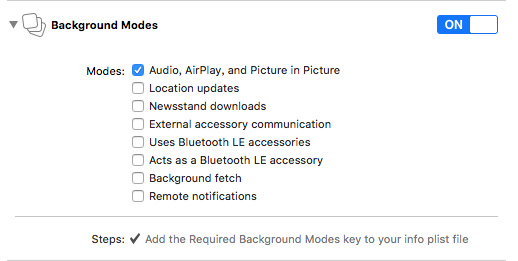
Secondly, there is a property in the player to set whether to enable background playback. The default value is YES, and the property declaration is as follows:
// 是否允许后台播放,默认 YES
@property (nonatomic, assign) BOOL enableBackgroundPlayback;
4.5.4 Enabling/Disabling Loop Playback
To enable loop playback, set the player's enablePlayRecycle property to YES. The default is NO. Note that this feature does not support HLS videos.
// 是否需要循环播放, 默认 NO
@property (nonatomic, assign) BOOL enablePlayRecycle;
4.5.5 Enabling/Disabling Pre-roll Playback
When "Pre-roll Playback" is enabled, the player will apply the video or image pre-roll set in the VOD backend according to the player logic. After the pre-roll finishes playing, the main video will automatically start. Note that the autoplay setting will not be applied in this case.
The pre-roll playback setting defaults to NO. Developers can obtain the playback status of the pre-roll via the player's teaserState property.
// 资源状态
typedef NS_ENUM(NSInteger, PLVVodAssetState) {
    PLVVodAssetStateUnknown = 0, // 未知
    PLVVodAssetStateLoading, // 加载中
    PLVVodAssetStatePlaying, // 播放中
    PLVVodAssetStateFinished // 播放结束
};
// 是否播放片头,默认 NO
@property (nonatomic, assign) BOOL enableTeaser;

// 片头播放状态
@property (nonatomic, assign, readonly) PLVVodAssetState teaserState;
4.5.6 Enabling/Disabling Ads
When ads are enabled, the player will apply the video or image ads set in the VOD backend according to the playback logic. Pre-roll ads play before the pre-roll, pause ads play when paused, and post-roll ads play after playback ends.
Note: After the ad finishes playing, the pre-roll will automatically play. If there is no pre-roll, or if the pre-roll is disabled, the main video will automatically play. The autoplay setting will not be applied in this case.
The property to enable ads is enableAd, with a default value of NO. The ad player adPlayer is a read-only property.
// 是否开启广告,默认 NO
@property (nonatomic, assign) BOOL enableAd;

// 广告播放器
@property (nonatomic, strong, readonly) PLVVodAdPlayerViewController *adPlayer;
4.5.7 Enabling/Disabling Resume Playback Position
Resume playback position, as the name suggests, records the last playback position of the video from the previous session. "Previous session" refers to the last time the player was destroyed or a video was switched. The playback position is only recorded and updated when this property is set to YES.
Note: After a video finishes playing, the recorded playback position for that video is cleared.
// 是否开启记忆播放位置,默认 NO
@property (nonatomic, assign) BOOL rememberLastPosition;
4.5.8 Setting the Marquee
To use the marquee feature, you need to import the PLVMarquee project via CocoaPods, create a PLVMarquee marquee model object, and pass it to the player's marquee property.
// 跑马灯
@property (nonatomic, strong) PLVMarquee *marquee;
For specific interfaces of PLVMarquee, refer to the code comments in its header file. Usage example:
PLVMarquee *marquee = [[PLVMarquee alloc] init];
marquee.type = PLVMarqueeTypeRollFade;
marquee.maxFadeInterval = 5;
player.marquee = marquee;
Note: The marquee feature is currently not connected to the VOD backend's marquee interface, so all data is local data.
4.5.9 Enabling/Disabling Screen Recording Prevention
When the screen recording prevention feature is enabled, once a screen recording behavior is detected, playback will immediately stop, and a popup will appear with the message "Stop screen recording or screen casting to continue playing the video." The screen recording prevention feature is disabled by default.
// 防录屏功能,默认 NO(关闭)
@property (nonatomic, assign) BOOL videoCaptureProtect;
Note: The screen recording prevention feature cannot be disabled during playback.
4.5.10 Enabling/Disabling Autoplay
When this property is enabled, the video will start playing immediately after loading. Otherwise, the developer needs to call the -play method for the player to start playing the video.
// 自动播放,默认 YES
@property (nonatomic, assign) BOOL autoplay;
4.5.11 Setting the Start Playback Time
After the developer sets the start playback time startPlaybackTime, the player will jump to that time when it starts playing. The "Resume Playback Position" feature in the player is also implemented by setting this property.
// 开始播放时间
@property (nonatomic, assign) NSTimeInterval startPlaybackTime;
